DataWorks ofrece verificaciones integradas, como la revisión de código antes del despliegue de nodos y las comprobaciones en Data Governance Center. También admite verificaciones personalizadas. Puede desarrollar un programa de verificación personalizado según sus requisitos empresariales y conectarlo a DataWorks para gestionar los procesos de los nodos. Este tema describe cómo suscribirse a eventos de cambio de estado de una instancia de nodo con ejecución automática mediante el módulo OpenEvent de DataWorks Open Platform. En este tema, los cambios de estado de una instancia de nodo con ejecución automática se obtienen desde Operation Center.
Contexto
Para obtener más información sobre las funciones y los conceptos básicos de DataWorks Open Platform relacionados con este tema, consulte Overview.
Descripción de la configuración de suscripción
Al configurar el parámetro Pattern Content para una regla de evento en EventBridge, establezca type en dataworks:InstanceStatusChanges:InstanceStatusChanges. De esta manera, podrá suscribirse a eventos de cambio de estado de una instancia de nodo con ejecución automática.
Requisitos previos
EventBridge está activado. Para obtener más información, consulte Billing.
DataWorks está activado. Para obtener más información, consulte Purchase guide.
Se ha creado un espacio de trabajo en DataWorks. Para obtener más información, consulte Create a workspace.
Procedimiento
Paso 1: Configurar un bus personalizado
Esta sección describe los pasos principales de configuración y las precauciones para configurar un bus personalizado. Para obtener más información sobre cómo habilitar y configurar la suscripción a mensajes de eventos, consulte Enable message subscription.
Inicie sesión en la consola de EventBridge. En el panel de navegación izquierdo, haga clic en Event Buses.
En la esquina superior derecha de la página Event Buses, haga clic en Quickly Create para crear un bus personalizado.
-
En el panel de navegación izquierdo, haga clic en Event Buses. En la página Event Buses, busque el bus personalizado que creó y haga clic en su nombre. Aparecerá la página Overview del bus personalizado.
En el panel de navegación izquierdo, haga clic en Event Rules. En la página que aparece, haga clic en Create Rule para crear una regla de evento.
-
En este ejemplo, el bus personalizado se configura para recibir mensajes de eventos de confirmación de nodos y mensajes de eventos de despliegue de nodos. A continuación se muestra un ejemplo de cómo configurar una demostración y los parámetros principales de la regla de evento:
Configure Basic Info: En este paso, debe configurar el parámetro Name.
-
Configure Event Pattern:
Event Source Type: Establézcalo en Custom Event Source.
Event Source: Deje este parámetro vacío.
-
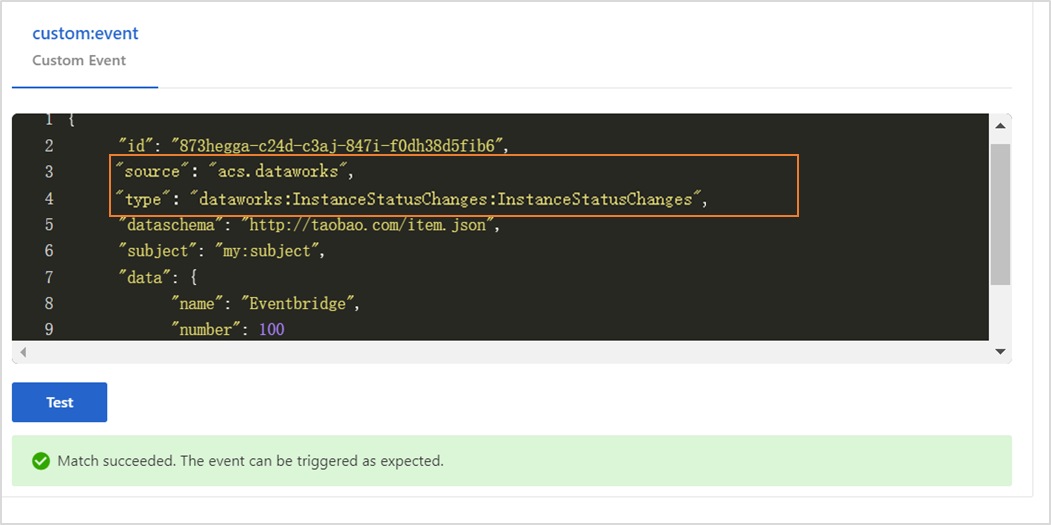
Pattern Content: Configure este parámetro en formato JSON. Introduzca el siguiente contenido.
{ "source": [ "acs.dataworks" ], "type": [ "dataworks:InstanceStatusChanges:InstanceStatusChanges" ] }source: el identificador del servicio donde ocurre un evento. Establezca este parámetro en acs.dataworks.
type: el tipo de evento que ocurre en el servicio. Establezca este parámetro en dataworks:InstanceStatusChanges:InstanceStatusChanges.
Event Pattern Debugging: Puede cambiar los valores de los parámetros source y type en esta sección y luego hacer clic en Test. Si la prueba es correcta, haga clic en Next Step.
-
Configure Targets:
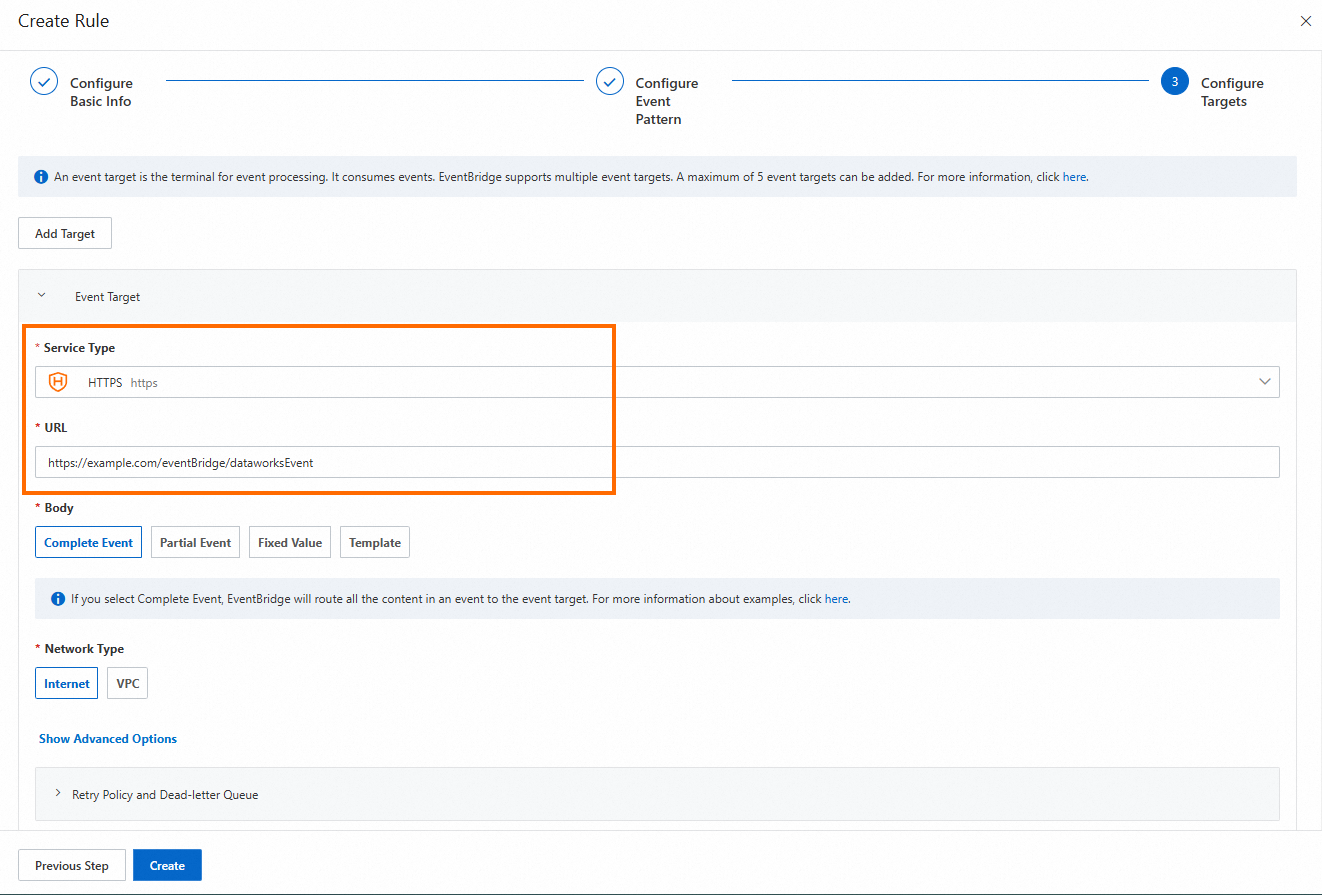
Service Type: Establézcalo en HTTPS o HTTP. Para obtener más información sobre los tipos de servicio, consulte Manage event rules.
URL: Introduzca la URL para recibir mensajes enviados por el bus personalizado, como
https://Server address:Port number/event/consumer.Body: Establézcalo en Complete Event.
Network Type: Establézcalo en Internet.
Paso 2: Configurar un canal de distribución de eventos
-
Inicie sesión en la consola de DataWorks. En la región objetivo, haga clic en en el panel de navegación izquierdo. Haga clic en Go to Open Platform para abrir la página Developer Backend.
-
En la página Developer Backend, haga clic en OpenEvent en el panel de navegación izquierdo. En la página que aparece, haga clic en Add Event Distribution Channel y configure los ajustes en el cuadro de diálogo.
Workspace for Event Distribution: Seleccione un espacio de trabajo que haya creado.
Custom Bus in Eventbridge for Distribution: Seleccione el bus de eventos creado en el Paso 1.
Después de guardar el canal de distribución de eventos, en la columna Operation del canal, haga clic en Enable para habilitar el nuevo canal de distribución de eventos.
Desarrollar un programa de servicio
Código de ejemplo
Modifique el código para obtener los mensajes que EventBridge envía al servicio y generar los mensajes.
package com.aliyun.dataworks.demo;

import com.alibaba.fastjson.JSON;
import com.alibaba.fastjson.JSONObject;
import com.aliyun.dataworks.config.Constants;
import org.springframework.web.bind.annotation.PostMapping;
import org.springframework.web.bind.annotation.RequestBody;
import org.springframework.web.bind.annotation.RequestMapping;
import org.springframework.web.bind.annotation.RestController;

/**
 * @author dataworks demo
 */
@RestController
@RequestMapping("/event")
public class ExtensionsController {

    /**
     * Receive event messages that are sent from EventBridge.
     * @param jsonParam
     */
    @PostMapping("/consumer")
    public void consumerEventBridge(@RequestBody String jsonParam){
        JSONObject jsonObj = JSON.parseObject(jsonParam);
        String eventCode = jsonObj.getString(Constants.EVENT_CODE_FILED);
        if(Constants.INSTANCE_STATUS_EVENT_CODE.equals(eventCode)){
            JSONObject dataParam = JSON.parseObject(jsonObj.getString("data"));
            // The time when the auto triggered node instance started to wait for the scheduling time.
            System.out.println("beginWaitTimeTime: "+ dataParam.getString("beginWaitTimeTime"));
            //DagId
            System.out.println("dagId: "+ dataParam.getString("dagId"));
            // The type of the directed acyclic graph (DAG). Valid values:
            // 0: for auto triggered nodes
            // 1: for manually triggered nodes
            // 2: for smoke testing
            // 3: for nodes for which you backfill data
            // 4: for manually triggered workflows
            // 5: for temporary workflows
            System.out.println("dagType: "+dataParam.getString("dagType"));
            // The type of the node. Valid values:
            // NORMAL(0): The node is an auto triggered node. The scheduling system regularly runs the node.
            // MANUAL(1): The node is a manually triggered node. The scheduling system does not regularly run the node.
            // PAUSE(2): The node is a frozen node. The scheduling system regularly runs the node but sets the node status to Failed when the scheduling system starts to run the node.
            // SKIP(3): The node is a dry-run node. The scheduling system regularly runs the node but sets the node status to Succeeded when the scheduling system starts to run the node.
            // SKIP_UNCHOOSE(4): The node is an unselected node in a temporary workflow. This type of node exists only in temporary workflows. The scheduling system sets the node status to Succeeded when the scheduling system starts to run the node.
            // SKIP_CYCLE(5): The node is scheduled by week or month, and is waiting for the scheduling time to arrive. The scheduling system regularly runs the node but sets the node status to Succeeded when the scheduling system starts to run the node.
            // CONDITION_UNCHOOSE(6): The node is not selected by its ancestor branch node and is run as a dry-run node.
            // REALTIME_DEPRECATED(7): The node has instances that are generated in real time but are deprecated. The scheduling system sets the node status to Succeeded.
            System.out.println("taskType: "+dataParam.getString("taskType"));
            // The time when the node instance was modified.
            System.out.println("modifyTime: "+dataParam.getString("modifyTime"));
            // The time when the node instance was created.
            System.out.println("createTime: "+dataParam.getString("createTime"));
            // The ID of the workspace. You can call the ListProjects operation to query the ID.
            System.out.println("appId: "+dataParam.getString("appId"));
            // The ID of the tenant that manages the workspace to which the auto triggered node instance belongs.
            System.out.println("tenantId: "+dataParam.getString("tenantId"));
            // The operation code of the auto triggered node instance. You can ignore the field value.
            System.out.println("opCode: "+dataParam.getString("opCode"));
            // The ID of the workflow. For an auto triggered node instance, the field value is 1. For a manually triggered workflow or an auto triggered node instance of the internal workflow type, the field value is the actual workflow ID.
            System.out.println("flowId: "+dataParam.getString("flowId"));
            // The ID of the node for which the auto triggered node instance was generated.
            System.out.println("nodeId:"+dataParam.getString("nodeId"));
            // The time when the auto triggered node instance started to wait for resources.
            System.out.println("beginWaitResTime: "+dataParam.getString("beginWaitResTime"));
            // The ID of the auto triggered node instance.
            System.out.println("taskId: "+dataParam.getString("taskId"));
            // The status of the node. Valid values:
            // 0: The node is not running.
            // 2: The node is waiting for the scheduling time to arrive. The scheduling time is specified by the dueTime or cycleTime parameter.
            // 3: The node is waiting for resources.
            // 4: The node is running.
            // 7: The tables that are specified in the node are issued to Data Quality and data in the tables is checked based on monitoring rules in Data Quality.
            // 8: Branch conditions are being checked.
            // 5: The node failed to be run.
            // 6: The node is successfully run.
            System.out.println("status: "+dataParam.getString("status"));
        }else{
            System.out.println("Failed to filter out other types of events. Check the parameter configurations.");
        }
    }
}
Despliegue del proyecto de ejemplo
-
Prepare el entorno y el proyecto.
Requisito del entorno: Java 8 o posterior y Maven. Maven es una herramienta de automatización de compilación para Java.
Enlace de descarga del archivo del proyecto: event-demo-instance-status.zip.
-
Después de descargar el archivo del proyecto, vaya al directorio raíz del proyecto y ejecute el siguiente comando:
mvn clean package -Dmaven.test.skip=true spring-boot:repackage -
Una vez obtenido el paquete JAR listo para instalar, ejecute el siguiente comando:
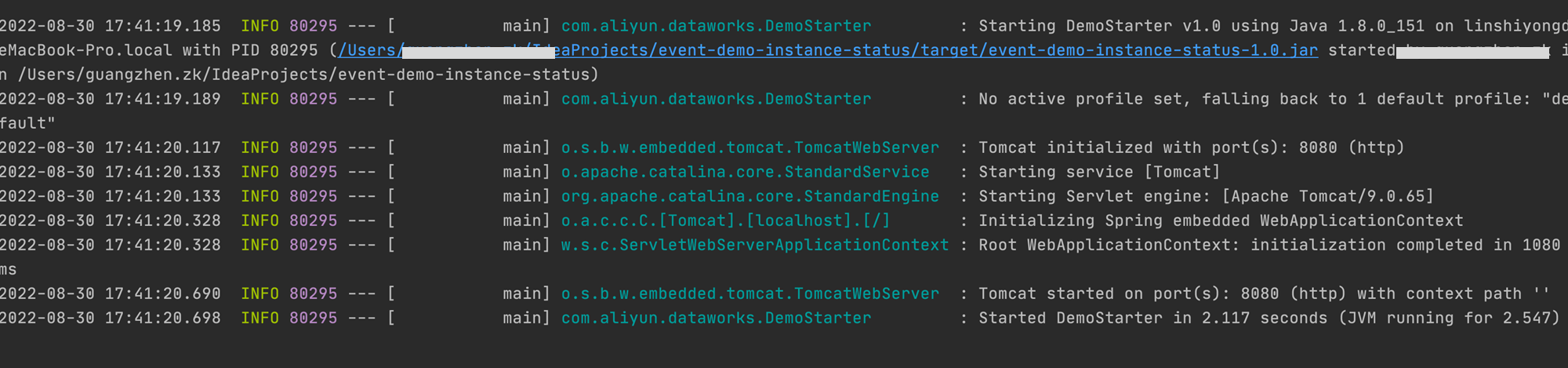
java -jar target/event-demo-instance-status-1.0.jarLa siguiente figura muestra el proyecto iniciado correctamente.
Introduzca
http://localhost:8080/indexen la barra de direcciones de un navegador y presione Enter. Si se devuelve"hello world!", la extensión se ha desplegado correctamente. Podrá suscribirse a mensajes de eventos una vez que se establezcan las conexiones de red entre DataWorks y su extensión, así como entre EventBridge y su extensión.
Habilitar y configurar la suscripción a mensajes de eventos (OpenEvent)
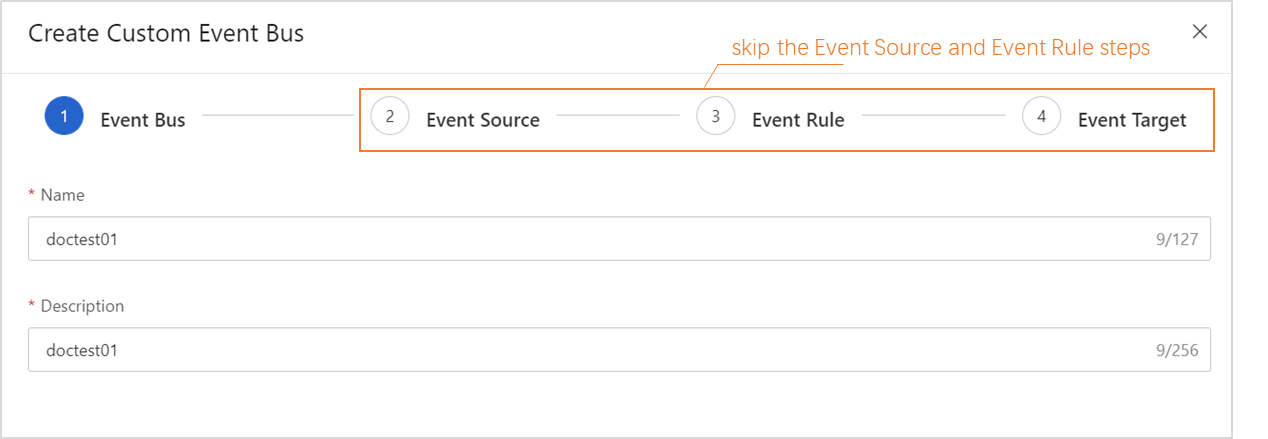
En la consola de EventBridge, cree un bus personalizado. No es necesario configurar los parámetros en los pasos Event Source, Event Rule y Event Target.
-
En la consola de EventBridge, cree una regla de evento para el bus personalizado.
En este ejemplo, el bus personalizado se configura para recibir mensajes de eventos de cambio de estado de una instancia de nodo con ejecución automática. A continuación se muestra un ejemplo de cómo configurar una demostración y los parámetros principales de la regla de evento:
-
Configure los parámetros en el paso Configure Event Pattern.
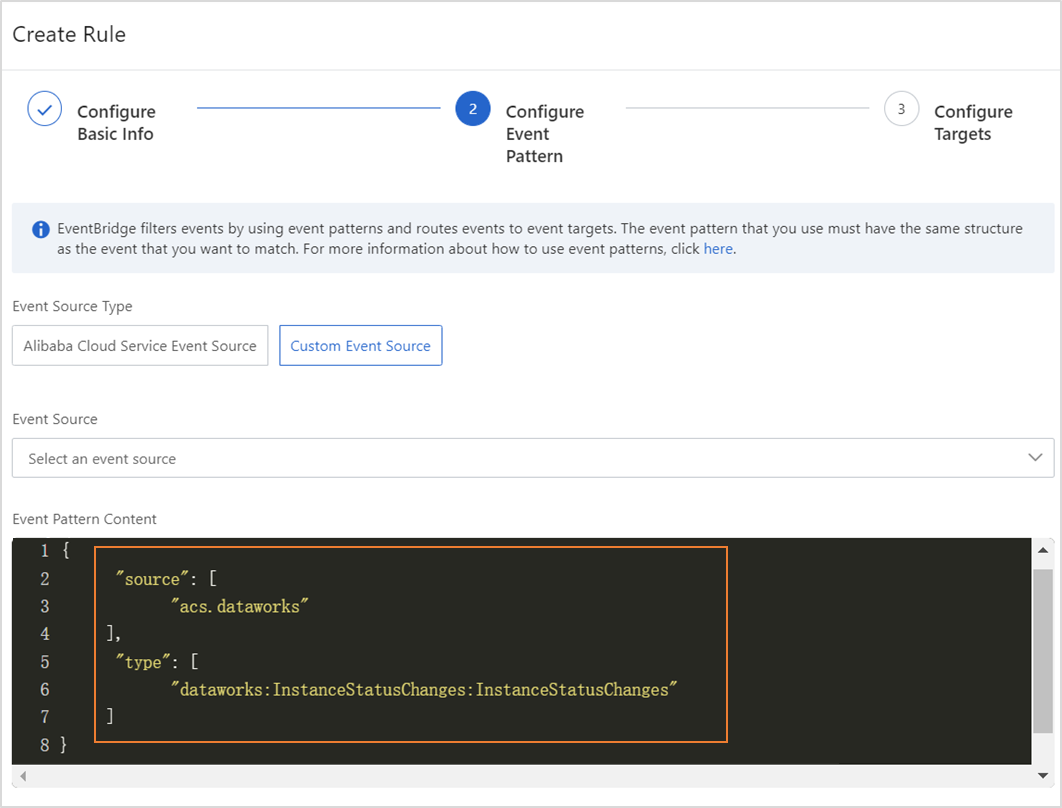
{
    "source": [
        "acs.dataworks"
    ],
    "type": [
        "dataworks:InstanceStatusChanges:InstanceStatusChanges"
    ]
}
source: el identificador del servicio donde ocurre un evento. Establezca este parámetro en acs.dataworks.
type: el tipo de evento que ocurre en el servicio. Establezca este parámetro en dataworks:InstanceStatusChanges:InstanceStatusChanges. Puede cambiar los valores de los parámetros source y type en la sección Event Pattern Debugging y luego hacer clic en Test. Si la prueba es correcta, haga clic en Next Step.
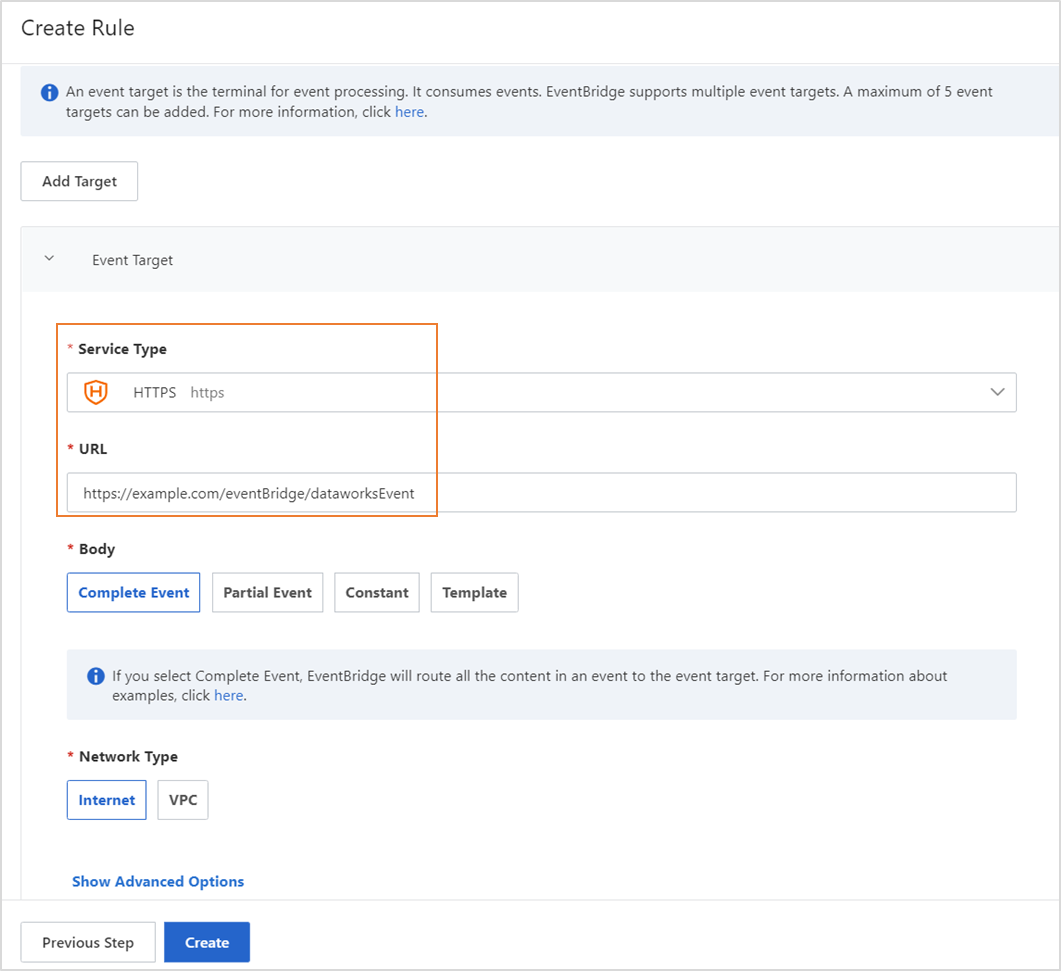
En el paso Configure Targets, establezca Service Type en HTTPS e introduzca una URL válida. Utilice la configuración predeterminada para los demás parámetros.
-
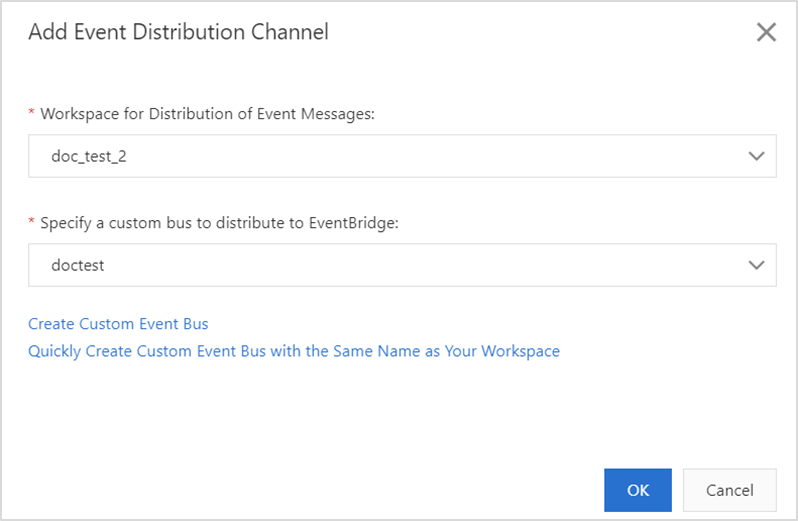
Vaya a la página Open Platform en la consola de DataWorks. En el árbol de navegación izquierdo, haga clic en OpenEvent. En la página que aparece, agregue un canal de distribución de eventos.
Escribir código
package com.aliyun.dataworks.demo;

import com.alibaba.fastjson.JSON;
import com.alibaba.fastjson.JSONObject;
import com.aliyun.dataworks.config.Constants;
import org.springframework.web.bind.annotation.PostMapping;
import org.springframework.web.bind.annotation.RequestBody;
import org.springframework.web.bind.annotation.RequestMapping;
import org.springframework.web.bind.annotation.RestController;

/**
 * @author dataworks demo
 */
@RestController
@RequestMapping("/event")
public class ExtensionsController {

    /**
     * Receive event messages that are sent from EventBridge.
     * @param jsonParam
     */
    @PostMapping("/consumer")
    public void consumerEventBridge(@RequestBody String jsonParam){
        JSONObject jsonObj = JSON.parseObject(jsonParam);
        String eventCode = jsonObj.getString(Constants.EVENT_CODE_FILED);
        if(Constants.INSTANCE_STATUS_EVENT_CODE.equals(eventCode)){
            JSONObject dataParam = JSON.parseObject(jsonObj.getString("data"));
            // The time when the auto triggered node instance started to wait for the scheduling time.
            System.out.println("beginWaitTimeTime: "+ dataParam.getString("beginWaitTimeTime"));
            //DagId
            System.out.println("dagId: "+ dataParam.getString("dagId"));
            // The type of the directed acyclic graph (DAG). Valid values:
            // 0: for auto triggered nodes
            // 1: for manually triggered nodes
            // 2: for smoke testing
            // 3: for nodes for which you backfill data
            // 4: for manually triggered workflows
            // 5: for temporary workflows
            System.out.println("dagType: "+dataParam.getString("dagType"));
            // The type of the node. Valid values:
            // NORMAL(0): The node is an auto triggered node. The scheduling system regularly runs the node.
            // MANUAL(1): The node is a manually triggered node. The scheduling system does not regularly run the node.
            // PAUSE(2): The node is a frozen node. The scheduling system regularly runs the node but sets the node status to Failed when the scheduling system starts to run the node.
            // SKIP(3): The node is a dry-run node. The scheduling system regularly runs the node but sets the node status to Succeeded when the scheduling system starts to run the node.
            // SKIP_UNCHOOSE(4): The node is an unselected node in a temporary workflow. This type of node exists only in temporary workflows. The scheduling system sets the node status to Succeeded when the scheduling system starts to run the node.
            // SKIP_CYCLE(5): The node is scheduled by week or month, and is waiting for the scheduling time to arrive. The scheduling system regularly runs the node but sets the node status to Succeeded when the scheduling system starts to run the node.
            // CONDITION_UNCHOOSE(6): The node is not selected by its ancestor branch node and is run as a dry-run node.
            // REALTIME_DEPRECATED(7): The node has instances that are generated in real time but are deprecated. The scheduling system sets the node status to Succeeded.
            System.out.println("taskType: "+dataParam.getString("taskType"));
            // The time when the node instance was modified.
            System.out.println("modifyTime: "+dataParam.getString("modifyTime"));
            // The time when the node instance was created.
            System.out.println("createTime: "+dataParam.getString("createTime"));
            // The ID of the workspace. You can call the ListProjects operation to query the ID.
            System.out.println("appId: "+dataParam.getString("appId"));
            // The ID of the tenant that manages the workspace to which the auto triggered node instance belongs.
            System.out.println("tenantId: "+dataParam.getString("tenantId"));
            // The operation code of the auto triggered node instance. You can ignore the field value.
            System.out.println("opCode: "+dataParam.getString("opCode"));
            // The ID of the workflow. For an auto triggered node instance, the field value is 1. For a manually triggered workflow or an auto triggered node instance of the internal workflow type, the field value is the actual workflow ID.
            System.out.println("flowId: "+dataParam.getString("flowId"));
            // The ID of the node for which the auto triggered node instance was generated.
            System.out.println("nodeId:"+dataParam.getString("nodeId"));
            // The time when the auto triggered node instance started to wait for resources.
            System.out.println("beginWaitResTime: "+dataParam.getString("beginWaitResTime"));
            // The ID of the auto triggered node instance.
            System.out.println("taskId: "+dataParam.getString("taskId"));
            // The status of the node. Valid values:
            // 0: The node is not running.
            // 2: The node is waiting for the scheduling time to arrive. The scheduling time is specified by the dueTime or cycleTime parameter.
            // 3: The node is waiting for resources.
            // 4: The node is running.
            // 7: The tables that are specified in the node are issued to Data Quality and data in the tables is checked based on monitoring rules in Data Quality.
            // 8: Branch conditions are being checked.
            // 5: The node failed to be run.
            // 6: The node is successfully run.
            System.out.println("status: "+dataParam.getString("status"));
        }else{
            System.out.println("Failed to filter out other types of events. Check the parameter configurations.");
        }
    }
}
Desplegar y ejecutar el código en su máquina local
-
Descargue el archivo del proyecto de demostración:
Requisito del entorno: Java 8 o posterior y Maven. Maven es una herramienta de automatización de compilación para Java.
Enlace de descarga del archivo del proyecto: event-demo-instance-status.zip.
-
Métodos de despliegue
Despliegue local: Empaquete el proyecto como un archivo JAR y luego ejecute el comando
java -jar yourapp.jaren un servidor local con Java 8 y Maven instalados para iniciar el servicio.Despliegue en la nube: Empaquete el proyecto como un archivo JAR y luego cárguelo en el entorno de ejecución adecuado, como un contenedor Docker o un servidor en la nube, para su despliegue.
NotaEl servicio desplegado debe ser accesible por EventBridge a través de Internet.
-
Después de descargar el archivo del proyecto, vaya al directorio raíz del proyecto y ejecute el siguiente comando:
mvn clean package -Dmaven.test.skip=true spring-boot:repackageUna vez obtenido el paquete JAR listo para instalar, ejecute el siguiente comando:
java -jar target/event-demo-instance-status-1.0.jarLa siguiente figura muestra el proyecto iniciado correctamente.
Introduzca http://localhost:8080/indexen la barra de direcciones de un navegador y presione Enter. Si se devuelve"hello world!", la extensión se ha desplegado correctamente. Podrá suscribirse a mensajes de eventos una vez que se establezcan las conexiones de red entre DataWorks y su extensión, así como entre EventBridge y su extensión.