Some Alibaba Cloud services allow you to upgrade the specifications of subscription instances in the product console.
How upgrade orders are billed
The upgrade fee is the sum of the prorated price differences for each billing item, calculated based on the new and original configurations for the remaining subscription term.
Formulas:
Upgrade fee for a single billing item = (List price of new configuration × Remaining duration of new order - List price of original configuration × Remaining duration of original order) × discount factor
Total upgrade fee = Sum of all billing item upgrade fees. Where:
-
Remaining duration of new order: From the upgrade submission to the new order's expiration date.
-
Remaining duration of original order: From the upgrade submission to the original order's expiration date.
-
Discount factor: Automatically calculated based on the upgraded configuration and remaining service duration.
-
If a billing item's price difference is negative, its upgrade fee is zero.
-
The post-upgrade validity period depends on the service. Most services keep the original expiration date; others require a new subscription duration. The values on the upgrade page are final.
|
Example |
Fee calculation |
|
On January 1, 2024, at 00:00:00, you purchase a one-year subscription for an ECS instance with a 4-vCPU, 8 GB of memory, and a 100 GB system disk. The monthly list price is USD 200 for the instance specifications and USD 50 for the system disk, with no discount. On July 1, 2024, at 00:00:00, you upgrade the instance. The new specifications are an 8-vCPU and 16 GB of memory, and the system disk is downgraded to 50 GB. The subscription period remains unchanged. The monthly list price is USD 400 for the new instance specifications and USD 25 for the new system disk, with no discount. |
Assuming hourly granularity and 30-day months, the per-item price difference is: |
|
Billing item 1 (instance specifications): Prorated list price for new configuration = USD 400 / (30 days × 24 hours) × (184 days × 24 hours) = USD 2,453.33 Prorated list price for original configuration = USD 200 / (30 days × 24 hours) × (184 days × 24 hours) = USD 1,226.67 Upgrade fee for instance specifications = 2,453.33 - 1,226.67 = USD 1,226.66 |
|
|
Billing item 2 (system disk): Prorated list price for new configuration = USD 25 / (30 days × 24 hours) × (184 days × 24 hours) = USD 153.33 Prorated list price for original configuration = USD 50 / (30 days × 24 hours) × (184 days × 24 hours) = USD 306.67 Upgrade fee for system disk = 153.33 - 306.67 = -USD 153.34 → Calculated as USD 0 |
|
|
Total amount payable = Fee for instance specifications + Fee for system disk = USD 1,226.66 + USD 0 = 1,226.66USD |
Payment rules for upgrade orders
The upgrade fee is calculated from when the order is placed, but the upgraded instance's validity period starts only after payment. Pay immediately to start using the upgraded service.
Example:
You have an instance that expires on January 30. You place an upgrade order on January 10 and pay for it on January 11. The fee and service period are as follows:
-
The upgrade fee is calculated for the period from January 10 to January 30.
-
The validity period of the upgraded instance is from January 11 to January 30.
If you cannot pay immediately, cancel the order and place a new one later to avoid unnecessary charges.
Scaling, renewal, and unsubscription scenarios
When a subscription instance undergoes scaling (upgrade or downgrade), auto-renewal, and unsubscription, the sequence of these operations determines whether orders are merged, which order the refund targets, and the "consumed duration" start point. Match your sequence to one of the scenarios below.
Scenario 1: Scaling, then auto-renewal, then unsubscription
You scale the instance first, then auto-renewal triggers at the renewal date, and you later unsubscribe. The scaling and renewal remain as two separate, unmerged orders.
-
Scaling order: Covers the remainder of the original cycle (scaling moment to original expiration), settled independently.
-
Renewal order: Auto-renewal is billed as a full new renewal cycle, not merged with the scaling order.
-
Refund target: The refund is calculated against the renewal order only. The scaling order was already settled within the original cycle.
-
"Consumed duration" start point: Starts from the new renewal cycle's start date (when the original cycle ends), independent of the scaling date.
Scenario 2: Auto-renewal, then scaling, then unsubscription
Auto-renewal triggers first, extending the expiration to the next cycle's end date. You then scale the instance and later unsubscribe. The scaling order covers the original cycle's remainder plus the entire renewed cycle as a single merged order.
-
Merged order: The scaling order covers the full duration from the scaling moment to the post-renewal expiration date.
-
Renewal order: Already merged into the scaling order; no separate renewal order is issued.
-
Refund target: The refund is calculated against this single merged order.
-
"Consumed duration" start point: Starts from the scaling date, independent of the renewal cycle's start date.
Verify bill or duration details in , or submit a ticket for further questions.
Upgrade order details
After paying for an upgrade order, view its details in .
-
Log on to the Expenses and Costs console. In the left-side navigation pane, choose .
-
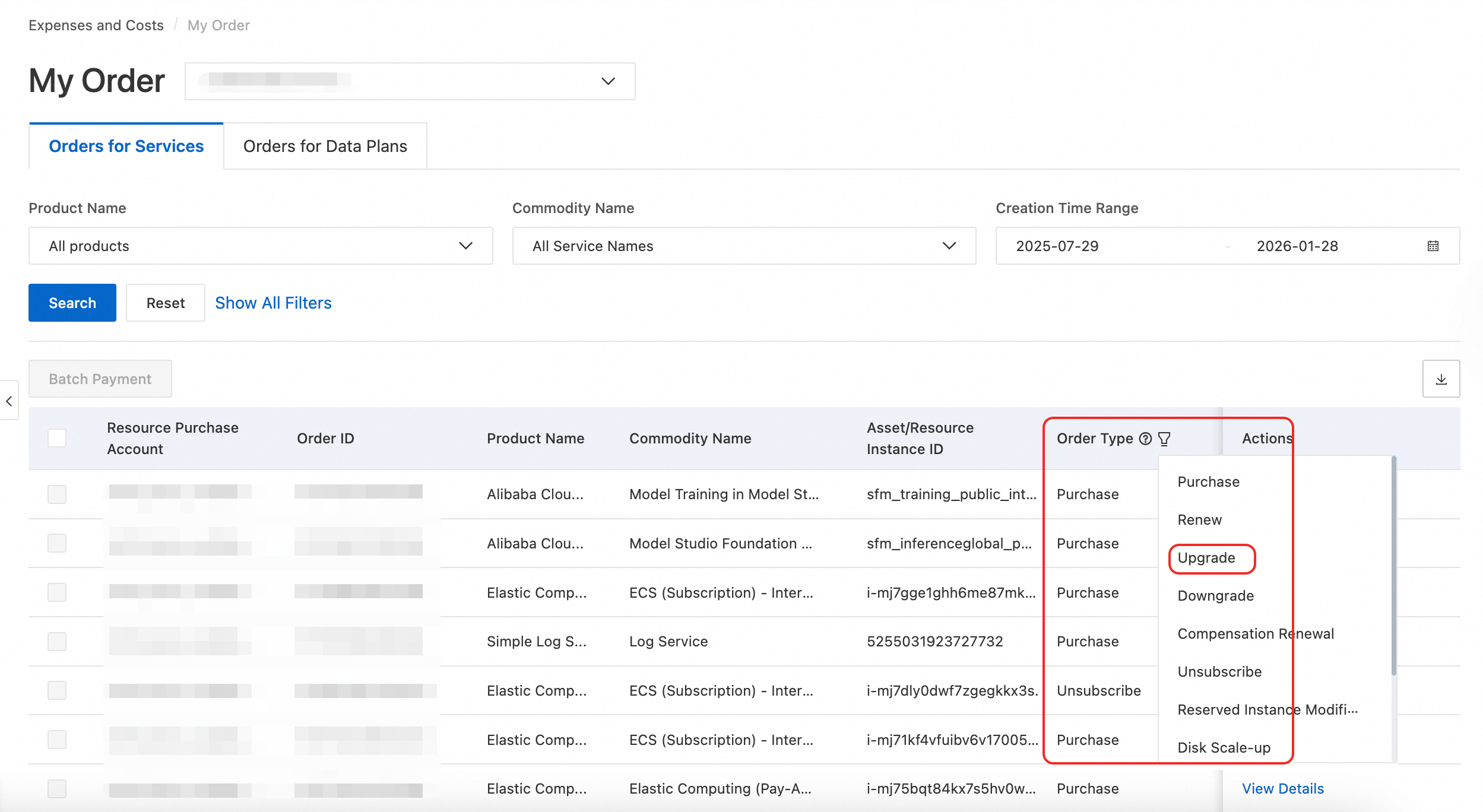
On the My Order page, find the completed upgrade order in the Orders for Services list. You can search by Product Name, Creation Time Range, Order ID, or Asset/Resource Instance ID. You can also filter the list by setting the Order Type to Upgrade.
-
Find the target order and click View Details in the Actions column to go to the Order Details page.
In the previous version of the Expenses and Costs console, the path in the left-side navigation pane was .
Supported services
The following table lists some services that support upgrades. For unlisted services, check the product documentation.
|
Service category |
Product name |
Documentation |
|
Elastic Compute |
|
|
|
Database |
|
|
|
Network |
|
|
|
Storage |
|