Query performance in Time Series Database (TSDB) depends heavily on how many timelines the system must scan to answer a query. Every timeline you create adds entries to the inverse indexes. If your schema generates too many timelines, or if a single tag maps to too many of them, every query becomes slower. This document explains how timelines work and how to design your schema to keep query times low.
How TSDB timelines work
A timeline is the combination of a metric and a set of tags. Time series data is collected at specific intervals on that timeline, and each data point consists of a timestamp and a value of the metric.
For example, {"metric":"cpu","tags":{"site":"et2","ip":"1.1.1.1","app":"TSDB"}} defines one timeline. The cpu metric and the three tags together uniquely identify it.
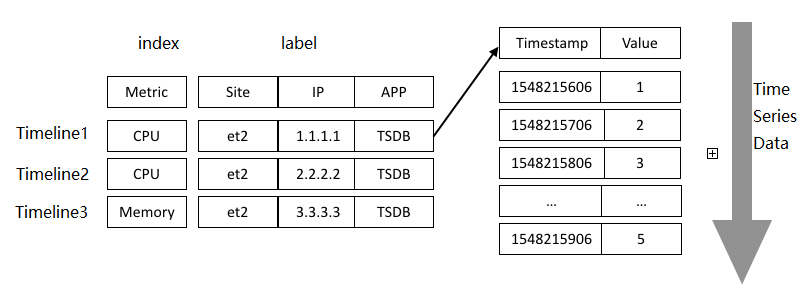
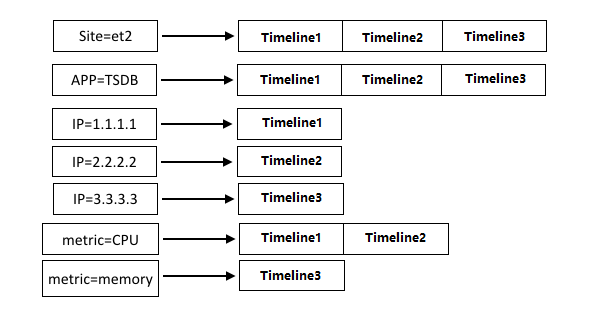
To accelerate queries, TSDB generates inverse indexes for each timeline—one index entry for the metric and one for each tag. When a query arrives, TSDB uses these indexes to locate matching timelines before reading any data.
What determines a timeline
Three factors determine whether two writes belong to the same timeline or create a new one:
| Factor | Description |
|---|---|
| Metric | The measurement name (for example, cpu) |
| Tag keys and values | Every unique key-value combination produces a distinct timeline |
| Fields | Required only when a metric has multiple fields |
The maximum number of timelines is the Cartesian product of metrics and tag key-value combinations. If a metric has multiple fields, fields are also included:
Max timelines = metrics x tags                    (single-field metric)
Max timelines = metrics x fields x tags           (multi-field metric)
Best practices
Keep the total number of timelines low
Every new timeline adds an entry to the inverse indexes. When timelines proliferate, index lookups scan more entries and query performance degrades.
Timelines grow fastest when tag values come from an unbounded or rapidly changing set—meaning a new, distinct value appears for each write or frequently over time. Common examples include:
Process IDs — a new ID for each process restart
Timestamps — a new value for every write
Even if the number of metrics and tag keys stays constant, using high-cardinality tag values causes the timeline count to increase rapidly.
Design tags to describe stable metadata about what you are measuring, not the state of each individual measurement. Minimize the value changes of metrics and tags when defining your schema.
Avoid assigning the same tag to every timeline
If a single tag is shared across a large number of timelines, the inverse index entry for that tag must store and scan many entries on every query that filters by it. This reduces the performance benefit that indexes provide.
Reserve a tag for cases where it meaningfully distinguishes a subset of timelines, not as a universal label applied to all of them.
Use the most selective tags in queries
When querying, TSDB uses the tags you specify to look up matching timelines through the inverse indexes. The fewer timelines a tag maps to, the faster the lookup.
A tag that covers a smaller set of timelines (a subset) offers higher query efficiency than a tag that maps to a larger set. Consider these two queries against the same timeline:
Method 1:
{"metric":"cpu","tags":{"site":"et2","ip":"1.1.1.1","app":"TSDB"}}Method 2:
{"metric":"cpu","tags":{"ip":"1.1.1.1"}}
Both return data for the same timeline. Method 2 uses only ip=1.1.1.1, which maps to exactly one timeline in this example and resolves the query in fewer steps. When a subset of tags uniquely identifies the timeline you want, use that subset rather than specifying all tags.