You can use Spark SQL in an E-MapReduce (EMR) cluster to access Tablestore. EMR uses the change data capture (CDC) technology to complete micro-batch stream consumption and computing for Spark based on Tunnel Service. The at-least-once semantics is also provided.
Prerequisites
An EMR cluster is created. For more information, see Getting started with EMR.
When you create the EMR cluster, use following parameter configurations and configure other parameters based on your business requirements.
Business Scenario: Set this parameter to Custom Cluster.
Optional Services: Select Spark2, Hive, YARN, Hadoop-Common, and HDFS.
Metadata: Set this parameter to Built-in MySQL.
Turn on Assign Public Network IP and use the default values for other parameters for Master Node Group.
ImportantIf you turn off Assign Public Network IP for Master Node Group, you can access the EMR cluster only over an internal network. To access the EMR cluster that you created over the Internet, go to the ECS to apply for an EIP. For more information, see Apply for EIPs.
Roles are assigned to EMR by using your Alibaba Cloud account. For more information, see Assign roles to an Alibaba Cloud account.
A RAM user is created and the RAM user is granted the AliyunOTSFullAccess permission to manage Tablestore. For more information, see Use a RAM policy to grant permissions to a RAM user.
ImportantTo prevent security risks caused by the leakage of the AccessKey pair of your Alibaba Cloud account, we recommend that you use a RAM user to complete authorization and create an AccessKey pair.
An AccessKey pair that consists of an AccessKey ID and an AccessKey secret is obtained. For more information, see Create an AccessKey pair.
Step 1: Create tables and a tunnel in Tablestore
Create a Source table and a Sink table in the Tablestore console. For more information, see Use the Wide Column model in the Tablestore console.
The Source table is named OrderSource. The primary key columns are UserId and OrderId. The attribute columns are price and timestamp.
The Sink table is named OrderStreamSink. The primary key columns are begin and end. The attribute columns are count and totalPrice. The values of the begin and end columns are in the format of yyyy-MM-dd HH:mm:ss. Example: 2019-11-27 14:54:00.
Create a tunnel for the Source table. For more information, see Quick start.
The information about the tunnel is displayed in the Tunnel section. The information includes the name, ID, and type of the tunnel. The tunnel ID is used to stream data.
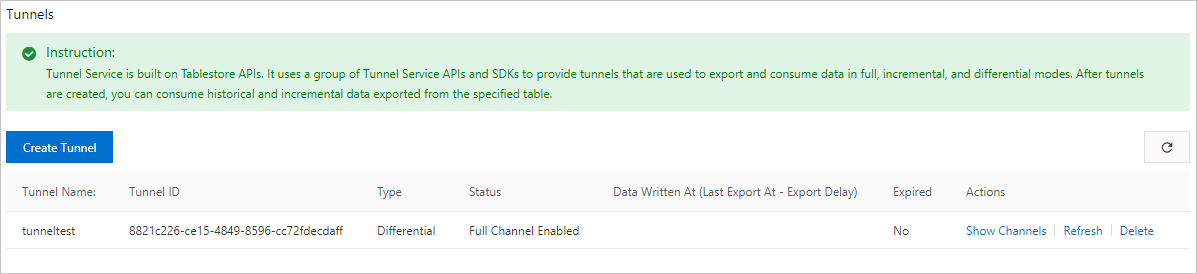
Step 2: Create a Spark external table in the EMR cluster
Connect to the Master node of the EMR cluster.
Run the following command to start the Spark SQL CLI. You can create Spark tables and execute SQL statements in the Spark SQL CLI.
spark-sql --jars /opt/apps/SPARK-EXTENSION/spark-extension-current/spark2-emrsdk/*Create an external Source table named order_source. This table corresponds to the OrderSource table in Tablestore.
Parameters
Parameter
Description
endpoint
The endpoint of the Tablestore instance. The EMR cluster uses a Virtual Private Cloud (VPC) endpoint to access the Tablestore instance.
access.key.id
The AccessKey ID and AccessKey secret of your Alibaba Cloud account or a RAM user. For more information, see Create an AccessKey pair.
access.key.secret
instance.name
The name of the Tablestore instance.
table.name
The name of the Tablestore table.
catalog
The schema of the Tablestore table.
Example
DROP TABLE IF EXISTS order_source;
CREATE TABLE order_source
USING tablestore
OPTIONS(endpoint="http://vehicle-test.cn-hangzhou.vpc.tablestore.aliyuncs.com",
        access.key.id="",
        access.key.secret="",
        instance.name="vehicle-test",
        table.name="OrderSource",
        catalog='{"columns": {"UserId": {"type": "string"}, "OrderId": {"type": "string"},"price": {"type": "double"}, "timestamp": {"type": "long"}}}'
);
Step 3: Perform real-time stream computing
Collect statistics on the data within a time window in real time and write the aggregation results to a table in Tablestore.
Create an external Sink table named order_stream_sink in the EMR cluster. This table corresponds to the OrderStreamSink table in Tablestore.
The parameter configurations for creating an external Sink table and external Source table differ only in the catalog field.
DROP TABLE IF EXISTS order_stream_sink;
CREATE TABLE order_stream_sink
USING tablestore
OPTIONS(endpoint="http://vehicle-test.cn-hangzhou.vpc.tablestore.aliyuncs.com",
       access.key.id="",
       access.key.secret="",
       instance.name="vehicle-test",
       table.name="OrderStreamSink",
       catalog='{"columns": {"begin": {"type": "string"},"end": {"type": "string"}, "count": {"type": "long"}, "totalPrice": {"type": "double"}}}'
);
Create a view named order_source_stream_view on the order_source table.
When you create the view, you must specify the tunnel ID configured for the Source table.
CREATE SCAN order_source_stream_view
ON order_source USING STREAM
OPTIONS(tunnel.id="4987845a-1321-4d36-9f4e-73d6db63bf0f",
        maxoffsetsperchannel="10000");
Run a Stream SQL job to perform aggregations in real time and write the aggregation results to the OrderStreamSink table in Tablestore in real time.
CREATE STREAM job1
OPTIONS(checkpointLocation='/tmp/spark/cp/job1',
        outputMode='update')
INSERT INTO order_stream_sink
SELECT CAST(window.start AS String) AS begin, CAST(window.end AS String) AS end, count(*) AS count, CAST(sum(price) AS Double) AS totalPrice
FROM order_source_stream_view
GROUP BY window(to_timestamp(timestamp / 1000), "30 seconds");  -- Aggregate data at intervals of 30 seconds.
You can obtain the aggregation results after you run the Stream SQL job. The aggregation results are saved in the OrderStreamSink table.