Learn how SMS encoding, segmentation, and sending limits affect cost and delivery.
Costs and segmentation
SMS cost depends on encoding, content length, and segment count.
Billing
-
Billing unit: Charged per segment, not per send request.
-
Formula: Total cost = Unit price × Segment count.
-
Cost factors:
-
Encoding: UCS-2 holds fewer characters per segment than GSM-7, producing more segments.
-
Length: Longer content requires more segments.
-
Signatures and variables: Signature characters and variable values affect encoding and billable length.
-
Calculate segment count and length
The system selects encoding based on message content. Each encoding has different segmentation thresholds that affect segment count and cost.
If a message contains any non-GSM-7 character, such as a Chinese punctuation mark (,) or an emoji (  ), the entire message is switched from GSM-7 to UCS-2 encoding, which increases the number of segments and the cost.
|
Message type |
Character counting |
Message segmentation |
|
English-only messages (GSM-7 encoding) |
Standard characters (letters, digits, and common symbols): each counts as one character. Extended characters ( For more information about GSM-7 characters, see GSM-7 characters. Note
If a message contains any character not in the GSM-7 standard or extended set, the entire message is billed under UCS-2 rules. |
Single messages can contain up to 160 characters. Longer messages split into 153-character segments, each billed separately. Example: A 350-character message will be split into three segments (153 + 153 + 44) and billed as 3 messages. |
|
Messages in other languages (UCS-2 encoding) |
Every character (Chinese characters, letters, symbols, spaces) counts as 1 character. |
Single messages can contain up to 70 characters. Longer messages split into 67-character segments, each billed separately. Example: A 150-character message will be split into three segments (67 + 67 + 16) and billed as 3 messages. |
Check characters before sending
-
Review content before sending to avoid unintended encoding switches, especially for GSM-7 messages.
-
Non-standard characters: Any non-GSM-7 character (Chinese punctuation, full-width symbols, emojis) switches the entire message to UCS-2, increasing segment count.
-
Variable values: Verify that resolved variable values contain no non-GSM-7 characters. Encoding is determined by the complete message, including resolved variables.
-
-
SMS signatures count toward total message length and affect encoding.
-
Use the content preview tool in the Alibaba Cloud SMS console to verify encoding and segmentation.
NoteThe content preview tool is available at:
|
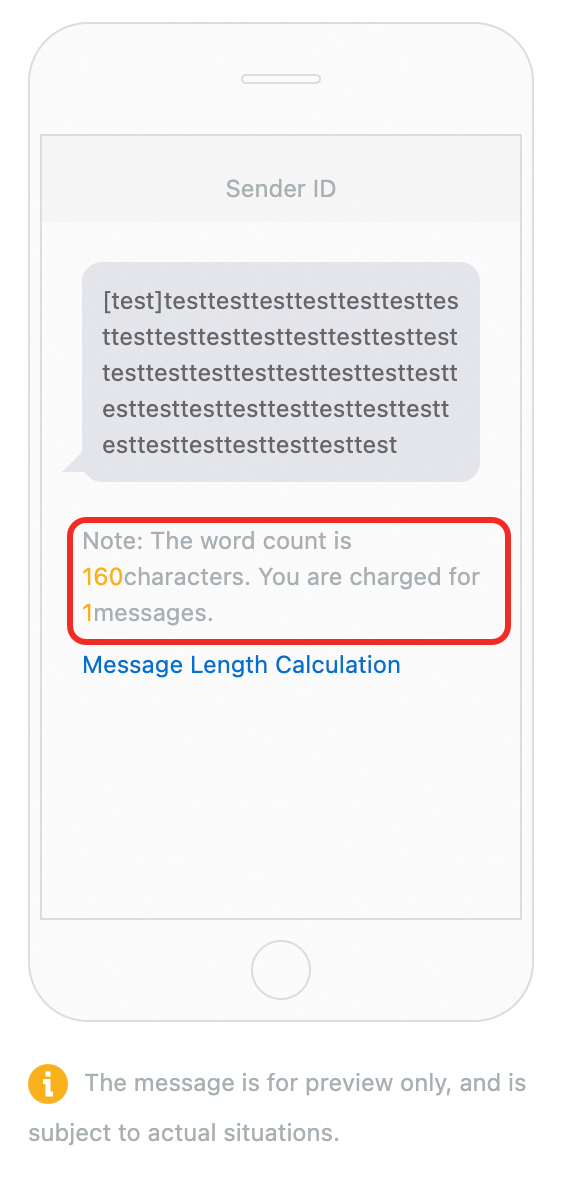
A GSM-7 message of 160 characters or fewer is billed as one segment. |
A GSM-7 message exceeding 160 characters splits into 153-character segments. This example splits into two segments (153 + 8 characters). |
A stray Chinese comma forces UCS-2 encoding. This example splits into three segments (67 + 67 + 25 characters). |


Message sending limit
To prevent spam and maintain channel stability, the default limit is 20 messages per mobile number per day.
To configure a custom sending limit, see Configure messaging limit.
GSM-7 characters
The GSM-7 character set includes a standard set and an extended set.
Standard GSM-7 characters, each counting as one character:
|
GSM-7 standard characters |
||||||||||||
|
A |
B |
C |
D |
E |
F |
G |
H |
I |
J |
K |
L |
M |
|
N |
O |
P |
Q |
R |
S |
T |
U |
V |
W |
X |
Y |
Z |
|
a |
b |
c |
d |
e |
f |
g |
h |
i |
j |
k |
l |
m |
|
n |
o |
p |
q |
r |
s |
t |
u |
v |
w |
x |
y |
z |
|
à |
Å |
å |
Ä |
ä |
Ç |
É |
é |
è |
ì |
Ñ |
ñ |
ò |
|
Ø |
ø |
Ö |
ö |
ù |
Ü |
ü |
Æ |
æ |
ß |
0 |
1 |
2 |
|
3 |
4 |
5 |
6 |
7 |
8 |
9 |
& |
* |
@ |
: |
, |
¤ |
|
$ |
= |
! |
> |
# |
- |
¡ |
¿ |
( |
< |
% |
. |
+ |
|
£ |
? |
" |
) |
§ |
; |
' |
/ |
_ |
¥ |
Δ |
Φ |
Γ |
|
Λ |
Ω |
Π |
Ψ |
Σ |
Θ |
Ξ |
||||||
Extended GSM-7 characters each count as two characters due to a required escape character:
|
^ |
{ |
} |
\ |
[ |
] |
~ |
| |
€ |
The GSM-7 set also includes these non-printing characters, each counting as one character:
-
Space
-
Line feed: Ends a line of text.
-
Carriage return: Returns the cursor to the start of a line.
-
Escape: Automatically added before each extended character.