Select a network type to optimize collection speed, configure startup parameters to tune performance, and review the configuration and log files that Logtail uses at runtime.
Network types and selection
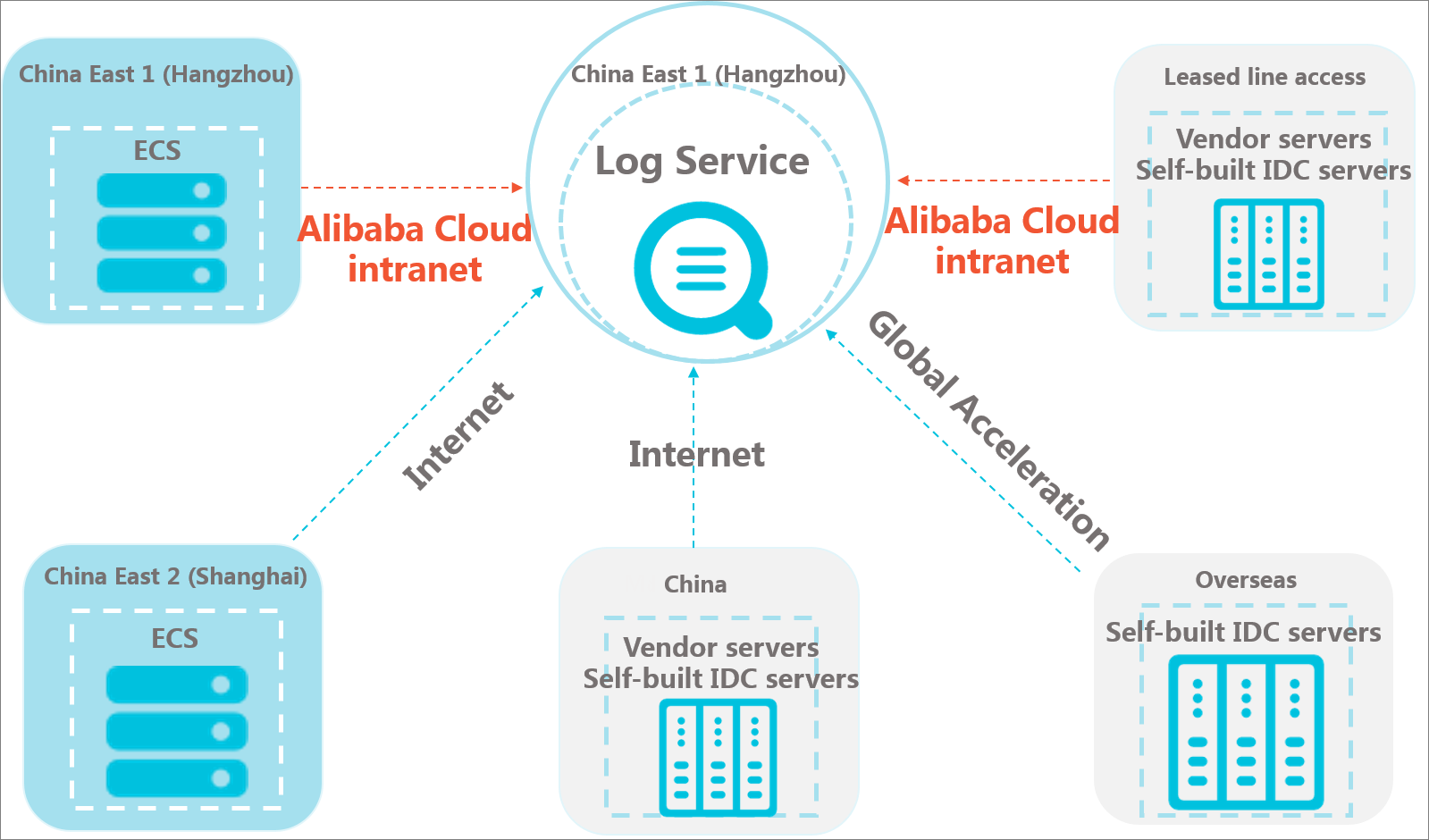
When you install Logtail, choose a network type based on your server's location relative to Simple Log Service (SLS). Choosing the right network type ensures faster and more reliable log data transmission.
|
Network type |
Description |
Use cases |
Example |
|
Alibaba Cloud internal network |
The Alibaba Cloud internal network is a shared gigabit network. It provides faster and more reliable log data transmission compared to the Internet. The internal network includes both VPC and classic network. |
The ECS instance and the Simple Log Service Project are in the same region. Note
We recommend creating a Project in the same region as your ECS instance. This lets Simple Log Service collect logs from the ECS instance over the Alibaba Cloud internal network without using Internet bandwidth. |
The ECS instance and Project are in the same region.
|
|
Internet |
Log data transmission over the Internet can be limited by bandwidth. Network issues like jitter, high latency, and packet loss can affect the speed and stability of data collection. |
Use the Internet in the following scenarios:
|
The ECS instance and Project are in different regions.
Self-managed data center
|
|
Transfer acceleration |
Transfer acceleration uses Alibaba Cloud CDN edge nodes to speed up log collection. This method provides lower latency and greater stability than collecting logs over the Internet. |
Use transfer acceleration to avoid the high latency and instability of transmitting data over the Internet between Chinese mainland and other regions. This applies when your business server is in one of these locations and your Simple Log Service Project is in the other. For more information, see transfer acceleration. |
Self-managed data center
Note
If your Simple Log Service Project is in a region in Chinese mainland and your server is in a region outside Chinese mainland, use transfer acceleration to collect server logs. This method provides greater network stability and better performance than transmitting data over the Internet. |
Transfer acceleration
To select transfer acceleration as the network type, you must first enable it for your project.
-
Log on to the Simple Log Service console. On the Project Overview page of the Project, find Acceleration Endpoint in the Endpoint area, and click Enable next to it.
-
Read the prompt in the dialog box and click Modify.
-
Configure transfer acceleration for Logtail in one of the following ways.
Install with acceleration
If you enable transfer acceleration before installing Logtail, you can select the transfer acceleration option during the installation. For more information, see Install Logtail.
Modify configuration
If you installed Logtail before enabling transfer acceleration, you must modify the Logtail configuration.
-
Stop Logtail.
-
Linux
Run the
sudo /etc/init.d/ilogtaild stopcommand. -
Windows
-
Choose .
-
In the Service dialog box, find the LogtailDaemon service (for Logtail 1.0.0.0 and later) or the LogtailWorker service (for Logtail 0.x.x.x versions). Right-click the service and select Stop.
-
-
-
Modify the Logtail startup configuration file, ilogtail_config.json.
In the data_server_list parameter, change the endpoint to
log-global.aliyuncs.com. For the file path, see Startup parameter configuration file (ilogtail_config.json). -
Start Logtail.
-
Linux
Run the
sudo /etc/init.d/ilogtaild startcommand. -
Windows
-
Choose .
-
In the Service dialog box, find the LogtailDaemon service (for Logtail 1.0.0.0 and later) or the LogtailWorker service (for Logtail 0.x.x.x versions). Right-click the service and select Start.
-
-
-
For more information, see Manage transfer acceleration.
Logtail startup parameters
Log Service throttles Logtail's collection performance to prevent excessive server resource consumption. You can modify startup parameters to improve collection performance.
Use cases
You can modify the Logtail startup parameters in the following scenarios:
-
Collecting a large number of log files (more than 100 simultaneously or over 5,000 in a monitored directory) consumes significant memory.
-
High log data throughput (for example, over 2 MB/s in simple mode or over 1 MB/s in full regex mode) causes high CPU usage.
-
Logtail's data sending rate to SLS exceeds 10 MB/s.
Recommended parameter values
The following tables list recommended parameter values for collecting standard JSON log files. Full regex mode and delimiter mode perform similarly to JSON mode, while simple mode is about five times faster. Data complexity, parsing rules, and the number of directories and files also affect CPU and memory consumption. Use these values as a starting point and adjust for your workload.
-
Host environment
Parameter
Default collection rate
Collection rate > 10 MB/s
Collection rate > 20 MB/s
Collection rate > 40 MB/s
cpu_usage_limit
0.4
1
2
4
mem_usage_limit
384
1024
2048
4096
max_bytes_per_sec
20971520
209715200
209715200
209715200
process_thread_count
1
2
4
8
send_request_concurrency
15
20
40
80
-
Container or Kubernetes environment
Parameter
Default collection rate
Collection rate > 10 MB/s
Collection rate > 20 MB/s
Collection rate > 40 MB/s
cpu_usage_limit
2
3
5
9
mem_usage_limit
2048
2048
2048
4096
max_bytes_per_sec
209715200
209715200
209715200
209715200
process_thread_count
1
2
4
8
send_request_concurrency
15
20
40
80
resources.limits.cpu
500M
1000M
2000M
4000M
resources.limits.memory
2 Gi
2 Gi
3 Gi
5 Gi
To modify Logtail startup parameters in a container or Kubernetes environment:
-
If Logtail is deployed in an Alibaba Cloud Kubernetes cluster and its version is Logtail-ds 1.7.3 or later, modify the parameters in the Container Service for Kubernetes console. On the Add-ons page, modify the corresponding parameters of the logtail-ds add-on.
-
If Logtail is deployed in a self-managed container or Kubernetes environment and its version is Logtail-ds 1.7.3 or later, modify the Logtail startup parameters by changing the environment variables in the DaemonSet. Some environments reference a ConfigMap. The referenced ConfigMap is .
-
For Logtail-ds versions earlier than 1.7.3, modify the Logtail startup parameters by changing the environment variables in the DaemonSet. In some environments, a ConfigMap is referenced. The referenced ConfigMap is . Also, adjust the resources.limits.cpu and resources.limits.memory parameters in the to prevent the container from exceeding its resource limits.
-
With the Collection rate greater than 40 MB/s values from the preceding tables, Logtail's collection performance approaches its limit. Further increasing the thread count yields no significant improvement. The following table lists collection performance limits.
Actual collection performance may vary between test and production environments.
|
Collection mode |
Performance limit |
|
simple mode |
440 MB/s |
|
full regex mode |
70 MB/s |
|
delimiter mode |
75 MB/s |
|
JSON mode |
75 MB/s |
Startup parameters
-
On the server where Logtail is installed, open the /usr/local/ilogtail/ilogtail_config.json file.
This step applies to a host environment.
In a container or Kubernetes environment, you need to modify the Logtail startup parameters by editing the DaemonSet environment variables. Some environments reference a ConfigMap, and its path is .
-
Configure the startup parameters as needed.
The following is an example of the startup parameters:
{ ... "cpu_usage_limit" : 0.4, "mem_usage_limit" : 384, "max_bytes_per_sec" : 20971520, "process_thread_count" : 1, "send_request_concurrency" : 15, "buffer_file_num" : 25, "buffer_file_size" : 20971520, "buffer_file_path" : "", ... }Note-
The following table lists only common startup parameters. For parameters not listed, keep the default settings.
-
You can add or modify parameters as needed.
Table 1. Logtail startup parameters
Parameter
Type
Description
Example
cpu_usage_limit
double
The CPU usage threshold, calculated based on a single core.
-
Valid range: 0.1 to the number of CPU cores on the current server.
-
Default value: 0.4
WarningThe cpu_usage_limit parameter is a soft limit. The actual CPU usage of Logtail may exceed this limit. If the usage exceeds the limit for more than 5 minutes, this triggers circuit breaking, and Logtail automatically restarts.
For example, if you set this parameter to 0.4, Logtail attempts to limit its CPU usage to 40% of a single core. If the usage exceeds this limit, Logtail automatically restarts.
In most cases, a single core can handle a data collection rate of approximately 100 MB/s in simple mode and 20 MB/s in full regex mode.
NoteIf you deploy Logtail-ds 1.7.3 or later in a Container Service for Kubernetes (ACK) cluster, we recommend that you set the CPU usage threshold in the Container Service for Kubernetes console. On the Add-ons page, modify the LogtailDSLimitCPU parameter of the logtail-ds component. For more information, see Manage components.
"cpu_usage_limit" : 0.4
mem_usage_limit
int
The memory usage threshold.
-
Valid range: 128 MB to 8192 MB
-
Default value: 384 MB (on a host), 2048 MB (for an ACK component)
WarningThe mem_usage_limit parameter is a soft limit. The actual memory usage of Logtail may exceed this limit. If the usage exceeds the limit for more than 5 minutes, this triggers circuit breaking, and Logtail automatically restarts.
The collection rate, the number of monitored directories and files, and the degree of send blocking are related to the mem_usage_limit parameter. For more information, see Logtail limits.
NoteIf you deploy Logtail-ds 1.7.3 or later in an ACK cluster, we recommend that you set the memory usage threshold in the Container Service for Kubernetes console. On the Add-ons page, modify the LogtailDSLimitMemory parameter of the logtail-ds component. For more information, see Manage components.
"mem_usage_limit" : 384
max_bytes_per_sec
int
The maximum rate at which Logtail sends raw data. Unit: bytes/second.
-
Valid range: 1,024 bytes/s to 52,428,800 bytes/s
-
Default value: 20,971,520 bytes/s
ImportantIf you set this parameter to a value greater than 20,971,520 (20 MB/s), the sending rate is not limited by this parameter.
For example, if you set this parameter to 2097152, Logtail sends data at a rate of 2 MB/s.
NoteIf you deploy Logtail-ds 1.7.3 or later in an ACK cluster, we recommend that you set the traffic limit in the Container Service for Kubernetes console. On the Add-ons page, modify the LogtailDSMaxBytePerSec parameter of the logtail-ds component. For more information, see Manage components.
"max_bytes_per_sec" : 2097152
process_thread_count
int
The number of threads that Logtail uses to process data.
-
Valid range: 1 to 64
-
Default value: 1
In most cases, a single thread can handle a data write rate of 24 MB/s in simple mode or 12 MB/s in full regex mode. You do not need to change the value of this parameter in most cases.
NoteIf you deploy Logtail-ds 1.7.3 or later in an ACK cluster, we recommend that you set the number of threads in the Container Service for Kubernetes console. On the Add-ons page, modify the LogtailDSProcessThreadCount parameter of the logtail-ds component. For more information, see Manage components.
"process_thread_count" : 1
send_request_concurrency
int
The number of concurrent requests for sending data asynchronously.
-
Valid range: 15 to 80
-
Default value: 15
If the write TPS is high, you can increase this value. As a general guideline, one concurrent request can handle a network throughput of 0.5 MB/s to 1 MB/s. The actual throughput depends on network latency.
Note-
Setting this value too high can lead to excessive use of network ports, which requires you to adjust TCP-related parameters.
-
If you deploy Logtail-ds 1.7.3 or later in an ACK cluster, we recommend that you set the number of concurrent requests in the Container Service for Kubernetes console. On the Add-ons page, modify the LogtailDSSendRequestConcurrency parameter of the logtail-ds component. For more information, see Manage components.
"send_request_concurrency" : 4
buffer_file_num
int
The maximum number of buffer files.
-
Valid range: 1 to 100
-
Default value: 25
If a network error occurs or the write limit is exceeded, Logtail parses logs in real time and writes the parsed logs to local buffer files in the installation directory. After the issue is resolved, Logtail retries sending the buffered logs.
"buffer_file_num" : 25
buffer_file_size
int
The maximum size of a single buffer file. Unit: byte.
-
Valid range: 1,048,576 bytes to 104,857,600 bytes
-
Default value: 20971520 Byte
The maximum disk space that buffer files can occupy is buffer_file_size × buffer_file_num.
"buffer_file_size" : 20971520
buffer_file_path
String
The directory where buffer files are stored. By default, this parameter is empty, meaning buffer files are stored in the Logtail installation directory /usr/local/ilogtail.
After you set this parameter, you must manually move the files whose names start with logtail\_buffer\_file_* from the original directory to the new directory. This ensures that Logtail can read the buffer files and delete them after they are sent.
"buffer_file_path" : ""
bind_interface
String
The name of the network interface controller (NIC) that is bound to the server. By default, this parameter is empty, meaning Logtail automatically binds to an available NIC.
If you set this parameter to a specific NIC, such as eth1, Logtail is forced to use that NIC to upload logs.
This parameter is supported only on Linux.
"bind_interface" : ""
check_point_filename
String
The path where Logtail checkpoint files are saved. Default value: /tmp/logtail_check_point.
"check_point_filename" : "/tmp/logtail_check_point"
check_point_dump_interval
int
The interval, in seconds, at which Logtail updates checkpoint files. Default: 900 (15 minutes).
This parameter is supported only by Logtail 1.0.19 or later for Linux and Logtail 1.0.19.0 or later for Windows.
"check_point_dump_interval" : 900
user_config_file_path
String
The path where the Logtail configuration file is saved. By default, the file is saved in the directory that contains the process binary. The file name is user_log_config.json.
"user_config_file_path" : "user_log_config.json"
docker_file_cache_path
String
This file records the path mappings between container files and host files. The default path is /usr/local/ilogtail/docker_path_config.json.
This parameter is supported only by Logtail 0.16.54 or later for Linux and Logtail 0.16.54.0 or later for Windows.
"docker_file_cache_path": "/usr/local/ilogtail/docker_path_config.json"
discard_old_data
Boolean
Specifies whether to discard historical logs. Default value: true, meaning logs generated more than 12 hours ago are discarded.
"discard_old_data" : true
ilogtail_discard_interval
int
The time threshold for discarding historical logs. If the difference between the log's timestamp and the current time exceeds this threshold, the log is discarded. Default value: 43200 (12 hours). Unit: seconds.
"ilogtail_discard_interval": 43200
working_ip
String
By default, this parameter is empty, meaning the IP address is automatically obtained from the server. If you set a value for this parameter, Logtail reports this value as the server's IP address.
"working_ip" : ""
working_hostname
String
The hostname that Logtail reports for the server. By default, this parameter is empty, meaning the hostname is automatically obtained from the server.
"working_hostname" : ""
max_read_buffer_size
long
The maximum size of a single log entry that Logtail can read. Default value: 524,288 (512 KB). Maximum value: 8,388,608 (8 MB). Unit: byte.
If a single log entry exceeds 524,288 bytes, you must increase this value.
"max_read_buffer_size" : 524288
oas_connect_timeout
long
The timeout for the connection phase of requests that Logtail initiates to obtain its configuration or an AccessKey pair. Default value: 5. Unit: seconds.
If it takes a long time to establish connections due to poor network conditions, you can increase this value.
"oas_connect_timeout" : 5
oas_request_timeout
long
The total request timeout for obtaining a configuration or an AccessKey pair. Default value: 10. Unit: seconds.
If it takes a long time to complete requests due to poor network conditions, you can increase this value.
"oas_request_timeout" : 10
data_server_port
long
If you set data_server_port to 443, Logtail transmits data to SLS over HTTPS.
This parameter is supported only by Logtail 1.0.10 or later for Linux and Logtail 1.0.10.0 or later for Windows.
"data_server_port": 443
enable_log_time_auto_adjust
Boolean
If you set enable_log_time_auto_adjust to true, log timestamps automatically adapt to the server's local time.
For security reasons, SLS validates the timestamp in each request, including requests from Logtail. If the timestamp differs from the SLS server time by more than 15 minutes, SLS rejects the request. Logtail uses the server's local time in its requests. If the server's local time is modified (for example, to a future time in a test environment), Logtail requests are rejected, and data writes fail. You can use this parameter to adapt log timestamps to the server's local time.
This parameter is supported only by Logtail 1.0.19 or later for Linux and Logtail 1.0.19.0 or later for Windows.
Important-
When this feature is enabled, Logtail adds the offset between the SLS server time and the server's local time to the log timestamp. The offset is updated only when SLS rejects a request. As a result, the timestamp that you see in SLS queries may differ from the actual write time.
-
Some Logtail logic depends on a monotonically increasing system time. We recommend that you restart Logtail each time you adjust the server's clock.
"enable_log_time_auto_adjust": true
accept_multi_config
Boolean
Specifies whether to allow multiple Logtail configurations to collect logs from the same file. Default value: false.
By default, a file can be collected by only one Logtail configuration. You can use this parameter to remove this restriction. The processing of each Logtail configuration is independent. If you allow multiple Logtail configurations to collect logs from the same file, the CPU and memory consumption increases proportionally.
This parameter is supported only by Logtail 0.16.26 or later for Linux and Logtail 0.16.26.0 or later for Windows.
"accept_multi_config": true
enable_checkpoint_sync_write
Boolean
Specifies whether to enable synchronous writes for checkpoints. Default value: false.
This feature is primarily used with the ExactlyOnce write feature. When ExactlyOnce is enabled, Logtail records fine-grained, file-level checkpoint information to the local disk. For performance reasons, Logtail does not call the sync command to flush data to disk by default when writing checkpoints. If the machine restarts before buffered data is written to the disk, checkpoint information may be lost. In this case, you can set enable_checkpoint_sync_write to true to enable synchronous writes. For more information, see Logtail configurations (legacy).
This parameter is supported only by Logtail 1.0.20 or later for Linux and Logtail 1.0.20.0 or later for Windows.
"enable_checkpoint_sync_write": false
enable_env_ref_in_config
Boolean
Specifies whether to enable environment variable substitution in collection configurations. Default value: false.
After you enable this feature, you can use
${xxx}as a placeholder for the environment variablexxxin a Logtail collection configuration in the console. For example, if you set the collection path to/${xxx}/logsand set the environment variable toxxx=user, the effective collection path is/user/logs.If you need to use the literal characters
${or}in your configuration, escape them by using$${or$}.This parameter is supported only by Logtail 1.0.31 or later for Linux and Logtail 1.0.31.0 or later for Windows.
"enable_env_ref_in_config": false
docker_config_update_interval
int
The minimum interval at which container paths are updated.
This parameter is used with the max_docker_config_update_times parameter. If either parameter's threshold is reached, container path updates stop.
-
For Logtail 1.0.32 or later for Linux and Logtail 1.0.32.0 or later for Windows, the default value is 3. Unit: seconds.
-
For versions earlier than Logtail 1.0.32 for Linux and Logtail 1.0.32.0 for Windows, the default value is 10. Unit: seconds.
"docker_config_update_interval": 3
max_docker_config_update_times
int
The maximum number of container path updates allowed within a 3-minute period. By default, if the number of updates exceeds this limit within 3 minutes, container path updates stop until the period ends.
-
For Logtail 1.0.32 or later for Linux and Logtail 1.0.32.0 or later for Windows, the default value is 10.
-
For versions earlier than Logtail 1.0.32 for Linux and Logtail 1.0.32.0 for Windows, the default value is 3.
"max_docker_config_update_times": 10
DOCKER_HOST
String
The socket address used to communicate with Docker. This must be configured as an environment variable.
Default value: an empty string, meaning the default address unix:///var/run/docker.sock is used.
DOCKER_HOST=unix:///var/run/docker.sock
CONTAINERD_SOCK_PATH
String
The socket address used to communicate with containerd. This must be configured as an environment variable.
Default value: an empty string, meaning the default address unix:///run/containerd/containerd.sock is used. If you use a K3s cluster, you can modify the value as shown in the example.
CONTAINERD_SOCK_PATH=/run/k3s/containerd/containerd.sock
logreader_max_rotate_queue_size
Int
The maximum length of the file rotation queue. Default value: 20. If log collection is blocked or delayed, files that are pending collection hold their file handles and wait in this queue.
If collection is delayed and you need to control the maximum disk usage, consider decreasing this value.
WarningWhen the number of delayed files exceeds this value, Logtail skips the collection of new files.
"logreader_max_rotate_queue_size" : 10
force_release_deleted_file_fd_timeout
Int
The timeout period for releasing a file handle after a container exits or a file is deleted. Default value: -1, which disables this feature. A value of 0 indicates that the handle is released immediately. Unit: seconds.
If you want to control the maximum destruction latency for containerd containers, you can set this parameter.
WarningIf log collection is delayed, data that exceeds the configured timeout is lost.
"force_release_deleted_file_fd_timeout" : 0
data_endpoint_policy
string
The switchover policy for Logtail to access SLS endpoints. Valid values:
NoteIn the ilogtail_config.json file, you can check whether a default endpoint is configured in the data_server_list parameter. For more information, see Startup parameter configuration file (ilogtail_config.json).
-
designated_first (default)
-
If a default endpoint is specified for a region and the endpoint is available, Logtail uses the default endpoint first.
-
If a default endpoint is specified for a region but the endpoint is unavailable, Logtail automatically selects an available endpoint.
-
If no default endpoint is specified for a region, Logtail automatically selects an available endpoint.
-
-
designated_locked
-
If a default endpoint is specified for a region, Logtail uses only the default endpoint, regardless of its availability.
-
If no default endpoint is specified for a region, Logtail automatically selects an available endpoint.
-
This parameter is supported only by Logtail 1.5.0 or later for Linux and Logtail 1.5.0.0 or later for Windows.
"data_endpoint_policy" : "designated_first"
inotify_black_list
Array<String>
The inotify monitoring blacklist. This parameter supports only exact path matching. Directories in this list are not monitored by inotify.
"inotify_black_list": ["/tmp"]
host_path_blacklist
String
The global host path blacklist. This parameter supports only substring matching.
-
On Linux servers, use colons (:) to separate multiple substrings.
-
On Windows servers, use semicolons (;) to separate multiple substrings.
For example,
"host_path_blacklist" : "/volumes/kubernetes.io~csi/nas-"prohibits Logtail from collecting data from NAS mounts.This parameter is supported only by Logtail 1.8.0 or later for Linux and Logtail 1.8.0.0 or later for Windows.
"host_path_blacklist" : "/volumes/kubernetes.io~csi/nas-"
LOGTAIL_LOG_LEVEL
String
The log level for Logtail's internal logs. This must be configured as an environment variable. By default, this parameter is empty, corresponding to the INFO level. Valid values: TRACE, DEBUG, INFO, WARNING, ERROR, and FATAL.
This parameter is supported only by Logtail 1.8.0 or later for Linux and Logtail 1.8.0.0 or later for Windows.
LOGTAIL_LOG_LEVEL=info
FORCE_RELEASE_STOP_CONTAINER_FILE
Boolean
-
Configuration method: This parameter can only be configured by using an environment variable.
-
Description: If this parameter is set to
true, Logtail immediately releases container file handles when the application container exits. This prevents a container from failing to exit because its file handles are not released. -
Important:
-
In this case, the completeness of data collected from the container cannot be guaranteed.
-
To ensure logs are completely collected, add a delay of a few seconds before the application exits.
-
-
Supported versions:
-
Logtail 2.1.6 or later for Linux
-
"FORCE_RELEASE_STOP_CONTAINER_FILE" : "true"
default_reader_flush_timeout
int
The timeout period for determining the completeness of the last log line. Default value: 60. Unit: seconds.
This parameter is supported only by Logtail 2.0.0 or later.
"default_reader_flush_timeout" : 1
-
-
Restart Logtail to apply the new configuration.
/etc/init.d/ilogtaild stop && /etc/init.d/ilogtaild startAfter the restart, you can run the
/etc/init.d/ilogtaild statuscommand to check the status of Logtail.
Environment variables
The following table maps environment variables to Logtail startup parameters.
Table 2. Mapping of environment variables to Logtail startup parameters
|
Parameter |
Environment variable |
Priority |
Supported version |
|
cpu_usage_limit |
cpu_usage_limit |
The environment variable takes precedence over the configuration file. |
|
|
mem_usage_limit |
mem_usage_limit |
The environment variable takes precedence over the configuration file. |
|
|
max_bytes_per_sec |
max_bytes_per_sec |
The environment variable takes precedence over the configuration file. |
|
|
process_thread_count |
process_thread_count |
The environment variable takes precedence over the configuration file. |
|
|
send_request_concurrency |
send_request_concurrency |
The environment variable takes precedence over the configuration file. |
|
|
check_point_filename |
check_point_filename or ALIYUN_LOGTAIL_CHECK_POINT_PATH |
The environment variable takes precedence over the configuration file. |
|
|
docker_file_cache_path |
docker_file_cache_path |
The configuration file takes precedence over the environment variable. |
|
|
user_config_file_path |
user_config_file_path |
The configuration file takes precedence over the environment variable. |
|
|
discard_old_data |
discard_old_data |
The configuration file takes precedence over the environment variable. |
|
|
working_ip |
working_ip or ALIYUN_LOGTAIL_WORKING_IP |
The configuration file takes precedence over the environment variable. |
|
|
working_hostname |
working_hostname or ALIYUN_LOGTAIL_WORKING_HOSTNAME |
The configuration file takes precedence over the environment variable. |
|
|
max_read_buffer_size |
max_read_buffer_size |
The configuration file takes precedence over the environment variable. |
|
|
oas_connect_timeout |
oas_connect_timeout |
The configuration file takes precedence over the environment variable. |
|
|
oas_request_timeout |
oas_request_timeout |
The configuration file takes precedence over the environment variable. |
|
|
data_server_port |
data_server_port |
The configuration file takes precedence over the environment variable. |
|
|
accept_multi_config |
accept_multi_config |
The configuration file takes precedence over the environment variable. |
|
|
enable_log_time_auto_adjust |
enable_log_time_auto_adjust |
The configuration file takes precedence over the environment variable. |
|
|
check_point_dump_interval |
check_point_dump_interval |
The configuration file takes precedence over the environment variable. |
|
|
enable_checkpoint_sync_write |
enable_checkpoint_sync_write |
The configuration file takes precedence over the environment variable. |
|
|
docker_config_update_interval |
docker_config_update_interval or ALIYUN_LOGTAIL_DOCKER_CONFIG_UPDATE_INTERVAL |
The configuration file takes precedence over the environment variable. |
|
|
max_docker_config_update_times |
max_docker_config_update_times or ALIYUN_LOGTAIL_MAX_DOCKER_CONFIG_UPDATE_TIMES |
The configuration file takes precedence over the environment variable. |
|
|
logreader_max_rotate_queue_size |
logreader_max_rotate_queue_size |
The configuration file takes precedence over the environment variable. |
|
|
force_release_deleted_file_fd_timeout |
force_release_deleted_file_fd_timeout |
The environment variable takes precedence over the configuration file. |
|
|
host_path_blacklist |
host_path_blacklist |
The environment variable takes precedence over the configuration file. |
|
|
Not supported |
FORCE_RELEASE_STOP_CONTAINER_FILE |
This parameter can be set only by an environment variable. |
Linux Logtail 2.1.6 and later |
Logtail configuration and logs
Logtail uses configuration files and generates log files at runtime. The following sections list these files and their paths.
Startup parameter file (ilogtail_config.json)
The ilogtail_config.json file is a JSON file used to configure the startup parameters for Logtail. For more information, see Configure Logtail startup parameters.
-
The file must be valid JSON. Otherwise, Logtail fails to start.
-
After modifying this file, restart Logtail to apply the changes. For more information, see Start and stop Logtail.
-
By default, Logtail communicates with servers on the control plane and data plane over HTTP, and uses HTTPS for authentication.
-
If you need to communicate with the server over HTTPS for security reasons, you can explicitly specify HTTPS for
config_server_addressanddata_server_list.endpoint. -
Using HTTPS for data transmission increases latency and is therefore not recommended in non-critical scenarios.
-
After installing Logtail, you can use the ilogtail_config.json file to:
-
Modify the runtime parameters of Logtail.
-
Verify that the installation command is correct.
The values of the
config_server_addressanddata_server_listparameters in the ilogtail_config.json file depend on the installation command that is selected during installation. If the region specified in these parameters does not match the region of Simple Log Service or if the addresses are unreachable, it indicates that an incorrect command was used for installation. In this case, Logtail cannot collect logs properly and must be reinstalled.
-
File path
-
Server environment
Operating system
Logtail
Path
Linux
Logtail (64-bit)
/usr/local/ilogtail/ilogtail_config.json
Windows (64-bit)
Logtail (64-bit)
C:\Program Files\Alibaba\Logtail\ilogtail_config.json
Logtail (32-bit)
C:\Program Files (x86)\Alibaba\Logtail\ilogtail_config.json
NoteYou can run both 32-bit and 64-bit applications on a 64-bit Windows operating system. For compatibility, Windows stores 32-bit applications in a separate x86 directory.
Windows (32-bit)
Logtail (32-bit)
C:\Program Files\Alibaba\Logtail\ilogtail_config.json
-
Container environment
The ilogtail_config.json file is stored in the Logtail container. The file path is configured in the
ALIYUN_LOGTAIL_CONFIGenvironment variable, which you can view by running thedocker inspect ${logtail_container_name} | grep ALIYUN_LOGTAIL_CONFIGcommand. For example: /etc/ilogtail/conf/cn-hangzhou/ilogtail_config.json.
-
-
File example
$cat /usr/local/ilogtail/ilogtail_config.json
{
    "config_server_address" : "http://logtail.cn-hangzhou-intranet.log.aliyuncs.com",
    "data_server_list" :
    [
        {
            "cluster" : "cn-hangzhou",
            "endpoint" : "cn-hangzhou-intranet.log.aliyuncs.com"
        }
    ],
    "cpu_usage_limit" : 0.4,
    "mem_usage_limit" : 100,
    "max_bytes_per_sec" : 2097152,
    "process_thread_count" : 1,
    "send_request_concurrency" : 15,
    "streamlog_open" : false
}
User identifier file
The user identifier file contains the ID of an Alibaba Cloud root account. It authorizes Logtail to access the server and collect logs for that account. For more information, see Configure a user identifier.
-
You must configure a user identifier to collect logs from an ECS instance that belongs to another Alibaba Cloud account, a server in a self-managed data center, or a server from another cloud service provider.
-
The user identifier file must contain the ID of an Alibaba Cloud root account. RAM user IDs are not supported.
-
Specify only the file name. Do not include a file name extension.
-
A server can have multiple user identifiers, but a Logtail container supports only one user identifier.
-
File path
-
Server environment
-
Linux: /etc/ilogtail/users/
-
Windows: C:\LogtailData\users\
-
-
Container environment
The user identifier is stored in the
ALIYUN_LOGTAIL_USER_IDenvironment variable of the Logtail container. Run thedocker inspect ${logtail_container_name} | grep ALIYUN_LOGTAIL_USER_IDcommand to view it.
-
-
File example
$ls /etc/ilogtail/users/
Custom identifier file (user_defined_id)
The user_defined_id file is used to configure a custom identifier. For more information, see Create a custom identifier-based machine group.
When you create a machine group based on a custom identifier, you must configure the user_defined_id file.
-
File path
-
Host environment
-
Linux:
/etc/ilogtail/user_defined_id. -
Windows:
C:\LogtailData\user_defined_id.
-
-
Container environment
The custom identifier is configured in the
ALIYUN_LOGTAIL_USER_DEFINED_IDenvironment variable of the Logtail container. You can view the identifier by running thedocker inspect ${logtail_container_name} | grep ALIYUN_LOGTAIL_USER_DEFINED_IDcommand.
-
-
File example
$cat /etc/ilogtail/user_defined_id
aliyun-ecs-rs1e16355
Logtail configuration file (user_log_config.json)
The user_log_config.json file is a JSON file that stores the Logtail configuration received from Simple Log Service. This file is updated each time a Logtail configuration is modified. You can check this file to verify that the Logtail configuration has been delivered to the server. If the file exists and its content matches the Logtail configuration in Simple Log Service, the configuration has been delivered successfully.
Do not modify this file unless you need to manually configure sensitive information, such as AccessKeys or database passwords.
-
File path
-
Host environment
Operating system
Logtail
Path
Linux
Logtail (64-bit)
/usr/local/ilogtail/user_log_config.json
Windows (64-bit)
Logtail (64-bit)
C:\Program Files\Alibaba\Logtail\user_log_config.json
Logtail (32-bit)
C:\Program Files (x86)\Alibaba\Logtail\user_log_config.json
NoteA 64-bit Windows operating system can run both 32-bit and 64-bit applications. For compatibility, Windows stores 32-bit applications in a separate x86 directory.
Windows (32-bit)
Logtail (32-bit)
C:\Program Files\Alibaba\Logtail\user_log_config.json
-
Container environment
The user_log_config.json file is stored in the Logtail container at /usr/local/ilogtail/user_log_config.json.
-
-
File example
$cat /usr/local/ilogtail/user_log_config.json
{
   "metrics" : {
      "##1.0##k8s-log-c12ba2028*****939f0b$app-java" : {
         "aliuid" : "16542189*****50",
         "category" : "app-java",
         "create_time" : 1534739165,
         "defaultEndpoint" : "cn-hangzhou-intranet.log.aliyuncs.com",
         "delay_alarm_bytes" : 0,
         "enable" : true,
         "enable_tag" : true,
         "filter_keys" : [],
         "filter_regs" : [],
         "group_topic" : "",
         "local_storage" : true,
         "log_type" : "plugin",
         "log_tz" : "",
         "max_send_rate" : -1,
         "merge_type" : "topic",
         "plugin" : {
            "inputs" : [
               {
                  "detail" : {
                     "IncludeEnv" : {
                        "aliyun_logs_app-java" : "stdout"
                     },
                     "IncludeLable" : {
                        "io.kubernetes.container.name" : "java-log-demo-2",
                        "io.kubernetes.pod.namespace" : "default"
                     },
                     "Stderr" : true,
                     "Stdout" : true
                  },
                  "type" : "service_docker_stdout"
               }
            ]
         },
         "priority" : 0,
         "project_name" : "k8s-log-c12ba2028c*****ac1286939f0b",
         "raw_log" : false,
         "region" : "cn-hangzhou",
         "send_rate_expire" : 0,
         "sensitive_keys" : [],
         "tz_adjust" : false,
         "version" : 1
      }
   }
}
AppInfo record file (app_info.json)
The app_info.json file records information about Logtail, such as its startup time, IP address, and hostname.
If a hostname is mapped to an IP address in the server's /etc/hosts file, Logtail automatically obtains the mapped IP address. If no mapping is configured, Logtail uses the IP address of the server's first NIC.
-
The
app_info.jsonfile only records Logtail's internal information. Modifying this file does not change the IP address that Logtail retrieves. -
If you modify the server's hostname or other network settings, restart Logtail to retrieve the new IP address.
-
File path
-
Host environment
Operating system
Logtail
app_info.json file path
Linux
Logtail (64-bit)
/usr/local/ilogtail/app_info.json
Windows (64-bit)
Logtail (64-bit)
C:\Program Files\Alibaba\Logtail\app_info.json
Logtail (32-bit)
C:\Program Files (x86)\Alibaba\Logtail\app_info.json
NoteA 64-bit Windows operating system can run both 32-bit and 64-bit applications. For compatibility, the operating system stores 32-bit applications in a separate x86 directory.
Windows (32-bit)
Logtail (32-bit)
C:\Program Files\Alibaba\Logtail\app_info.json
-
Container environment
The
app_info.jsonfile is stored in the Logtail container at/usr/local/ilogtail/app_info.json.
-
-
Example file
$cat /usr/local/ilogtail/app_info.json
{
   "UUID" : "",
   "hostname" : "logtail-ds-slpn8",
   "instance_id" : "E5F93BC6-B024-11E8-8831-0A58AC14039E_1**.***.***.***_1536053315",
   "ip" : "1**.***.***.***",
   "logtail_version" : "0.16.13",
   "os" : "Linux; 3.10.0-693.2.2.el7.x86_64; #1 SMP Tue Sep 12 22:26:13 UTC 2017; x86_64",
   "update_time" : "2018-09-04 09:28:36"
}
Field
Description
UUID
The server serial number.
hostname
The hostname.
instance_id
A randomly generated unique identifier for Logtail.
ip
The IP address that Logtail obtains. If this field is empty, Logtail failed to obtain an IP address and cannot run. Set an IP address for the server and restart Logtail.
NoteIf you create a machine group based on IP addresses, ensure the configured IP address in the machine group matches the IP address displayed here. If they do not match, confirm the correct host IP address. Then, modify the IP address in the machine group in the Simple Log Service console, or modify the value of the working_ip parameter in Set Logtail startup parameters.
logtail_version
The Logtail client version.
os
The operating system version.
update_time
The time when Logtail was last started.
Logtail operational log (ilogtail.LOG)
The ilogtail.LOG file records Logtail's operational logs. Log levels are INFO, WARN, and ERROR, in ascending order of severity. INFO-level logs can typically be ignored.
If a collection error occurs, use the error type and the Logtail operational log to troubleshoot the error. For more information, see How to view Logtail collection error messages.
When submitting a ticket for a Logtail collection error, attach this log file.
-
File path
-
Server environment
Operating system
Logtail
Path
Linux
Logtail (64-bit)
/usr/local/ilogtail/ilogtail.LOG
Windows (64-bit)
Logtail (64-bit)
C:\Program Files\Alibaba\Logtail\ilogtail.LOG
Logtail (32-bit)
C:\Program Files (x86)\Alibaba\Logtail\ilogtail.LOG
NoteA 64-bit Windows operating system can run both 32-bit and 64-bit applications. For compatibility, Windows stores 32-bit applications in a separate x86 directory.
Windows (32-bit)
Logtail (32-bit)
C:\Program Files\Alibaba\Logtail\ilogtail.LOG
-
Container environment
The ilogtail.LOG file is stored in the Logtail container at /usr/local/ilogtail/ilogtail.LOG.
-
-
File example
$tail /usr/local/ilogtail/ilogtail.LOG
[2018-09-13 01:13:59.024679]    [INFO]    [3155]    [build/release64/sls/ilogtail/elogtail.cpp:123]    change working dir:/usr/local/ilogtail/
[2018-09-13 01:13:59.025443]    [INFO]    [3155]    [build/release64/sls/ilogtail/AppConfig.cpp:175]    load logtail config file, path:/etc/ilogtail/conf/ap-southeast-1/ilogtail_config.json
[2018-09-13 01:13:59.025460]    [INFO]    [3155]    [build/release64/sls/ilogtail/AppConfig.cpp:176]    load logtail config file, detail:{
   "config_server_address" : "http://logtail.ap-southeast-1-intranet.log.aliyuncs.com",
   "data_server_list" : [
      {
         "cluster" : "ap-southeast-1",
         "endpoint" : "ap-southeast-1-intranet.log.aliyuncs.com"
      }
]
Logtail plugin log (logtail_plugin.LOG)
The logtail_plugin.LOG file records operational logs for the Logtail plugin. The log levels, in increasing order of severity, are INFO, WARN, and ERROR. You can safely ignore INFO-level logs.
To troubleshoot collection errors such as CANAL_RUNTIME_ALARM, check the logtail_plugin.LOG file.
If you submit a ticket for a plugin-related issue, attach this file to the ticket.
-
File path
-
Host environment
Operating system
Logtail
logtail_plugin.LOG file path
Linux
Logtail (64-bit)
/usr/local/ilogtail/logtail_plugin.LOG
Windows (64-bit operating system)
Logtail (64-bit)
C:\Program Files\Alibaba\Logtail\logtail_plugin.LOG
Logtail (32-bit)
C:\Program Files (x86)\Alibaba\Logtail\logtail_plugin.LOG
NoteA 64-bit Windows operating system can run both 32-bit and 64-bit applications. For compatibility, Windows stores 32-bit applications in a separate x86 directory.
Windows (32-bit operating system)
Logtail (32-bit)
C:\Program Files\Alibaba\Logtail\logtail_plugin.LOG
-
Container environment
The logtail_plugin.LOG file is stored in the Logtail container at /usr/local/ilogtail/logtail_plugin.LOG.
-
-
Example
$tail /usr/local/ilogtail/logtail_plugin.LOG
2018-09-13 02:55:30 [INF] [docker_center.go:525] [func1] docker fetch all:start
2018-09-13 02:55:30 [INF] [docker_center.go:529] [func1] docker fetch all:stop
2018-09-13 03:00:30 [INF] [docker_center.go:525] [func1] docker fetch all:start
2018-09-13 03:00:30 [INF] [docker_center.go:529] [func1] docker fetch all:stop
2018-09-13 03:03:26 [INF] [log_file_reader.go:221] [ReadOpen] [##1.0##sls-zc-test-hz-pub$docker-stdout-config,k8s-stdout]    open file for read, file:/logtail_host/var/lib/docker/containers/7f46afec6a14de39b59ee9cdfbfa8a70c2fa26f1148b2e2f31bd3410f5b2d624/7f46afec6a14de39b59ee9cdfbfa8a70c2fa26f1148b2e2f31bd3410f5b2d624-json.log    offset:40379573    status:794354-64769-40379963
2018-09-13 03:03:26 [INF] [log_file_reader.go:221] [ReadOpen] [##1.0##k8s-log-c12ba2028cfb444238cd9ac1286939f0b$docker-stdout-config,k8s-stdout]    open file for read, file:/logtail_host/var/lib/docker/containers/7f46afec6a14de39b59ee9cdfbfa8a70c2fa26f1148b2e2f31bd3410f5b2d624/7f46afec6a14de39b59ee9cdfbfa8a70c2fa26f1148b2e2f31bd3410f5b2d624-json.log    offset:40379573    status:794354-64769-40379963
2018-09-13 03:04:26 [INF] [log_file_reader.go:308] [CloseFile] [##1.0##sls-zc-test-hz-pub$docker-stdout-config,k8s-stdout]    close file, reason:no read timeout    file:/logtail_host/var/lib/docker/containers/7f46afec6a14de39b59ee9cdfbfa8a70c2fa26f1148b2e2f31bd3410f5b2d624/7f46afec6a14de39b59ee9cdfbfa8a70c2fa26f1148b2e2f31bd3410f5b2d624-json.log    offset:40379963    status:794354-64769-40379963
2018-09-13 03:04:27 [INF] [log_file_reader.go:308] [CloseFile] [##1.0##k8s-log-c12ba2028cfb444238cd9ac1286939f0b$docker-stdout-config,k8s-stdout]    close file, reason:no read timeout    file:/logtail_host/var/lib/docker/containers/7f46afec6a14de39b59ee9cdfbfa8a70c2fa26f1148b2e2f31bd3410f5b2d624/7f46afec6a14de39b59ee9cdfbfa8a70c2fa26f1148b2e2f31bd3410f5b2d624-json.log    offset:40379963    status:794354-64769-40379963
2018-09-13 03:05:30 [INF] [docker_center.go:525] [func1] docker fetch all:start
2018-09-13 03:05:30 [INF] [docker_center.go:529] [func1] docker fetch all:stop
Container path mapping (docker_path_config.json)
The docker_path_config.json file is a JSON file created only when you collect container logs. It records the path mappings between container and host files.
If the DOCKER_FILE_MAPPING_ALARM error occurs when diagnosing collection errors, this indicates that the Docker file path mapping has failed. Check the docker_path_config.json file to troubleshoot the issue.
-
The
docker_path_config.jsonfile serves only as a record, and changes to it do not take effect. If you delete it, Logtail automatically recreates it without affecting your services. -
If you submit a ticket for a container log collection error, attach this file.
-
File path
/usr/local/ilogtail/docker_path_config.json
-
Example
$cat /usr/local/ilogtail/docker_path_config.json
{
   "detail" : [
      {
         "config_name" : "##1.0##k8s-log-c12ba2028cfb444238cd9ac1286939f0b$nginx",
         "container_id" : "df19c06e854a0725ea7fca7e0378b0450f7bd3122f94fe3e754d8483fd330d10",
         "params" : "{\n   \"ID\" : \"df19c06e854a0725ea7fca7e0378b0450f7bd3122f94fe3e754d8483fd330d10\",\n   \"Path\" : \"/logtail_host/var/lib/docker/overlay2/947db346695a1f65e63e582ecfd10ae1f57019a1b99260b6c83d00fcd1892874/diff/var/log\",\n   \"Tags\" : [\n      \"nginx-type\",\n      \"access-log\",\n      \"_image_name_\",\n      \"registry.cn-hangzhou.aliyuncs.com/log-service/docker-log-test:latest\",\n      \"_container_name_\",\n      \"nginx-log-demo\",\n      \"_pod_name_\",\n      \"nginx-log-demo-h2lzc\",\n      \"_namespace_\",\n      \"default\",\n      \"_pod_uid_\",\n      \"87e56ac3-b65b-11e8-b172-00163f008685\",\n      \"_container_ip_\",\n      \"172.20.4.224\",\n      \"purpose\",\n      \"test\"\n   ]\n}\n"
      }
   ],
   "version" : "0.1.0"
}