Identify and resolve errors that occur when data transformation results fail to write to a target Logstore. Each error section includes the error message, root cause, and resolution steps.
How data transformation output works
After the Simple Log Service (SLS) data transformation engine processes log events, it writes the results to a preconfigured target Logstore. The engine reads source logs in batches of 1 to approximately 10,000 entries. Instead of writing each log immediately after transformation, the engine caches all processed data and writes the entire batch at once.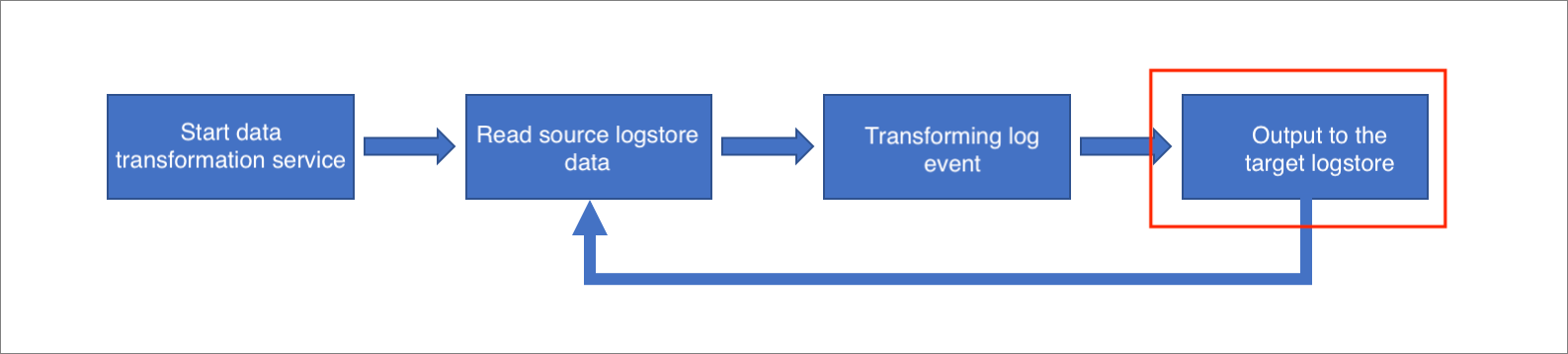
Errors at this stage typically result from access failures to the target Logstore. The three most common root causes are:
-
Incorrect target Logstore configuration
-
Target Logstore settings changed during job execution
-
Network connectivity issues
Error impact on data integrity:
-
When a write error occurs, the data transformation job retries continuously until the operation succeeds or you manually stop the job. On a successful retry, the job resumes normal operation with no data loss or duplication.
-
When a partial write error occurs (for example, one of two configured output targets succeeds while the other fails), the job saves a checkpoint and retries the failed target. On a successful retry, no data loss or duplication occurs. However, if you stop and restart the job at this point, it resumes from the saved checkpoint, which prevents data loss but may cause data duplication.
Error reference
Invalid AccessKey
An invalid AccessKey error occurs when the AccessKey ID or AccessKey secret configured for the target Logstore is incorrect or inactive.
-
Error message:
# Invalid AccessKeyId { "errorCode": "Unauthorized", "errorMessage": "AccessKeyId not found: LTAI****************" } # Invalid AccessKeySecret { "errorCode": "SignatureNotMatch", "errorMessage": "signature uJfAJbc0ji04gb+cXhh0qWt****= not match" } -
Resolution:
Open the data transformation job configuration and locate the AccessKey settings for the target Logstore. Verify that the AccessKey ID matches an active RAM user or Alibaba Cloud account. Verify that the AccessKey secret corresponds to the specified AccessKey ID. If the credentials are invalid, update them with a valid AccessKey pair and restart the job.
The target project does not exist
-
Error message:
{ "errorCode": "ProjectNotExist", "errorMessage": "The Project does not exist : your_project_name" } -
Cause:
This error has two possible causes:
-
The target project name in the job configuration contains a typo or is otherwise incorrect.
-
The target project existed when the job started but was deleted while the job was running.
-
-
Resolution:
-
Open the data transformation job configuration and verify that the target project name is correct.
-
Log on to the SLS console and confirm that the target project exists and has not been deleted. If the project was deleted, re-create it or update the job configuration with a valid project name.
-
-
Output target not found.
Sample DSL rule:
e_coutput("target1")-
Error message:
{ "errorMessage": "transform_data: output target target1 is not found in configurations" } -
Cause:
The DSL rule sends log events to an output target named
target1, but the job configuration does not maptarget1to a specific project and Logstore. Every output target name referenced in DSL rules must have a corresponding configuration entry. -
Resolution:
Open the data transformation job configuration. Compare the output target names in the DSL rules against the configured storage targets. Add the missing output target definition, mapping it to the correct project and Logstore.
-
Target Logstore changed during execution
-
Cause:
The target Logstore was correctly configured at job creation time but its settings changed while the job was running, making the original configuration invalid.
-
Error message:
Two scenarios trigger this error:
-
The target Logstore was deleted after the data transformation job started.
{ "errorMessage": "Logstore [logstore_name] does not exist." } -
The AccessKey associated with the target Logstore was rotated, disabled, or deleted after the job started.
# Invalid AccessKeyId
{
  "errorCode": "Unauthorized",
  "errorMessage": "AccessKeyId not found: LTAI****************"
}
# Invalid AccessKeySecret
{
  "errorCode": "SignatureNotMatch",
  "errorMessage": "signature uJfAJbc0ji04gb+cXhh0qWt****= not match"
}
-
-
Resolution:
-
Log on to the SLS console and verify that the target Logstore still exists. If the Logstore was deleted, re-create it or update the job configuration with a valid Logstore.
-
Verify that the AccessKey configured for the target Logstore is still active and has not been rotated. If the AccessKey changed, update the job configuration with the new credentials and restart the job.
-
-
Network error
-
Error message:
{ "errorCode": "LogRequestError", "errorMessage": "HTTPConnectionPool(host='your_host', port=80): Max retries exceeded with url: your_url (Caused by NewConnectionError: Failed to establish a new connection: [Errno 11001] getaddrinfo failed'" } -
Resolution:
Verify that the target Logstore endpoint is correct and reachable. Review firewall rules and security group configurations to confirm that outbound traffic to the target endpoint is not blocked. Test network connectivity to the target endpoint from the same network environment. If the issue persists, contact Alibaba Cloud technical support.
-