Shards are used to manage the read and write capacity of Logstores or Metricstores. In Simple Log Service, data is stored in a shard. This topic describes how to query, split, and merge shards by using Simple Log Service SDK for Python and provides sample code.
Prerequisites
A Resource Access Management (RAM) user is created, and the required permissions are granted to the RAM user. For more information, see Create a RAM user and grant permissions to the RAM user.
The ALIBABA_CLOUD_ACCESS_KEY_ID and ALIBABA_CLOUD_ACCESS_KEY_SECRET environment variables are configured. For more information, see Configure environment variables in Linux, macOS, and Windows.
ImportantThe AccessKey pair of an Alibaba Cloud account has permissions on all API operations. We recommend that you use the AccessKey pair of a RAM user to call API operations or perform routine O&M.
We recommend that you do not save the AccessKey ID or AccessKey secret in your project code. Otherwise, the AccessKey pair may be leaked, and the security of all resources within your account may be compromised.
Simple Log Service SDK for Python is installed. For more information, see Install Simple Log Service SDK for Python.
A Logstore is created. For more information, see Create a Logstore.
To split or merge shards, the status of the shards must be
readwrite.
Usage notes
In this example, the public Simple Log Service endpoint for the China (Hangzhou) region is used, which is https://cn-hangzhou.log.aliyuncs.com. If you want to access Simple Log Service by using other Alibaba Cloud services that reside in the same region as your project, you can use the internal Simple Log Service endpoint, which is https://cn-hangzhou-intranet.log.aliyuncs.com. For more information about the supported regions and endpoints of Simple Log Service, see Endpoints.
Billing information
For more information about the billing of shards, see Why am I charged for active shards?.
Sample code that is used to query shards
The following sample code provides an example on how to query the shards of a specified Logstore:
from aliyun.log import LogClient
import os

# Configure environment variables. In this example, the AccessKey ID and AccessKey secret are obtained from environment variables.
accessKeyId = os.environ.get('ALIBABA_CLOUD_ACCESS_KEY_ID', '')
accessKey = os.environ.get('ALIBABA_CLOUD_ACCESS_KEY_SECRET', '')
# The Simple Log Service endpoint. In this example, the Simple Log Service endpoint for the China (Hangzhou) region is used. Replace the parameter value with the actual endpoint.
endpoint = "cn-hangzhou.log.aliyuncs.com"
# Create a Simple Log Service client.
client = LogClient(endpoint, accessKeyId, accessKey)

# The name of the project.
project_name = "ali-test-project"

# The name of the Logstore.
logstore_name = "ali-test-logstore"

if __name__ == '__main__':
    # Query all shards of the specified Logstore.
    print("ready to list shards")

    res = client.list_shards(project_name, logstore_name)

    print("Shards info is :%s" % res.get_shards_info())

    print("list shards success")
Expected results:
ready to list shards
Shards info is :[{'shardID': 0, 'status': 'readwrite', 'inclusiveBeginKey': '00000000000000000000000000000000', 'exclusiveEndKey': '7f000000000000000000000000000000', 'createTime': 1670999677}, {'shardID': 1, 'status': 'readwrite', 'inclusiveBeginKey': '7f000000000000000000000000000000', 'exclusiveEndKey': 'ffffffffffffffffffffffffffffffff', 'createTime': 1670999677}]
list shards success
Sample code that is used to split a shard
You can split and merge shards in the Simple Log Service console with ease. For more information, see Split a shard.
The following sample code provides an example on how to split a shard of a specified Logstore:
import time
import os
from aliyun.log import LogClient

# Configure environment variables. In this example, the AccessKey ID and AccessKey secret are obtained from environment variables.
accessKeyId = os.environ.get('ALIBABA_CLOUD_ACCESS_KEY_ID', '')
accessKey = os.environ.get('ALIBABA_CLOUD_ACCESS_KEY_SECRET', '')
# The Simple Log Service endpoint. In this example, the Simple Log Service endpoint for the China (Hangzhou) region is used. Replace the parameter value with the actual endpoint.
endpoint = "cn-hangzhou.log.aliyuncs.com"
# Create a Simple Log Service client.
client = LogClient(endpoint, accessKeyId, accessKey)

# The name of the project.
project_name = "ali-test-project"

# The name of the Logstore.
logstore_name = "ali-test-logstore"

if __name__ == '__main__':
    # Query shards before you split a shard.
    res1 = client.list_shards(project_name, logstore_name)
    print("Before splite shard, Shards info is :%s" % res1.get_shards_info())

    # Split Shard 0.
    print("ready to split shards")
    client.split_shard(project_name, logstore_name, shardId=0, split_hash="3f000000000000000000000000000000")

    # Query the split results after 60 seconds.
    time.sleep(60)
    res2 = client.list_shards(project_name, logstore_name)
    print("After split Shards, Shards info is :%s" % res2.get_shards_info())

    print("list shards success")
Expected results:
Before splite shard, Shards info is :[{'shardID': 0, 'status': 'readwrite', 'inclusiveBeginKey': '00000000000000000000000000000000', 'exclusiveEndKey': '7f000000000000000000000000000000', 'createTime': 1670999677}, {'shardID': 1, 'status': 'readwrite', 'inclusiveBeginKey': '7f000000000000000000000000000000', 'exclusiveEndKey': 'ffffffffffffffffffffffffffffffff', 'createTime': 1670999677}]
ready to split shards
After split Shards, Shards info is :[{'shardID': 2, 'status': 'readwrite', 'inclusiveBeginKey': '00000000000000000000000000000000', 'exclusiveEndKey': '3f000000000000000000000000000000', 'createTime': 1672042813}, {'shardID': 3, 'status': 'readwrite', 'inclusiveBeginKey': '3f000000000000000000000000000000', 'exclusiveEndKey': '7f000000000000000000000000000000', 'createTime': 1672042813}, {'shardID': 1, 'status': 'readwrite', 'inclusiveBeginKey': '7f000000000000000000000000000000', 'exclusiveEndKey': 'ffffffffffffffffffffffffffffffff', 'createTime': 1670999677}, {'shardID': 0, 'status': 'readonly', 'inclusiveBeginKey': '00000000000000000000000000000000', 'exclusiveEndKey': '7f000000000000000000000000000000', 'createTime': 1670999677}]
list shards success
Sample code that is used to merge shards
You can split and merge shards in the Simple Log Service console with ease. For more information, see Merge shards.
The following sample code provides an example on how to merge the shards of a specified Logstore:
import time
import os
from aliyun.log import LogClient

# Configure environment variables. In this example, the AccessKey ID and AccessKey secret are obtained from environment variables.
accessKeyId = os.environ.get('ALIBABA_CLOUD_ACCESS_KEY_ID', '')
accessKey = os.environ.get('ALIBABA_CLOUD_ACCESS_KEY_SECRET', '')
# The Simple Log Service endpoint. In this example, the Simple Log Service endpoint for the China (Hangzhou) region is used. Replace the parameter value with the actual endpoint.
endpoint = "cn-hangzhou.log.aliyuncs.com"
# Create a Simple Log Service client.
client = LogClient(endpoint, accessKeyId, accessKey)

# The name of the project.
project_name = "ali-test-project"

# The name of the Logstore.
logstore_name = "ali-test-logstore"

if __name__ == '__main__':
    # Query shards before you merge shards.
    res1 = client.list_shards(project_name, logstore_name)
    print("Before merge shard, Shards info is :%s" % res1.get_shards_info())

    # Merge Shard 2 and Shard 3. Simple Log Service automatically identifies the neighbor shard for merging.
    print("ready to merge shards")
    client.merge_shard(project_name, logstore_name, shardId=2)

    # Query the merge results after 60 seconds.
    time.sleep(60)
    res2 = client.list_shards(project_name, logstore_name)
    print("After merge Shards, Shards info is :%s" % res2.get_shards_info())

    print("merge shards success")
Expected results:
Before merge shard, Shards info is :[{'shardID': 2, 'status': 'readwrite', 'inclusiveBeginKey': '00000000000000000000000000000000', 'exclusiveEndKey': '3f000000000000000000000000000000', 'createTime': 1672042813}, {'shardID': 3, 'status': 'readwrite', 'inclusiveBeginKey': '3f000000000000000000000000000000', 'exclusiveEndKey': '7f000000000000000000000000000000', 'createTime': 1672042813}, {'shardID': 1, 'status': 'readwrite', 'inclusiveBeginKey': '7f000000000000000000000000000000', 'exclusiveEndKey': 'ffffffffffffffffffffffffffffffff', 'createTime': 1670999677}, {'shardID': 0, 'status': 'readonly', 'inclusiveBeginKey': '00000000000000000000000000000000', 'exclusiveEndKey': '7f000000000000000000000000000000', 'createTime': 1670999677}]
ready to merge shards
After merge Shards, Shards info is :[{'shardID': 4, 'status': 'readwrite', 'inclusiveBeginKey': '00000000000000000000000000000000', 'exclusiveEndKey': '7f000000000000000000000000000000', 'createTime': 1672043611}, {'shardID': 1, 'status': 'readwrite', 'inclusiveBeginKey': '7f000000000000000000000000000000', 'exclusiveEndKey': 'ffffffffffffffffffffffffffffffff', 'createTime': 1670999677}, {'shardID': 0, 'status': 'readonly', 'inclusiveBeginKey': '00000000000000000000000000000000', 'exclusiveEndKey': '7f000000000000000000000000000000', 'createTime': 1670999677}, {'shardID': 2, 'status': 'readonly', 'inclusiveBeginKey': '00000000000000000000000000000000', 'exclusiveEndKey': '3f000000000000000000000000000000', 'createTime': 1672042813}, {'shardID': 3, 'status': 'readonly', 'inclusiveBeginKey': '3f000000000000000000000000000000', 'exclusiveEndKey': '7f000000000000000000000000000000', 'createTime': 1672042813}]
merge shards success
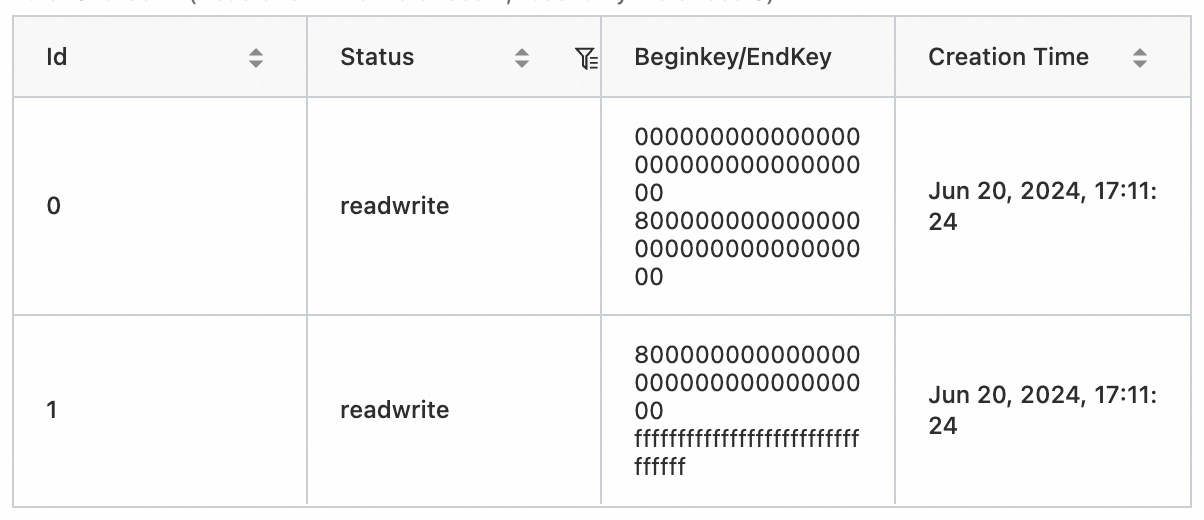
View shards in the console
Log on to the Simple Log Service console.
In the Projects section, click the project that you want to manage.

On the tab, click the Logstore that you want to manage. Then select
 > Modify.
 View the shard information on the right side of the page.
References
- Alibaba Cloud OpenAPI Explorer provides debugging capabilities, SDKs, examples, and related documents. You can use OpenAPI Explorer to debug Log Service API operations without the need to manually encapsulate or sign requests. For more information, visit OpenAPI Portal.
- Log Service provides the command-line interface (CLI) to meet the requirements for automated configurations in Log Service. For more information, see Log Service CLI.
For more information about shard-related operations, see the following topics:
For more information about sample code, see Alibaba Cloud Simple Log Service SDK for Python on GitHub.