After you install the Security Center agent, it starts processes such as AliYunDun and AliYunDunMonitor on your server to collect system information and detect threats. Use the commands in this topic to confirm that the protection features are active.
Agent architecture
The Security Center agent uses a modular architecture composed of core processes and functional processes.
-
Core processes —
AliYunDun,AliYunDunMonitor, andAliYunDunUpdatemaintain the heartbeat connection with Security Center, report security data, and keep the agent up to date. They start automatically after installation. -
Functional processes —
AliHips,AliNet, and others are downloaded and started on demand when you enable the corresponding advanced protection features in the console, such as Malicious Host Behavior Prevention or Web Tamper Proofing.
Process details
Do not manually terminate or delete agent processes or their files. To remove agent-related files, first disable agent self-protection in the agent capability configuration.
Core processes
Core processes start automatically after the agent is installed and are required for communication between the agent and the cloud.
Starting from versionaegis_12_3x, theAliSecureCheckAdvancedandAliDetectprocesses are merged intoAliSecCheck. Earlier versions are not affected.
| Process | Folder | Description |
|---|---|---|
AliYunDun |
aegis_client |
Communicates with Security Center. Reports heartbeats, receives instructions, reports security data, and enforces agent self-protection. |
AliYunDunMonitor |
aegis_client |
Monitors host security. Collects and detects information about assets, processes, ports, and accounts. |
AliYunDunUpdate |
aegis_update |
Automatically updates the agent version and rule library. |
AliSecCheck |
AliSecCheck, AliSecCheckTmp, AliSecCheck (Detect plug-in) |
Runs security scans and detection tasks, including vulnerability scans, compliance baseline checks, and runtime detection of malicious programs such as mining programs and trojans. |
Functional processes
Functional processes are tied to specific paid features and start only after you enable the corresponding feature.
| Process | Folder | Description | Start condition |
|---|---|---|---|
AliNet |
AliNet |
Provides network-layer protection. Blocks malicious IP access and outbound attacks. | Enable Malicious Network Behavior Prevention. |
AliHips |
AliHips |
Provides host intrusion prevention. Blocks malicious host behaviors, provides anti-ransomware capabilities, and prevents web shell connections. | Enable Malicious Host Behavior Prevention, Anti-ransomware (Bait Capture), or Webshell Prevention. |
AliWebGuard |
AliWebGuard |
Performs web tamper proofing and core file monitoring. | Enable Web Tamper Proofing or Core File Monitoring. |
ids |
hbrclient |
Generates security reports, performs anomaly detection, and provides real-time monitoring. | Enable Anti-ransomware for Servers. |
hbrclient |
hbrclient |
Handles data backup, data restoration, fault monitoring, and task scheduling. | |
dbackup3-agent |
dbackup3-agent |
Database backup proxy. Handles initial and incremental database backups, restoration, scheduling and management, and logging and monitoring. | Enable Anti-ransomware for Databases. |
Relationship between processes and features
| Feature | Related process | Edition and protection level | Documentation |
|---|---|---|---|
| Agent Protection | AliYunDun |
Not required | Advanced features |
| Malicious Network Behavior Prevention | AliNet |
Subscription: Advanced, Enterprise, Ultimate. Pay-as-you-go: Host Protection or Host and Container Protection. | Host protection settings |
| Malicious Host Behavior Prevention | AliHips |
Subscription: Anti-virus, Advanced, Enterprise, Ultimate. Pay-as-you-go: Antivirus, Host Protection, Host and Container Protection. | |
| Anti-ransomware (Bait Capture) | AliHips |
Subscription: Anti-virus, Advanced, Enterprise, Ultimate. Pay-as-you-go: Antivirus, Host Protection, Host and Container Protection. | |
| Webshell Prevention | AliHips |
Subscription: Enterprise, Ultimate. Pay-as-you-go: Host Protection, Host and Container Protection. | |
| Web Tamper Proofing | AliWebGuard |
Not required. Important
This feature is a value-added service that you must purchase separately. |
Web Tamper Proofing |
| Core File Monitoring | AliWebGuard |
Subscription: Enterprise, Ultimate. Pay-as-you-go: Host Protection, Host and Container Protection. | Core File Monitoring |
| Anti-ransomware for Servers | hbrclient, ids |
Not required. Important
This feature is a value-added service (Managed Anti-ransomware) that you must purchase separately. |
Anti-ransomware for Servers |
| Anti-ransomware for Databases | dbackup3-agent |
Not required. Important
This feature is a value-added service (Managed Anti-ransomware) that you must purchase separately. |
Anti-ransomware for Databases |
How agent status is determined
Security Center evaluates agent status by monitoring the heartbeat communication between the AliYunDun process and the cloud. The agent status changes from Online to Offline in either of the following situations:
View the agent status on the Host page: Offline () or Online (
).
-
The connection between
AliYunDunand the cloud is interrupted — for example, due to a network exception, the process being terminated, or the agent being uninstalled. -
Security Center receives no information (heartbeats or security data) from the agent for 10 hours.
Running permissions and file paths
Process permissions
To perform kernel-level monitoring, file system protection, network behavior analysis, and agent self-protection, the agent processes require high operating system privileges:
-
Linux: Processes run as
root. -
Windows: Processes run as
SYSTEM.
Default file paths
| OS | Architecture | Path |
|---|---|---|
| Windows | 32-bit | C:\Program Files\Alibaba\aegis |
| Windows | 64-bit | C:\Program Files (x86)\Alibaba\aegis |
| Linux | — | /usr/local/aegis |
Check process status
Use the following commands to verify that the core agent processes and services are running.
Linux
Run the following commands in a terminal:
# Check that AliYunDun, AliYunDunMonitor, and AliYunDunUpdate are all running.
ps -ef | grep -E 'AliYunDun|YunDunMonitor|YunDunUpdate'

# Check the service status. The output should show "active (running)".
systemctl status aegis
Expected output when all processes are healthy:
root        5472       1  0 Sep10 ?        00:00:18 /usr/local/aegis/aegis_update/AliYunDunUpdate
root        5524       1  0 Sep10 ?        00:01:34 /usr/local/aegis/aegis_client/aegis_12_61/AliYunDun
root        5546       1  0 Sep10 ?        00:03:13 /usr/local/aegis/aegis_client/aegis_12_61/AliYunDunMonitor

● aegis.service - LSB: Aegis service
   Loaded: loaded (/etc/rc.d/init.d/aegis; generated)
   Active: active (running) since Mon 2023-10-30 10:00:00 CST; 1 day 2h ago
If any of the three core processes is missing from the ps output, or the service status is not active (running), the agent is not fully operational.
Windows
Use one of the following methods.
Method 1: Open Task Manager and check that AliYunDun, AliYunDunMonitor, and AliYunDunUpdate appear in the process list.
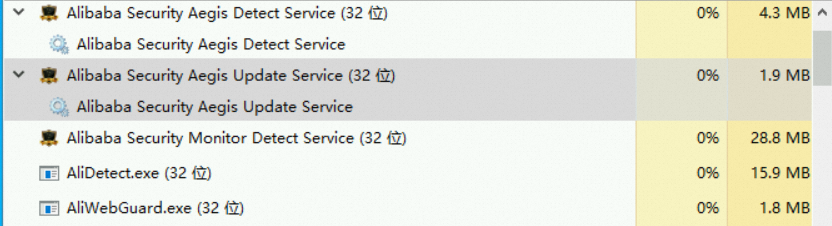
Method 2: Run the following commands in PowerShell:
# Check that the three core processes are running.
Get-Process | Where-Object {$_.Name -match '^(AliYunDun|AliYunDunMonitor|AliYunDunUpdate)$'}

# Check the service status. The Status column should show "Running".
Get-Service | Where-Object {$_.Name -match 'Aegis|AliYunDun'}
Expected output when all processes are healthy:
Handles  NPM(K)    PM(K)      WS(K)     CPU(s)     Id  SI ProcessName
-------  ------    -----      -----     ------     --  -- -----------
    380      26    15948      19656     615.75   6072   0 AliYunDun
    599      31    47576      37356     968.73   2488   0 AliYunDunMonitor
    257      14     8072      11336     232.03   2904   0 AliYunDunUpdate

Status   Name               DisplayName
------   ----               -----------
Running  Alibaba Securit... Alibaba Security Aegis Detect Service
Running  Alibaba Securit... Alibaba Security Aegis Update Service
If any core process is missing or a service status shows anything other than Running, the agent is not fully operational.