This topic describes the concepts of Serverless App Engine (SAE) networks and explains how to select a network type based on your access requirements.
Alibaba Cloud network infrastructure
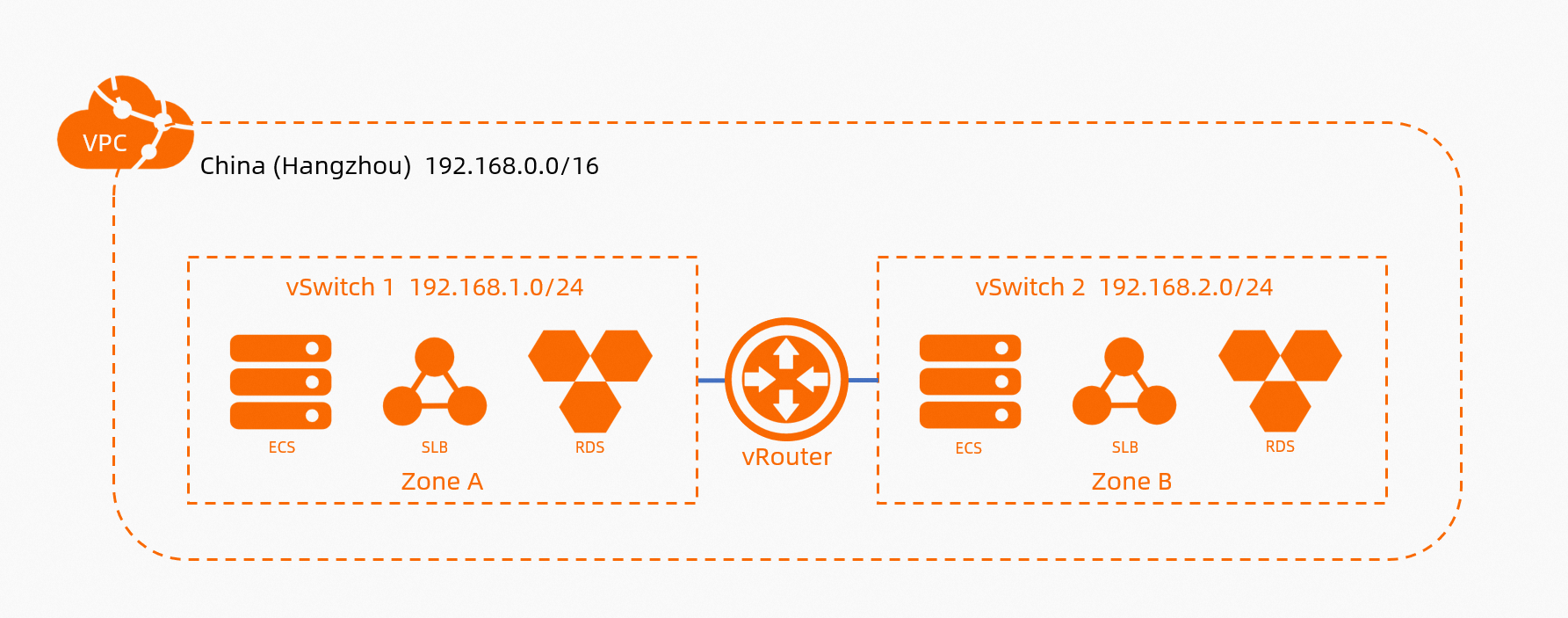
Virtual private cloud (VPC): A VPC is a custom private network that you create on Alibaba Cloud. VPCs are logically isolated from each other.
NoteBy default, access from VPCs to the Internet is denied.
vSwitch: A vSwitch is a basic network component that connects different cloud resources in a VPC. A vSwitch corresponds to a physical server. When you create a cloud resource in a VPC, you need to specify a vSwitch for cloud resource to connect.
Elastic IP address (EIP): An EIP is associated with only one resource, such as an ECS instance or SAE instance. After associating an EIP with a resource, the resource can access and be accessed by other services over the Internet.
NAT gateway: The source network address translation (SNAT) feature of a NAT gateway allows all resources in a VPC to access the Internet. An Internet NAT gateway is suitable for all resources in a VPC. Notice that an EIP is suitable for only one resource in a VPC.
Scenarios and methods of SAE network access
After deploying an application to SAE, you may have the following network access requirements. The following figure shows the concept.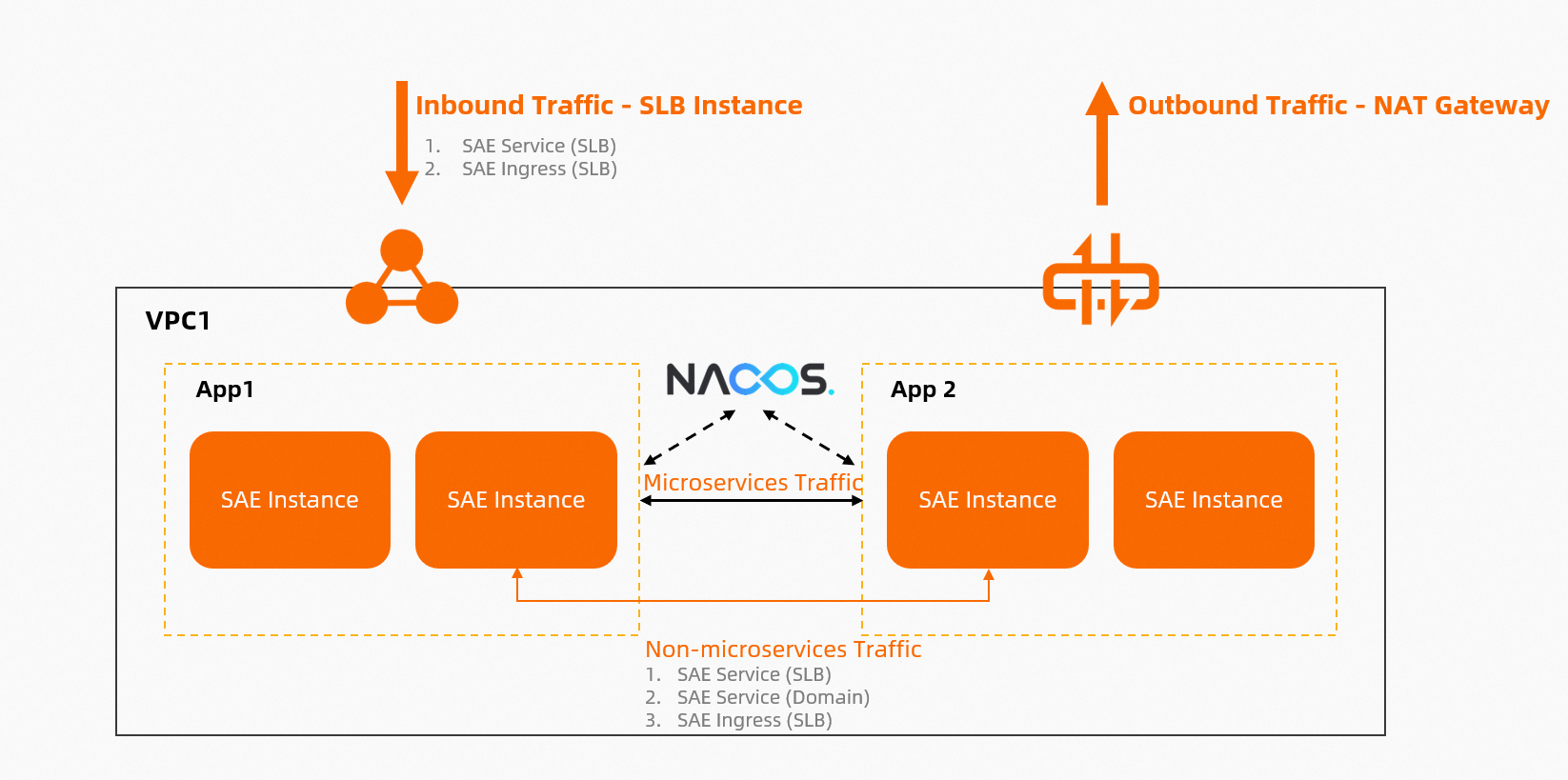
Mutual access between SAE applications over an internal network (not microservices scenarios)
In serverless mode, new internal IP addresses are generated after deployment. However, you cannot access the application by using the IP addresses of the instances in the application. Use one of the following methods to enable access:
SAE Service (CLB): Use an SAE service based on an Alibaba Cloud Server Load Balancer (SLB) instance (internal CLB instance) to access applications. For more information, see Configure CLB-based application access.
SAE Ingress (ALB/CLB): Use gateway routing based on an Alibaba Cloud SLB instance (internal Application Load Balancer (ALB) or CLB instance) to route traffic to different SAE applications. For more information, see Configure gateway routing (Ingress) access.
Access to SAE applications from the Internet (inbound traffic)
You can use one of the following methods to enable access:
SAE Service (CLB): You can use an SAE service that is implemented based on an Alibaba Cloud SLB instance (Internet CLB instance) to access applications. For more information, see Configure CLB-based application access.
SAE Ingress (ALB/CLB): You can use gateway routing that is implemented based on an Alibaba Cloud SLB instance (Internet CLB or ALB instance) to route traffic to different SAE applications based on different domain names and paths. For more information, see Configure gateway routing (Ingress) access.
SAE EIP: You can associate an EIP with each instance of an SAE application. Then, the instance can access and be accessed by other services over the Internet. For more information, see Configure EIP-based Internet access for SAE instances.
Access to the Internet from SAE applications (outbound traffic)
Use one of the following methods to enable access:
SAE Service (CLB): You can use an SAE service that is implemented based on an Alibaba Cloud SLB instance (Internet CLB instance) to access applications. For more information, see Configure CLB-based application access.
SAE Ingress (ALB/CLB): You can use gateway routing that is implemented based on an Alibaba Cloud SLB instance (Internet CLB/ALB instance) to route traffic to different SAE applications based on different domain names and paths. For more information, see Configure gateway routing (Ingress) access
SAE EIP: You can associate an EIP with each instance of an SAE application. Then, the instance can access and be accessed by other services over the Internet. For more information, see Configure EIP-based Internet access for SAE instances.
Access to ECS instances, ApsaraDB RDS, and Tair (Redis OSS-compatible) from SAE applications in the same VPC
SAE is based on Alibaba Cloud VPC networks. Therefore, you do not need to configure additional settings to access resources in the same VPC, such as ECS instances, ApsaraDB RDS, and Tair (Redis OSS-compatible). Similarly, Alibaba Cloud resources in the same VPC can access SAE.
You need to check whether the related security groups and service whitelists are configured. If you encounter issues, follow the troubleshooting in FAQ.
Access to registries from microservices applications and mutual access between instances
For more information, see Network-related concepts and capabilities of SAE.
Comparison items in SAE networks
Differences between ServiceName and gateway routing in SAE
Gateway routing (Ingress) in SAE is based on Alibaba Cloud SLB (CLB and ALB). It can route traffic to different applications by domain names and paths (as shown in the following figure), while ServiceName can not. We recommend that you use the gateway routing more than ServiceName. ServiceName is better at using the Layer 4 TCP protocol.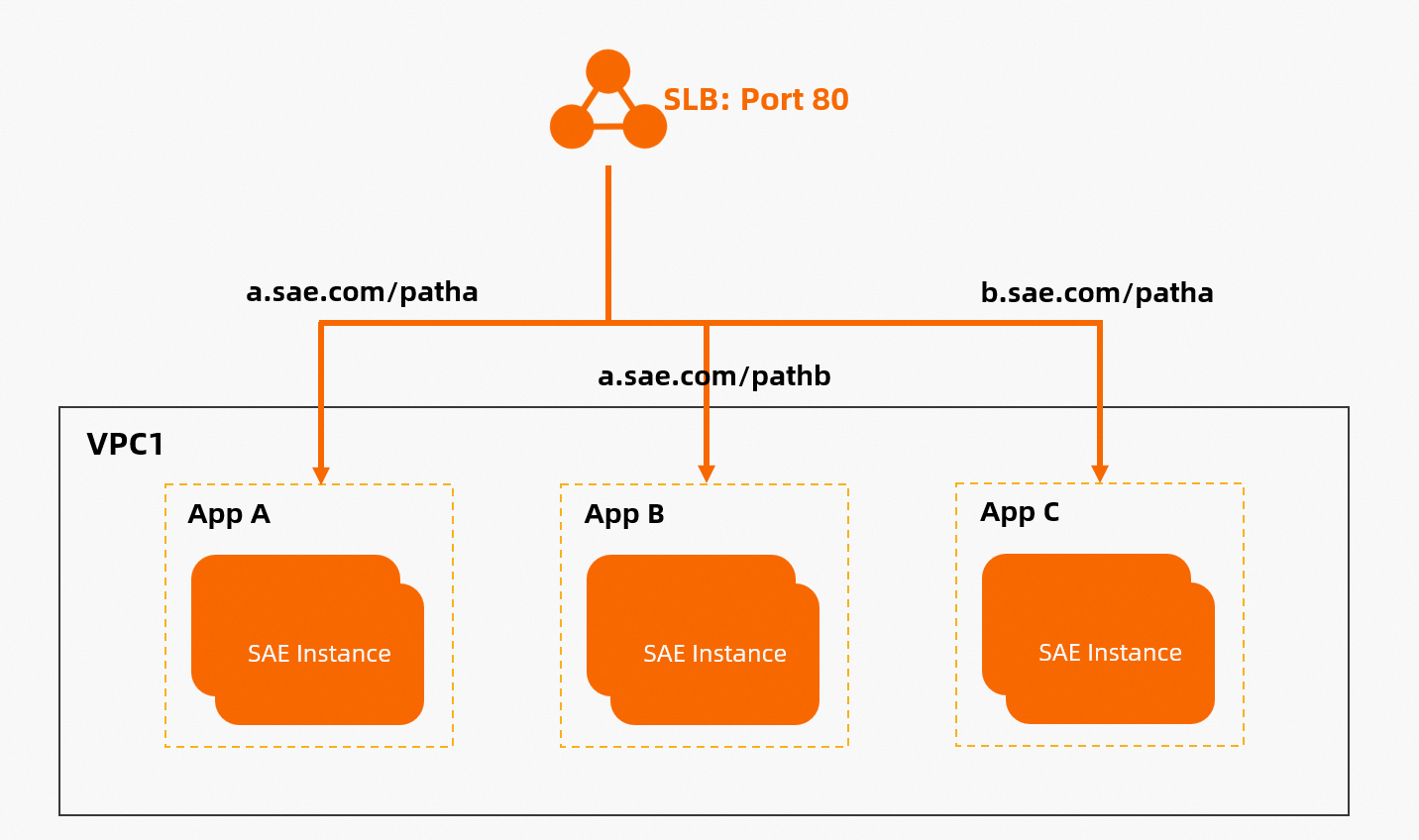
For more information, see the following topics:
Differences between CLB-based and Kubernetes Service name-based application access
Kubernetes Services are classified into CLB-based Services and ClusterIP-based Services. SAE does not directly provide ClusterIP. Instead, it provides a domain name. The following table describes the differences between the Service types.
Comparison item | CLB | Domain (ClusterIP) |
Billing | Free of charge | |
O&M | CLB is an independent Alibaba Cloud service with: monitoring, alerting, and log collection to Log Service. CLB provides fine-grained troubleshooting. | This type of Service do not provide independent monitoring, alerting, or access log collection. You need to configure alerts and logs for an application. |
Differences between ALB-based and CLB-based gateway routing
ALB is a load balancing service that runs at the application layer, and supports protocols such as HTTP, HTTPS, and QUIC. We recommend that you use an ALB instance in gateway routing. For more information, see Introduction to Server Load Balancer (SLB) product family.
Differences between NAT-based and EIP-based Internet access
The following figure shows how to enable EIP-based Internet access. Each instance is associated with an EIP. If the EIPs are insufficient, the instances fail to be created and cannot provide services.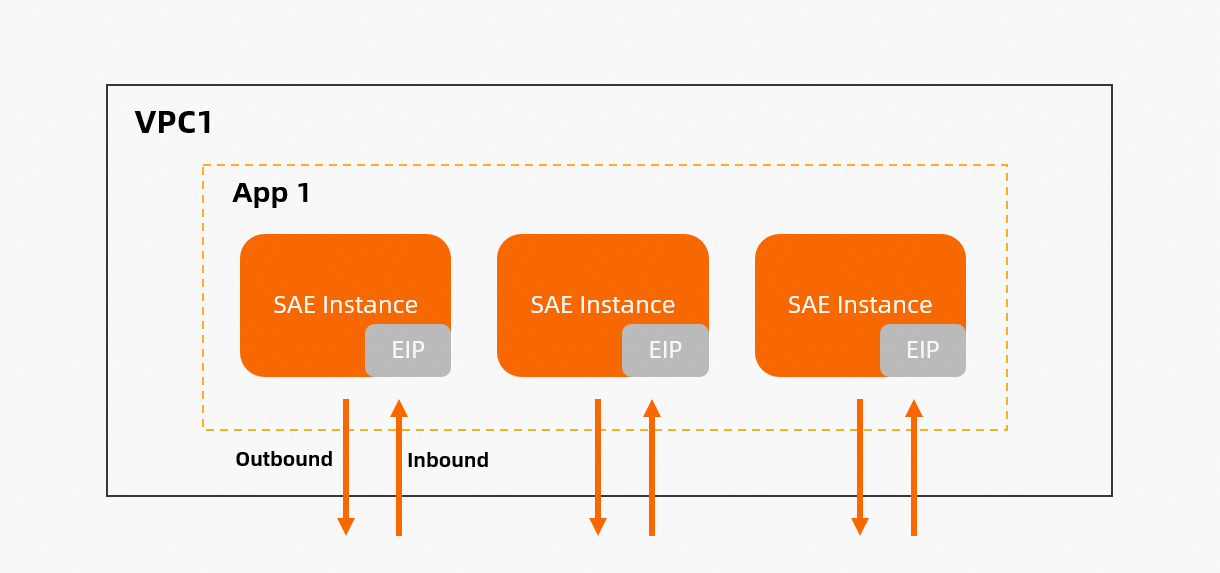
The following table shows the differences between NAT-based and EIP-based Internet access.
Comparison item | NAT | EIP |
Effective scope | The effective scope of a NAT gateway is a VPC or a vSwitch. An Internet NAT gateway allows all instances in a VPC or vSwitch to access the Internet even with no public IP. Only one NAT gateway is required in a VPC or vSwitch. Then, all instances that reside in the VPC can access the Internet. | The effective scope of an EIP is an instance. If you have 10 instances, you need to configure 10 EIPs. After associating an EIP with an instance, the instance can access and be accessed by other services over the Internet. |
Fixed public IP address | Yes. | No. SAE releases the original instance and the original EIP, only after a new instance is successfully associated with an EIP. In this case, you need to prepare additional EIPs. An EIP is a pool of IP addresses. |
Common | NAT-based Internet access is suitable for which auto scaling are configured for applications, and new instances require Internet and fixed IP addresses. This method can fulfill 95% of SAE users. | EIP-based Internet access is suitable when EIPs are changeable, instances need to be directly connected (such as online conferences), and the lifecycle of each instance need to be managed. |
Billing | For more information about billing, see NAT Gateway billing. | For more information about billing, see EIP billing. If the number of instances is less than or equal to 20, the EIP-based Internet is more cost-efficient. |
FAQ
How can an SAE application access the Internet?
First, determine whether you need inbound or outbound Internet access by referring to the following figure. For outbound traffic, refer to this section. For inbound traffic, see How can an SAE application be accessed from the Internet?.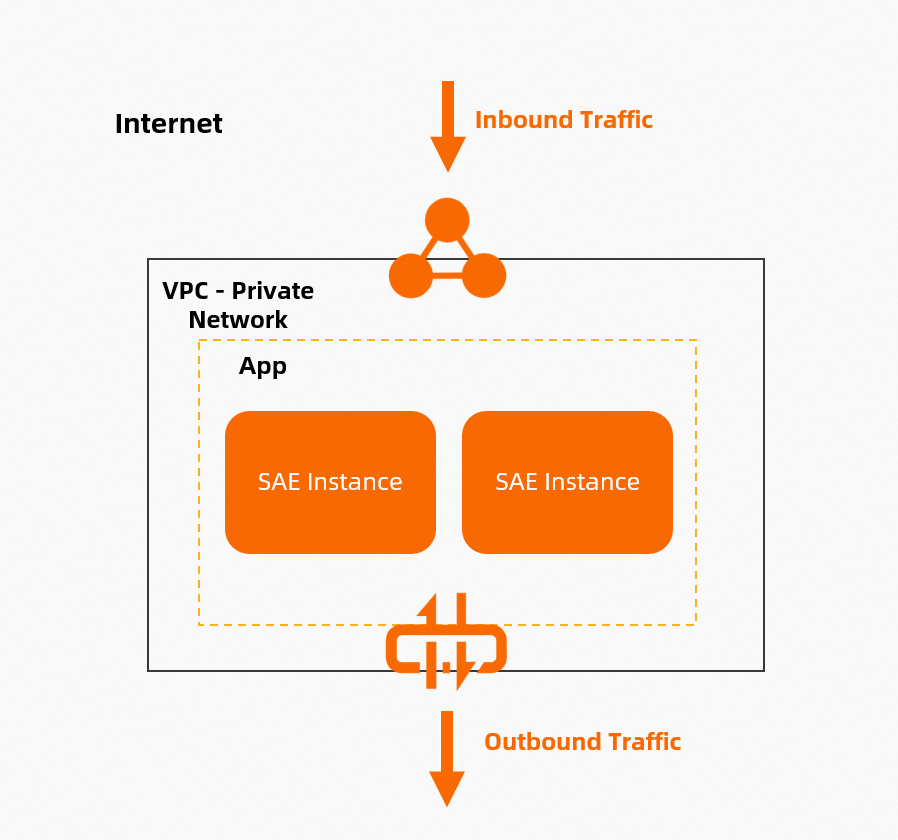
SAE provides two ways for an application to access the Internet: you can configure an Internet NAT gateway for the VPC that is associated with the SAE application or associate an EIP with each instance of the SAE application.
How can an SAE application be accessed from the Internet?
First, determine whether you need inbound or outbound Internet access by referring to the following figure. For inbound traffic, refer to this section. For outbound traffic, see How can an SAE application access the Internet?.
An SAE application can be accessed from the Internet in one of three ways: using an application service (Service), using gateway routing (Ingress), or by associating an EIP with each instance of the SAE application.
How do I bind a public domain name to an SAE application?
SAE does not handle operations related to domain names. After you configure an ALB or CLB instance in the SAE console, you can obtain the public IP address or domain name of the instance, and then use the DNS service to bind the domain name.
What do I do if an SAE application cannot access an ECS instance?
Perform the following steps to troubleshoot the issue:
Ensure that the SAE application and the ECS server are in the same VPC. Check whether the security group configuration allows access to the required ports.
Log on to the webshell of the application instance and run commands such as ping and telnet to check connectivity to the ECS instance. If these commands are not available in the container, you must install them first.
For more information about how to access a public ECS endpoint, see How can an SAE application access the Internet?.
What do I do if an SAE application cannot access an ApsaraDB RDS instance or a Tair (Redis OSS-compatible) instance?
First, check whether the SAE application is accessing a public or internal endpoint for the ApsaraDB RDS or Tair (Redis OSS-compatible) instance. An internal endpoint provides better network quality and lower latency than a public endpoint. We recommend using an internal endpoint if the resources are in the same VPC. Network fees vary based on the resource types you create. For more information, see Product Billing. If the resources are in different VPCs, we recommend using Cloud Enterprise Network (CEN) to connect the VPCs and then using an internal endpoint. After you confirm the endpoint type, follow these steps to troubleshoot the issue:
Check whether a whitelist is configured.
NoteFor internal access, you must add the CIDR blocks of the VPC or vSwitch to a whitelist. For Internet access, you must add the public IP address of the NAT Gateway or the EIP of the application instance to the whitelist.
If no whitelist is configured, see Access Alibaba Cloud databases from applications to configure one.
Log on to the webshell of the application instance and run commands such as ping and telnet to check connectivity to the ApsaraDB instance. If these commands are not available in the container, you must install them first.
If the ping and telnet commands run normally, you can also install a MySQL or Redis client in the image to test the connectivity. If the connection is successful, the SAE network environment is normal. In this case, you must check your application's configuration.