ApsaraDB RDS for SQL Server provides a GUI-based interface that allows you to view and modify database-level attributes directly from the ApsaraDB RDS console, without writing T-SQL statements. You can configure basic settings, review runtime metrics, and adjust advanced options such as snapshot isolation, delayed durability, and accelerated database recovery. You can also manually shrink database transaction logs and update database statistics to optimize performance and improve query efficiency.
For the full list of database attributes and their SQL Server equivalents, see sys.databases (Transact-SQL) in the Microsoft documentation.
Prerequisites
You have created a database on your ApsaraDB RDS for SQL Server instance.
View or modify attributes
Usage notes
When you modify certain database attributes, the database temporarily enters the exclusive mode. During this period, the system closes all connections to the database and rolls back existing transactions for the modifications to take effect. If the database is under heavy load, the modifications may fail. To prevent business interruptions, we recommend that you perform attribute modifications during off-peak hours.
When a database enters the exclusive mode, only one user or process can access and manage the database. Other users or processes can access the database only after all operations on it are completed.
Procedure
Go to the Instances page. In the top navigation bar, select the region in which the RDS instance resides. Then, find the RDS instance and click the ID of the instance.
-
In the left-side navigation pane, click Databases.
-
Find the database that you want to manage and click View Details in the Actions column.
NoteFor more information about the database attributes, see Appendix: Database attributes in this topic or sys.databases (Transact-SQL) in the Microsoft documentation.

-
In the Allowed Values column, modify the attribute values and click Submit.
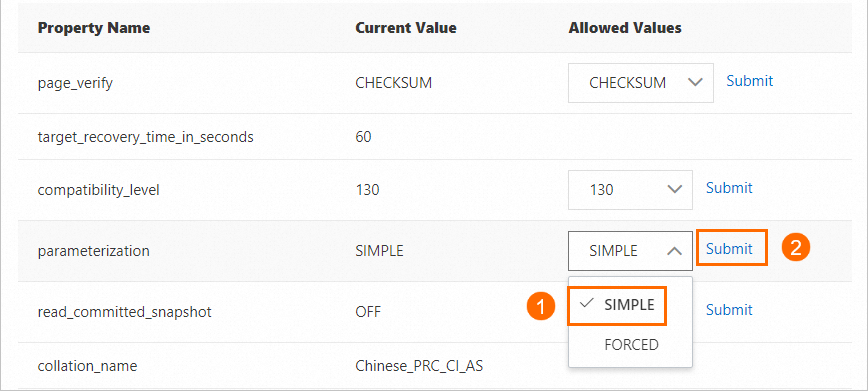
Shrink database transaction logs
Transaction log files can accumulate unused space over time. You can shrink database transaction logs to reclaim disk space when the following conditions are met:
-
The transaction log files use only a small portion of their total allocated storage. Compare the LogUsedSizeInMB value (space used by transaction log files) against the TotalLogSizeInMB value (total space allocated for transaction log files) to assess this.
-
The
log_reuse_wait_descattribute of the database is set to Nothing, which means the transaction log has no pending operations preventing reuse.
Procedure
Go to the Instances page. In the top navigation bar, select the region in which the RDS instance resides. Then, find the RDS instance and click the ID of the instance.
-
In the left-side navigation pane, click Databases.
-
In the Actions column, choose More > Shrink Database Transaction Logs.
-
In the message that appears, click OK.
Update database statistics
The amount and distribution of data in a database change over time. To ensure that the query optimizer generates accurate and efficient execution plans, you must update database statistics on a regular basis.
When to use
Consider manually updating database statistics in the following scenarios:
-
After a major engine version upgrade: A new engine version may introduce new data types, storage engines, or query optimizers. The original database statistics may become inaccurate or unavailable. Update the statistics to adjust data distribution for the new engine.
-
After migrating a self-managed database to the cloud: The change in environment may require statistics to be refreshed for optimal query performance and query plan generation.
-
When automatic statistics updates are insufficient: This can happen when:
-
Business data is unevenly distributed.
-
You perform many DELETE or UPDATE operations, but the volume of modified data does not exceed 20% of the table, which may not trigger the automatic update threshold.
-
The automatic statistics update feature of SQL Server is no longer applicable to your workload pattern.
-
By default, SQL Server enables automatic statistics updates. However, the automatic update frequency may be lower than the rate at which your data changes, which can lead to poor query performance. For more information, see Statistics in the Microsoft documentation.
Usage notes
Updating database statistics may cause heavy I/O loads. To prevent service interruptions, we recommend that you perform this operation during off-peak hours.
Procedure
Go to the Instances page. In the top navigation bar, select the region in which the RDS instance resides. Then, find the RDS instance and click the ID of the instance.
-
In the left-side navigation pane, click Databases.
-
In the Actions column, click More > Update Database Statistics.
-
In the message that appears, click OK.
Appendix: Database attributes
Basic information
| Attribute | Description | Default value |
|---|---|---|
page_verify |
The page-level verification method for the database. Uses the checksum of each data page for integrity verification. |
CHECKSUM |
target_recovery_time_in_seconds |
The target recovery time for the database, in seconds. | 60 |
compatibility_level |
The database compatibility level, which determines the behavior of T-SQL features. Valid values:
|
- |
parameterization |
The parameterization behavior for SQL queries. SIMPLE: Parameterizes only queries with simple constant parameters. FORCED: Forces parameterization for all queries. | SIMPLE |
read_committed_snapshot |
Specifies whether to use row versioning for READ COMMITTED isolation. OFF: Uses read locks for the READ COMMITTED isolation level. ON: Enables READ COMMITTED SNAPSHOT ISOLATION. Concurrent read operations are allowed and are not blocked by write operations. | OFF |
collation_name |
The character set collation and character encoding of the database. For more information, see Change the character set collation and time zone of system databases. | - |
auto_close |
Specifies whether to automatically close the database when no users are connected. When set to OFF, the database remains open. | OFF |
recovery_model_desc |
The recovery model of the database. Enables full recovery and supports point-in-time restore. | FULL |
auto_update_statistics |
Specifies whether to enable automatic statistics updates. Valid values: ON, OFF. | ON |
auto_update_statistics_async |
Specifies whether to update statistics asynchronously. OFF: Updates statistics synchronously. Queries wait for the statistics update to complete before execution. ON: Updates statistics asynchronously. Queries proceed with existing statistics while the update runs in the background. | OFF |
allow_snapshot_isolation |
Specifies whether to enable the SNAPSHOT isolation level. Valid values: OFF, ON. | OFF |
state_desc |
The current status of the database. The value ONLINE indicates that the database is online and available. | - |
create_date |
The date and time when the database was created. | - |
log_reuse_wait_desc |
The reason why the transaction log cannot be reused. The value NOTHING indicates that no conditions are preventing log reuse. | - |
Runtime information
| Attribute | Description | Unit |
|---|---|---|
TotalDataSizeInMB |
The total space allocated for the data files of the database. | MB |
DataUsedSizeInMB |
The space used by the data files of the database. | MB |
TotalLogSizeInMB |
The total space allocated for the transaction log files of the database. | MB |
LogUsedSizeInMB |
The space used by the transaction log files of the database. | MB |
VLFCount |
The number of virtual log files (VLFs) in the database. | - |
LastestBackupTime |
The date and time of the most recent backup of the database. | - |
LastestBackupType |
The type of the most recent database backup. Valid values: D (Full backup), I (Differential backup), L (Log backup). | - |
Advanced information
| Attribute | Description | Default value |
|---|---|---|
accelerated_database_recovery |
Specifies whether to enable Accelerated Database Recovery (ADR). ADR uses versioned storage and logical rollback to achieve near-instant database recovery, which significantly reduces downtime caused by restarts or failures. ADR is suitable for online transaction processing (OLTP) systems that frequently handle long-running transactions and require high availability. Valid values: OFF, ON. Note
This feature is supported only on Standard Edition and Enterprise Edition instances that run SQL Server 2019 or later. Enabling ADR can significantly reduce recovery time for scenarios with long-running transactions and improve system availability. However, it increases storage consumption and introduces minor performance overhead. |
OFF |
ansi_nulls |
Specifies whether to enable ANSI NULL behavior. When enabled, comparisons with NULL always return UNKNOWN instead of TRUE or FALSE. Valid values: OFF, ON. | OFF |
recursive_triggers |
Specifies whether to allow triggers to fire recursively. Valid values: OFF, ON. | OFF |
delayed_durability |
Specifies whether to enable delayed durability. When enabled, transactions write to the transaction log asynchronously after commit, which improves transaction throughput. DISABLED: Transactions are fully durable. After a commit, data is synchronously written to disk at the earliest opportunity. ALLOWED: Enables delayed durability on a per-transaction basis. Individual transactions can opt in. FORCED: All transactions use delayed durability. Important
Enabling delayed durability (ALLOWED or FORCED) may result in data loss if the server fails before the transaction log is flushed to disk. Evaluate the trade-off between performance and durability for your workload. |
DISABLED |
ansi_warnings |
Specifies whether to enable ANSI warnings. When enabled, warnings are raised for conditions such as null values in aggregate functions or divide-by-zero errors. Valid values: OFF, ON. | OFF |
ansi_null_default |
Specifies whether new columns default to allowing NULL values when no explicit NULL or NOT NULL constraint is specified. Valid values: OFF, ON. | OFF |
ansi_padding |
Specifies whether to enable ANSI padding for character columns. When enabled, trailing spaces in varchar values and trailing zeros in varbinary values are preserved. Valid values: OFF, ON. | OFF |
optimized_locking |
Specifies whether to enable optimized locking. Optimized locking reduces lock memory consumption and blocking between concurrent transactions. Valid values: OFF, ON. Note
This feature is supported only on instances that run SQL Server 2022 or later. |
OFF |
db_owner |
The owner of the database. The database owner has the highest level of permissions, including deleting the database, modifying all objects, and managing user permissions. The default value is typically the account that created the database. The owner must be a valid user account in the current instance. Note
Modifying the |
- |
concat_null_yields_null |
Specifies whether concatenating a value with NULL returns NULL. When enabled, any string concatenation involving NULL produces a NULL result. Valid values: OFF, ON. | OFF |
Related API operation
You can modify the attributes of an ApsaraDB RDS for SQL Server database by calling the ModifyDatabaseConfig API operation.