DDL (Data Definition Language) is among the most common operations in MySQL. As MySQL has evolved, its DDL capabilities have improved significantly. This topic covers the evolution of MySQL DDL algorithms, explains common DDL operations and their impact, and describes the optimization features and best practices specific to AliSQL.
DDL capability development
-
MySQL 5.5 and earlier: Only the COPY algorithm is supported.
-
How it works: Creates a temporary table with the new schema, copies all rows, and then swaps the tables.
-
Limitation: The table is read-only during DDL execution. No write operations are allowed.
-
-
MySQL 5.6 and 5.7: The INPLACE algorithm is introduced.
-
How it works: The storage engine handles the DDL operation directly, without creating a temporary table.
-
Advantage: Supports concurrent reads and writes during DDL execution.
-
Limitation: The table is briefly locked (blocking all reads and writes) at the start and end of the operation, and temporary disk space may be consumed.
-
-
MySQL 8.0 and 8.4: The INSTANT algorithm is introduced.
-
How it works: Modifies only the table metadata without touching the actual data.
-
Advantage: Completes in seconds, dramatically reducing the impact of DDL on running workloads.
-
Limitation: Supports only specific operations such as adding and dropping columns. A brief exclusive metadata lock (MDL X lock) is still required at the start and end of execution.
-
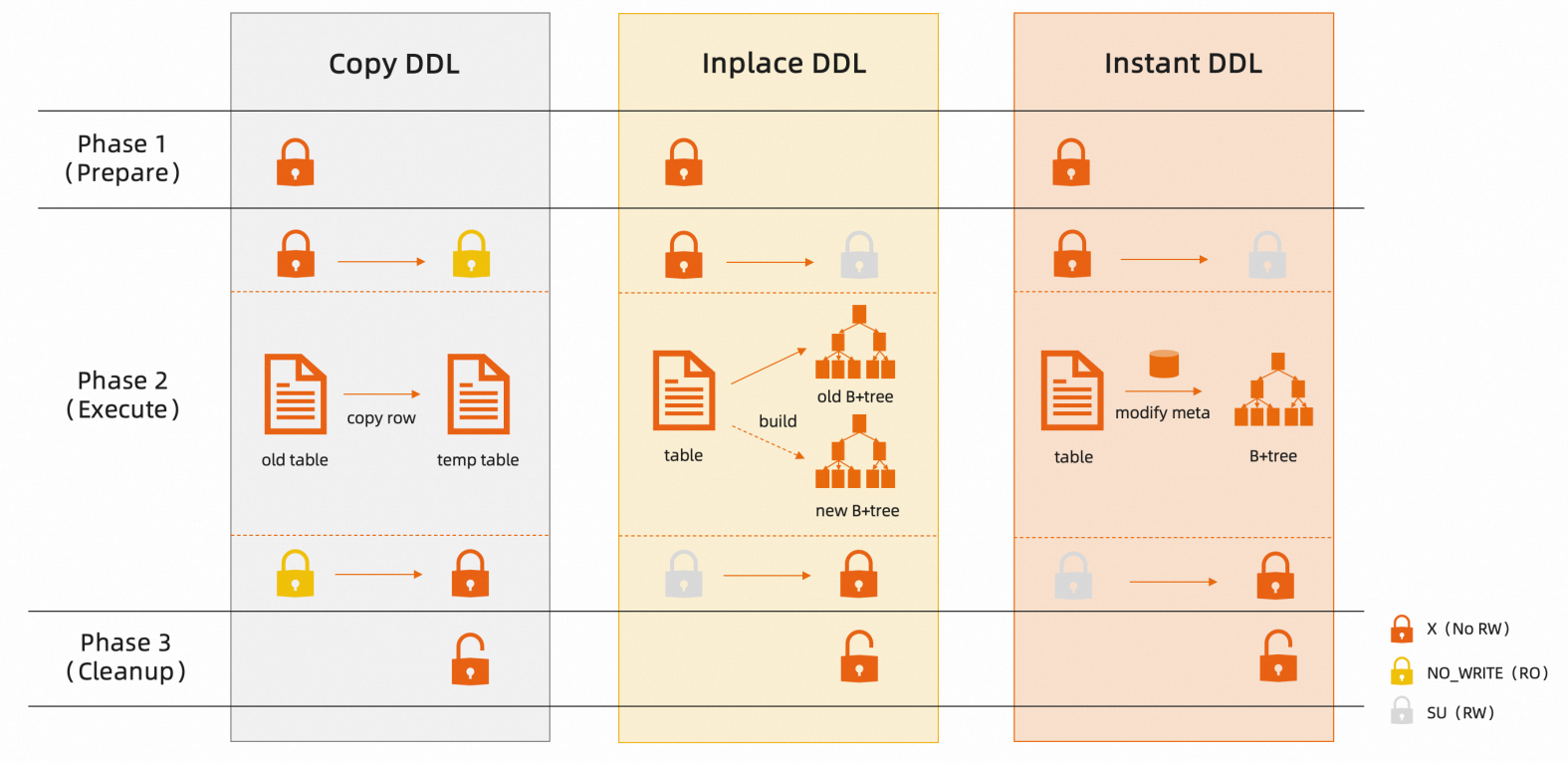
All three algorithms acquire an MDL X lock during the initialization and commit phases of DDL execution (phases 1 and 3 in the diagram above), which briefly blocks all reads and writes. AliSQL optimizes this metadata lock wait behavior. For more information, see AliSQL DDL optimization features.
MySQL common DDL operations
When you run a DDL statement, MySQL selects the best algorithm based on the operation type. You can also specify an algorithm explicitly. The following tables summarize the behavior of common DDL operations on tables that use the default InnoDB engine.
Table operations
|
Operation |
Command |
Default algorithm |
DML concurrency during execution |
Impact |
|
Rename table |
RENAME |
Configurable. Default:
|
Reads and writes allowed |
Metadata-only change. No impact. |
|
Rebuild table |
OPTIMIZE / ALTER ENGINE |
Not configurable. Default for 5.6, 5.7, 8.0, and 8.4: INPLACE. |
Reads and writes allowed Note
During AliSQL 8.0 and 8.4 data archiving, the table is read-only. Writes are blocked. |
|
|
Update statistics |
ANALYZE |
Not configurable. |
Reads and writes allowed |
Updates optimizer statistics only. May block queries in specific scenarios. For more information, see the ANALYZE TABLE blocking scenarios section in the Special cases tab. |
|
Change character set |
CONVERT CHARSET |
|
Read-only. Writes are blocked. |
|
|
Modify table comment |
ALTER COMMENT |
Not configurable. Default for 5.6, 5.7, 8.0, and 8.4: INPLACE. |
Reads and writes allowed |
Metadata-only change. No impact. |
Column operations
|
Operation |
Command |
Default algorithm |
DML concurrency during execution |
Impact |
|
Rename column |
RENAME |
Configurable. Default:
|
Reads and writes allowed |
Metadata-only change. No impact. |
|
Add column |
ADD |
Configurable. Default:
|
Reads and writes allowed |
|
|
Drop column |
DROP |
Configurable. Default:
|
Reads and writes allowed |
|
|
Change column type |
CHANGE / MODIFY |
Configurable. Default for 5.6, 5.7, 8.0, and 8.4: COPY. VARCHAR length changes may use INPLACE. For more information, see Using the INPLACE algorithm when modifying VARCHAR field length. |
Read-only. Writes are blocked. |
|
|
Change column character set |
ALTER CHARSET |
|
Read-only. Writes are blocked. |
|
|
Modify column comment |
ALTER COMMENT |
Configurable. Default:
|
Reads and writes allowed |
Metadata-only change. No impact. |
Index operations
|
Operation |
Command |
Default algorithm |
DML concurrency during execution |
Impact |
|
Rename index |
RENAME |
Configurable. Default:
|
Reads and writes allowed |
Metadata-only change. No impact. |
|
Create index |
ADD / CREATE |
Configurable. Default for 5.6, 5.7, 8.0, and 8.4: INPLACE. |
Reads and writes allowed |
|
|
Drop index |
DROP |
Configurable. Default for 5.6, 5.7, 8.0, and 8.4: INPLACE. |
Reads and writes allowed |
Metadata-only change. No impact. |
Special cases
Using the INPLACE algorithm when modifying VARCHAR field length
VARCHAR fields have a length threshold that determines which algorithm MySQL can use. When you use the INPLACE algorithm to change the length of a VARCHAR field, both the old and new lengths must fall on the same side of the threshold. If the change crosses the threshold, you must use the COPY algorithm. The threshold varies by character set (measured in characters):
|
Character set |
Critical value (number of characters) |
Length change range |
Available algorithms |
|
utf8 / utf8mb3 |
85 |
Length before and after modification both in |
INPLACE, COPY |
|
Length before and after modification both in |
|||
|
Cross-critical value change |
COPY |
||
|
utf8mb4 |
63 |
Length before and after modification both in |
INPLACE, COPY |
|
Length before and after modification both in |
|||
|
Cross-critical value change |
COPY |
||
|
latin1 |
255 |
Length before and after modification both in |
INPLACE, COPY |
|
Length before and after modification both in |
|||
|
Cross-critical value change |
COPY |
Using the INPLACE algorithm when modifying character sets (CONVERT CHARSET)
Character set changes affect all columns that carry character set information: CHAR, VARCHAR, TEXT, ENUM, and SET. To use the INPLACE algorithm for a character set change, all of the following conditions must be met:
-
MySQL version 8.0 or later.
-
If the table contains CHAR or VARCHAR columns, those columns must not be part of an index, and the column length must be at or below the smaller threshold or above the larger threshold of the old and new character sets.
Taking the change from utf8 / utf8mb3 character set to utf8mb4 character set as an example:
-
The critical value for
utf8 / utf8mb3character set is 85. -
The critical value for
utf8mb4character set is 63.
When the table contains CHAR or VARCHAR type fields that are not index columns, the corresponding field length needs to be in the range of (0,63] or (85,65535] to use the INPLACE algorithm for character set modification.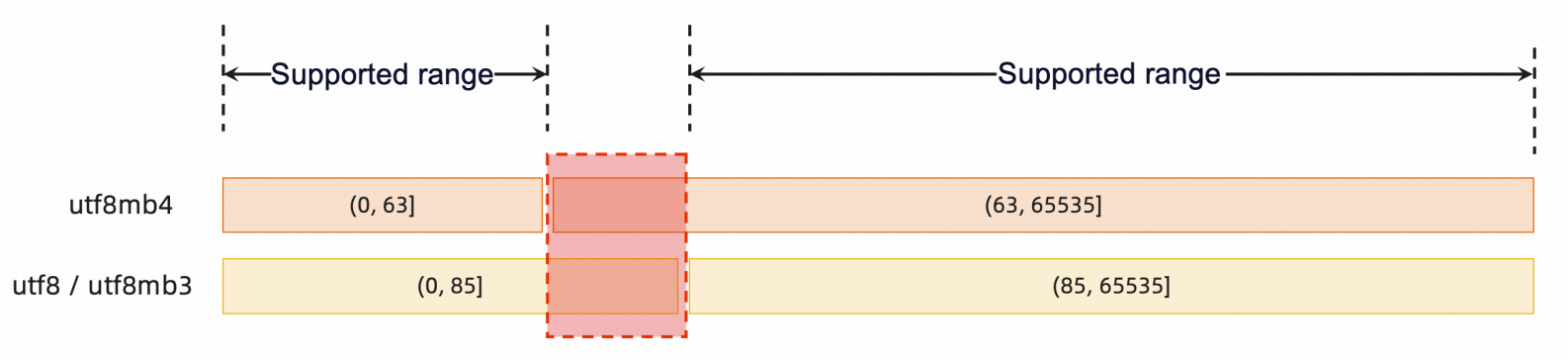
ANALYZE TABLE blocking scenarios
-
Issue: If a table has unfinished slow SQL statements, all subsequent table access after ANALYZE waits for those slow SQL statements to finish before the table cache can refresh.
-
Solution: This issue is fixed in MySQL 8.0 and 8.4.
DDL execution time estimation
Method 1: Use Performance Schema (real-time monitoring)
Starting with MySQL 5.7, Performance Schema tracks DDL progress through stage events. You can monitor a running DDL operation and estimate the remaining time by querying the processlist and the events_stages_current table.
-
When to use: Real-time progress tracking for a DDL operation that is already running.
-
Query statement:
SELECT * FROM information_schema.processlist WHERE ID = <Replace with actual ID>; SELECT THREAD_ID, EVENT_ID, EVENT_NAME, WORK_COMPLETED, WORK_ESTIMATED,(WORK_COMPLETED/WORK_ESTIMATED)*100 AS PROGRESS FROM performance_schema.events_stages_current WHERE THREAD_ID = <Replace with actual ID>;NoteRun
SHOW PROCESSLISTto find the process ID that corresponds to your DDL statement. -
Example: For a local 10 GB Sysbench table, the query returns
TIME=116andPROGRESS=83.9961%, as shown below:mysql> SELECT * FROM information_schema.processlist WHERE ID = 18; +----+------+-----------+----------+---------+------+----------------+------------------------+ | ID | USER | HOST | DB | COMMAND | TIME | STATE | INFO | +----+------+-----------+----------+---------+------+----------------+------------------------+ | 18 | root | localhost | ddl_test | Query | 116 | altering table | optimize table sbtest1 | +----+------+-----------+----------+---------+------+----------------+------------------------+ 1 row in set (0.00 sec) mysql> SELECT THREAD_ID, EVENT_ID, EVENT_NAME, WORK_COMPLETED, WORK_ESTIMATED,(WORK_COMPLETED/WORK_ESTIMATED)*100 AS PROGRESS FROM performance_schema.events_stages_current WHERE THREAD_ID = 32; +-----------+----------+------------------------------------------------------+----------------+----------------+----------+ | THREAD_ID | EVENT_ID | EVENT_NAME | WORK_COMPLETED | WORK_ESTIMATED | PROGRESS | +-----------+----------+------------------------------------------------------+----------------+----------------+----------+ | 32 | 127 | stage/innodb/alter table (read PK and internal sort) | 2273884 | 2707129 | 83.9961 | +-----------+----------+------------------------------------------------------+----------------+----------------+----------+ 1 row in set (0.00 sec)-
Estimated total time = elapsed time / (progress / 100)= 116 / 0.8399 = 138.1 seconds -
Actual execution time: 123.14 seconds (2 min 3.14 s)
-
Running optimize table sbtest1; took 2 minutes 3.14 seconds, or about 123 seconds, which closely matches the 138.1 seconds estimated from Performance Schema.
mysql>
mysql> optimize table sbtest1;
+------------------+----------+----------+-------------------------------------------------------------------+
| Table            | Op       | Msg_type | Msg_text                                                          |
+------------------+----------+----------+-------------------------------------------------------------------+
| ddl_test.sbtest1 | optimize | note     | Table does not support optimize, doing recreate + analyze instead |
| ddl_test.sbtest1 | optimize | status   | OK                                                                |
+------------------+----------+----------+-------------------------------------------------------------------+
2 rows in set (2 min 3.14 sec)
Method 2: Estimate from tablespace size (before execution)
-
When to use: You want to estimate DDL duration before starting the operation. Use this method when Performance Schema is disabled, which is the default for RDS MySQL to reduce memory overhead and performance impact.
-
Steps:
-
Query table size:
SELECT * FROM information_schema.tables WHERE TABLE_SCHEMA = <Replace with actual database name> AND TABLE_NAME = <Replace with actual table name>; -
Estimate the DDL time based on your storage type:
-
Cloud disk instances (Premium ESSD and ESSD): 30–60 MB/s
-
Instance with Premium Local SSD: 50–100 MB/s
NoteThese throughput values are estimates based on typical instance I/O capabilities. Actual speeds may vary.
-
-
(Optional) If the table has many secondary indexes, add additional time for index sorting and building. Index building is approximately 3× slower than raw data copy speed.
-
-
Example: For a local 10 GB Sysbench table, the query returns the following result:
mysql> SELECT * from information_schema.tables WHERE TABLE_SCHEMA = 'ddl_test' AND TABLE_NAME = 'sbtest1'\G *************************** 1. row *************************** TABLE_CATALOG: def TABLE_SCHEMA: ddl_test TABLE_NAME: sbtest1 TABLE_TYPE: BASE TABLE ENGINE: InnoDB VERSION: 10 ROW_FORMAT: Dynamic TABLE_ROWS: 39452112 AVG_ROW_LENGTH: 260 DATA_LENGTH: 10270785536 MAX_DATA_LENGTH: 0 INDEX_LENGTH: 665829376 DATA_FREE: 3145728 AUTO_INCREMENT: 40000001 CREATE_TIME: 2025-05-09 15:58:33 UPDATE_TIME: NULL CHECK_TIME: NULL TABLE_COLLATION: utf8_general_ci CHECKSUM: NULL CREATE_OPTIONS: TABLE_COMMENT: 1 row in set (0.00 sec)-
Estimated time = (DATA_LENGTH / throughput) + (INDEX_LENGTH / throughput × 3)= 9,570/100 + 635/100 × 3 = 95.7 + 19.1 = 117 seconds -
Actual execution time: 123.14 seconds (2 min 3.14 s)
-
AliSQL DDL best practices
General guidelines
-
Schedule DDL during off-peak hours. DDL is a change operation that can impact running workloads.
-
Prefer INSTANT or metadata-only operations. These operations are safe to run at any time. However, monitor for slow queries and large transactions that could prevent the DDL from acquiring the required MDL X lock.
-
Use caution with COPY operations. The COPY algorithm blocks all writes to the table for the entire duration of the DDL operation.
-
Plan INPLACE operations carefully. Although INPLACE allows concurrent reads and writes, evaluate the expected execution time, disk space requirements, and potential replication lag before running the operation.
AliSQL DDL optimization features
-
Large table deletion optimization
-
Cleans up large data files asynchronously to avoid filesystem jitter when dropping tables.
-
Parameter:
innodb_data_file_purge=ON(enabled by default)
-
-
Buffer Pool management optimization
-
Reduces DDL execution time and minimizes the performance impact on concurrent workloads.
-
Parameter:
loose_innodb_rds_faster_ddl=ON(must be enabled manually)
-
-
-
Adds columns by modifying metadata only, without rebuilding the table. Equivalent to MySQL 8.0 INSTANT DDL.
-
Parameter:
loose_innodb_instant_ddl_enabled=ON(enabled by default in MySQL 8.0; must be enabled manually in 5.7 and earlier)
-
-
Other optimizations
-
Adaptive Hash Index (AHI) cleanup optimization: Prevents performance degradation caused by AHI cleanup when dropping tables or indexes. Parameter:
innodb_rds_drop_ahi_ahead(disabled by default). -
Unique index conflict handling: Resolves DDL failures caused by unique index conflicts during online DDL operations.
-
Non-blocking MDL lock acquisition: Changes the MDL X lock wait behavior from blocking to non-blocking, preventing a single DDL operation from causing a cascading block on all queries to the table.
-
ANALYZE TABLE fix: Resolves the MySQL 5.7 issue where
ANALYZE TABLEblocks subsequent queries on tables with long-running operations. -
Parallel DDL: Fixes DDL performance regressions by enabling parallel execution of certain DDL stages.
-
References
-
Upgrade to the latest version of AliSQL to access all optimization features.