The qtAnalytics native plugin integrates the QuickTracking App Analytics SDK, letting you collect app data such as launch counts, events, and page views.
Get started with qtAnalytics
1. Before you begin, register an account and create an application on the QuickTracking platform to obtain an appkey and a data collection domain.
Refer to the QuickTracking integration guide.
2. Configure the config.xml file. The configuration takes effect after a cloud build:
-
Name: qtAnalytics
-
Parameters:
ios_appkey,ios_channel,android_appkey,android_channel,primaryDomain,standbyDomain -
Configuration example:
<feature name="qtAnalytics">
  <param name="ios_appkey" value="YOUR_IOS_APP_KEY"/>
  <param name="ios_channel" value="YOUR_IOS_CHANNEL"/>
  <param name="android_appkey" value="YOUR_ANDROID_APP_KEY"/>
  <param name="android_channel" value="YOUR_ANDROID_CHANNEL"/>
  <param name="primaryDomain" value="YOUR_primaryDomain"/>
  <param name="standbyDomain" value="YOUR_standbyDomain"/>
</feature>
-
Field descriptions:
-
ios_appkey: The appkey for your iOS app. -
ios_channel: The channel ID for your iOS app. -
android_appkey: The appkey for your Android app. -
android_channel: The channel ID for your Android app. -
primaryDomain: The primary data collection domain. -
standbyDomain: The standby data collection domain.
-
API reference
Initialization
Initialize the SDK to start collecting analytics data.
init
Parameters
|
Parameter |
Type |
Description |
Default |
Notes |
|
|
logEnabled |
boolean |
Disable SDK debug logs before releasing your app. |
false |
Recommended for development and debugging only. |
|
|
callback(ret, err) |
ret |
JSON object |
{ "status": true }, where 'status' (boolean) indicates if the SDK initialized successfully. |
None |
|
|
err |
JSON object |
{ "msg": "Error message" }, where 'msg' (string) is the error message. |
None |
||
Example
var qtAnalytics = api.require('qtAnalytics');
qtAnalytics.init(
    {logEnabled:true},
    function(ret, err) {
        if (ret.status) {
            api.alert({
                msg: JSON.stringify(ret)
            })
        } else {
            api.alert({
                msg: JSON.stringify(err)
            })
        }
    }
);
Availability
iOS, Android
Available in v1.0.0 and later.
Disable data collection
disableSDK
-
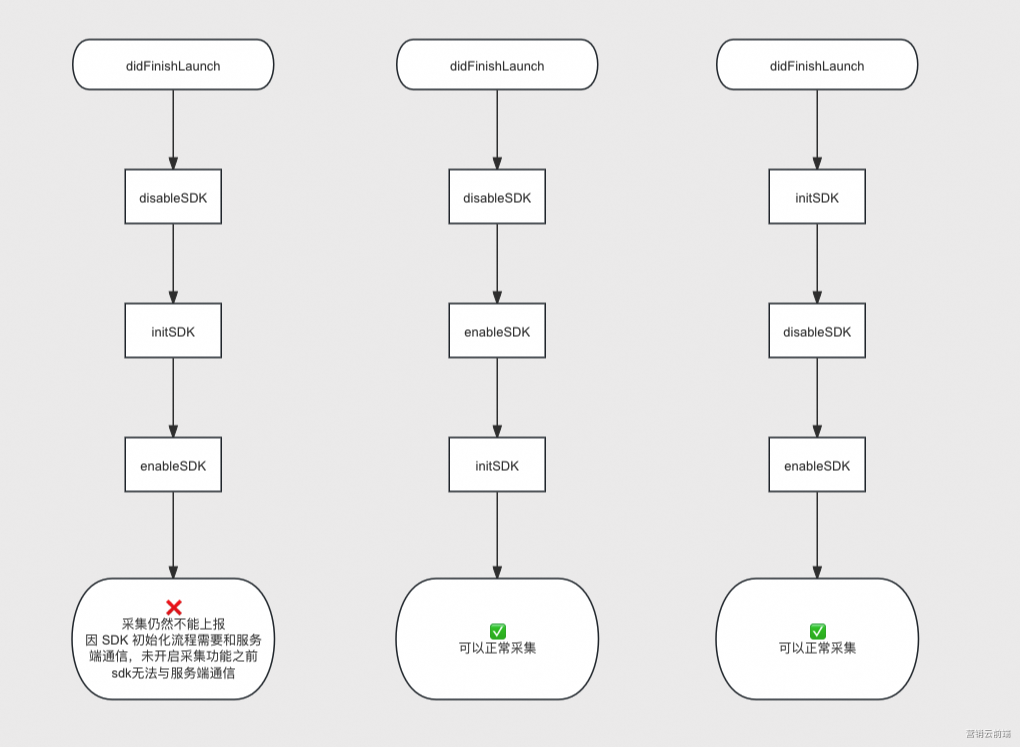
To comply with app privacy policies, the SDK does not cache its enabled or disabled state. If you want data collection to remain disabled across cold starts, you must call the
disableSDKAPI on every cold start. -
On iOS, the SDK can only be initialized once per app lifecycle and requires network communication. Therefore, keep the following in mind when enabling or disabling the SDK:
Example
var qtAnalytics = api.require('qtAnalytics');
qtAnalytics.disableSDK();
Availability
iOS, Android
Available in v1.0.0 and later.
Enable SDK
enableSDK
Example
var qtAnalytics = api.require('qtAnalytics');
qtAnalytics.enableSDK();
Availability
iOS, Android
Available in v1.0.0 and later.
Set storage path
resetStorePath
Important: Check if you are already using the Umeng+ SDK. If so, you must change the SDK's file path to avoid conflicts.
To change the SDK file path:
-
If you are adding the QuickTracking SDK to an app that already uses the Umeng+ SDK, add
[QTConfigure resetStorePath]before any other QuickTracking or Umeng+ code, and before setting the data collection domain. -
If you are adding the Umeng+ SDK to an app that already uses the QuickTracking SDK, add
[UMConfigure resetStorePath]before any other QuickTracking or Umeng+ code, and before setting the data collection domain.
Otherwise, the Umeng+ and QuickTracking SDKs will share the same storage path, resulting in corrupted logs. After initializing one SDK, you must reset the storage path for the other. For example, if you initialize the Umeng+ SDK first, call [QTConfigure resetStorePath]. If you initialize the QuickTracking SDK first, call [UMConfigure resetStorePath].
Important: If you reset the QuickTracking SDK path, the storage keys for user-defined information, such as user account and app version, will change. If your business logic depends on these fields, you must set them again. To avoid data loss, configure the path during the initial integration.
Example
var qtAnalytics = api.require('qtAnalytics');
qtAnalytics.resetStorePath();
Availability
iOS, Android
Available in v1.0.0 and later.
Customize Android device identifiers
setAndroidDeviceInfo
The SDK collects the following device identifiers by default:
|
Device identifier |
Collection method |
Notes |
|
Android ID |
String getAndroidID(Context context) |
Android ID |
|
Serial number |
String getSerial() |
Android device serial number. |
|
IMEI |
String getImei(Context context) |
IMEI |
|
IMSI |
String getImsi(Context context) |
IMSI |
|
WiFiMac |
String getWifiMac(Context context) |
Wi-Fi MAC address |
|
OAID |
String getOaid(Context context) |
Open Anonymous Device Identifier (for Chinese mainland) |
|
GAID |
String getGaid(Context context) |
Google Advertising ID |
|
MCCMNC |
String getMCCMNC(Context context) |
MCC: Mobile Country Code |
You can customize how these identifiers are collected. For example, you can prevent IMEI and serial number collection, or provide your own OAID value.
Note:
-
If you do not provide a custom implementation, the QuickTracking SDK collects these identifiers by default.
-
Call the
setAndroidDeviceInfofunction before you initialize the SDK. -
If you do not need to customize device identifier collection, do not call this function.
Parameters
|
Parameter |
Type |
|
AndroidID |
String |
|
Serial |
String |
|
IMEI |
String |
|
IMSI |
String |
|
WiFiMac |
String |
|
OAID |
String |
|
GAID |
String |
|
MCCMNC |
String |
Example
var qtAnalytics = api.require('qtAnalytics');
// Prevents the collection of IMEI and Serial, and provides a custom OAID.
qtAnalytics.setAndroidDeviceInfo({
    IMEI:null,
    Serial:null,
    OAID:"custom_oaid"
});
qtAnalytics.init(
    {logEnabled:true},
    function(ret, err) {
        if (ret.status) {
            api.alert({
                msg: JSON.stringify(ret)
            })
        } else {
            api.alert({
                msg: JSON.stringify(err)
            })
        }
    }
);
Availability
Android
Available in v1.0.0 and later.
Customize IDFA
customSetIdfa
Sets a custom Identifier for Advertisers (IDFA). To prevent collection, pass an empty string ('').
|
Parameter |
Type |
Description |
|
idfa |
String |
Identifier for Advertisers (IDFA). |
Important: Use this method with caution. When you provide a custom implementation, your app becomes responsible for collecting the identifier. Collecting fewer device identifiers can reduce the accuracy and stability of your analytics data.
Example
var qtAnalytics = api.require('qtAnalytics');
qtAnalytics.customSetIdfa({
    idfa: ''
});
Availability
iOS
Available in v1.0.0 and later.
Customize IDFV
customSetIdfv
Sets a custom Identifier for Vendors (IDFV). To prevent collection, pass an empty string ('').
|
Parameter |
Type |
Description |
|
idfv |
String |
Identifier for Vendors (IDFV). |
Important: Use this method with caution. When you provide a custom implementation, your app becomes responsible for collecting the identifier. Collecting fewer device identifiers can reduce the accuracy and stability of your analytics data.
Example
var qtAnalytics = api.require('qtAnalytics');
qtAnalytics.customSetIdfv({
    idfv: ''
});
Availability
iOS
Available in v1.0.0 and later.
Customize OpenUDID
customSetOpenUdid
Sets a custom OpenUDID. To prevent collection, pass an empty string ('').
|
Parameter |
Type |
Description |
|
openUdid |
String |
The OpenUDID. |
Important: Use this method with caution. When you provide a custom implementation, your app becomes responsible for collecting the identifier. Collecting fewer device identifiers can reduce the accuracy and stability of your analytics data.
Example
var qtAnalytics = api.require('qtAnalytics');
qtAnalytics.customSetOpenUdid({
    openUdid: ''
});
Availability
iOS
Available in v1.0.0 and later.
Customize UTDID
customSetUtdid
Sets a custom UTDID. To prevent collection, pass an empty string ('').
|
Parameter |
Type |
Description |
|
utdid |
String |
The Taobao UTDID. QuickTracking only collects this identifier if you have integrated the Taobao UTDID SDK. |
Important: Use this method with caution. When you provide a custom implementation, your app becomes responsible for collecting the identifier. Collecting fewer device identifiers can reduce the accuracy and stability of your analytics data.
Example
var qtAnalytics = api.require('qtAnalytics');
qtAnalytics.customSetUtdid({
    utdid: ''
});
Availability
iOS
Available in v1.0.0 and later.
Customize MCC
customSetMcc
Sets a custom Mobile Country Code (MCC). To prevent collection, pass an empty string ('').
|
Parameter |
Type |
Description |
|
mcc |
String |
Mobile Country Code (MCC). |
Important: Use this method with caution. When you provide a custom implementation, your app becomes responsible for collecting the identifier. Collecting fewer device identifiers can reduce the accuracy and stability of your analytics data.
Example
var qtAnalytics = api.require('qtAnalytics');
qtAnalytics.customSetMcc({
    mcc: ''
});
Availability
iOS
Available in v1.0.0 and later.
Customize MNC
customSetMnc
Sets a custom Mobile Network Code (MNC). To prevent collection, pass an empty string ('').
|
Parameter |
Type |
Description |
|
mnc |
String |
Mobile Network Code (MNC). |
Important: Use this method with caution. When you provide a custom implementation, your app becomes responsible for collecting the identifier. Collecting fewer device identifiers can reduce the accuracy and stability of your analytics data.
Example
var qtAnalytics = api.require('qtAnalytics');
qtAnalytics.customSetMnc({
    mnc: ''
});
Availability
iOS
Available in v1.0.0 and later.
Set a custom device ID
setCustomDeviceId
|
Parameter |
Type |
Description |
|
deviceId |
String |
The SDK supports setting a custom device ID (UMID). To use a custom UMID, call the |
Note:
This function takes effect only if a UMID has not yet been generated. If a UMID already exists locally, calling this method has no effect. To clear a UMID for testing, uninstall and reinstall the app.
Example
var qtAnalytics = api.require('qtAnalytics');
qtAnalytics.setCustomDeviceId({
    deviceId: 'xxxxxx'
});
Availability
iOS, Android
Available in v1.0.0 and later.
Get device ID
getUMIDString
Example
var qtAnalytics = api.require('qtAnalytics');
var umidStr = qtAnalytics.getUMIDString();
Availability
iOS, Android
Available in v1.0.0 and later.
Sign in
By default, analytics are tracked per device. To track by user account instead, call this method.
onProfileSignIn
|
Parameter |
Type |
Description |
|
userId |
String |
The user account ID. The length must be less than 64 bytes. |
Note: After a user account ID is set, it is saved locally. The ID remains active until the app is uninstalled, app data is cleared, or the onProfileSignOff method is called. Subsequent events are then associated with this account ID.
Example
var qtAnalytics = api.require('qtAnalytics');
qtAnalytics.onProfileSignIn({userId:"custom_userId"});
Availability
iOS, Android
Available in v1.0.0 and later.
Sign out
Call this method when a user signs out. The SDK stops sending account-related information after this call.
onProfileSignOff
Example
var qtAnalytics = api.require('qtAnalytics');
qtAnalytics.onProfileSignOff()
Availability
iOS, Android
Available in v1.0.0 and later.
Set user properties
Call onProfileSignIn to set a userId before reporting user properties. Without a userId, QuickTracking cannot associate user properties with an account. Once set, use the following method to report user properties:
setUserProfile
|
Parameter |
Type |
Description |
|
properties |
JSON object |
Key-value pairs representing the user properties. |
Example
var qtAnalytics = api.require('qtAnalytics');
qtAnalytics.setUserProfile({
    properties:{
        sex:"girl", // Gender
        age:"8"     // Age
    }
});
Availability
iOS, Android
Available in v1.0.0 and later.
Register global properties
Registered global properties are automatically included in all subsequent events. These properties are cached for the current session and cleared when the app exits.
registerGlobalProperties
|
Parameter |
Type |
Description |
|
properties |
JSON object |
Key-value pairs for the global properties. |
Example
var qtAnalytics = api.require('qtAnalytics');
var param = {properties:{a:"1",b:"2"}};
qtAnalytics.registerGlobalProperties(param); // Global properties are now {a: "1", b: "2"}

var param = {properties:{b:"3",c:"4"}};
qtAnalytics.registerGlobalProperties(param); // Global properties are now {a: "1", b: "3", c: "4"}
Availability
iOS, Android
Available in v1.0.0 and later.
Unregister a global property
unregisterGlobalProperty
|
Parameter |
Type |
Description |
|
propertyName |
String |
Must contain only letters, numbers, and underscores. |
Example
var qtAnalytics = api.require('qtAnalytics');
var param = {propertyName:"lnch_Source"};
qtAnalytics.unregisterGlobalProperty(param);
Availability
iOS, Android
Available in v1.0.0 and later.
Get a global property by key
getGlobalProperty
|
Parameter |
Type |
Description |
|
propertyName |
String |
Must contain only letters, numbers, and underscores. |
Example
var qtAnalytics = api.require('qtAnalytics');
var param = {propertyName:"lnch_Source"};
var gp = qtAnalytics.getGlobalProperty(param);
Availability
iOS, Android
Available in v1.0.0 and later.
Get all global properties
getGlobalProperties
-
Description: Returns a JSON-formatted string that contains all global properties. Example:
{"id":"SA1375","userName":"Mike","account_type":"vip", "MemberLevel":"Level1"}
Example
var qtAnalytics = api.require('qtAnalytics');
var allgp = qtAnalytics.getGlobalProperties();
Availability
iOS, Android
Available in v1.0.0 and later.
Clear all global properties
clearGlobalProperties
Example
var qtAnalytics = api.require('qtAnalytics');
qtAnalytics.clearGlobalProperties();
Availability
iOS, Android
Available in v1.0.0 and later.
Start manual page tracking
Track page paths and time spent on each page by calling onPageStart and onPageEnd.
Note:
-
onPageStartmarks the beginning of a page view but does not send an event. The SDK sends the page view event only whenonPageEndis called. -
onPageStartandonPageEndmust be called in pairs, and thepageNamevalue must be identical for both calls. IfonPageEndis not called, or if itspageNamedoes not match that ofonPageStart`, the SDK discards the information recorded byonPageStart.
onPageStart
|
Parameter |
Type |
Description |
|
pageName |
String |
A custom page name. |
Example
var qtAnalytics = api.require('qtAnalytics');
qtAnalytics.onPageStart({pageName:"MainScreen"});
Availability
iOS, Android
Available in v1.0.0 and later.
Manual page capture complete
onPageEnd
|
Parameter |
Type |
Description |
|
pageName |
String |
The name of the custom page. |
Example
var qtAnalytics = api.require('qtAnalytics');
qtAnalytics.onPageEnd({pageName:"MainScreen"});
Availability
iOS, Android
Available in v1.0.0 and later.
Upload page properties
Add custom attributes to the current page.
setPageProperty
|
Parameter |
Type |
Description |
|
pageName |
String |
A custom page name. |
|
properties |
JSON format |
The custom properties of the page. |
Example
var qtAnalytics = api.require('qtAnalytics');
qtAnalytics.onPageStart({pageName:"MainScreen"});
qtAnalytics.setPageProperty({
    pageName:"MainScreen",
    properties:{
        home_param_1:"value11" // Set properties for the current page.
    }
});
Availability
iOS, Android
Available in v1.0.0 and later.
Attach custom attributes to the next page
Note: This must be called before the onPageStart of the next page.
setNextPageProperty
|
Parameter |
Type |
Description |
|
properties |
JSON format |
The business parameters to pass to the next page. |
Example
var qtAnalytics = api.require('qtAnalytics');
qtAnalytics.setNextPageProperty({
    properties: {
                nextPageProperty: "secondPageProperty"
            }
        });
Availability
iOS, Android
Available in v1.0.0 and later.
Event Tracking
Use custom events to track user behavior and record event details.
onEventObject
|
Parameter |
Type |
Description |
|
eventId |
String |
The ID of the event that is being tracked. |
|
pageName |
String |
The code of the page where the event occurred. |
|
properties |
JSON format |
The custom properties of the event. |
Example
var qtAnalytics = api.require('qtAnalytics');
qtAnalytics.onEventObject({
    eventId:"play_music",
    pageName:"MainScreen",
    properties:{
        music_type:"popular", // Custom parameter: music type, value: popular
        singer:"JJ", // Singer: JJ
        song_name:"A_Thousand_Years_Later", // Song name: A Thousand Years Later
        song_price:100 // Price: 100
    }
});
Availability
iOS, Android
Available in v1.0.0 and later.
Process kill protection methods
If you call kill or exit to terminate a process, call onKillProcess first to save statistical data.
onKillProcess
Example
var qtAnalytics = api.require('qtAnalytics');
qtAnalytics.onKillProcess();
Availability
Android
Available in version 1.0.0 and later.
Notes
-
The tracking point verification feature is temporarily unavailable for iOS because the YonBuilder platform does not expose the openURL interface. Use the real-time log verification feature to test. For more information, see Get device ID.
-
YonBuilder does not support the codeless tracking feature.
-
YonBuilder does not support the referral marketing feature.