Integrate the Quick Tracking Analytics SDK Flutter plugin into your app to collect user behavior data and report analytics events.
Flutter plugin integration
Prerequisites
qt_common_sdk: ^2.1.4
|--- Depends on native iOS version 1.7.6
|---Depends on native Android version 1.8.5.PX
Manual integration
-
Download this project's Git repository: flutter-ananlytics-plugin, and delete the hidden
.gitdirectory from the project root. -
Copy the
android,ios, andlibfolders and thepubspec.yamlfile from this project's root directory into your Flutter project.
Add the plugin as a path dependency in your Flutter project's pubspec.yaml file.
# Path dependency

qt_common_sdk:
 path: ../
Remote dependency
Add the following to the dependencies section of your project's pubspec.yaml file.
# Remote dependency
dependencies:
  qt_common_sdk: ^2.1.4
Import the package.
import 'package:qt_common_sdk/qt_common_sdk.dart';Host app configuration
Android host app configuration
In the sample Android host project, see example/android/app/src/main/java/com/aliyun/qt_common_sdk_example/App.java. Add a similar App class that extends io.flutter.app.FlutterApplication to your Flutter project's Android host project. In the onCreate method, call QtConfigure.preInit with the appkey and channel parameters.
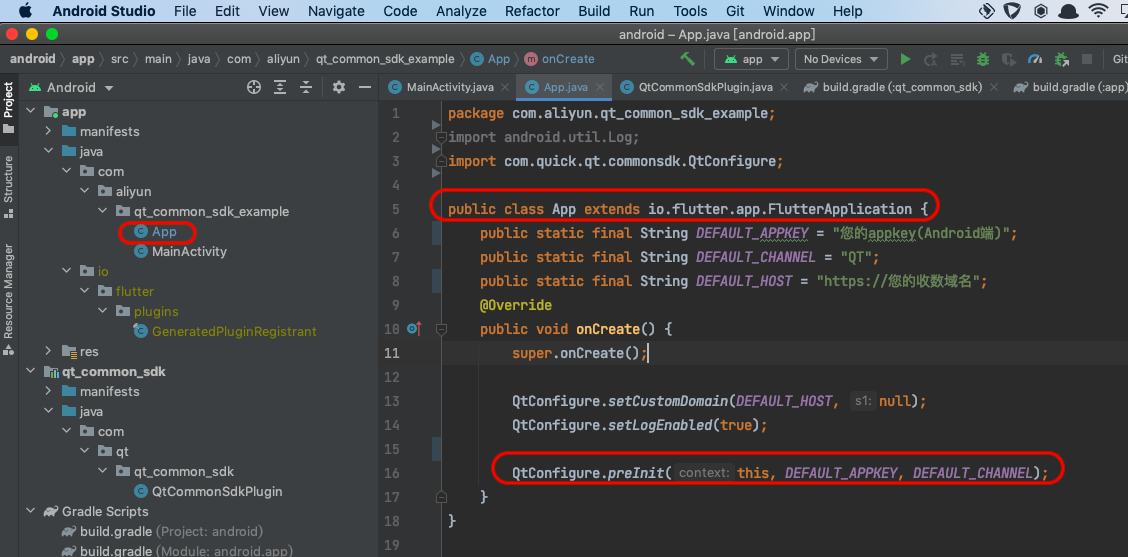
Add the android:name attribute to the application tag in your Android host project's AndroidManifest.xml file. Set its value to the new App class, as shown below:
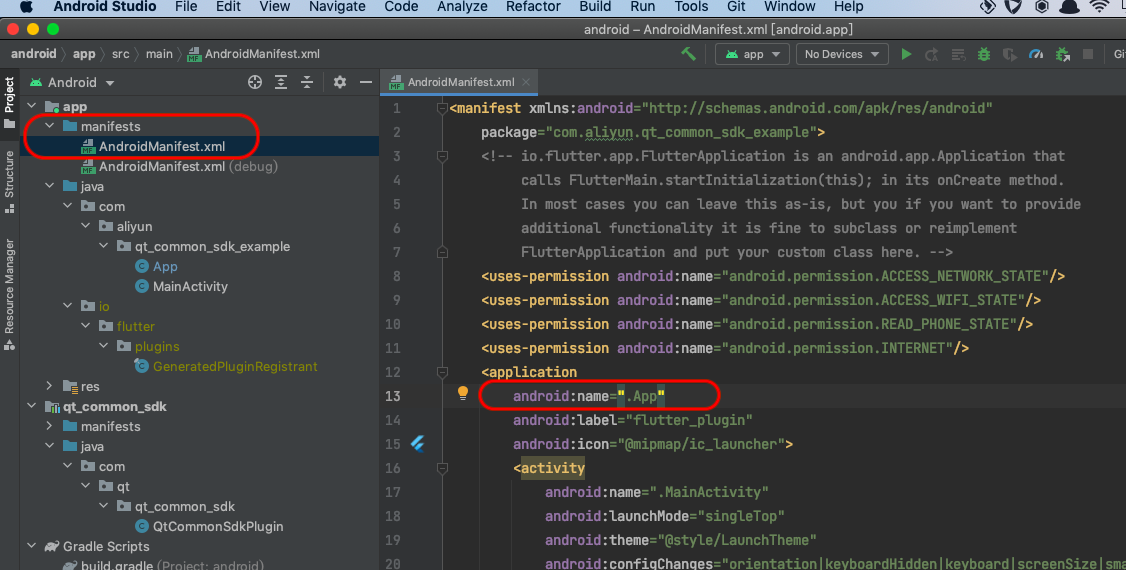
The appkey and channel parameters for pre-initialization must match the androidAppkey (first) and channel (third) parameters passed to QTCommonSdk.initCommon in your Dart code.
To comply with privacy policy requirements, call QTCommonSdk.initCommon only after the user consents to your privacy policy on the first cold start after installation.
On subsequent cold starts after the user has granted consent, call QTCommonSdk.initCommon directly when your app's first page initializes.
Obfuscation configuration
flutter build apk enables R8 by default. If your application uses code obfuscation, add the following rules to prevent the Quick Tracking SDK from being incorrectly obfuscated.
-keep class com.quick.qt.** {*;}
-keep class rpk.quick.qt.** {*;}
-dontwarn com.quick.qt.analytics.middle.DevLog

-keepclassmembers class * {
   public <init> (org.json.JSONObject);
}

-keepclassmembers enum * {
    public static **[] values();
    public static ** valueOf(java.lang.String);
}
The SDK uses reflection to access resource files such as R.java. If ProGuard or a similar obfuscation tool removes R.java, add the following configuration:
-keep public class [your.application.package.name].R$*{
public static final int *;
}
Privacy policy compliance and plugin initialization
1. Compliance statement
You must inform users that you use the SDK service. Add the following clause to your Privacy Policy:
"Our product integrates an SDK that needs to collect your device identifier (such as IDFA, IDFV, OPENUDID, or GUID) to provide an analytics service. It also uses geographic location to calibrate report data accuracy and provide basic anti-fraud capabilities."
2. Compliant initialization
Initializing the SDK enables analytics data collection. To comply with relevant regulations, call QTCommonSdk.initCommon only after the user has read and consented to your privacy policy during the app's first cold start. The SDK collects device information and reports data only after initialization. If the user does not grant consent, do not call the initialization function.
After obtaining user consent, call the initialization function on every subsequent app cold start.
3. Code example
if (!sdkHasInit) {
      sdkHasInit = true;

      // Differentiate between iOS and Android platforms
      if (Platform.isAndroid) {
        // Android-specific code
        QTCommonSdk.setCustomDomain(DOMAIN, DOMAIN);
        QTCommonSdk.setLogEnabled(true);
        QTCommonSdk.initCommon(APP_ANDROID_KEY, APP_IOS_KEY, 'Android App Market');
      } else if (Platform.isIOS) {
        // iOS-specific code
        QTCommonSdk.setCustomDomain(DOMAIN, DOMAIN);
        QTCommonSdk.setLogEnabled(true);
        QTCommonSdk.initCommon(APP_ANDROID_KEY, APP_IOS_KEY, 'App Store');
      }
    }
    ...
Plugin API
In the following API reference, methods marked with "Android only" or "iOS only" apply only to that platform. Unlabeled methods are compatible with both Android and iOS.
///
  /// Sets the primary and fallback domains for reporting analytics logs.
  /// This function must be called before SDK initialization.
  ///
  /// @param primaryDomain The primary domain.
  /// @param standbyDomain The fallback domain. If null or an empty string,
  /// the primary domain is automatically used as the fallback domain.
  ///
  ///
  static void setCustomDomain(String primaryDomain, String standbyDomain)

  ///
  /// Initializes the SDK.
  ///
  /// @param androidAppkey The appkey for your Android app.
  /// @param iosAppkey The appkey for your iOS app.
  /// @param channel The channel identifier, for example, 'App Store' or 'Android App Market'.
  ///
  ///
  static Future<dynamic> initCommon(
      String androidAppkey, String iosAppkey, String channel)

  ///
  /// Sets a custom app version number. Defaults to the version specified in your project's pubspec.yaml file.
  /// This can only be set once. It is recommended to call this before any other SDK methods.
  ///
  /// @param appVersion The custom version number string.
  /// @param appVersionCode The corresponding Android `versionCode`. (Android only)
  ///
  static void setAppVersion(String appVersion, int appVersionCode)

  ///
  /// Controls whether the SDK outputs log messages to the console.
  ///
  /// @param bFlag Default is `false` (no logs). Set to `true` to enable
  /// debug logs. Must be set to `false` in release builds.
  ///
  ///
  static void setLogEnabled(bool bFlag)

  ///
  /// Tracks a custom event.
  ///
  /// @param event The event ID.
  /// @param properties A map of custom parameters.
  ///
  static void onEvent(String event, Map<String, dynamic> properties)

  ///
  /// Dart autotrack click event channel.

  ///
  /// Tracks a custom event associated with a specific page.
  ///
  /// @param event The event ID.
  /// @param pageName The name of the page.
  /// @param properties A map of custom parameters.
  ///
  static void onEventWithPage(
      String event, String pageName, Map<String, dynamic> properties)

  ///
  /// Tracks user profile sign-in.
  ///
  /// @param userID The user's ID.
  ///
  ///
  static void onProfileSignIn(String userID)

  ///
  /// Tracks user profile sign-in with a provider.
  ///
  /// @param userID The user's ID.
  /// @param provider The authentication provider.
  ///
  static void onProfileSignInEx(String userID, String provider)

  ///
  /// Tracks user profile sign-off.
  ///
  ///
  static void onProfileSignOff()

  ///
  /// Starts tracking a page view.
  ///
  /// @param viewName The name of the page.
  ///
  ///
  static void onPageStart(String viewName)

  ///
  /// Ends tracking a page view.
  ///
  /// @param viewName The name of the page.
  ///
  ///
  static void onPageEnd(String viewName)

  ///
  /// Registers global properties that will be included in all events.
  ///
  /// @param properties A map of custom parameters to register.
  ///
  ///
  static void registerGlobalProperties(Map<String, dynamic> properties)

  ///
  /// Unregisters a global property.
  ///
  /// @param propertyName The key of the global property to unregister.
  ///
  ///
  static void unregisterGlobalProperty(String propertyName)

  ///
  /// Gets all registered global properties as a JSON string.
  ///
  ///
  static Future<String>? get getGlobalProperties async

  ///
  /// Gets the value of a single global property.
  ///
  ///
  static Future<dynamic>? getGlobalProperty(String propertyName) async

  ///
  /// Clears all global properties.
  ///
  static void clearGlobalProperties()

  ///
  /// Skips page view tracking for a specific page.
  ///
  /// @param pageName The name of the page to skip.
  ///
  ///
  static void skipMe(String pageName)

  ///
  /// Sets properties for a specific page.
  ///
  /// @param pageName The name of the page.
  /// @param properties A map of custom parameters for the page.
  ///
  static void setPageProperty(
      String pageName, Map<String, dynamic> properties)

  ///
  /// Updates the current SPM (Super Position Model).
  ///
  /// @param curSPM The SPM for the current page event.
  ///
  static void updateCurSpm(String curSPM)

  ///
  /// Updates business parameters for the next page.
  ///
  /// @param properties A key-value map of business parameters to pass to the next page.
  ///
  static void updateNextPageProperties(Map<String, dynamic> properties)

  ///
  /// Sets a custom device ID.
  ///
  /// @param customDeviceId The custom device ID.
  ///
  static void setCustomDeviceId(String customDeviceId)

  ///
  /// Gets the device ID.
  ///
  ///
  static Future<dynamic>? getDeviceId() async

  ///
  ///  iOS only API
  /// Enables or disables hooking of system methods.
  ///
  /// @param value A boolean value.
  ///
  ///
  static void isHook(bool value)
  static void isHookUrl(bool value)
  static void isHookEvent(bool value)
  static void isHookPage(bool value)

  ///
  /// iOS only API
  /// Sets a custom OpenUDID.
  ///
  /// @param customOpenUdid The custom OpenUDID.
  ///
  ///
  static void setCustomOpenUdid(String customOpenUdid)

  ///
  /// iOS only API
  /// Sets a custom IDFA.
  ///
  /// @param customIdfa The custom IDFA.
  ///
  ///
  static void setCustomIdfa(String customIdfa)

  ///
  /// iOS only API
  /// Sets a custom IDFV.
  ///
  /// @param customIdfv The custom IDFV.
  ///
  ///
  static void setCustomIdfv(String customIdfv)

  ///
  /// iOS only API
  /// Sets a custom UTDI.
  ///
  /// @param customUtdid The custom UTDI.
  ///
  ///
  static void setCustomUtdid(String customUtdid)

  ///
  /// iOS only API
  /// Sets a custom MCC (Mobile Country Code).
  ///
  /// @param customMcc The custom MCC.
  ///
  ///
  static void setCustomMcc(String customMcc)

  ///
  /// iOS only API
  /// Sets a custom MNC (Mobile Network Code).
  ///
  /// @param customMnc The custom MNC.
  ///
  ///
  static void setCustomMnc(String customMnc)

  ///
  /// iOS only API
  /// Sets a custom local IP address.
  ///
  /// @param customLocalIP The custom local IP.
  ///
  ///
  static void setCustomLocalIP(String customLocalIP)

  ///
  /// If the application exits by forcefully terminating its own process,
  /// call this method before termination. (Android only)
  ///
  ///
  static void onKillProcess()

  //
  // When the QT JS SDK sends analytics data from the JS layer to the Flutter
  // layer via the flutter_webview_plugin's JavascriptChannel interface,
  // this method must be called. See lines 15-23 in example/lib/main.dart
  // for a detailed example.
  //
  static void onJSCall(String msg)

  static void setViewProperties(String keyName, dynamic value)

  ///
  /// For automatic event tracking.
  ///
  /// @param event The event code.
  /// @param autoTrackProperties Preset parameters for autotrack.
  /// @param customProperties Custom parameters.
  static void onAutoEvent(
      String event,
      Map<String, dynamic> autoTrackProperties,
      Map<String, dynamic>? customProperties)
Bridging QT JS SDK and flutter_webview_plugin
If your Flutter project uses flutter_webview_plugin (version 0.4.0 or later) for hybrid development and the Quick Tracking JS SDK is integrated in your H5 pages, use the onJSCall interface to forward analytics data from the JS SDK to the native Android/iOS SDK for reporting.
See the implementation in example/lib/main.dart, lines 15-23. Register a JS bridge channel named 'Umeng4AplusFlutter' for the flutter_webview_plugin. In the onMessageReceived: (JavascriptMessage message) callback, call QTCommonSdk.onJSCall(message.message);.
The following code example is from example/lib/main.dart.
// Define a JS bridge channel callback object named 'Umeng4AplusFlutter'
final Set<JavascriptChannel> jsChannels = [
   JavascriptChannel(
       name: 'Umeng4AplusFlutter',
       onMessageReceived: (JavascriptMessage message) {
         // print(message.message);
         QTCommonSdk.onJSCall(message.message);
       }),
].toSet();

//..........

// Register the JS bridge object when launching the Flutter WebView plugin
flutterWebViewPlugin.launch(
                   selectedUrl,
                   javascriptChannels: jsChannels,
                   rect: Rect.fromLTWH(
                        0.0, 0.0, MediaQuery.of(context).size.width, 300.0),
                   userAgent: kAndroidUserAgent,
                   invalidUrlRegex:
                        r'^(https).+(twitter)', // prevent redirecting to twitter when user click on its icon in flutter website
								 );
Note: You must call QTCommonSdk.initCommon to initialize the plugin for other features to function correctly. You can find your appkey in the analytics console under Management -> App Management -> App List, or by selecting your app in My Products and navigating to Settings -> App Information.