Quick Tracking SDK for Windows (C++) API reference covering device ID, account ID, user attributes, global attributes, page events, custom events, and application lifecycle tracking.
1. View a tracking plan
Before implementing event tracking, define what to track and where. Quick Tracking uses tracking plans with standardized templates to organize these requirements.
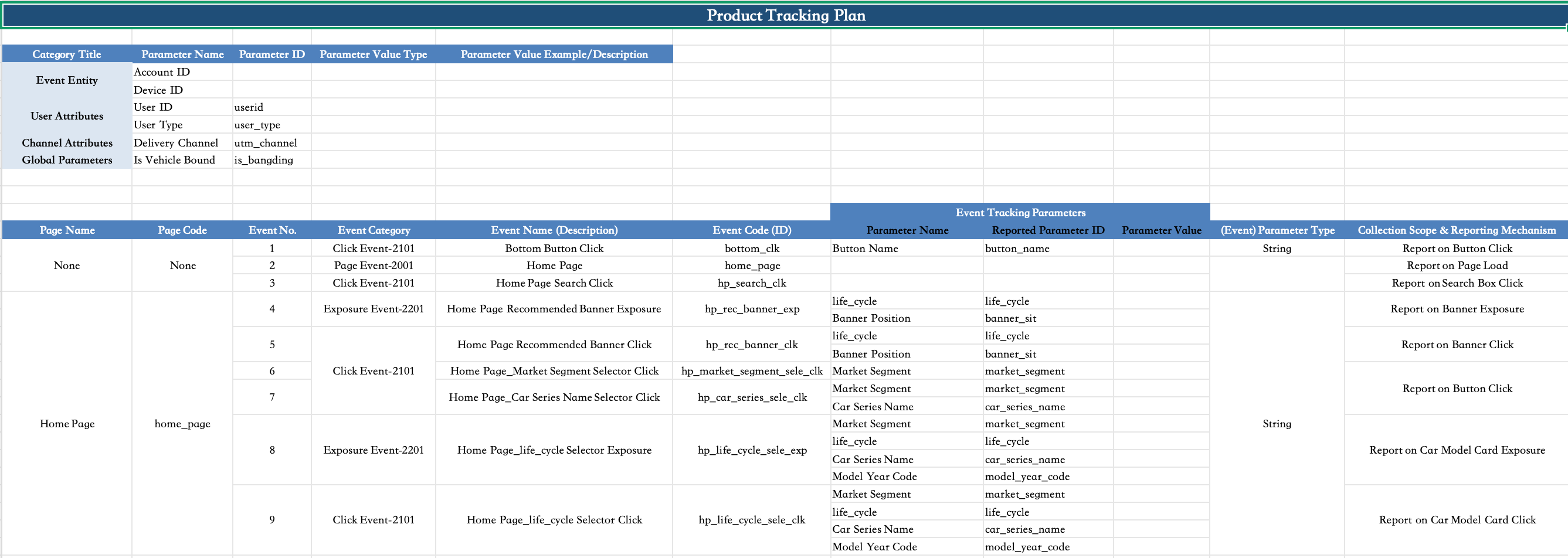
A tracking plan includes:
1. Event subject: Device ID and Account ID.
-
Device ID: On Windows, the default device ID is an application-level unique identifier. It is auto-generated by the Quick Tracking SDK, or you can set a custom one via setCustomDeviceId.
-
Account ID: the user's login account. The device ID changes across devices, but the account ID stays the same. For example, a user logging in from both a computer and a tablet shares one account ID.
2. User attributes: properties of an account. For example, for account "testdemo@111", "birthday" is "1999-02-13" and "membership level" is "platinum". Here, "birthday" and "membership level" are user attributes.
3. Global attributes: attributes attached to every event once set
4. Page view events: events reported on page load. In the tracking plan, events where the page code matches the event code are highlighted in blue.
5. Click, exposure, and custom events: events reported on user interaction.
2. Usage notes
-
Input parameters must not contain special characters such as single quotation marks or unsupported data types. Invalid parameters may cause event ingestion failures and data loss.
-
To use Chinese characters in parameters, ensure the source file uses UTF-8 (unsigned) encoding.
-
Except for the log switch, all operations require initQTPC to be called first.
-
On Windows 10.x, GetVersionEx may return inaccurate OS version info. To fix this, add a manifest file to your project folder and reference it in Project Properties > Manifest Tool > Input and Output > Additional Manifest Files. Sample manifest:
<?xml version="1.0" encoding="UTF-8" standalone="yes"?> <assembly xmlns="urn:schemas-microsoft-com:asm.v1" manifestVersion="1.0" xmlns:asmv3="urn:schemas-microsoft-com:asm.v3"> <asmv3:application> <asmv3:windowsSettings xmlns="http://schemas.microsoft.com/SMI/2005/WindowsSettings"> <dpiAware>false</dpiAware> </asmv3:windowsSettings> </asmv3:application> <compatibility xmlns="urn:schemas-microsoft-com:compatibility.v1"> <application> <!-- Windows 10 and Windows 11 --> <supportedOS Id="{8e0f7a12-bfb3-4fe8-b9a5-48fd50a15a9a}"/> <!-- Windows 8.1 --> <supportedOS Id="{1f676c76-80e1-4239-95bb-83d0f6d0da78}"/> <!-- Windows 8 --> <supportedOS Id="{4a2f28e3-53b9-4441-ba9c-d69d4a4a6e38}"/> <!-- Windows 7 --> <supportedOS Id="{35138b9a-5d96-4fbd-8e2d-a2440225f93a}"/> <!-- Windows Vista --> <supportedOS Id="{e2011457-1546-43c5-a5fe-008deee3d3f0}"/> </application> </compatibility> <trustInfo xmlns="urn:schemas-microsoft-com:asm.v3"> <security> <requestedPrivileges> <!-- UAC settings: - app should run at same integrity level as calling process - app does not need to manipulate windows belonging to higher-integrity-level processes --> <requestedExecutionLevel level="asInvoker" uiAccess="false" /> </requestedPrivileges> </security> </trustInfo> </assembly> -
Input parameter size limits:
// If the keys and values of custom and global attributes exceed the upper limit, the settings cannot be completed.
const size_t kStringPropertyValueMaxLength=4096; // The upper limit of the custom property and global property value.
const size_t kStringPropertyKeyMaxLength=1024; // The maximum value of the custom property and global property key.
const size_t kStringArrayValueMaxSize=100; // The upper limit of the length of the custom attribute string array. If the upper limit is exceeded, the string array is truncated.
const size_t kStringMapValueMaxSize=50; // The upper limit of the global attribute set. If the upper limit is exceeded, no more data can be inserted.
const size_t kStringEventCodeMaxLength=500; // event code maximum length
3. Device ID, account ID, and user attributes
3.1 Device ID
The SDK supports custom device IDs. To use one, call setCustomDeviceId with a valid value.
Interface functions:
// Specify the custom device ID.
QTFORPC_API QT_VOID setCustomDeviceId(QT_CSTR deviceId);
Parameters:
|
Field |
Type |
Description |
Required |
|
deviceId |
const char * |
The ID of the custom device. The value must be a non-empty string. |
Yes |
string customDeviceId = "testId";
qtInterface->setCustomDeviceId(customDeviceId.c_str());
3.2 Account ID
3.2.1 User Login
By default, the Quick Tracking SDK identifies users by device. To track by user account instead, use the following methods.
Interface functions:
// Log on to the application.
QTFORPC_API QT_VOID onProfileSignIn(QT_CSTR userID, QT_CSTR nick);
Parameters:
|
Field |
Type |
Description |
Required |
|
userID |
const char * |
User account ID. Must not be an empty string. |
Yes |
|
nick |
const char * |
The nickname of the user. |
No. If provided, must not be empty. |
qtInterface->onProfileSignIn("userId", "userNick");3.2.2 User Logout
To unbind a user account, call the SDK logout method. After logout, the SDK stops sending account-related data.
Interface functions:
// Log out.
QTFORPC_API QT_VOID onProfileSignOff();qtInterface->onProfileSignOff();3.3 Upload user attributes
Upload user attributes as a custom event with the event code $$_user_profile. The event attributes are stored in the user table as user attributes.
Note: Call uploadUserProfile after onPageStart and before onPageEnd to ensure data accuracy.
Interface functions:
// Upload user properties.
QTFORPC_API QT_VOID uploadUserProfile(QT_VSTR pageObj, QT_MAP customProperties);
Parameters:
|
Field |
Type |
Description |
Required |
|
pageObj |
void * |
WNDCLASS container object. |
Yes |
|
customProperties |
const char * |
The business parameter as a JSON literal string. |
Yes |
WNDCLASS *wndClass = new WNDCLASS();
qtInterface->onPageStart(wndClass, "PageName");
std::string cusp = R"({
    "age": 18,
    "level": "King",
    "name": "coolboy",
})";
qtInterface->uploadUserProfile(wndClass, cusp.c_str());
qtInterface->onPageEnd(wndClass);
4. Global attributes
4.1 Register Global Attributes
Interface functions:
// Set global properties.
QTFORPC_API QT_VOID registerGlobalProperty(QT_CSTR key, QT_CSTR value);
Parameters:
|
Field |
Type |
Description |
Required |
|
key |
const char * |
Set the global property key |
Yes |
|
value |
const char * |
Set the global property value |
Yes |
qtInterface->registerGlobalProperty("key", "value");Note: If the key already exists, the value is updated. If the key does not exist, a new global attribute is added.
4.2 Delete a global attribute
API functions:
// Delete global attributes based on the key.
QTFORPC_API QT_VOID unregisterGlobalProperty(QT_CSTR key);
Parameters:
|
Field |
Type |
Description |
Required |
|
key |
const char * |
Global attribute key to delete |
Yes |
qtInterface->unregisterGlobalProperty("key");4.3 Get a global attribute by key
API functions:
// Obtain global properties based on the key.
QTFORPC_API QT_VOID getGlobalProperty(QT_CSTR key, QT_STR value, QT_INT size);
Parameters:
|
Field |
Type |
Description |
Required |
|
key |
const char * |
The key of the global property to get |
Yes |
|
value |
char * |
The global property value to get |
Yes |
|
size |
int |
Global attribute value length |
Yes |
// The size is set as required.
char value[64] = { 0 };
qtInterface->getGlobalProperty("key", value, 64);
string myValue = value;
4.4 Get all global attributes
API functions:
// Obtain all global attributes.
QTFORPC_API QT_VOID getGlobalProperties(QT_STR properties, QT_INT size);
Parameters:
|
Field |
Type |
Description |
Required |
|
properties |
char * |
Buffer to store all global attributes as a serialized string. |
Yes |
|
size |
int |
Global attribute value length |
Yes |
// The size is set as required.
char properties[128] = { 0 };
qtInterface->getGlobalProperties(properties);
std::map<string, string> myProperties = QT::Helper::QT_DeserializePerson(properties, 128);Note: Convert the returned string to std::map using QT::Helper::QT_DeserializePerson.
5. Page browsing events
5.1 Manual page tracking
Note
onPageStart records page entry information but does not report events. PageView events are reported only when onPageEnd is called.
onPageStart and onPageEnd must be called in pairs with the same pageObj value. Mismatched or missing onPageEnd calls invalidate the recorded page entry data.
Interface functions:
// The page starts to be displayed.
QTFORPC_API QT_VOID onPageStart(QT_VSTR pageObj, QT_CSTR pageName);
// The page starts to disappear.
QTFORPC_API QT_VOID onPageEnd(QT_VSTR pageObj);
Parameters:
|
Field |
Type |
Description |
Required |
|
pageObj |
void * |
WNDCLASS container object. Pass the same pageObj to onPageEnd as to onPageStart. |
Yes |
|
pageName |
const char * |
Event code of page events |
Yes |
WNDCLASS *wndClass = new WNDCLASS();
qtInterface->onPageStart(wndClass, "PageName");
qtInterface->onPageEnd(wndClass);
5.2 Set page event properties
API functions:
// Set the page event parameters.
QTFORPC_API QT_VOID updatePageProperties(QT_VSTR pageObj, QT_MAP pageProperties);
Parameters:
|
Field |
Type |
Description |
Required |
|
pageObj |
void * |
WNDCLASS container object. Pass the same pageObj as onPageStart. |
Yes |
|
pageProperties |
const char * |
Page event attributes as a JSON literal string. |
Yes |
WNDCLASS *wndClass = new WNDCLASS();
qtInterface->onPageStart(wndClass, "PageName");
std::string cusp = R"({
    "param_str": "hello c++",
    "param_num": 1900,
    "param_bool": true,
    "param_list": ["hello", "world", "c++"]
})";
qtInterface->updatePageProperties(wndClass, cusp.c_str());
qtInterface->onPageEnd(wndClass);
5.3 Container Skip
Skips the previous page (container page) as the referrer for the current child page.
API functions:
// Skip a container for multi-container nesting.
QTFORPC_API QT_VOID skipPage(QT_VSTR pageObj);|
Field |
Type |
Description |
Required |
|
pageObj |
void * |
WNDCLASS container object. Pass the same pageObj as onPageStart. |
Yes |
WNDCLASS *wndClass = new WNDCLASS();
qtInterface->onPageStart(wndClass, "firstPage");
std::string cusp = R"({
    "param_str": "hello c++",
    "param_num": 1900,
    "param_bool": true,
    "param_list": ["hello", "world", "c++"]
})";
qtInterface->updatePageProperties(wndClass, cusp.c_str());
qtInterface->onPageEnd(wndClass);

WNDCLASS *wndClass1 = new WNDCLASS();
qtInterface->onPageStart(wndClass1, "secondPage");
qtInterface->onPageEnd(wndClass1);

WNDCLASS *wndClass2 = new WNDCLASS();
// Skips the previous page of thirdPage, that is, secondPage. In this case, the ref_page_name of thirdPage is firstPage. If skipPage is not called, the ref_page_name is secondPage.
qtInterface->skipPage(wndClass2);
qtInterface->onPageStart(wndClass2, "thirdPage");
qtInterface->onPageEnd(wndClass2);
6. Event tracking
Custom events track user behavior and capture event-specific details.
Note: Call trackEvent or trackEventWithPageName after onPageStart and before onPageEnd to ensure data accuracy.
Interface functions:
// The tracking event.
QTFORPC_API QT_VOID trackEvent(QT_VSTR pageObj, QT_CSTR id, QT_MAP customProperties);
// The tracking event includes the page name.
QTFORPC_API QT_VOID trackEventWithPageName(QT_VSTR pageObj, QT_CSTR id, QT_MAP customProperties, QT_CSTR pageName);
Parameters:
|
Field |
Type |
Description |
Required |
|
pageObj |
void * |
WNDCLASS container object. Pass the same pageObj as onPageStart. |
Yes |
|
id |
const char * |
Event code. Must be a non-empty string and must not start with "$$_". |
Yes |
|
customProperties |
const char * |
The event attribute. You must specify a JSON literal string. |
No |
|
pageName |
const char * |
Page encoding |
No |
WNDCLASS *wndClass = new WNDCLASS();
qtInterface->onPageStart(wndClass, "PageName");
std::string cusp = R"({
    "param_str": "hello c++",
    "param_num": 1900,
    "param_bool": true,
    "param_list": ["hello", "world", "c++"]
})";
qtInterface->trackEventWithPageName(wndClass, "test_event", cusp.c_str(), "PageName");
qtInterface->onPageEnd(wndClass);
7. Manually track application startup and exit events
Note: Call onPageStart and onPageEnd before using enterForeground/enterBackground or their WithPageName variants to ensure data accuracy.
Interface functions:
// Enter the foreground.
QTFORPC_API QT_VOID enterForeground(QT_VSTR pageObj, QT_MAP customProperties);
// Enter the foreground with a PageName.
QTFORPC_API QT_VOID enterForegroundWithPageName(QT_VSTR pageObj, QT_MAP customProperties, QT_CSTR pageName);
// Enter the background.
QTFORPC_API QT_VOID enterBackground(QT_VSTR pageObj, QT_MAP customProperties);
// Enter the background with the PageName.
QTFORPC_API QT_VOID enterBackgroundWithPageName(QT_VSTR pageObj, QT_MAP customProperties, QT_CSTR pageName);
Parameters:
|
Field |
Type |
Description |
Required |
|
pageObj |
void * |
WNDCLASS container object. Pass the same pageObj as onPageStart. |
Yes |
|
customProperties |
const char * |
The business parameter as a JSON literal string. |
No |
|
pageName |
const char * |
Page encoding |
No |
WNDCLASS *wndClassForeground = new WNDCLASS();
qtInterface->onPageStart(wndClassForeground, "StartPageName");
std::string start_cusp = R"({
    "param_str": "hello c++",
    "param_num": 1900,
    "param_bool": true,
    "param_list": ["hello", "world", "c++"]
})";
qtInterface->enterForeground(wndClassForeground, start_cusp.c_str());
qtInterface->onPageEnd(wndClassForeground);

WNDCLASS *wndClassBackground = new WNDCLASS();
qtInterface->onPageStart(wndClassBackground, "EndPageName");
std::string end_cusp = R"({
    "param_str": "hello c++",
    "param_num": 1900,
    "param_bool": true,
    "param_list": ["hello", "world", "c++"]
})";
qtInterface->enterBackground(wndClassBackground, end_cusp.c_str());
qtInterface->onPageEnd(wndClassBackground);
8. Other
8.1 Stop local data persistence
Call finiQTPC to stop persisting data locally. Currently, only the stop method is supported.
API functions:
// deinitialize QT
QTFORPC_API QT_VOID finiQTPC(QT_CB cb);
Parameters:
|
Field |
Type |
Description |
Required |
|
cb |
void |
Lifecycle hooks |
Yes |
void callBackFunc()
{
	fprintf(stderr, "finiQTPC callback\n");
}

qtInterface->finiQTPC(callBackFunc);
8.2 Real-time debug mode
turnOnRealTimeDebug sets the data reporting interval to 30 seconds. Call turnOffRealTimeDebug to restore the default interval.
Note: Disable real-time debug mode before releasing your application.
API functions:
// Enable the real-time debugging mode.
QTFORPC_API QT_VOID turnOnRealTimeDebug(QT_MAP configs);
// Disable real-time debugging.
QTFORPC_API QT_VOID turnOffRealTimeDebug();
Parameters:
|
Field |
Type |
Description |
Required |
|
configs |
const char * |
Configuration map, serialized via QT::Helper::QT_Serializable. |
Yes |
map<string, string> configs;
configs["debug_key"] = "test";
std::string sconfig;
QT::Helper::QT_Serializable(sconfig, configs);
qtInterface->turnOnRealTimeDebug(sconfig.c_str());

qtInterface->turnOnRealTimeDebug();
8.3 Fast upload mode
setFastUploadMode changes the reporting interval to one upload per second (default: one per three seconds).
Note: Disable fast upload mode before releasing your application.
API functions:
// Enable the quick upload mode.
QTFORPC_API QT_VOID setFastUploadMode();
qtInterface->setFastUploadMode();