1. How to view the tracking plan
Before tracking, it is necessary to determine where to track and which to track, that is, it is necessary to sort out the clear tracking requirements. In the QuickTracking platform, the explicit requirements of the tracking are called the tracking plan, and a specification template is designed for the tracking plan.
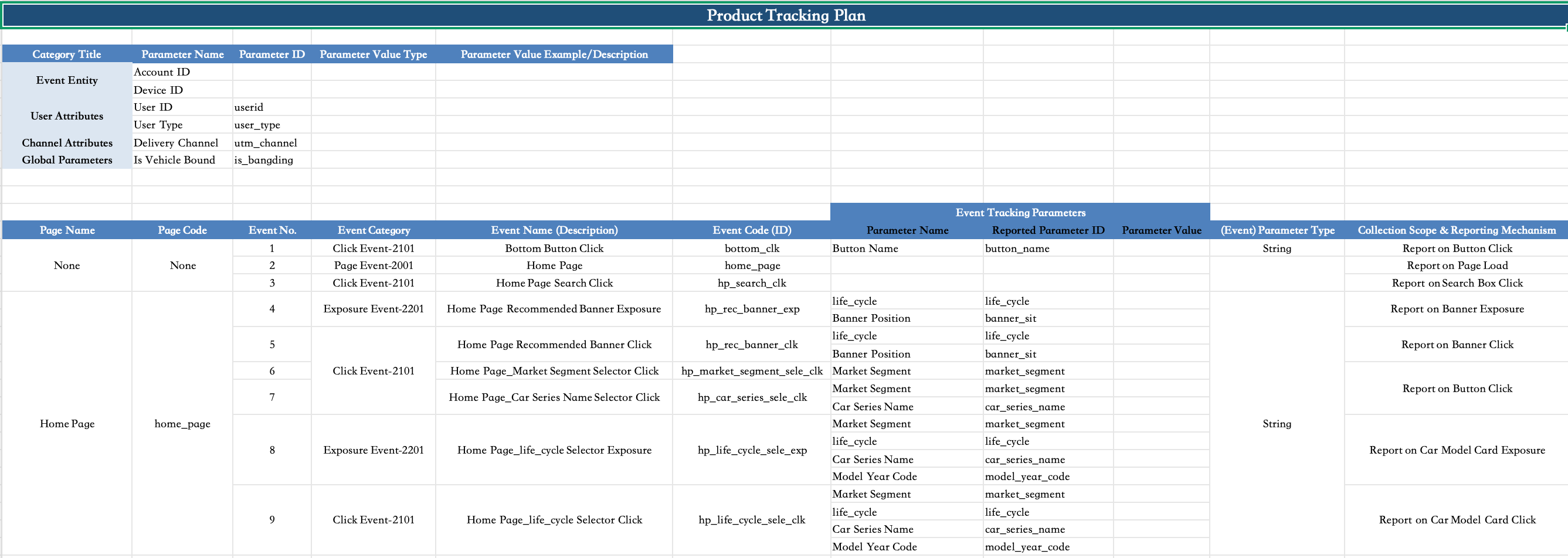
In the burial point scheme, the required tracking contents include:
1. Event subject: Device ID and Account ID.
Device ID: The default device ID of the HarmonyNext application is a unique device ID at the application level, which is automatically generated by Quicktracking:
Account ID: the account ID of the client user after logon. When a user logs on from different devices, the device ID changes, but the account ID does not change. For example, a user uses a mobile phone and a pad to log in separately.
2. User attribute: the attribute of account ID, such as the user whose account ID is "testdemo@111", "birthday" is "1999-02-13", and "membership level" is "platinum". The "birthday" and "membership" ratings are user attributes.
3. Channel attributes: the attributes of the ad delivery, such as the delivery channel, delivery method, and delivery content.
4. Global attributes: the attributes that are carried in each event after the global attribute is set once
5. Page browsing events: the events that are reported when the page is loaded. In the tracking scheme, the events whose page code is the same as the event code are marked in blue.
6. Click, exposure, and custom events: the events that are reported when the client user interacts with the client.
2. Device ID&Account ID&User Property Settings
2.1. Device ID
The device ID of the current version is automatically generated by the QuickTrackingSDK. Custom device IDs are not supported.
2.1.1 Obtain the device ID
@quicktracking/analytics_2.0.3 version support
import { getDeviceId } from '@quicktracking/analytics';

function getDeviceId():string
2.2. Account ID
The Quick Tracking SDK uses devices as the standard to count users. To count your own accounts, use the following method
2.2.1. User Login
2.2.1.1. API description
import { onProfileSignIn } from '@quicktracking/analytics';

function onProfileSignIn(provider: string, puid: string):void
2.2.1.2. Parameter description
Option | Parameter | Description | Required |
provider | string | The nickname of the user. The value must be a non-empty string and cannot exceed 32 characters in length. | Yes |
puid | string | The ID of the user account. The value must be a non-empty string and cannot exceed 64 characters in length. | Yes |
Note: The account ID is stored in the local storage. The account ID becomes invalid only when you uninstall the application, clear the application data, or call the following logout API. Otherwise, each event carries the account ID.
2.2.1.3. Sample code
import { onProfileSignIn } from '@quicktracking/analytics';

Button ('Logon').onClick(() => {
  onProfileSignIn("QuickTrackingUser", "QuickTrackingUser_demo");
})
2.2.2. User logout
If you no longer need to bind a user account, you can call the user logout method provided by the SDK. After the call, the SDK no longer sends user account-related content.
2.2.2.1. API description
import { onProfileSignOff } from '@quicktracking/analytics';

function onProfileSignOff():void
2.2.2.2. Sample code
import { onProfileSignOff } from '@quicktracking/analytics';

Button ('logout').onClick(() => {
  onProfileSignOff();
})
2.3. User attribute upload
Upload a custom event whose event encoding is fixed to $$_user_profile. The event attributes carried by the event are placed in the user table as user attributes.
2.3.1. API description
See Custom Event API
2.3.2. Sample code
import { trackEvent } from '@quicktracking/analytics';

Button ('Upload user properties').onClick(() => {
  trackEvent("$$_user_profile", {
    sex: "boy",
    age: 13,
    favorite: "basketball"
  });
})
3. Channel attributes
There are two scenarios in which channel attribute information needs to be tracked:
H5 Link Pull Live Installed APP Application
H5 Link Pull New APP Applications Not Installed
3.1. H5 Link Pull Live Installed APP APPlications
The URL scheme of the app contains these channel attributes, and the attribute key must start with "utm_" because the keyword recognized by the SDK is "utm_".
For example: utm_channel=gzh <URL scheme>?
attention:! ! !. If the channel attribute has been cooperated with the channel delivery company on the market and cannot start with utm_, you can use the global attribute API to report the channel attribute (the attribute key still needs to start with utm_)
3.1.1. H5-side evocation code example
<html>
  <script>
    function openHarmonyApp() {
      var url = "hmapp://ut.open.realtime:80/Index?utm_a=aaa&utm_b=bbb";
      alert(url)
      window.location.href = url
    };
  </script>
  <body>
    <button onclick="openHarmonyApp()"> Evoke Hongmeng application </button>
  </body>
</html>
3.1.2. Sample application code for Hongmeng Next
If the application can be invoked by an H5 link, you must configure the skills tag of the module. For more information, see HarmonyOS Next Official Website Documentation.
3.1.2.1. Configuration example
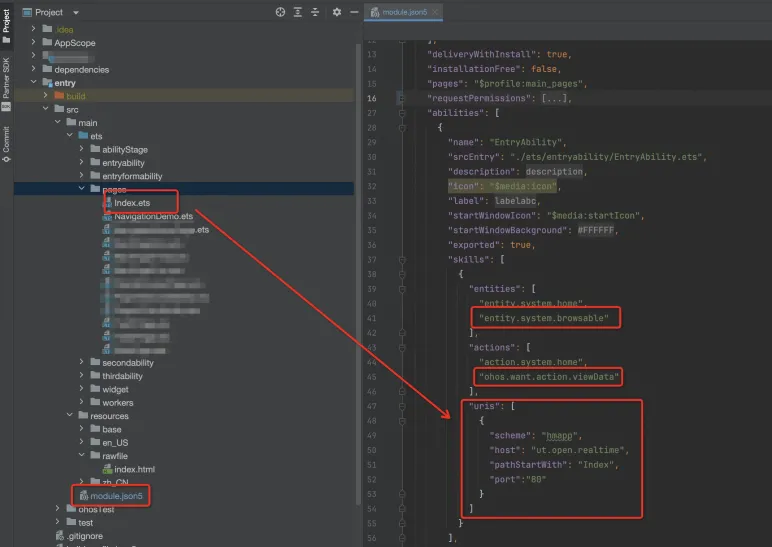
3.1.2.2. Parse utm parameters and set them as global attributes Example
import AbilityConstant from '@ohos.app.ability.AbilityConstant';
import hilog from '@ohos.hilog';
import UIAbility from '@ohos.app.ability.UIAbility';
import Want from '@ohos.app.ability.Want';
import window from '@ohos.window';
import {registerGlobalProperties, trackAppInstall } from '@quicktracking/analytics'


export default class EntryAbility extends UIAbility {
  handleWant(want: Want) {
    if (want.uri && want.uri.indexOf('utm_')) {
      const dUri = decodeURI(want.uri)
      const utmArgs:Record<string, string> = {}
      const paramsString = dUri.split("?")[1]
      const paramsArray = paramsString.split("&")
      for (let i of paramsArray) {
        const kvs = i.split("=")
        const k: string = kvs[0]
        const v = kvs[1]
        utmArgs[k] = v
      }
      registerGlobalProperties(utmArgs)
    }
  }
  // H5 link pulls up APP application, hot start
  onNewWant(want: Want, launchParam: AbilityConstant.LaunchParam): void {
    this.handleWant(want)
  }

  // The H5 link pulls up the APP application and cold starts it.
  onCreate(want: Want, launchParam: AbilityConstant.LaunchParam): void {
    this.handleWant(want)

    //! ! !. Only need to be called when enableAutoTrackApplication = false
    trackAppInstall({
      browser: `'Mozilla/5.0 (Macintosh; Intel Mac OS X 10_15_7) AppleWebKit/537.36 (KHTML, like Gecko) Chrome/126.0.x.x Safari/537.36'`,
      page_name: "ManIndex", // The page code of the evoked page. This parameter is optional. We recommend that you configure this parameter.
      url: "pages/Index" // The path of the page that evokes the page. This parameter is optional. We recommend that you configure this parameter.
    }, {
      man_app_p1: 111, // The custom property. Optional.
      man_app_p2: 222
    })

  }

  onWindowStageCreate(windowStage: window.WindowStage): void {
    windowStage.loadContent('pages/Index', (err, data) => {
      if (err.code) {
        return;
      }
    });
  }
}
3.2. H5 Link Pull New APP Application Not Installed
In this scenario, if only the "utm_" parameter is carried in the H5 link, the "utm_" parameter cannot be carried in the startup event after the app is downloaded. Therefore, it is necessary to perform fuzzy matching between "H5 arousing event" and "application activation event" about "IP address and browser UserAgent".
When a user clicks the "Call /Download App" button in H5, an "app call event ($$_app_link)" is reported. In the event, the appKey and channel attribute of the call app must be included.
// Sample code
aplus_queue.push({
  action:'aplus.recordAppLink',
  arguments:[{
    targetAppKey: 'Application appKey', // Required. The appKey of the application to be evoked.
    custom1: 'custom1', // Optional. The custom parameter.
    ...
 }]
})
After an app is downloaded, the app automatically or manually reports the first startup event $$_ app_install to complete the associated action.
If the default configuration of the SDK is enableAutoTrackApplication = true, the $$_app_install application activation event is automatically reported.
If the SDK default configuration is enableAutoTrackApplication = false, developers must actively report application activation events.
3.2.1. API description
import { trackAppInstall } from '@quicktracking/analytics'

function trackAppInstall(params: {
  browser?: string,
  [key: string]: string
}, customProps?: object)
3.2.2. Call example
See 3.1.2 Hongmeng Next3.1.2. 3.1.2. HarmonyOS Next Application Code Example.
4. Global attributes
4.1. Registering Global Properties
4.1.1. API description
import { registerGlobalProperties } from '@quicktracking/analytics'

function registerGlobalProperties(params?: Record<string, string | number | string[]>)
4.1.2. Parameter description
Value | Description |
params | kv key-value pairs The name of the k attribute, which is of the string type. It should be a non-empty (including undefined) string with a length of 128 characters or less. v attribute value, string type or number type or string array type
|
4.1.3. Code example
import { registerGlobalProperties } from '@quicktracking/analytics'

Button ('Register global properties').onClick(async () => {
  registerGlobalProperties({
    "a": 1,
    "b": 2
  }) // Output result:{a: 1, b: 2}
})
Button ('Re-register global properties').onClick(async () => {
  registerGlobalProperties({
    "b": 6,
    "c": 4
  }) // Output result:{a: 1, b: 6, c: 4}
})
Note: If the key of an existing global attribute is the same as the key of an existing global attribute, the existing value is updated. If the key of an existing global attribute is different from the key of an existing global attribute, a new global attribute is inserted.
4.2. Delete a global property
4.2.1. API description
import { unregisterGlobalProperty } from '@quicktracking/analytics'

function unregisterGlobalProperty(key?: string)
4.2.2. Parameter description
Value | Description |
key | The name of the attribute key to be deleted. The key should have a value and be a string within 128 characters. |
4.2.3. Sample code
import { unregisterGlobalProperty } from '@quicktracking/analytics'

Button ('Delete a global property value').onClick(async () => {
  unregisterGlobalProperty('a')
})
4.3. Get a single global property based on the key.
4.3.1. API description
import { getGlobalProperty } from '@quicktracking/analytics'

function getGlobalProperty(key?: string): string | number | string[] | undefined
4.3.2. Parameter description
Value | Description |
key | The name of the attribute key. The key should have a value and be a string of less than 128 characters. |
4.3.3. Sample code
import { getGlobalProperty } from '@quicktracking/analytics'

Button ('Obtain a single global property based on the key').onClick(async () => {
  promptAction.showToast({
    message: 'Obtain attribute b =${ getGlobalProperty("b")}',
    duration: 3000
  })
})
4.4. Get all global properties.
4.4.1. API description
import { getGlobalProperties } from '@quicktracking/analytics'

function getGlobalProperties(): Record<string, string | number | string[]>
4.4.2. Sample code
import { getGlobalProperties } from '@quicktracking/analytics'

Button ('Get all global properties').onClick(async () => {
  promptAction.showToast({
    message: 'Global attribute is \n${JSON.stringify(getGlobalProperties())}',
    duration: 5000
  })
})
4.5. Clear all global properties
4.5.1. API description
import { clearGlobalProperties } from '@quicktracking/analytics'

function clearGlobalProperties()
4.5.2. Code example
Button ('Clear all global properties').onClick(async () => {
  clearGlobalProperties()
  promptAction.showToast({
    message: 'Global attribute is \n${JSON.stringify(getGlobalProperties())}',
    duration: 5000
  })
})
5. Page browsing events
QuickTracking Hongmeng Next SDK provides two capabilities: automatic page tracking and manual tracking.
5.1. Automatic acquisition
If the default configuration of the SDK is enableAutoTrackPage = true, page browsing events are automatically tracked. For more information, see Pre-initialization API description.
Routing Mode | Automatic Page Browsing Events-Page Encoding | Automatic Page Browsing Event-Page Path |
RouterPage | Name of the routerPage that triggers the lifecycle | Path of the routerPage page that triggers the lifecycle |
NavDestination | Name of the NavDestination component | Name of the NavDestination component |
5.2. Manual Acquisition
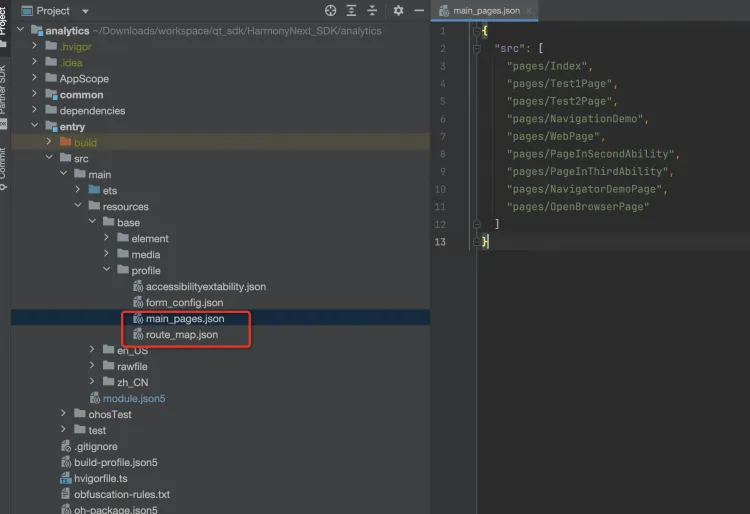
Compared with iOS system or Android system, Hongmeng Next system does not have a strict sense of page components in concept. Any component declared by decorator syntax can be considered as a page component in business sense as long as it is marked in the main_pages.json file or route_map.json file.
The RouterPage page defined in the main_pages.json file
Define the NavDestination page in the route_map.json file
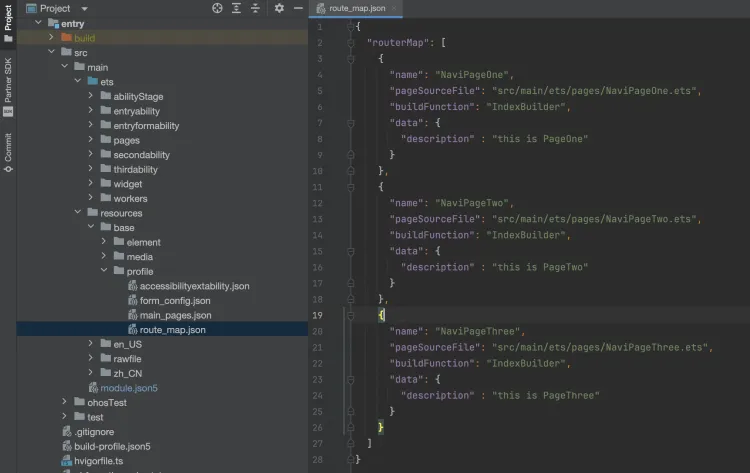
For the preceding two scenarios, the SDK provides a set of API onPageStart and onPageEnd that need to be called in pairs for page tracking.
5.2.1. API description
import { onPageStart, onPageEnd } from '@quicktracking/analytics'

function onPageStart(context: PageContext | null, pageName: string, pageUrl?: string) // Call when the page is entered.
function onPageEnd(context: PageContext | null, pageName: string, pageUrl?: string) // Call
when the page exits.
5.2.2. Parameter description
Value | Description |
context | Page Environment Context Variables |
pageName | The event code of the page event. The value must be a string of up to 128 characters in length and cannot be empty. |
pageUrl | The URL of the page. If the call logic of some pages cannot get the context, developers need to actively pass the value. Otherwise, data analysis will not be prepared. Default value "undefined" |
5.2.3. Code example
RouterPage Page
import { onPageStart, onPageEnd, updatePageProperties, skipAutoTrack } from '@quicktracking/analytics';

@Entry
@Component
struct RouterPageDemo {
  @State message: string = 'RouterPageDemo';

  onPageShow(): void {
    //skipAutoTrack(this)
    onPageStart(this, "RouterPageDemo")
    updatePageProperties(this, "RouterPageDemo", {
      a: 1,
      b: 2
    })
  }

  onPageHide() {
    onPageEnd(this, "RouterPageDemo")
  }

  build() {
    Column() {
      Text(this.message)
        .id('HelloWorld')
        .fontSize(50)
        .fontWeight(FontWeight.Bold)
        .alignRules({
          center: { anchor: '__container__', align: VerticalAlign.Center },
          middle: { anchor: '__container__', align: HorizontalAlign.Center }
        })
    }
    .height('100%')
    .width('100%')
  }
}
NavDestination Page
import { onPageStart, updatePageProperties, onPageEnd, skipAutoTrack } from '@quicktracking/analytics';

@Builder
export function IndexBuilder(name: string, param: Object) {
  NaviPageOne()
}

@Component
export default struct NaviPageOne {

  @State name: string = 'NaviPageOne';

  pathInfos: NavPathStack = new NavPathStack();

  build() {
    NavDestination() {
      Column() {
        Text("")
          .id('NaviPageOneHelloWorld')
          .fontSize(50)
          .fontWeight(FontWeight.Bold)
          .alignRules({
            center: { anchor: '__container__', align: VerticalAlign.Center },
            middle: { anchor: '__container__', align: HorizontalAlign.Center }
          })
      }
      .height('100%')
      .width('100%')
    }
    .onReady((context: NavDestinationContext) => {
      this.pathInfos = context.pathStack
    })
    .title(this.name)
    .id(this.name)
    .onShown(() =>{
      //skipAutoTrack(this)
      onPageStart(this, "NaviPageOne")
      updatePageProperties(this, "NaviPageOne", {
        a: 1,
        b: 2
      })
    })
    .onHidden(() => {
      onPageEnd(this, "NaviPageOne")
    })
  }
}
5.3. Set page event properties.
5.3.1. API description
import { updatePageProperties } from '@quicktracking/analytics';

function updatePageProperties(context: PageContext, pageName: string, params?: Record<string, string | number | string[]>, pageUrl?: string)
5.3.2. Parameter description
Value | Description |
context | Page Environment Context Variables |
pageName | The event code of the page event. The value must be a string of up to 128 characters in length and cannot be empty. |
params | The event properties of page events, which are a tracking of kv key-value pairs. The name of the k attribute, which is of the string type. It should be a non-empty (including undefined) string with a length of 128 characters or less. v attribute value, string type or number type or string array type
|
pageUrl | The URL of the page. If the call logic of some pages cannot get the context, developers need to actively pass the value. Otherwise, data analysis will not be prepared. Default value "undefined" |
5.3.3. Code example
See section 5.2.3 for code examples.
5.4. Automatic page tracking and manual page tracking are mixed.
In some scenarios, user tracking is expected to use automatic page tracking to complete general behavior tracking and to manually control tracking timing for some pages to complete fine-grained tracking. However, if automatic page browsing events and manual page browsing events are repeatedly reported, the accuracy of user behavior data will be caused. Therefore, the SDK can disable automatic page tracking for a single page.
5.4.1. API description
import { skipAutoTrack } from '@quicktracking/analytics';

function skipAutoTrack(context: PageContext)
5.4.2. Parameter description
Value | Description |
context | Page Environment Context Variables |
5.4.3. Code example
See 5.2.2 Code Example
attention:! ! !
To ensure that the statistics of page event codes are normalized, the developer calls onPageStart when the automatically tracked page enters the page and specifies the pageName of the page event code. In this case, the event code of the automatic page event also changes to the pageName that is passed in by onPageStart.
If the developer has enabled the automatic tracking of page events, and page A does not call the skipAutoTrack operation, but calls onPageStart and onPageEnd in pairs through code tracking, two page browsing events are reported when page A leaves.
onPageStart and onPageEnd must be called in pairs. Otherwise, the tracking accuracy of page events is affected.
6. Custom Events
6.1.1. API description
import { trackEvent } from '@quicktracking/analytics';

function trackEvent(eventID: string, params?: Record<string, string | number | string[]>)
6.1.2. Parameter description
Value | Description |
eventID | Event encoding for custom events |
params | event attributes of custom events, a tracking of kv key-value pairs The name of the k attribute, which is of the string type. It should be a non-empty (including undefined) string with a length of 128 characters or less. v attribute value, string type or number type or string array type
attention:! ! !. of which k="$page_name": a preset property of the event. It is used to declare the page code of the page to which the current custom event belongs. This parameter is optional. If this parameter is set to a value, it must be a string of up to 128 characters in length and cannot be empty. k="$page_url": a preset property of the event. It is used to declare the path of the page to which the current custom event belongs. This parameter is optional. If this parameter is set to a value, it must be a string of up to 256 characters in length and cannot be empty. |
6.1.3. Code example
To track in the UI thread
import { trackEvent } from '@quicktracking/analytics';
Button ('Custom event').onClick(() => {
  trackEvent("eventid", {
    param1: "value"
    param2: 2,
    param3: ["productId1", "productId2"],
    $page_name: "pageDemo", // Optional. The property of the event.
    $page_url: "pages/pageDemo", // Optional. The property of the event.
  });
});
To track in a worker thread
import worker, { ThreadWorkerGlobalScope, MessageEvents, ErrorEvent } from '@ohos.worker';
import { trackEvent } from '@quicktracking/analytics';

const workerPort: ThreadWorkerGlobalScope = worker.workerPort;

workerPort.onmessage = function (e: MessageEvents) {
 trackEvent("workerevent", {
    param1: "value"
    param2: 2,
    param3: ["productId1", "productId2"],
    $page_name: "pageDemo", // Optional. The property of the event.
    $page_url: "pages/pageDemo", // Optional. The property of the event.
  })
}

workerPort.onmessageerror = function (e: MessageEvents) {}

workerPort.onerror = function (e: ErrorEvent) {}
There is no method directly called in c++. If c++ layer embedding is required, please refer to the knowledge of interworking between c++ and arkts on Hongmeng Next official website and call trackEvent method to implement embedding through NAPI.
7. Manually track application startup, exit, and activation events
By default, the SDK configuration enableAutoTrackApplication = true is enabled. If the tracking requirements for startup, exit, and activation events cannot be met in some scenarios, you can manually call API operations to track the behaviors in these three scenarios.
attention:! ! !
Manual tracking of startup, exit, and activation events cannot be mixed with automatic tracking of application startup, exit, and activation events. Otherwise, the statistical accuracy of data is affected. That is, the enableAutoTrackApplication = false needs to be set.
7.1. Manually report application activation events
7.1.1. API description
import { trackAppInstall } from '@quicktracking/analytics';

function trackAppInstall(context: ApplicationContext,  appKey: string, params: {
  browser?: string,
  $page_name?: string,
  $page_url?: string,
  [key: string]: string | number | string[]
}) {
  appTrack.manager.manualTrackAppInstall(context, appKey, params)
}
7.1.2. Parameter description
Value | Description |
context | Application environment context variables |
appKey | The unique identifier of the application. The appkey of the input parameter must be the same as that of the QT backend. |
params | The event attributes of the application activation event. A tracking of kv key-value pairs The name of the k attribute, which is of the string type. It should be a non-empty (including undefined) string with a length of 128 characters or less. v attribute value, string type or number type or string array type
attention:! ! !. of which k="browser": Optional. This parameter is a preset attribute of the activation event. It is used to declare the UserAgent information of the browser that invokes the application. Default value: undefined. k="utm_xxx": a preset property of the activation event. k starts with the string 'utm_'and is used to declare the channel parameter information of the current evoked application. the sdk parses such parameters and stores them in global properties. k="$page_name": a preset attribute of an activation event. It is used to declare the page code of the page to which the activation event belongs. This parameter is optional. Default value: undefined. If a value is passed, the value is a string within 128 characters in length and cannot be empty k="$page_url": a preset attribute of an activation event. It is used to declare the path of the page to which the activation event belongs. This parameter is optional. Default value: undefined. If a value is passed, the value is a string within 256 characters in length and cannot be empty |
7.1.3. Code example
import UIAbility from '@ohos.app.ability.UIAbility';
import Want from '@ohos.app.ability.Want';
import window from '@ohos.window';
import { trackAppInstall } from '@quicktracking/analytics';

export default class EntryAbility extends UIAbility {

  onCreate(want: Want, launchParam: AbilityConstant.LaunchParam): void {
    trackAppInstall(
      this.context.getApplicationContext(),
      "The appKey of your application",
      {
        $browser: 'Mozilla/5.0 Chrome/126. X.X Safari/537.36', // Optional. The default value is undefined.
        $page_name: "home_page", // Optional. The default value is undefined.
        $page_url: "pages/Index", // Optional. The default value is undefined.
        utm_source: "hwbroser",
        man_app_p1: 111,
        man_app_p2: '222',
        man_app_p3: ['1', '2']
      }
    )
  }
}
7.2. Manually report application startup events
7.2.1. API description
import { trackAppStart } from '@quicktracking/analytics';

function trackAppStart(params: {
  isFirstLaunch?: boolean,
  $page_name?: string,
  $page_url?: string,
}, customParams?: object )
7.2.2. Parameter description
Value | Description |
params | A tracking of pre-made attributes for application startup events. kv key-value pairs. Valid values: 1 to 9. k="isFirstLaunch" indicates the hot and cold start identifier. The default value is false, which indicates a hot start. If you want to distinguish between hot and cold start events, you must control the value of the isFirstLaunch field. k="$page_name": a preset attribute of an activation event. It is used to declare the page code of the page to which the activation event belongs. This parameter is optional. Default value: undefined. If a value is passed, the value is a string within 128 characters in length and cannot be empty k="$page_url": a preset attribute of an activation event. It is used to declare the path of the page to which the activation event belongs. This parameter is optional. Default value: undefined. If a value is passed, the value is a string within 256 characters in length and cannot be empty |
customParams | Event attributes of application startup events, a tracking of kv key-value pairs The name of the k attribute, which is of the string type. It should be a non-empty (including undefined) string with a length of 128 characters or less. v attribute value, string type or number type or string array type
|
7.2.3. Code example
import UIAbility from '@ohos.app.ability.UIAbility';
import Want from '@ohos.app.ability.Want';
import window from '@ohos.window';
import { trackAppStart } from '@quicktracking/analytics';

export default class EntryAbility extends UIAbility {

  onForeground(): void {

    trackAppStart({
      isFirstLaunch: true, // Optional. Default value: false.
      $page_name: "home_page", // Optional. The default value is undefined.
      $page_url: "pages/Index" // Optional parameter. Default value: undefined.
    }, {
      man_app_p1: 111,
      man_app_p2: "222",
      man_app_p3: ['1', '2']
    })

  }
}
7.3. Manually report application exit events
7.3.1. API description
import { trackAppEnd } from '@quicktracking/analytics';

function trackAppEnd(params: {
  $page_name?: string,
  $page_url?: string,
  duration?: number
}, customParams?: object)
7.3.2. Parameter description
Value | Description |
params | A tracking of kv key-value pairs of pre-made attributes for application exit events. Valid values: 1 to 9. k="duration": indicates the application browsing duration, which is of the number type. Default value: 0 k="$page_name": the code of the page to which the application exit event belongs. This parameter is optional. Default value: undefined. If a value is passed, the value is a string within 128 characters in length and cannot be empty k="$page_url": the path of the page to which the application exit event belongs. This parameter is optional. Default value: undefined. If a value is passed, the value is a string within 256 characters in length and cannot be empty |
customParams | Event attributes of application startup events, a tracking of kv key-value pairs The name of the k attribute, which is of the string type. It should be a non-empty (including undefined) string with a length of 128 characters or less. v attribute value, string type or number type or string array type
|
7.3.3. Code example
import UIAbility from '@ohos.app.ability.UIAbility';
import Want from '@ohos.app.ability.Want';
import window from '@ohos.window';
import { trackAppEnd } from '@quicktracking/analytics';

export default class EntryAbility extends UIAbility {

  onBackground(): void {

    trackAppEnd({
      $page_name: "home_page",
      $page_url: "pages/Index",
      duration: 666
    }, {
      man_app_p1: 111,
      man_app_p2: "222",
      man_app_p3: ['1', '2']
    })

  }
}