1 Path Settings
Check whether you have used the Umeng + SDK. If you have used the SDK, change the SDK file path in a timely manner.
The Umeng + SDK has been integrated, and now QT SDK needs to be integrated:
[QTConfigure resetStorePath]in front of all codes of QT and Umeng + (at least earlier than the receiving domain name)QT SDK has been integrated, and now you need to integrate Youmeng + SDK:
[UMConfigure resetStorePath]in front of all QT and Youmeng + code (at least earlier than the receiving domain name)
If is not called based on the preceding logic, Umeng + SDK and QT SDK use the same storage path, resulting in log confusion. The specific logic is: which SDK initialization method is called first will reset the file path of another SDK, for example, the first initialized Youmeng + SDK will call [QTConfigure resetStorePath];, if it is the first initialized QT SDK, you need to call [UMConfigure.resetStorePath];
Note: If you reset the path of the QT SDK, the key values of the feature information store that are actively set for the SDK, such as the user account and application version, will change. If you need to use these fields for business processing, we recommend that you reset these fields. We recommend that you configure these fields when you integrate the QT SDK for the first time to avoid data loss.
2 Domain name settings
Interface:
/**Set the primary and alternate domain names for reporting statistics logs. This function must be called before the SDK initializes the function call.

 @ param primaryDomain The receipt address of the primary domain name to which logs are passed. The parameter cannot be null or an empty string. For example: https://www.xxx.com
 @ param standbyDomain The receipt address of the backup domain name for uploading logs. The parameter can be null or an empty string. If this parameter is empty, the SDK automatically sets the primary domain name as the backup domain name.
*/
+ (void)setCustomDomain:(NSString *)primaryDomain standbyDomain:(NSString *)standbyDomain;Parameter:
Option | Type | Description | Remarks |
primaryDomain | NSString | Primary domain name | Required Settings |
standbyDomain | NSString | Alternate domain name | No |
Prompt
This method needs to be called before the initialization method
Sample code:
[QTConfigure setCustomDomain:@"Your collection service domain name" standbyDomain:nil];3. Initialize compliance
3.1 Initialization Interface
1. Compliance Statement
You must inform the user that you choose to Quick Tracking SDK the service, please add the following terms of reference to the Privacy Policy:
Our product integration Quick Tracking SDK,Quick Tracking SDK need to collect your OAID/GAID/MAC/IMEI/Android ID/IDFA/IDFV/OPENUDID/GUID/SIM card IMSI information /hardware serial number /MCC (mobile country code), MNC (mobile network number) to provide statistical analysis services.
2. Initialize compliance
To ensure that your app can meet the compliance requirements of the Ministry of Industry and Information Technology (MIIT) after you integrate the [Quick Tracking] statistics SDK, you must ensure that the initial initialization function is called to initialize the statistics SDK after the user reads your privacy policy and obtains user authorization during the first cold start of the app. In this case, the SDK collects device information and reports data. Conversely, if the user does not agree with the Privacy Policy authorization, the initialization function cannot be called.
/**Initialize Quick Tracking for all component products
 @ param appKey The appkey that the developer applied for in Quick Tracking.
 @ param channel The channel identifier. You can set nil to "App Store".
 */
+ (void)initWithAppkey:(NSString *)appKey channel:(NSString *)channel;
If you use the performance experience SDK at the same time and need to separately set the collection domain name of the performance experience SDK, call the following interface to initialize the SDK (supported by v1.5.6.PX and later):
/**Initialize all components of QTSDK
 @ param appKey The appkey that the developer applied for on the official website of the QuickTracking platform.
 @ param channel The channel identifier. You can set nil to "App Store".
 @ param pluginsTrackDomainIndepent whether to independently set the domain name of the performance experience SDK.
 */
+ (void)initWithAppkey:(NSString *)appKey channel:(NSString *)channel shouldPluginsTrackDomainIndepent:(BOOL)pluginsTrackDomainIndepent;
Once the App obtains the user authorization of the "Privacy Policy", the developer should ensure that the initialization function is called for subsequent App cold start.
3.2 Appkey acquisition
When you initialize the SDK, you must specify the Appkey parameter. The application key is the unique ID of an application in Quick Tracking. It is generated when you create an application. For more information about how to obtain or view the application key, see Application management.
4-day log printing
In iOS, the log module is an independent plug-in and can be used only after it is integrated.
4.1 Log Plug-in Introduction
If you manually introduce the SDK, you need to import the log plug-in package to your project
1. Select and download the SDK functional components, and decompress the. zip file to obtain the corresponding component package (for example, UMCommonLog.framework,UMCommonLog.bundle).
2. XcodeFile ->Add Files to"Your Project" and select the downloaded component package->Add in the pop-up Panel. (Note: check "Copy items if needed")
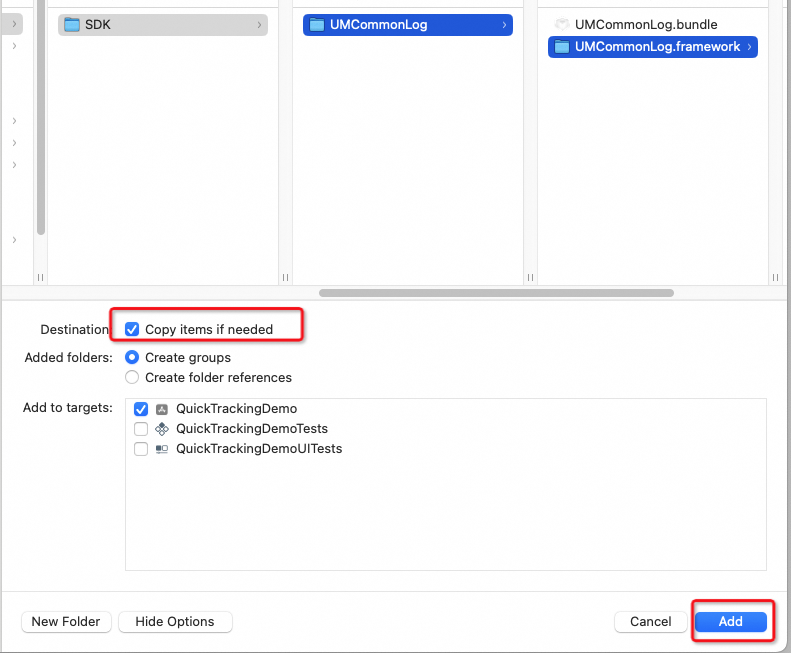
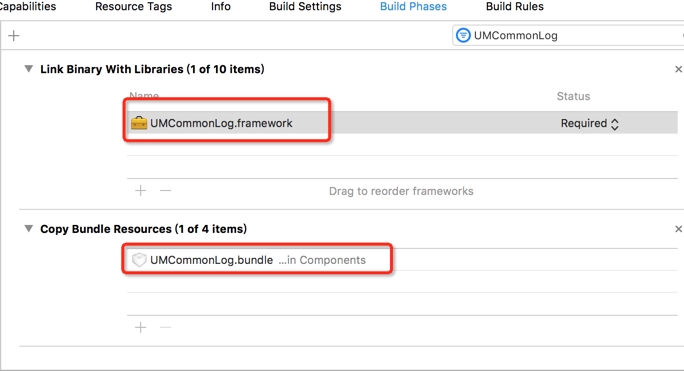
Initialize the 4.2 log plug-in
1. Description and use
Set whether to output the log information of the SDK in the console.
The UMCommonLog.framework Logstore must be explicitly initialized before it can be used by various business components.
The UMCommonLog.bundle is a resource file. If you manually introduce the SDK, you must add the UMCommonLog.bundle to the project. Otherwise, the log content is incorrect.
2. Interface functions
Interface:
+(void) setUpUMCommonLogManager;Sample code:
#import <UMCommonLog/UMCommonLogManager.h>

- (BOOL)application:(UIApplication *)application didFinishLaunchingWithOptions:(NSDictionary *)launchOptions {

    // Developers need to explicitly call this function for the logging system to work.
    [UMCommonLogManager setUpUMCommonLogManager];
}
4.3 Open Log
Use the UMConfigure.h API of the QTCommon.framwork header file to enable logging.
Interface:
/**Set whether to output the log information of the SDK in the console.
 @ param bFlag Default NO (no log output); Set to YES to output log information for debugging reference. When publishing the product, set it to NO.
 */
+ (void)setLogEnabled:(BOOL)bFlag;
If you want to view the logs generated during SDK initialization, you must enable logging before you initialize the SDK. We recommend that you enable logging before you call the API.
Example
- (BOOL)application:(UIApplication *)application didFinishLaunchingWithOptions:(NSDictionary *)launchOptions {

    // Developers need to explicitly call this function for the logging system to work.
    [UMCommonLogManager setUpUMCommonLogManager];
    [QTConfigure setLogEnabled:YES];// Specify to enable logging.
    [QTConfigure setCustomDomain:@"The domain name of your collection service" standbyDomain:nil];// Set the domain name.
    [QTConfigure initWithAppkey:@"Your appkey" channel:@"App Store"];

     /**
     * If you need to set the APM domain name separately, use the following interface to initialize
     * [QTConfigure initWithAppkey:@"Your appkey" channel:@"App Store" shouldPluginsTrackDomainIndepent:YES]; // Supported by V1.5.6.PX and later
     */
}
Log format:
For example, if the AppKey passed in by the user is empty, the log is printed as shown in the following figure:

2025-05-16 10:35:15: Refers to the current printing time;
QTCommon: the name of the component-based SDK(QTCommon.framework).
<1.7.1.PX>: the version number of the component-based SDK(QTCommon.framework).
The appKey passed in by the user is illegal. Please apply for an appkey on the official website to avoid affecting the statistics of your own App. : indicates the error message that prompts the developer to help the developer find the cause of the error.
5. Custom data encryption
Custom codec interface functions:
The SDK does not directly implement custom encryption and decryption algorithms. The SDK provides a proxy QTCryptoProviderDelegate that allows developers to implement the following two methods:
@protocol QTCryptoProviderDelegate <NSObject>

- (NSData *)encode:(NSMutableDictionary<NSString *,NSString *> *)header input:(NSData *)input;

- (NSData *)decode:(NSDictionary<NSString *,NSString *> *)header input:(NSData *)input;

@end
Interface methods | Parameters |
- (NSData *)encode:(NSMutableDictionary<NSString *,NSString *> *)header input:(NSData *)input; | Parameters: header: additional information that needs to be passed to the decryption side (such as the encryption algorithm used, the encryption mode, and any other information). is passed in as multiple strings K-V key-value pairs. The SDK performs Base64 encoding on all K-V key-value pairs in the dictionary and passes them as HTTP header fields dc-args to the receiving server. The collection server passes this dictionary parameter to the corresponding decryption method intact. input: raw data to be encrypted. Return value: the encrypted data. |
- (NSData *)decode:(NSDictionary<NSString *,NSString *> *)header input:(NSData *)input; | Parameters: header: the extra encryption information passed by the encryptor. The decryptor needs to use this information to determine the decryption algorithm, mode, and other details. input: raw data to be decoded. Return value: the decrypted data. |
Custom codec interface registration function:
[QTConfigure registerCryptoProvider:self];Interface methods | Parameters |
+ (void)registerCryptoProvider:(id<QTCryptoProviderDelegate>)delegate; | Parameters: delegate: The object that implements the delegate-agent method. |
Sample code:
#import <QTCommon/UMCommon.h>

@interface AppDelegate ()<QTCryptoProviderDelegate>

@end

@implementation AppDelegate

- (BOOL)application:(UIApplication *)application didFinishLaunchingWithOptions:(NSDictionary *)launchOptions {
    [QTConfigure setCustomDomain:@"Your collection service domain name" standbyDomain:nil];
		[QTConfigure registerCryptoProvider:self];
    [QTConfigure initWithAppkey:@"Your appkey" channel:@"Your channel"];

	....

    return YES;
}

- (NSData *)encode:(NSMutableDictionary<NSString *,NSString *> *)header input:(NSData *)input{
    // Sample code
    [header setObject:@"value1" forKey:@"arg1"];
    [header setObject:@"value2" forKey:@"arg2"];
    return [self customEncode:input key:CryptoKey];
}

- (NSData *)decode:(NSDictionary<NSString *,NSString *> *)header input:(NSData *)input{
    // Sample code
    NSLog(@"decode header:%@",header);
    return [self customDecode:input key:CryptoKey];
}

// Custom encryption
- (NSData *)customEncode:(NSData *)data key:(NSString *)key
{
    // Customize encryption.
}

// Customize decryption.
- (NSData *)customDecode:(NSData *)data key:(NSString *)key
{
    // Customize the decryption implementation.
}
6 Data Acquisition Switch
By default, the SDK enables data collection. You can also enable or disable the API to control the timing of data collection. Supported by 1.5.2.PX and later
6.1 Enable Collection Capability
enableSDK
Example:
[QTConfigure enableSDK];6.2 Disable Acquisition Capability
disableSDK
Example:
[QTConfigure disableSDK];note: the app has a privacy policy that controls the operation process. therefore, the sdk does not provide additional cache status control for enabling and disabling logos.
system, that is, if you want to disable the SDK feature after the cold start and want to disable the collection state every cold start, you need to actively adjust the service development
DisableSDK API features