1 Overview of SDK principles
Principle of 1.1
The SDK provides two API calling methods
Call the API directly by using the aplus environment variable
Send API commands to the aplus_queue of the SDK
Note: two ways to choose one, can be mixed
1.1.1 Use the aplus environment variable to call an API operation
The code for direct API calls is more concise in the following format:
const { aplus } =Mini Program Platform Environment Variables // Such as WeChat wx, Alipay my, Byte tt, Baidu Swan, etc.
aplus.${APIName}($arguments) // The arguments are the input parameters
of the specified API.
The APIName includes:
setMetaInfo: overwrites the existing default settings of the SDK
appendMetaInfo: the default configuration of the append SDK
getMetaInfo: obtains the current configuration of the SDK.
record: used to send event logs
sendPV: used to send page logs
arguments are the input parameters for each API call
1.1.2 Send API instructions to the instruction queue aplus_queue
To send an API command to the SDK, you can send a command to the command queue aplus_queue of the SDK. The SDK executes the command. The command format is as follows:
const { aplus_queue } =Mini Program Platform Environment Variables // Such as WeChat wx, Alipay my, Byte tt, Baidu Swan, etc.
aplus_queue.push({
 	'action': "$APIName",
  'arguments': [$arguments] // The arguments are the input parameters of the specified API.
})
The action parameter represents the name of the API that sends the instruction. Its input parameter is a string and the value is an enumerated value. Available enumerated values are as follows
aplus.setMetaInfo: Overwrites the existing default settings of the SDK
aplus.appendMetaInfo: the default configuration of the append SDK
aplus. getMetaInfo: obtains the current configuration of the SDK.
aplus. record: used to send event logs
aplus. sendPV: used to send page logs
The arguments parameter is the input parameter of the API specified in the action. The format is an array. The order of the elements in the array is the same as the order of the input parameter defined by the API.
1.2 example
1.2.1 Use the aplus environment variable to call an API operation
const { aplus } =Mini Program Platform Environment Variables // Such as WeChat wx, Alipay my, Byte tt, Baidu Swan, etc.

// Overwrite the default settings of the SDK.
aplus.setMetaInfo(metaName, metaValue);

// The default settings of the append SDK. This parameter is valid only when the metaValue parameter is of the Array or Object type.
aplus.appendMetaInfo(metaName, metaValue)

// Obtain the current configuration of the SDK.
aplus.getMetaInfo(metaName);

// Used to send event logs.
aplus.record(trackerEventCode, eventType, eventParams);

// Used to send page logs.
aplus.sendPV(pageEventConfig, userData);
1.2.2 Send API commands to the aplus_queue command queue
const { aplus_queue, aplus } =Mini Program Platform Environment Variables // Such as WeChat wx, Alipay my, byte tt, Baidu Swan, etc.

// Overwrite the default settings of the SDK.
aplus_queue.push({
  action: 'aplus.setMetaInfo',
  arguments: [metaName, metaValue]
});

// The default settings of the append SDK. This parameter is valid only when the metaValue parameter is of the Array or Object type.
aplus_queue.push({
  action: 'aplus.appendMetaInfo',
  arguments: [metaName, metaValue]
});

// Obtain the current configuration of the SDK.
aplus.getMetaInfo(metaName);

// Used to send event logs.
aplus_queue.push({
  action: 'aplus.record',
  arguments: [trackerEventCode, eventType, eventParams]
});

// Used to send page logs.
aplus_queue.push({
  action: 'aplus.sendPV',
  arguments: [pageEventConfig, userData]
});
2-day log printing
const aplusConfig = {
	metaInfo: {
		...
		'DEBUG': true, // Enable the debugging mode.
  	...
	}
};
Output log example: 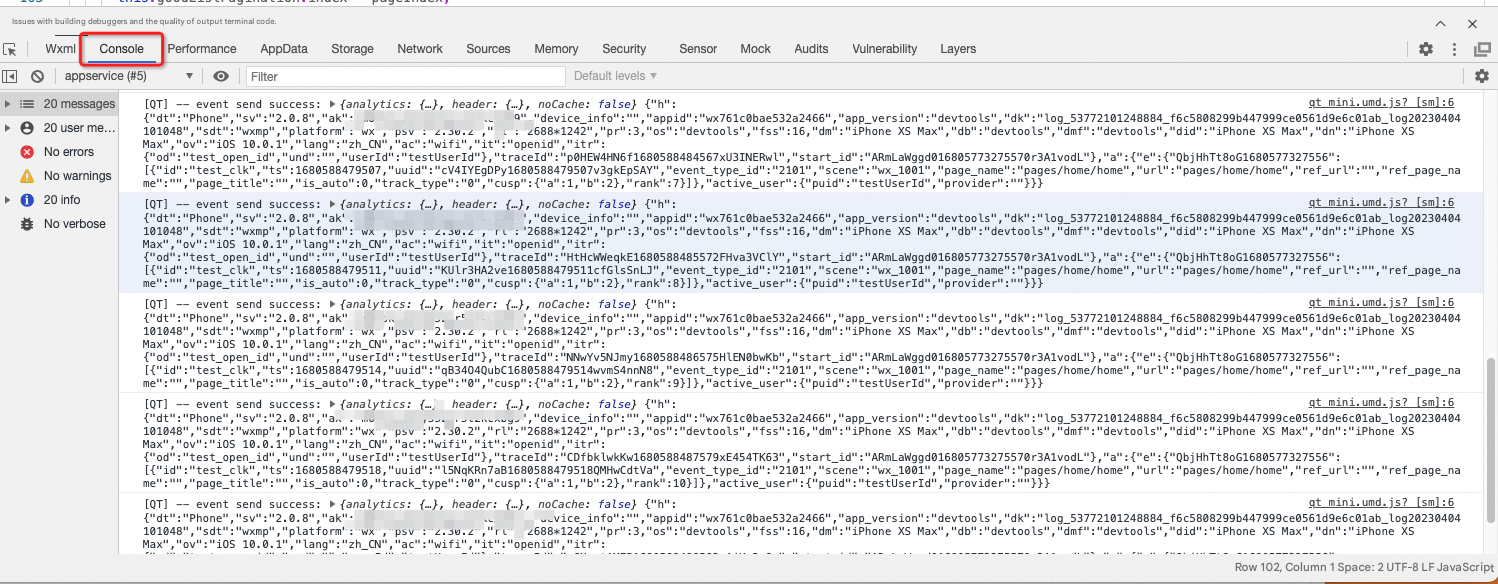
3-day Logo Sending Policy
The default event reporting policy for the QuickTracking applet SDK is:
Non-aggregated reporting of normal request logs
Request logs are sent every 1s seconds.
By default, a maximum of 1 network request channel for mini programs is occupied.
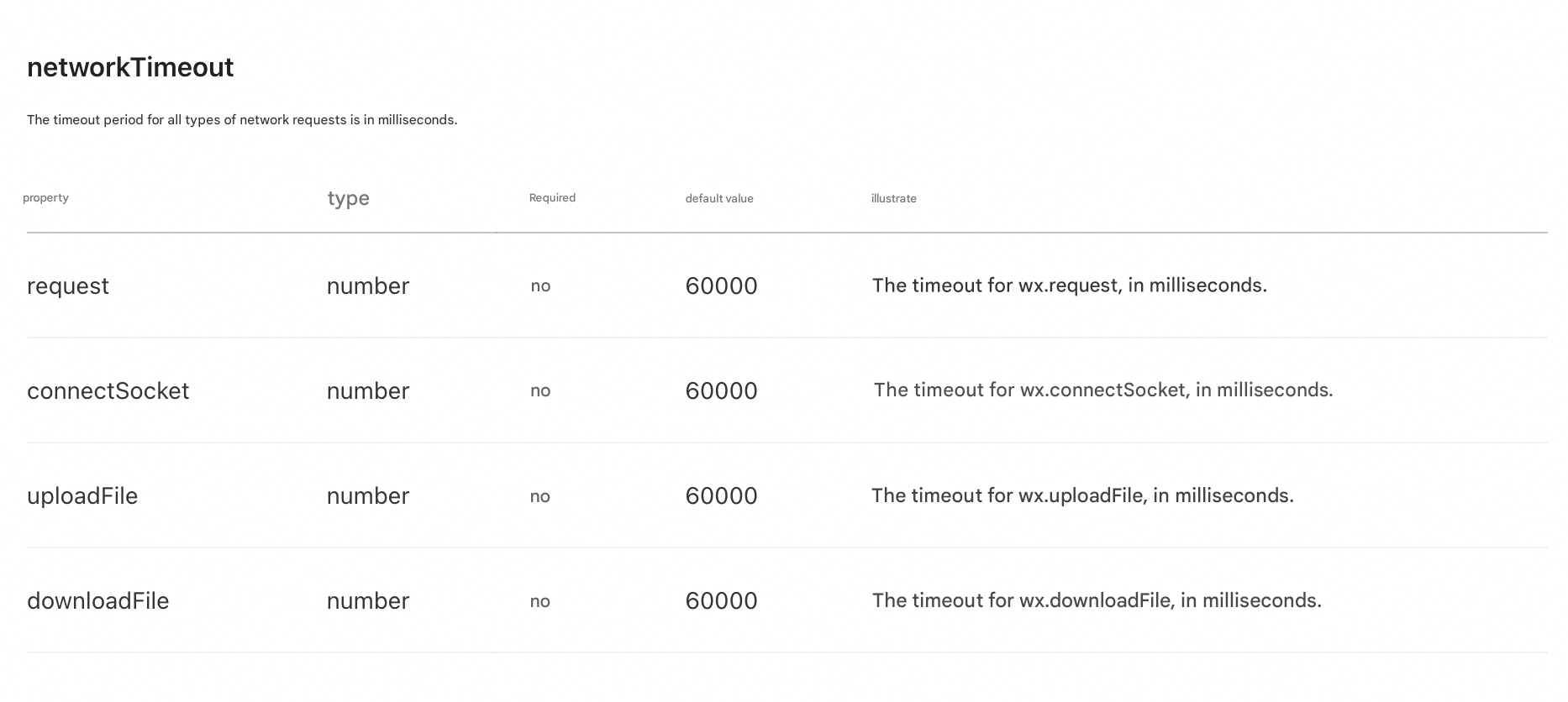
The default request timeout period is 3s. The priority of the default request timeout period is lower than that of some platform applets. Set networkTimeout in app.json (the example link is WeChat applet)
Optional. 3.1 to enable log aggregation and reporting
In some scenarios, you want to aggregate SDK request reporting. You can add SDK configuration items max-queue-count to complete the aggregate reporting function. Example:
const aplusConfig = {
	metaInfo: {
		...
    // Optional. The number of log entries to be aggregated. By default, log entries are not aggregated. We recommend that you specify a maximum of 1 to 5.
		'max-queue-count': 1,
  	...
	}
};
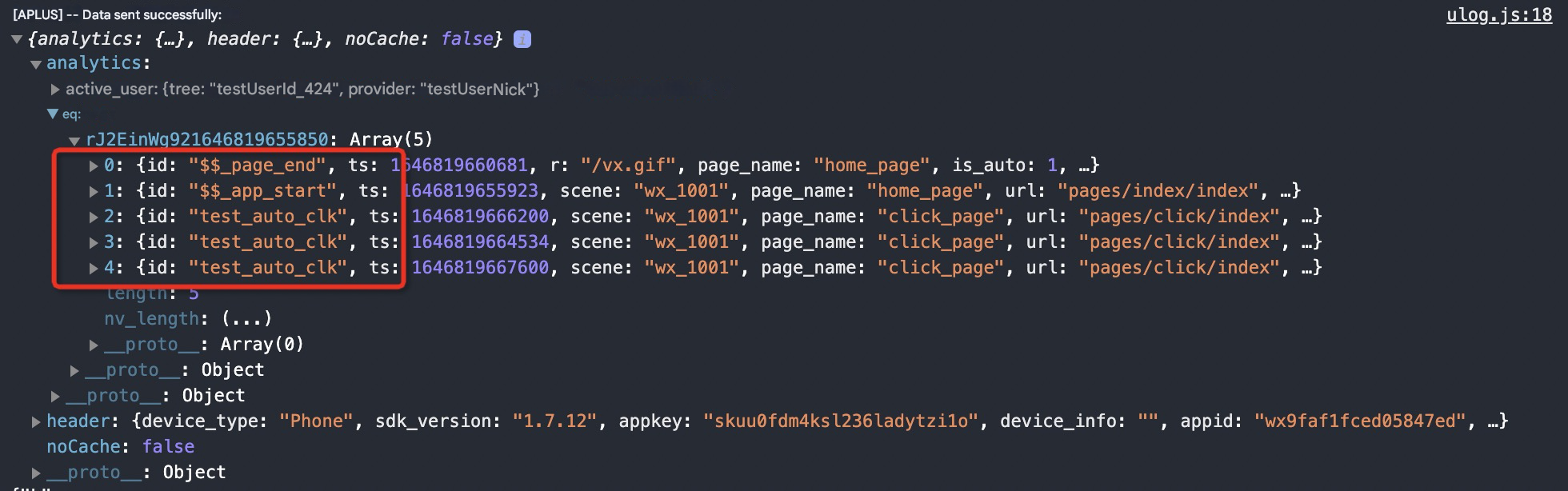
As shown in the following figure: If max-queue-count is set to 5, the request is submitted to the server only when five log entries are collected.
If the number is less than 5, it will be automatically reported when you exit the mini program.
Note:
WeChat mini programs require that "initiating too many requests in a short period of time will trigger the limit of the amount of parallel request data of mini programs. At the same time, too many requests may also lead to problems such as slow loading. We should reasonably control the number of requests and even merge requests." Therefore, we recommend that you use the preceding "Log Aggregation Report".
We recommend that you do not set the max-queue-count value to be too large. The larger the number of records that are aggregated and reported, the larger the bandwidth occupied by a single request log. There is a risk of network loss.
Optional. 3.2 Modify the number of channels occupied by SDK network requests
Some mini program platforms, such as WeChat mini programs, require that if too many network requests are initiated within a short period of time, the page performance may be affected. We recommend that you control the number of requests and even merge requests. For more information, see the description of the 3.1 SDK. The default network request channel of the Quick Tracking mini program occupies up to one. The following example shows how to modify the request channel:
const aplusConfig = {
	metaInfo: {
		...
    // Optional. The maximum number of concurrent request channels. Default value: 1. Valid values: 1 to 5.
		'aplus-mini-requests-limit': 1,
  	...
	}
};
Optional. 3.3 Modify the default request timeout period of the SDK
The default network request timeout period varies among small program platforms. Some platforms, such as WeChat, Douyin, Alipay, and DingTalk, support custom request timeout periods. You can modify the SDK configuration items aplus-request-timeout to customize the SDK request timeout period. The default timeout period is 3000ms. The configuration example is as follows:
const aplusConfig = {
	metaInfo: {
		...
    // Optional. The default request timeout period. Unit: milliseconds.
		'aplus-request-timeout': 3000,
  	...
	}
};
Note: All platform applets also support unified setting of networkTimeout in app.json. If the developer applies the networkTimeout configuration in app.json, the unified configuration has a higher priority. The following screenshot shows the official documents of WeChat applets. For other platform applets, please refer to the official documents of each platform.
4. Configure basic application information
In the SDK introduction section, you can modify or append some default settings
const aplusConfig = {
	metaInfo: {
    'appKey': '', // The Appkey that you entered when you created the application in QuickTracking. This parameter is required.
    'trackDomain': '', // Required. The domain name for log collection and reporting.
    '_user_id': 'testUserId', // Report the logon account ID of the mini program as needed. If you need to calculate and analyze the user account latitude data
    'autoGetOpenid': true, // Automatically obtain the openid setting (recommended! Currently, only WeChat applets are supported)
    'DEBUG': true, // Turn on debug logging.
    // '_hold': 'BLOCK', // In asynchronous scenarios, you must block log reporting. After you set the OpenID parameter, you can report the log.
    'appVersion': ''// Optional. The version of your mini program. Default value: devtools.
	}
};

import { initQTSDK } from './utils/qt_mini.umd.js';
initQTSDK(aplusConfig);
MetaName | Meta configuration description | MetaValue assignment description | Supported versions |
DEBUG | After you enable this feature, the SDK tracking logs are returned in the console. | true to open the log, false to close the log | all |
appVersion | Set the version of the current applet | Enter the version of the current mini program. | all |
appKey | The Appkey that you entered when you created an application in the platform system | You need to obtain the appkey corresponding to the tracking mini program in the platform. | all |
aplus-rhost-v | Collection and Report Domain Name (Deprecated) | You can obtain the information collected by the platform. | all |
trackDomain | Collect and report domain names | You can obtain the information collected by the platform. | Starting with v2.0.0 |
autoGetOpenid | Automatically collect openid | A Boolean value. The default value is false. You can use the code to obtain the OpenID. | all |
_anony_id | Set the unique identifier of a device | Business-defined anonymous user IDs , alipayid for Alipay, openid for WeChat | all |
_dev_id | Set unionid in WeChat mini program | Set unionid in WeChat mini program | all |
_user_id | Set userid | The ID of the custom logon account. | all |
_hold | Send a hold signal. You can set_hold multiple times throughout the SDK lifecycle. However, you must set the BLOCK and START settings in pairs. Otherwise, log reporting is affected. Note BLOCK only controls API commands sent by the command queue | The enumeration type. The available values and descriptions are as follows:
| all |
max-queue-count | Enable SDK log aggregation | The value of number. The default value is undefined. You can configure numbers 1 to 5. | all |
aplus-request-timeout | Set the SDK default request timeout period | The value of number. Unit: milliseconds. The default value is 3000ms. Supported platforms include WeChat, Douyin, Alipay, and DingTalk. | Starting with v2.0.0 |
aplus-mini-requests-limit | Set the maximum number of network request channels simultaneously occupied by the SDK | The value of number. The default value is 1. The value 1 to 5 is supported. | Starting with v2.0.8 |
aplus-preset-events-disabled | Prefabricated event used to disable SDK default collection | The default value is undefined. You can assign values to arrays. Example: | Starting with v2.0.8 |