Upgrade from the old row-level permission management feature to the row- and column-level permission management feature.
Requirements
You must have purchased the Quick BI service or applied for a trial use before June 3, 2021.
Notes
-
The estimated upgrade duration depends on how many datasets in your organization have row- and column-level permissions configured, and is for reference only.
-
After the upgrade, verify that permission controls work as expected. If they do not, contact Quick BI technical support for assistance. If your business is affected, you can choose to Roll Back To The Old Version.
-
If you Roll Back To The Old Version after the upgrade, all row- and column-level permissions configured in the new version will be lost. Proceed with caution.
-
If the upgrade fails, contact Quick BI technical support engineers for assistance.
Upgrade procedure
-
Log on to the Quick BI console.
-
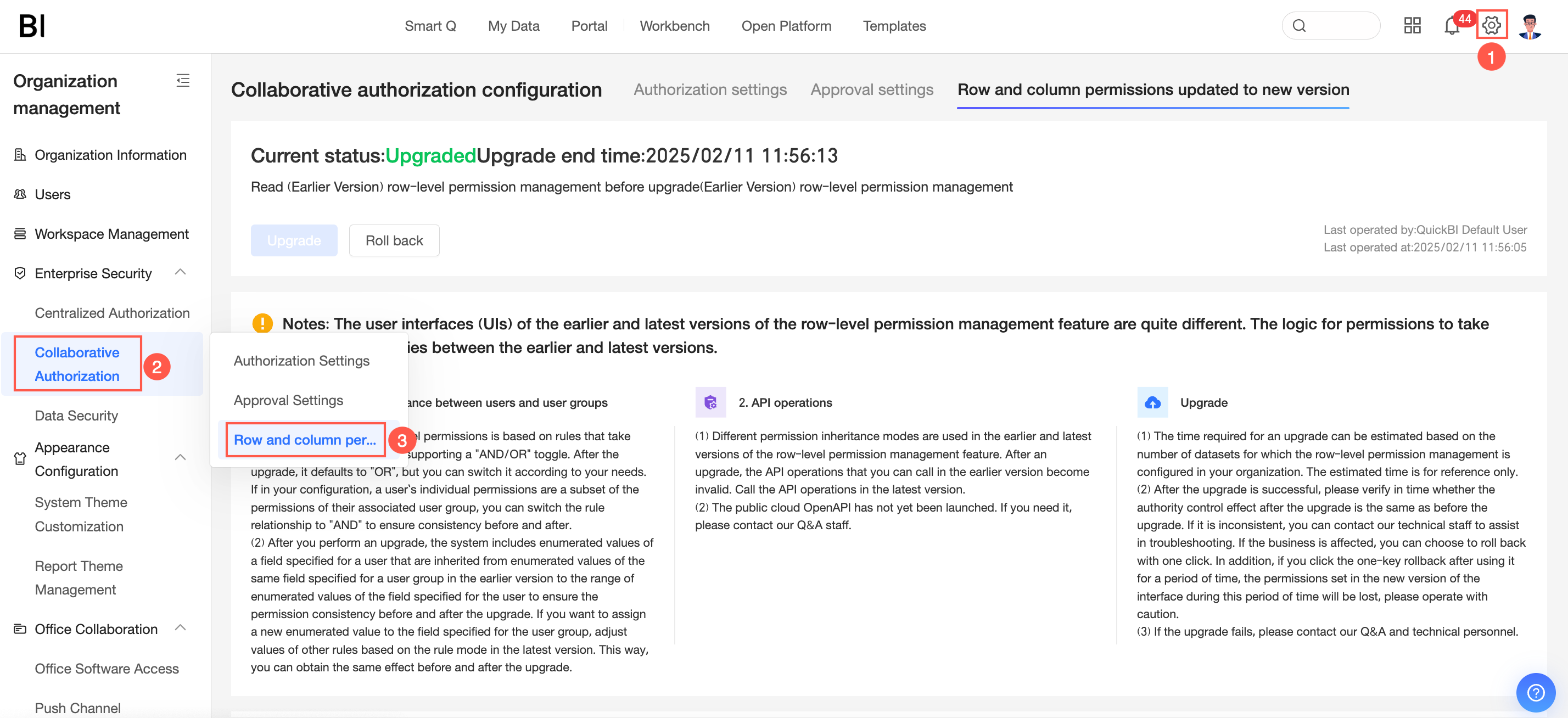
Follow the steps shown in the figure to access the interface for upgrading row- and column-level permissions to the new version.
-
Click One-click Upgrade.
What to do next
After the upgrade, configure row-level permissions in the new version. For more information, see Mode 1: Combined condition authorization, Mode 2: Tag-based Authorization, and Column-level permissions.