Learn the field types and data format requirements for statistics tables imported into Quick Audience.
The MaxCompute data source for storing raw data is MaxCompute, and the Analysis Source used by Quick Audience is ADB 3.0 or Hologres. To ensure data flows between these sources, Quick Audience does not support the following MaxCompute data types: BOOLEAN, CHAR, ARRAY, STRUCT, MAP, BINARY. For the complete MaxCompute data type list, see 2.0 Data Type Version.
A statistics table records user operation metrics. MaxCompute wide table example: 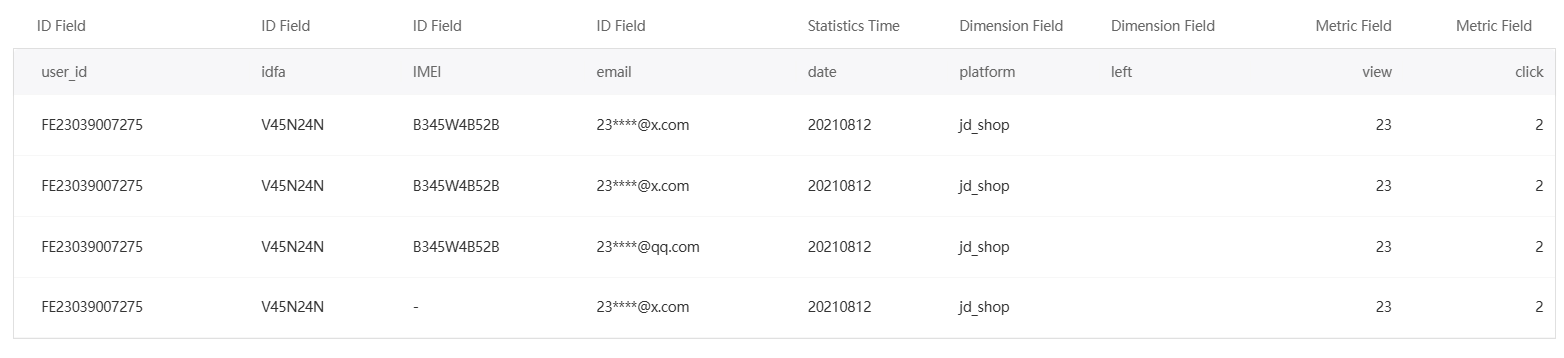
Field requirements:
|
Field |
Data type |
Description |
|
User ID |
Text type, numeric type |
|
|
Time range |
Time |
Optional. At most one time field. Typically a date used to aggregate metrics over time. |
|
Dimension field |
Text type, numeric type |
Constrains the scope of metrics. Examples: city, campaign name, or time period. Optional. Multiple fields allowed. |
|
Label |
Numeric types |
Statistical data fields such as clicks, impressions, and clicks in the last three days. Required. Multiple fields allowed. |
-
All field names are customizable.
-
No primary key. The same user ID can have multiple records. Each unique combination of time and dimension values requires a separate row.
-
Partitioned tables are supported.