All Products
Search
Document Center

Quick Audience:User Tag Table Data Requirements

Last Updated:Aug 22, 2025

This topic describes the data format requirements for user tag tables to be imported to Quick Audience.

Note

Due to the fact that the Data Source type for storing raw data is MaxCompute, and the Analysis Source type used by Quick Audience is ADB 3.0 or Hologres, in order for data to flow smoothly between the computing and analysis sources, Quick Audience does not support the following data types of MaxCompute: BOOLEAN, CHAR, ARRAY, STRUCT, MAP, BINARY. Please refer to the 2.0 Data Type Version for the MaxCompute data type list.

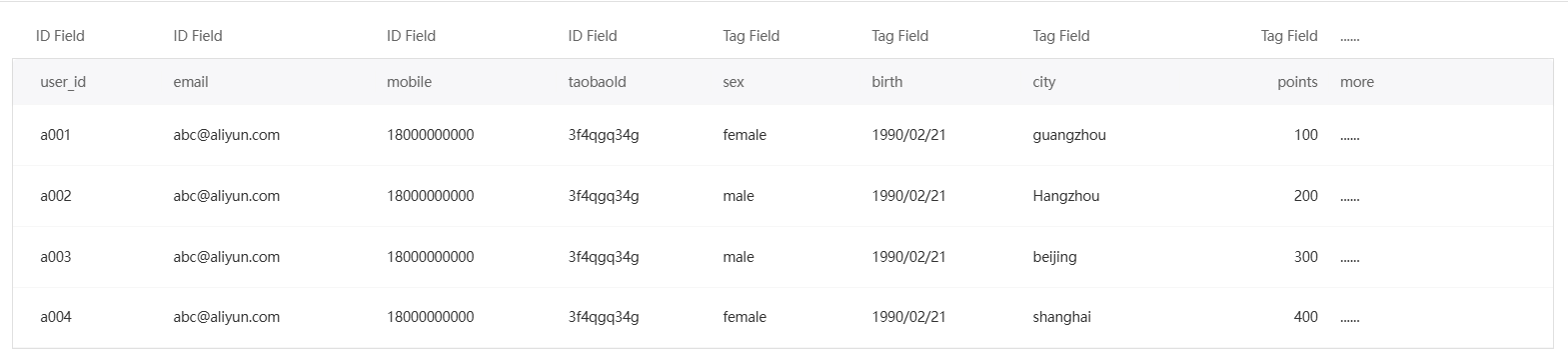
The user tag table records a series of dimensional characteristics of users. Example of MaxCompute large-width representation:

9868

Field requirements:

Field Type

The type of the tag.

Description

The ID of the user who executes the statement.

Text type, numeric type

  • The user ID can be used for marketing, push, etc. user_id is the primary key of the table and is a required field, called the user ID. Set other user IDs based on your business requirements.

  • You can use all the ID types that are enabled in ID Type Management. You can store only one field of the same ID type.

  • You can save the original user ID or the encrypted user ID. The encryption method supports MD5, SHA256, and AES.

    Except for Taobao OUID, Taobao OUID has been encrypted in a unique way when Taobao provides it to the outside. Please keep it as it is.

  • For more information about the ID types and encryption methods supported by each marketing and push channel, see ID Types and Encryption Methods Supported by Each Channel.

  • If you use a user ID of the mobile phone number type, make sure that the mobile phone number format is 11 digits and 86 is not added before the number. Otherwise, it cannot be used for SMS marketing.

Tag field

Text type, numeric type, time type, and multi-value type

  • The Label field stores other dimension characteristics of users. It can be used to generate user profiles, pivot analysis, and group filtering. Set the label field based on your business requirements.

  • You can set the field name to the User Attributes property code. The field stores the corresponding user attribute values. This field is automatically identified and mapped to the corresponding user attribute when you configure the Table Structure Configuration. You can modify this field. You can assign a value to the corresponding user attribute when you import the table schema.

  • The tag field supports multiple values. Separate multiple tag values with delimiters. Do not use the delimiters that may contain the field values.

Note

  • You can customize the names of all fields.

  • user_id is the primary key of the table. Each user_id has only one record.

  • Support partition table.