The always-confidential database feature keeps sensitive columns encrypted at all times — including during storage, transmission, and query execution. This page shows how to connect to and query an always-confidential PolarDB for PostgreSQL database from a Java application using EncJDBC, the EncDB SDK, psql, or Data Management (DMS).
Prerequisites
Before you begin, make sure you have:
Enabled the always-confidential database feature. See Enable the always-confidential database feature.
Defined sensitive data columns. See Define sensitive data.
The cluster connection details: hostname, port, database name, username, and password. See View or apply for an endpoint.
Java 1.8 or later, Maven 3.9.2, and IntelliJ IDEA Community Edition 2022.3.2 (or compatible versions)
Usage notes
Store your master encryption key (MEK) securely. The always-confidential database feature does not generate, store, or back up your MEK. If you lose it, you cannot access existing encrypted data. We recommend that you back up your MEK.
Choose a client
| Client | Description | Business code changes required |
|---|---|---|
| EncJDBC (recommended) | Drop-in JDBC replacement. Automatically encrypts and decrypts data — no changes to your SQL or data-handling code. | No |
| EncDB SDK | Gives you direct control over encryption and decryption through API calls. | Yes |
| psql | Command-line PostgreSQL client. Returns ciphertext for encrypted columns — use for queries and inspection only. | No |
| Data Management (DMS) | Visual and interactive web console. Returns ciphertext for encrypted columns. | No |
EncJDBC
EncJDBC is a drop-in replacement for the standard PostgreSQL JDBC driver. It intercepts queries, encrypts parameters targeting encrypted columns before sending them to the server, and decrypts results transparently on the way back. Your SQL and data-handling code stays exactly the same — only the driver class name and connection URL change.
Set up dependencies
EncJDBC requires the community PostgreSQL JDBC driver as a dependency.
Version compatibility
| PolarDB for PostgreSQL minor version | EncDB version | Client dependency |
|---|---|---|
| 14: 20231030 (14.9.14.0) or later | 1.1.13 | encjdbc-1.0.6.jar |
Install the JAR to your local Maven repository
mvn install:install-file \
  -DgroupId=com.alibaba.encdb \
  -DartifactId=<jar-artifact-id> \
  -Dversion=<jar-version> \
  -Dpackaging=jar \
  -Dfile=<path-to-jar>
Example (JAR stored at D:\encdb\libs\encjdbc-1.0.6.jar):
mvn install:install-file -DgroupId=com.alibaba.encdb -DartifactId=encjdbc -Dversion=1.0.6 -Dpackaging=jar -Dfile=D:\encdb\libs\encjdbc-1.0.6.jarMaven 3.9.2 or later is required. If you use an earlier version, upgrade before running the command.
Add dependencies to `pom.xml`
<dependencies>
  <dependency>
    <groupId>com.alibaba.encdb</groupId>
    <artifactId>encjdbc</artifactId>
    <version>1.0.6</version>
  </dependency>
  <!-- Bouncy Castle crypto provider -->
  <dependency>
    <groupId>org.bouncycastle</groupId>
    <artifactId>bcprov-jdk15on</artifactId>
    <version>1.62</version>
  </dependency>
  <dependency>
    <groupId>org.bouncycastle</groupId>
    <artifactId>bcpkix-jdk15on</artifactId>
    <version>1.62</version>
  </dependency>
  <dependency>
    <groupId>com.alibaba.fastjson2</groupId>
    <artifactId>fastjson2</artifactId>
    <version>2.0.2</version>
  </dependency>
  <!-- PostgreSQL community driver (required by EncJDBC) -->
  <dependency>
    <groupId>org.postgresql</groupId>
    <artifactId>postgresql</artifactId>
    <version>42.2.23</version>
  </dependency>
  <dependency>
    <groupId>com.google.guava</groupId>
    <artifactId>guava</artifactId>
    <version>24.1.1-jre</version>
  </dependency>
  <dependency>
    <groupId>com.alibaba</groupId>
    <artifactId>druid</artifactId>
    <version>1.2.4</version>
  </dependency>
  <dependency>
    <groupId>org.jgrapht</groupId>
    <artifactId>jgrapht-core</artifactId>
    <!-- jgrapht does not support Java 1.8 since 1.5.0 -->
    <version>1.4.0</version>
  </dependency>
</dependencies>
Connect and query data
The sample code below is for demonstration only. In production, never hardcode password or mek as string literals. Load them from environment variables or an external configuration file.
Connection URL format
The URL follows standard JDBC syntax with two changes: the scheme prefix (encjdbc:postgresql://) and security parameters appended as query string parameters. Use & to separate multiple parameters.
String dbUrl = String.format(
    "encjdbc:postgresql://%s:%s/%s?mek=%s&enc_algo=%s",
    hostname, port, dbname, mek, encAlgo
);
Class.forName("com.alibaba.encdb.encjdbc.EncDriver");
Connection dbConnection = DriverManager.getConnection(dbUrl, username, password);Complete sample
The code below is identical to standard JDBC code except for the driver class name and URL prefix. There are no encryption-specific calls in the application logic — EncJDBC handles encryption and decryption transparently.
// Load connection details from your configuration or environment variables.
String hostname = "hostname";
String port     = "port";
String dbname   = "db";
String username = "user";
String password = "password";

// Use a strong, randomly generated MEK in production.
String mek     = "00112233445566778899aabbccddeeff";
String encAlgo = "SM4_128_CBC";

String dbUrl = String.format(
    "encjdbc:postgresql://%s:%d/%s?mek=%s&enc_algo=%s",
    hostname, port, dbname, mek, encAlgo
);
Class.forName("com.alibaba.encdb.encjdbc.EncDriver");
Connection dbConnection = DriverManager.getConnection(dbUrl, username, password);

// Create table
dbConnection.createStatement().executeUpdate("DROP TABLE IF EXISTS example");
dbConnection.createStatement().executeUpdate(
    "CREATE TABLE example (id INTEGER, name VARCHAR, price enc_int4, miles enc_float4, secret enc_text, PRIMARY KEY (id))"
);

// Insert data.
PreparedStatement insertStmt = dbConnection.prepareStatement(
    "INSERT INTO example (id, name, price, miles, secret) VALUES(?,?,?,?,?)"
);
int price    = 1234;
float miles  = 12.34f;
String secret = "aliyun";
insertStmt.setInt(1, 1);
insertStmt.setString(2, "name");
insertStmt.setInt(3, price);
insertStmt.setFloat(4, miles);
insertStmt.setString(5, secret);
insertStmt.execute();

// Query — EncJDBC automatically decrypts results from encrypted columns.
PreparedStatement queryStmt = dbConnection.prepareStatement(
    "SELECT * FROM example WHERE price > ?"
);
queryStmt.setInt(1, 100);
ResultSet rs = queryStmt.executeQuery();
while (rs.next()) {
    int id         = rs.getInt(1);
    String name    = rs.getString(2);
    int priceVal   = rs.getInt(3);
    float milesVal = rs.getFloat(4);
    String secretVal = rs.getString(5);
    System.out.println(id + ", " + name + ", " + priceVal + ", " + milesVal + ", " + secretVal);
}
Expected output:
1, name, 1234, 12.34, aliyunEncDB SDK
Use the EncDB SDK when you need direct control over encryption and decryption — for example, to handle ciphertext payloads outside of SQL queries. Unlike EncJDBC, the SDK requires explicit encrypt() and decrypt() calls in your business code.
Set up dependencies
Version compatibility
| PolarDB for PostgreSQL minor version | EncDB version | Client dependency |
|---|---|---|
| 14: 20231030 (14.9.14.0) or later | 1.1.13 | libencdb-1.2.12.jar |
Install the JAR to your local Maven repository
mvn install:install-file \
  -DgroupId=com.alibaba.encdb \
  -DartifactId=<jar-artifact-id> \
  -Dversion=<jar-version> \
  -Dpackaging=jar \
  -Dfile=<path-to-jar>
Example (JAR stored at D:\encdb\libs\libencdb-1.2.12.jar):
mvn install:install-file -DgroupId=com.alibaba.encdb -DartifactId=encjdbc -Dversion=1.2.12 -Dpackaging=jar -Dfile=D:\encdb\libs\libencdb-1.2.12.jarAdd dependencies to `pom.xml`
<dependencies>
  <dependency>
    <groupId>com.alibaba.encdb</groupId>
    <artifactId>libencdb</artifactId>
    <version>1.2.12</version>
  </dependency>
  <!-- Bouncy Castle crypto provider -->
  <dependency>
    <groupId>org.bouncycastle</groupId>
    <artifactId>bcprov-jdk15on</artifactId>
    <version>1.70</version>
  </dependency>
  <dependency>
    <groupId>org.bouncycastle</groupId>
    <artifactId>bcpkix-jdk15on</artifactId>
    <version>1.70</version>
  </dependency>
  <dependency>
    <groupId>com.google.code.gson</groupId>
    <artifactId>gson</artifactId>
    <version>2.10.1</version>
  </dependency>
  <!-- PostgreSQL community driver -->
  <dependency>
    <groupId>org.postgresql</groupId>
    <artifactId>postgresql</artifactId>
    <version>42.2.23</version>
  </dependency>
  <dependency>
    <groupId>com.google.guava</groupId>
    <artifactId>guava</artifactId>
    <version>31.1-jre</version>
  </dependency>
</dependencies>
Connect and query data
The sample code below is for demonstration only. In production, never hardcode password or mek as string literals. Load them from environment variables or an external configuration file.
SDK initialization
The EncDB SDK uses a standard PostgreSQL JDBC connection (not the EncJDBC driver). After establishing the connection, initialize an EncdbSDK object with your security parameters. At minimum, configure setMek() and setEncAlgo() — use defaults for everything else.
The mek value is transmitted to the server via envelope encryption and is never exposed in plaintext.
// Establish a standard PostgreSQL JDBC connection.
String dbUrl = String.format(
    "jdbc:postgresql://%s:%s/%s?binaryTransfer=true",
    hostname, port, dbname
);
Class.forName("org.postgresql.Driver");
Connection dbConnection = DriverManager.getConnection(dbUrl, username, password);

// Initialize the SDK.
String mek = ...;
Constants.EncAlgo encAlgo = ...;
EncdbSDK sdk = EncdbSDKBuilder.newInstance()
    .setDbConnection(dbConnection)
    .setMek(mek)
    .setEncAlgo(encAlgo)
    .build();
Cryptor cryptor = sdk.getCryptor();

// Use cryptor.encrypt() before inserting and cryptor.decryptXXX() after reading.
Complete sample
// Load connection details from your configuration or environment variables.
String hostname = "hostname";
String port     = "port";
String dbname   = "db";
String username = "user";
String password = "password";

// Establish a standard PostgreSQL JDBC connection.
String dbUrl = String.format(
    "jdbc:postgresql://%s:%s/%s?binaryTransfer=true",
    hostname, port, dbname
);
Class.forName("org.postgresql.Driver");
Connection dbConnection = DriverManager.getConnection(dbUrl, username, password);

// Initialize the SDK with your MEK and encryption algorithm.
// Use a strong, randomly generated MEK in production.
String mek = "00112233445566778899aabbccddeeff";
Constants.EncAlgo encAlgo = Constants.EncAlgo.SM4_128_CBC;
EncdbSDK sdk = EncdbSDKBuilder.newInstance()
    .setDbConnection(dbConnection)
    .setMek(mek)
    .setEncAlgo(encAlgo)
    .build();
Cryptor cryptor = sdk.getCryptor();

// Create table
dbConnection.createStatement().executeUpdate("DROP TABLE IF EXISTS example");
dbConnection.createStatement().executeUpdate(
    "CREATE TABLE example (id INTEGER, name VARCHAR, price enc_int4, miles enc_float4, secret enc_text, PRIMARY KEY (id))"
);

// Insert data — encrypt each sensitive value before binding it as bytes.
PreparedStatement insertStmt = dbConnection.prepareStatement(
    "INSERT INTO example (id, name, price, miles, secret) VALUES(?,?,?,?,?)"
);
int price    = 1234;
float miles  = 12.34f;
String secret = "aliyun";
insertStmt.setInt(1, 1);
insertStmt.setString(2, "name");
insertStmt.setBytes(3, cryptor.encrypt("example", "price", price));
insertStmt.setBytes(4, cryptor.encrypt("example", "miles", miles));
insertStmt.setBytes(5, cryptor.encrypt("example", "secret", secret));
insertStmt.execute();

// Query — decrypt each byte[] result from an encrypted column.
PreparedStatement queryStmt = dbConnection.prepareStatement(
    "SELECT * FROM example WHERE price > ?"
);
queryStmt.setBytes(1, cryptor.encrypt("example", "price", 100));
ResultSet rs = queryStmt.executeQuery();
while (rs.next()) {
    int id        = rs.getInt(1);
    String name   = rs.getString(2);
    int priceVal  = cryptor.decryptInt(rs.getBytes(3));
    float milesVal = cryptor.decryptFloat(rs.getBytes(4));
    String text   = cryptor.decryptString(rs.getBytes(5));
    System.out.println(id + ", " + name + ", " + priceVal + ", " + milesVal + ", " + text);
}
Expected output:
1, name, 1234, 12.34, aliyunSDK API reference
psql
Connect to your cluster with psql and run queries as usual. Encrypted columns return ciphertext — the values cannot be decrypted through psql.
SELECT * FROM example;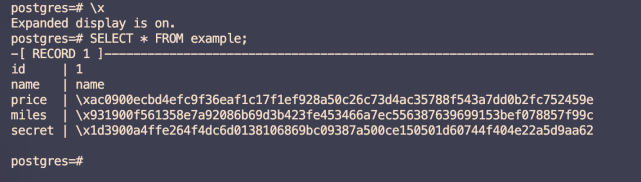
In the output above, id and name are plaintext columns. The price, miles, and secret columns display ciphertext — encrypted data is never visible on the cluster side, protecting your data from threats inside and outside the cloud.
Data Management (DMS)
Connect through the DMS console to run queries interactively. Like psql, encrypted columns return ciphertext.

The id and name columns display plaintext. The price, miles, and secret columns display ciphertext.
FAQ
I see the error `org.postgresql.util.PSQLException: ERROR: db_process_msg_api: process message failure - returned 0xf7070000` when connecting. What does this mean?
Error code 0xf7070000 means the MEK cannot be imported. This happens when you connect to the same always-confidential database using the same account but a different MEK than the one used to encrypt the data. Data encrypted with one MEK cannot be decrypted with another. Use the same MEK that was used when the data was originally encrypted.