Trajectory SQL is an extension of PolarDB for Oracle that models and queries the movement of objects over time. This page defines the core data types and concepts you will encounter when working with Trajectory SQL.
Trajectory objects
A Trajectory Object captures the complete movement history of a moving object — a vehicle, a person, or any entity that changes location over time. It is a high-dimensional structure composed of trajectory points and events, spanning four dimensions: time, space, attributes, and events.
The table below defines each component of a Trajectory Object.
| Term | Description |
|---|---|
| Trajectory Point | A snapshot of a moving object at a specific moment in time. Each point records the object's spatial location (as 2D or 3D coordinates) and any number of attribute fields using different data types. |
| Trajectory Object | The complete spatio-temporal record of a moving object. Comprises trajectory points and events, covering time, space, attributes, and events. |
| Trajectory Timeline | The ordered sequence of timestamps in a trajectory. Timestamps must be consecutive — no gaps or out-of-order values are allowed. |
| Trajectory Spatial | The spatial geometry of a trajectory, typically represented as a LineString connecting all trajectory points in sequence. In most cases, this is the data type used to describe the spatial geometry. |
| Trajectory Leaf | The spatial location of a moving object at a specific point in time. The spatial location is a trajectory point. |
| Trajectory Attributes | The time-varying attributes recorded at each trajectory point, such as velocity and direction. |
| Trajectory Attribute Field | A named attribute channel that records one value per trajectory point. For example, a velocity field stores a speed reading at every point along a vehicle's route, and a direction field stores a heading angle at each point. The number of values in an attribute field equals the number of trajectory points in the trajectory. |
| Trajectory Field Value | The value of a specific Trajectory Attribute Field at a specific point in time. For example, the speed reading at 14:32:05 in a velocity field, or the heading angle at that same moment in a direction field. |
| Trajectory Events | Discrete occurrences along a trajectory that are not captured by regular attribute sampling. For a vehicle trajectory, these might include refueling, breakdown, and car lock events. Each event is identified by an event type ID and an event time. |
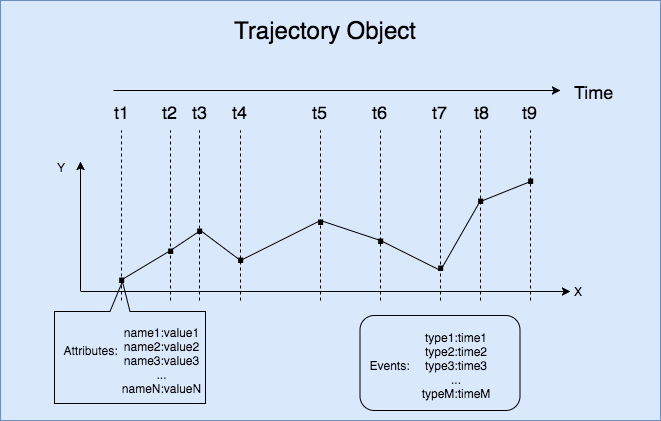
The following figure shows the trajectory of a moving object.
How these terms relate
A Trajectory Object is the top-level structure. It is made up of:
A Trajectory Timeline — the time axis, defining when each observation occurred. In the figure above, the timeline corresponds to the sequence of timestamps along the object's path.
A Trajectory Spatial — the space axis, connecting all spatial positions as a LineString. In the figure above, this is the continuous path line.
Trajectory Attributes — one or more attribute fields (such as velocity and direction), each recording one value per point on the timeline.
Trajectory Events — irregular occurrences (such as a refueling stop) that fall outside the regular sampling interval and are recorded with an event type ID and an event time.
Each position on the timeline corresponds to a Trajectory Point, which combines a location (Trajectory Leaf) with the attribute values at that moment (Trajectory Field Values).
BoxNDF objects
Trajectory and geometry objects can be structurally complex, which makes certain queries computationally expensive. To simplify queries, Trajectory SQL provides the BoxNDF data type — a multi-dimensional spatio-temporal cube that approximates the extent of a trajectory or geometry.
A BoxNDF object is defined by the minimum and maximum values on up to four axes:
| Axis | Dimension |
|---|---|
| x | Space |
| y | Space |
| z | Space |
| t | Time |
Not all four axes are required. A BoxNDF can cover any combination: for example, an (x, y) box for 2D spatial queries, an (x, y, t) box for 2D spatial queries with a time range, or an (x, y, z, t) box for full four-dimensional queries.
When you run a query, you can use a BoxNDF cube to specify the query scope. In addition, you can use a bounding box of the trajectory or geometry type to make the query easier.
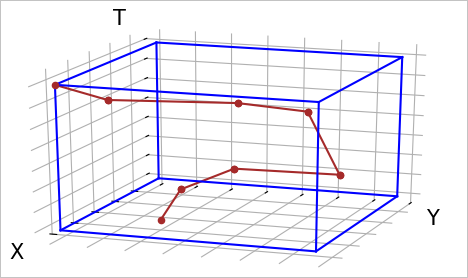
The following figure shows the trajectory and bounding box of an object that moves on the x, y, and t axes.