Elastic Parallel Query (ePQ) accelerates queries on cold data stored in OSS tables by distributing work across multiple worker threads — on one node or across multiple nodes simultaneously.
How it works
ePQ assigns independent scan tasks to parallel workers. Each worker reads a portion of the CSV data in the OSS table concurrently, then the results are aggregated. The degree of parallelism is controlled by the number of workers and the number of nodes involved.
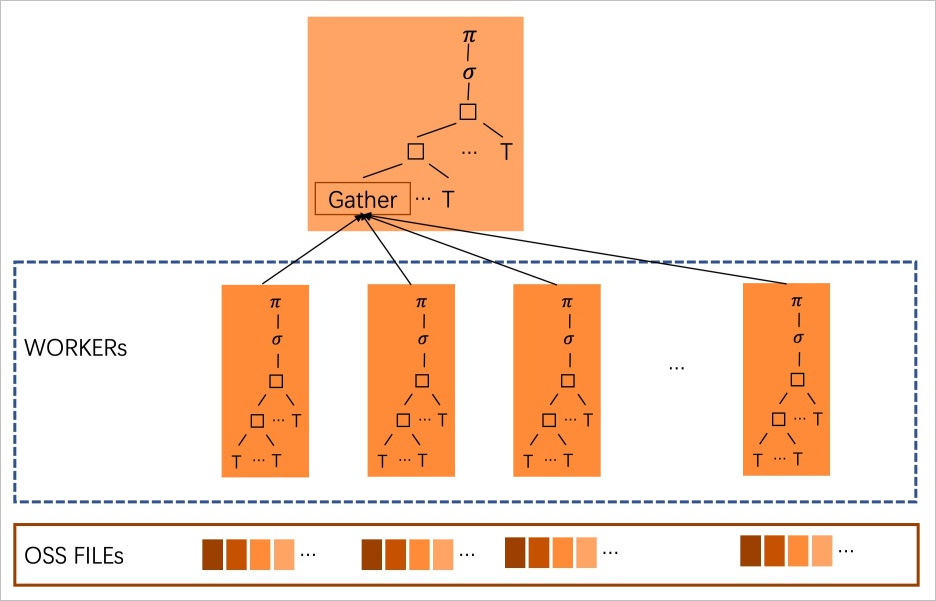
Parallel query on cold data supports CSV format only.
Supported versions
All modes require Enterprise Edition.
| Mode | Database engine | Minimum revision version |
|---|---|---|
| Single-node parallel query (MySQL 8.0.1) | MySQL 8.0.1 | 8.0.1.1.34 |
| Single-node parallel query (MySQL 8.0.2) | MySQL 8.0.2 | 8.0.2.2.24 |
| Multi-node parallel query | MySQL 8.0.2 | 8.0.2.2.24 |
Prerequisites
Before you begin, ensure that you have:
Connected to the cluster. See Connect to a cluster
Enabled cold data archiving on the cluster. See Enable cold data archiving
Enabled the ePQ feature. See Enable elastic parallel query
Cold data in CSV format
loose_csv_max_oss_threadsset to 2 or higher

loose_csv_max_oss_threads controls the maximum number of OSS threads that run in parallel on a single node. Valid values: 1–100. Default: 1. At the default value of 1, parallel query is disabled. Each OSS thread consumes 128 MB of memory, so set this parameter based on available cluster memory.Run parallel queries on cold data
The examples below use a TPC-H dataset but do not satisfy all requirements of a formal TPC-H benchmark test. Results are not comparable with published TPC-H benchmark results. For details, see TPC-H dataset.
The examples use a table named lineitem archived to OSS in CSV format:
mysql> show create table lineitem;
*************************** 1. row ***************************
       Table: lineitem
Create Table: CREATE TABLE `lineitem` (
  `l_orderkey` int(11) NOT NULL,
  `l_partkey` int(11) NOT NULL,
  `l_suppkey` int(11) NOT NULL,
  `l_linenumber` int(11) NOT NULL,
  `l_quantity` decimal(10,2) NOT NULL,
  `l_extendedprice` decimal(10,2) NOT NULL,
  `l_discount` decimal(10,2) NOT NULL,
  `l_tax` decimal(10,2) NOT NULL,
  `l_returnflag` char(1) NOT NULL,
  `l_linestatus` char(1) NOT NULL,
  `l_shipDATE` date NOT NULL,
  `l_commitDATE` date NOT NULL,
  `l_receiptDATE` date NOT NULL,
  `l_shipinstruct` char(25) NOT NULL,
  `l_shipmode` char(10) NOT NULL,
  `l_comment` varchar(44) NOT NULL
) ENGINE=CSV DEFAULT CHARSET=utf8 /*!99990 800020204 NULL_MARKER='NULL' */ CONNECTION='default_oss_server'

1 row in set (0.00 sec)
To enable parallel query, add the /*+ PARALLEL(N) */ hint to your query, where N is the number of workers per node. To verify whether parallel query is active, run EXPLAIN and check the Extra column:
Extra column value | Meaning |
|---|---|
Parallel scan (N workers) | Parallel query is active; N is the total number of worker threads across all participating nodes |
MPP (N nodes) | Multi-node parallel query is active; N is the number of participating nodes |
Total parallelism = workers per node × number of nodes.
Serial query
Without the hint, the query runs in a single thread. The Extra column shows Using where with no Parallel scan:
mysql> explain SELECT
    ->     sum(l_extendedprice * l_discount) AS revenue
    -> FROM
    ->     lineitem
    -> WHERE
    ->     l_shipdate >= date '1994-01-01'
    ->     AND l_shipdate < date '1994-01-01' + interval '1' year
    ->     AND l_discount between 0.05 - 0.01 AND 0.05 + 0.01
    ->     AND l_quantity < 24;

+----+-------------+----------+------------+------+---------------+------+---------+------+----------+----------+-------------+
| id | select_type | table    | partitions | type | possible_keys | key  | key_len | ref  | rows     | filtered | Extra       |
+----+-------------+----------+------------+------+---------------+------+---------+------+----------+----------+-------------+
|  1 | SIMPLE      | lineitem | NULL       | ALL  | NULL          | NULL | NULL    | NULL | 61560489 |     0.41 | Using where |
+----+-------------+----------+------------+------+---------------+------+---------+------+----------+----------+-------------+

1 row in set, 1 warning (1.23 sec)
The table is scanned and aggregated sequentially in one thread.
Single-node parallel query
Add /*+ PARALLEL(4) */ to distribute the scan across 4 workers on the current node. Parallel scan (4 workers) in the Extra column confirms that parallel query is active:
mysql> explain SELECT /*+ PARALLEL(4) */
    ->     sum(l_extendedprice * l_discount) AS revenue
    -> FROM
    ->     lineitem
    -> WHERE
    ->     l_shipdate >= date '1994-01-01'
    ->     AND l_shipdate < date '1994-01-01' + interval '1' year
    ->     AND l_discount between 0.05 - 0.01 AND 0.05 + 0.01
    ->     AND l_quantity < 24;
+----+-------------+-------------+------------+------+---------------+------+---------+------+----------+----------+----------------------------------------+
| id | select_type | table       | partitions | type | possible_keys | key  | key_len | ref  | rows     | filtered | Extra                                  |
+----+-------------+-------------+------------+------+---------------+------+---------+------+----------+----------+----------------------------------------+
|  1 | SIMPLE      | <gather1.1> | NULL       | ALL  | NULL          | NULL | NULL    | NULL |        4 |   100.00 | NULL                                   |
|  1 | SIMPLE      | lineitem    | NULL       | ALL  | NULL          | NULL | NULL    | NULL | 15390122 |     0.41 | Parallel scan (4 workers); Using where |
+----+-------------+-------------+------------+------+---------------+------+---------+------+----------+----------+----------------------------------------+

2 rows in set, 1 warning (2.17 sec)
Four workers run in parallel on the current node, delivering approximately 4x the throughput of a single-thread query.
Multi-node parallel query
When multiple nodes participate, the Extra column shows both Parallel scan (N workers) and MPP (N nodes). Here, Parallel scan (8 workers) means 8 workers are active in total across all nodes, and MPP (2 nodes) means 2 nodes are participating — 4 workers per node:
mysql> explain SELECT /*+ PARALLEL(4) */
    ->     sum(l_extendedprice * l_discount) AS revenue
    -> FROM
    ->     lineitem
    -> WHERE
    ->     l_shipdate >= date '1994-01-01'
    ->     AND l_shipdate < date '1994-01-01' + interval '1' year
    ->     AND l_discount between 0.05 - 0.01 AND 0.05 + 0.01
    ->     AND l_quantity < 24;
+----+-------------+-------------+------------+------+---------------+------+---------+------+----------+----------+-------------------------------------------------------+
| id | select_type | table       | partitions | type | possible_keys | key  | key_len | ref  | rows     | filtered | Extra                                                 |
+----+-------------+-------------+------------+------+---------------+------+---------+------+----------+----------+-------------------------------------------------------+
|  1 | SIMPLE      | <gather1.1> | NULL       | ALL  | NULL          | NULL | NULL    | NULL |        1 |   100.00 | NULL                                                  |
|  1 | SIMPLE      | lineitem    | NULL       | ALL  | NULL          | NULL | NULL    | NULL | 59986051 |     0.41 | Parallel scan (8 workers); MPP (2 nodes); Using where |
+----+-------------+-------------+------------+------+---------------+------+---------+------+----------+----------+-------------------------------------------------------+

2 rows in set, 1 warning (0.00 sec)
With 2 nodes and 8 total workers, query throughput is approximately 8x that of a single-thread query.
Troubleshooting
If EXPLAIN shows no Parallel scan in the Extra column, parallel query did not activate. Check the following:
| Condition | Fix |
|---|---|
loose_csv_max_oss_threads is 1 (default) | Set it to 2 or higher |
| Cold data is not in CSV format | Convert data to CSV before archiving |
| The cluster version does not meet the minimum requirement | Upgrade to a supported revision version (see Supported versions) |
| ePQ is not enabled | Enable ePQ (see Enable elastic parallel query) |