Read-only partitions protect historical, archival, or compliance-sensitive data from accidental modification. Mark individual partitions or the entire table as read-only to block INSERT, UPDATE, and DELETE operations—including those triggered automatically.
The following figure illustrates read-only partitions.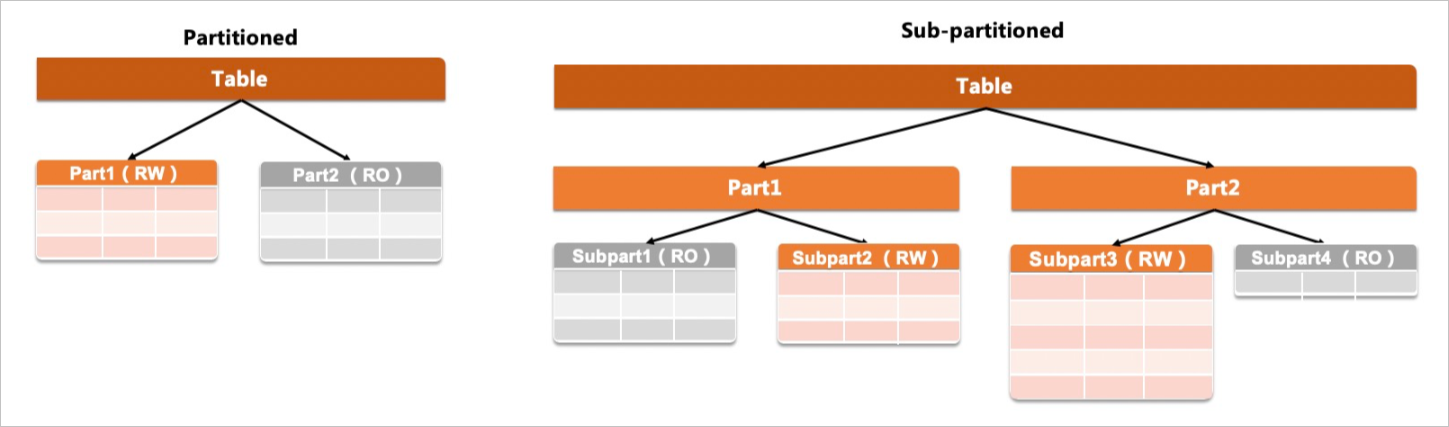
Syntax
Set a table-level read-only mode at creation
Apply READ ONLY or READ WRITE at the table level to set the default mode for all partitions. Individual partitions inherit this default unless overridden.
CREATE TABLE [IF NOT EXISTS] [schema.]table_name
    table_definition [READ {ONLY | WRITE}]
    partition_options;
partition_options syntax:
PARTITION BY
    { RANGE{(expr) | COLUMNS(column_list)} }
    [(partition_definition [, partition_definition] ...)]
partition_definition syntax:
PARTITION partition_name
        [VALUES LESS THAN {expr | MAXVALUE}]
        [READ {ONLY | WRITE}]
        [[STORAGE] ENGINE [=] engine_name]
        [COMMENT [=] 'string' ]
        [DATA DIRECTORY [=] 'data_dir']
        [INDEX DIRECTORY [=] 'index_dir']
        [MAX_ROWS [=] max_number_of_rows]
        [MIN_ROWS [=] min_number_of_rows]
        [TABLESPACE [=] tablespace_name]
Add a read-only partition to an existing table
Use ALTER TABLE with ADD PARTITION to add a partition that inherits the table-level read-only mode.
ALTER TABLE tbl_name
    [alter_option [, alter_option] ...]
    [partition_options]
partition_options and partition_option syntax:
partition_options:
    partition_option [partition_option] ...

partition_option: {
    ADD PARTITION (partition_definition)
partition_definition syntax:
PARTITION partition_name
        [VALUES LESS THAN {expr | MAXVALUE}]
        [READ {ONLY | WRITE}]
        [[STORAGE] ENGINE [=] engine_name]
        [COMMENT [=] 'string' ]
        [DATA DIRECTORY [=] 'data_dir']
        [INDEX DIRECTORY [=] 'index_dir']
        [MAX_ROWS [=] max_number_of_rows]
        [MIN_ROWS [=] min_number_of_rows]
        [TABLESPACE [=] tablespace_name]
alter_option syntax:
alter_option: {
    table_options
  | ADD [COLUMN] col_name column_definition
            [FIRST | AFTER col_name]
  | ADD [COLUMN] (col_name column_definition,...)
  | ADD {INDEX | KEY} [index_name]
            [index_type] (key_part,...) [index_option] ...
  | ADD {FULLTEXT | SPATIAL} [INDEX | KEY] [index_name]
            (key_part,...) [index_option] ...
  | ADD [CONSTRAINT [symbol]] PRIMARY KEY
            [index_type] (key_part,...)
            [index_option] ...
  | ADD [CONSTRAINT [symbol]] UNIQUE [INDEX | KEY]
            [index_name] [index_type] (key_part,...)
            [index_option] ...
  | ADD [CONSTRAINT [symbol]] FOREIGN KEY
            [index_name] (col_name,...)
            reference_definition
  | ADD [CONSTRAINT [symbol]] CHECK (expr) [[NOT] ENFORCED]
  | DROP {CHECK | CONSTRAINT} symbol
  | ALTER {CHECK | CONSTRAINT} symbol [NOT] ENFORCED
  | ALGORITHM [=] {DEFAULT | INSTANT | INPLACE | COPY}
  | ALTER [COLUMN] col_name {
            SET DEFAULT {literal | (expr)}
          | SET {VISIBLE | INVISIBLE}
          | DROP DEFAULT
        }
  | ALTER INDEX index_name {VISIBLE | INVISIBLE}
  | CHANGE [COLUMN] old_col_name new_col_name column_definition
            [FIRST | AFTER col_name]
  | [DEFAULT] CHARACTER SET [=] charset_name [COLLATE [=] collation_name]
  | CONVERT TO CHARACTER SET charset_name [COLLATE collation_name]
  | {DISABLE | ENABLE} KEYS
  | {DISCARD | IMPORT} TABLESPACE
  | DROP [COLUMN] col_name
  | DROP {INDEX | KEY} index_name
  | DROP PRIMARY KEY
  | DROP FOREIGN KEY fk_symbol
  | FORCE
  | LOCK [=] {DEFAULT | NONE | SHARED | EXCLUSIVE}
  | MODIFY [COLUMN] col_name column_definition
            [FIRST | AFTER col_name]
  | ORDER BY col_name [, col_name] ...
  | RENAME COLUMN old_col_name TO new_col_name
  | RENAME {INDEX | KEY} old_index_name TO new_index_name
  | RENAME [TO | AS] new_tbl_name
  | {WITHOUT | WITH} VALIDATION
}
Parameters
| Parameter | Description |
|---|---|
table_name | The name of the table. |
expr | The expression of partition key columns. |
column_list | The list of partition key columns. Expressions are not supported. |
MAXVALUE | The maximum value in the partition. |
partition_name | The name of the partition. Must be unique within the table. |
engine_name | The name of the storage engine. |
table_options | The table options. |
col_name | The name of the column. |
Usage notes
Allowed and blocked operations
| Operation | Allowed on read-only partitions |
|---|---|
SELECT | Yes |
INSERT | No |
UPDATE | No |
DELETE | No |
| DDL that changes data | No |
ALTER TABLE ... ADD COLUMN | Yes — adding a column does not modify existing data |
When a blocked operation is attempted, the following error is returned:
ERROR HY000: Data in a read-only partition or subpartition cannot be modified.Example of an allowed DDL operation on a table with read-only partitions:
ALTER TABLE [schema.]table_name ADD col_new varchar(100) DEFAULT 'i am not empty';Examples
Create a table with all partitions read-only
Apply READ ONLY at the table level. All partitions inherit the mode.
CREATE TABLE t1 (
  id INT,
  year_col INT
) READ ONLY
PARTITION BY RANGE (year_col) (
  PARTITION p0 VALUES LESS THAN (2001),
  PARTITION p1 VALUES LESS THAN (2010),
  PARTITION p2 VALUES LESS THAN (2020)
);
Add a read-only partition to an existing table
A new partition added to a READ ONLY table inherits the table-level mode automatically.
ALTER TABLE t1 ADD PARTITION (PARTITION p3 VALUES LESS THAN (2030));Expected output:
Query OK, 0 rows affected (0.22 sec)
Records: 0  Duplicates: 0  Warnings: 0
Verify that p3 inherits the table-level READ ONLY mode:
SHOW CREATE TABLE t1;Expected output:
+-------+---------------------------------------------------------------------------------------------------------------------------------------------------------------------------------------------------------------------------------------------------------------------------------------------------------------------------------------------------------------------------------------------------------------------------------------------------------------+
| Table | Create Table                                                                                                                                                                                                                                                                                                                                                                                                                                                  |
+-------+---------------------------------------------------------------------------------------------------------------------------------------------------------------------------------------------------------------------------------------------------------------------------------------------------------------------------------------------------------------------------------------------------------------------------------------------------------------+
| t1    | CREATE TABLE `t1` (
  `id` int(11) DEFAULT NULL,
  `year_col` int(11) DEFAULT NULL
) /*!99990 800020201 READ ONLY */ ENGINE=InnoDB DEFAULT CHARSET=utf8mb4 COLLATE=utf8mb4_0900_ai_ci
/*!50100 PARTITION BY RANGE (`year_col`)
(PARTITION p0 VALUES LESS THAN (2001) ENGINE = InnoDB,
 PARTITION p1 VALUES LESS THAN (2010) ENGINE = InnoDB,
 PARTITION p2 VALUES LESS THAN (2020) ENGINE = InnoDB,
 PARTITION p3 VALUES LESS THAN (2030) ENGINE = InnoDB) */ |
+-------+---------------------------------------------------------------------------------------------------------------------------------------------------------------------------------------------------------------------------------------------------------------------------------------------------------------------------------------------------------------------------------------------------------------------------------------------------------------+
1 row in set (0.00 sec)
The READ ONLY marker in the /*!99990 800020201 ... */ comment block confirms the table-level mode is active and all four partitions inherit it.
Create a table with mixed read-only and read/write partitions
Set the table to READ WRITE and override individual partitions with READ ONLY.
CREATE TABLE t1 (
    id INT,
    year_col INT
) READ WRITE
PARTITION BY RANGE (year_col) (
    PARTITION p0 VALUES LESS THAN (2001) READ ONLY,
    PARTITION p1 VALUES LESS THAN (2010),
    PARTITION p2 VALUES LESS THAN (2020) READ ONLY
);
Verify which partitions are read-only:
SHOW CREATE TABLE t1;Expected output:
+-------+-----------------------------------------------------------------------------------------------------------------------------------------------------------------------------------------------------------------------------------------------------------------------------------------------------------------------------------------------------------------------------------------------------------------------------------------------------------------------------------------------------+
| Table | Create Table                                                                                                                                                                                                                                                                                                                                                                                                                                                                                        |
+-------+-----------------------------------------------------------------------------------------------------------------------------------------------------------------------------------------------------------------------------------------------------------------------------------------------------------------------------------------------------------------------------------------------------------------------------------------------------------------------------------------------------+
| t1    | CREATE TABLE `t1` (
  `id` int(11) DEFAULT NULL,
  `year_col` int(11) DEFAULT NULL
) /*!99990 800020201 READ WRITE */ ENGINE=InnoDB DEFAULT CHARSET=utf8mb4 COLLATE=utf8mb4_0900_ai_ci
/*!50100 PARTITION BY RANGE (`year_col`)
(PARTITION p0 VALUES LESS THAN (2001) */ /*!99990 800020201  READ ONLY */
/*!50100  ENGINE = InnoDB,
 PARTITION p1 VALUES LESS THAN (2010) ENGINE = InnoDB,
 PARTITION p2 VALUES LESS THAN (2020) */ /*!99990 800020201  READ ONLY */
/*!50100  ENGINE = InnoDB) */ |
+-------+-----------------------------------------------------------------------------------------------------------------------------------------------------------------------------------------------------------------------------------------------------------------------------------------------------------------------------------------------------------------------------------------------------------------------------------------------------------------------------------------------------+
1 row in set (0.01 sec)
Partitions p0 and p2 show READ ONLY in their respective comment blocks, while p1 has no override and defaults to READ WRITE.