This topic describes the file preview watermark feature.
Only super administrators and drive administrators can enable this feature.
After you enable the preview watermark feature, a watermark is applied to all files that support online preview. All users will see the watermark when they preview files.
This is a paid feature. You can use it for free during the public preview period.
Enable the feature
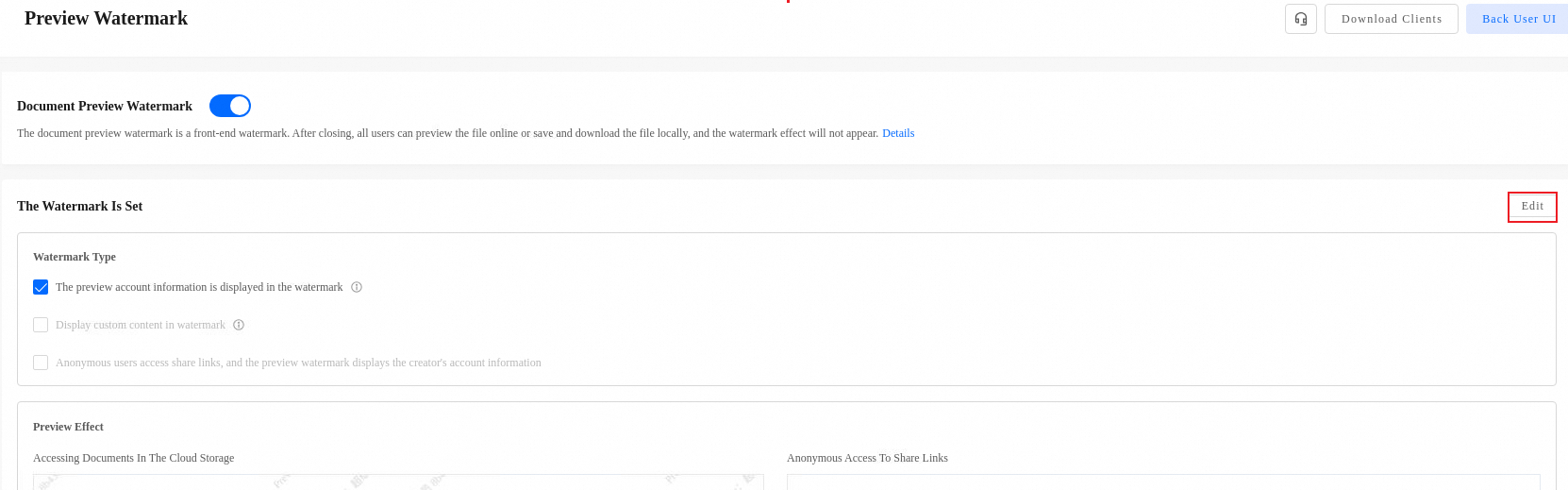
Log on to enterprise drive as an administrator. Go to and enable Document Preview Watermark.

Use the feature
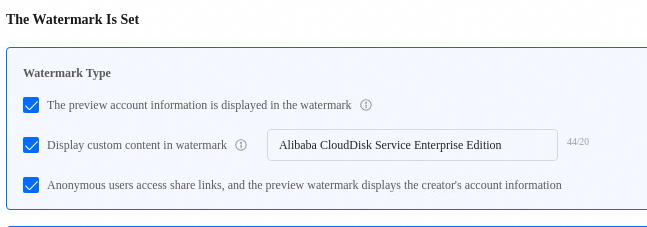
After you enable the feature, click Edit to configure it.
When a logged-on user accesses a shared link, the watermark displays the previewer's account information.
The watermark supports custom content of up to 20 characters.
When an anonymous user accesses a shared link, the watermark displays the creator's account information.
Supported formats
Spreadsheet files | Text files | Presentation files | PDF files |
et, xls, xlt, xlsx, xlsm, xltx, xltm, csv | doc, docx, txt, dot, wps, wpt, dotx, docm, dotm, rtf | ppt, pptx, pptm, ppsx, ppsm, pps, potx, potm, dpt, dps |
Limitations
Watermarks are displayed only during online previews. They do not appear on downloaded files or when you edit files online.