Export trained EasyRec models for deployment.
Prerequisites
Complete model training.
Configure component
-
Input ports
Input port (left to right)
Data type/Upstream component
PAI command parameter
Required
Training model directory
OSS path/Model training
model_dir
Yes
-
Component parameters
Tab
Parameter
Required
Description
PAI command parameter
Default value
Parameters Setting
EasyRec configuration file
No
The pipeline.config file from Model Training component. Specify either training model directory or this file. Training model directory takes precedence.
config
None
Specify checkpoint path
No
Full OSS path to checkpoint. Overrides upstream training model path.
checkpoint_path
None
export_dir
No
Export destination directory.
export_dir
Random folder in pipeline data path
extra_params
No
Parameters not defined in workflow. Example: --assert_files oss://xxx
extra_params
None
Specify algorithm version
No
Custom EasyRec execution version. Select Advanced options to configure.
1. Generate TAR package for EasyRec. See EasyRec Release Notes.
2. Upload TAR package to OSS. See Upload files.
3. Select uploaded file for this parameter.
script
Empty
Execution Tuning
Worker Count
No
Number of workers.
Execution tuning parameters assemble into cluster parameter.
1
Worker CPU Usage
No
CPU cores requested per worker. 1 = one CPU core.
8
Worker Memory Usage (MB)
No
Memory requested per worker. 100 = 100 MB.
40000
Number of Worker GPUs
No
GPUs not typically required for EasyRec model export.
-
Output ports
Output port (left to right)
Data type
Downstream component
Model export path
OSS path
Model Deployment
PAI command
PAI -project algo_public -name easy_rec_ext
    -Dcmd="export"
    -Dconfig="oss://rec_sln_demo/EasyRec/deploy/rec_sln_demo_rec_sln_demo_sorting_v2/20230425/pipeline.config"
    -Dmodel_dir="oss://rec_sln_demo/EasyRec/deploy/rec_sln_demo_rec_sln_demo_sorting_v2/20230425"
    -Dexport_dir="oss://lcl-hz/rec_sln_demo/EasyRec/deploy/rec_sln_demo_rec_sln_demo_sorting_v2/export/20230425/final_witn_fg"
    -Darn="acs:ram::xxxx:role/aliyunodpspaidefaultrole"
    -Dbuckets="oss://rec_sln_demo/"
    -Dcluster="{\"worker\": {\"count\": 1, \"cpu\": 800, \"gpu\": 0, \"memory\": 40000}}"
    -Dextra_params="--asset_files oss://rec_sln_demo/EasyRec/deploy/rec_sln_demo_rec_sln_demo_sorting_v2/fg.json"
    -Dlifecycle="28"
-DossHost="oss-cn-hangzhou-internal.aliyuncs.com";|
Parameter |
Description |
Required |
|
config |
Pipeline.config file from training. If model_dir is specified, it overrides model_dir in config. Used for periodic workflow scheduling. |
No |
|
model_dir |
OSS path where trained model is stored. Overrides model_dir in config. Used for periodic workflow scheduling. |
No |
|
cmd |
Set to export to enable model export. |
Yes |
|
export_dir |
Export destination OSS folder. |
Yes |
|
arn |
Resource group authorization. Obtain from PAI console > Activation and Authorization > All Cloud Product Dependencies > Designer section > View Authorization Information. |
Yes |
|
ossHost |
OSS endpoint for each region. See Regions and Endpoints. |
Yes |
|
buckets |
Bucket containing config file and bucket storing model. For multiple buckets, separate with commas: |
Yes |
|
extra_params |
Undefined paiflow parameter. |
No |
Example
-
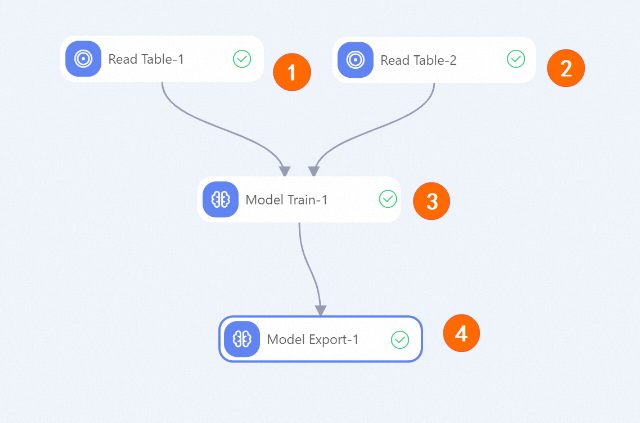
Create workflow:
Area
Description
1, 2, 3
Model training example instances.
4
Configure export_dir in Model Export component.
-
After workflow completes, view exported model in OSS path specified for export_dir.
For complete example, see component 8_rec_sln_demo_rec_sln_demo_sorting_v2_train in Recommendation Solutions - Sorting workflow.