The Factorization Machine (FM) algorithm is a general predictive model particularly well-suited for handling high-dimensional sparse data. The FM algorithm introduces latent vectors to model interactions between features, which can be viewed as an extension of matrix factorization techniques. It is widely used in fields such as recommendation systems and advertisement click-through rate prediction.
How it works
The FM algorithm comprises two processes: FM training and FM prediction. These two processes correspond to the model construction and application phases, respectively.
FM training: The core objective of this process is to learn the model parameters from a given training dataset so that the model can accurately predict the target variable. During this phase, the algorithm analyzes the input data and optimizes the parameters to ensure the efficiency and accuracy of the model.
FM prediction: In this process, the already trained model is used to make predictions on new input data. During the FM prediction phase, the model parameters are fixed, allowing the model to compute and output the predicted results for the new data using these established parameters.
Configure the components
Method 1: Configure the component on the pipeline page
FM training
On the pipeline page, add an FM Train component and configure the following parameters:
Category | Parameter | Description | |
Fields Setting | Feature Columns | Select feature columns based on the characteristics of the input table. Columns of the STRING and DOUBLE types are supported. | |
Label Column | Select a label column based on the characteristics of the input table. Only the columns of the DOUBLE type are supported. | ||
Advanced Options | This parameter is available only in Machine Learning Designer. If you select Advanced Options, Flink configuration item is available. Fore more information about how to configure Flink, see Configure Flink. | ||
Parameters Setting | Task Type | Select the task type. Valid values:
| |
Number of iterations | Specify the total number of iterations. Default value: 10. | ||
Regularization coefficient | Specify three floating-point numbers separated by commas (,). These three numbers represent the regularization coefficients of the 0th order term, 1st order term, and 2nd order term. | ||
Learning rate | Specify the learning rate. If the training is diverged, set this parameter to a smaller value. | ||
Parameter initialization standard deviation | Specify the standard deviation for parameter initialization. This parameter is used to normalize data. The value is of the DOUBLE type. Default value: 0.05. | ||
Dimensions | Specify three positive integers separated by commas (,). These three positive integers represent the lengths of the 0th order term, 1st order term, and 2nd order term. | ||
Block size | Specify the name of the performance metric. | ||
Output table lifecycle | This parameter is available only in Machine Learning Studio. Specify the lifecycle of the output table. | ||
Tuning | Choose Running Mode | MaxCompute | Use MaxCompute or Flink computing resources. Fore information about how to configure the number of workers and their memory, see Appendix: How to estimate resource usage. |
Flink | |||
DLC | Use DLC computing resources. Configure the specifications based on the prompts. | ||
FM prediction
On the pipeline page, add an FM Prediction component and configure the following parameters:
Category | Parameter | Description | |
Parameters Setting | Prediction Result Column | Specify the name of the prediction result column. | |
Output Detail Column | Specify the name of the prediction detail column. | ||
Reserved Columns | Specify the columns that you want to reserve in the output table. | ||
Advanced Configuration | This parameter is available only in Machine Learning Designer. If you select Advanced Configuration, Number of Threads using by each worker and Type of ModelSize are available. | ||
Tuning | Choose Running Mode | MaxCompute | Use MaxCompute or Flink computing resources. Fore information about how to configure the number of workers and their memory, see Appendix: How to estimate resource usage. |
Flink | |||
DLC | Use DLC computing resources. Configure the specifications based on the prompts. | ||
Method 2: Use PAI commands
Use PAI commands to configure the parameters of FM Train and FM Prediction components.
FM Train
Parameter | Required | Default value | Description |
tensorColName | Yes | None | The name of the feature column. Data in the column must be in the key-value format. Separate multiple names with commas (,). Example: 1:1.0,3:1.0. |
labelColName | Yes | None | The name of the label column. Only the columns of numeric data types are supported. If the task parameter is set to binary_classification, the value of label must be 0 or 1. |
task | Yes | regression | The type of the task. Valid values: regression and binary_classification. |
numEpochs | No | 10 | The number of iterations. |
dim | No | 1,1,10 | Three positive integers separated by commas (,). These three positive integers represent the lengths of the 0th order term, 1st order term, and 2nd order term. |
learnRate | No | 0.01 | The learning rate. If the training is diverged, set the learnRate parameter to a smaller value. |
lambda | No | 0.01,0.01,0.01 | Three floating-point numbers separated by commas (,). These three numbers represent the regularization coefficients of the 0th order term, 1st order term, and 2nd order term. |
initStdev | No | 0.05 | The standard deviation of parameter initialization. |
FM Prediction
Parameter | Required | Default value | Description |
predResultColName | No | prediction_result | The name of the prediction result column. |
predScoreColName | No | prediction_score | The name of the prediction score column. |
predDetailColName | No | prediction_detail | The name of the prediction detail column. |
keepColNames | No | All columns | The columns that you want to reserve in the output table. |
Example
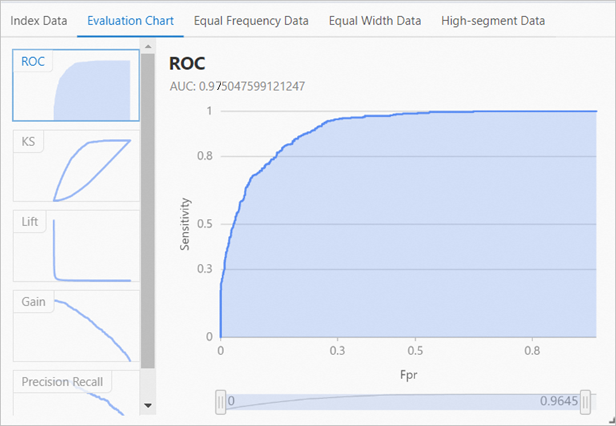
If you use the following data as input for the FM recommendation model based on the Alink framework template, the model area under the curve (AUC) generated by the training operation is about 0.97. 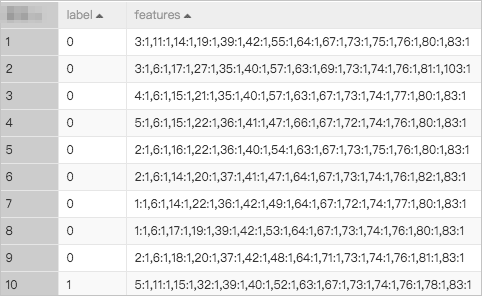
Reference
Create an FM recommendation model based on the Alink framework