Accounts and permissions
Sign in to LangStudio with enterprise identity systems like Okta
Configure Single Sign-On (SSO) through Alibaba Cloud Resource Access Management (RAM). Employees sign in with existing corporate accounts from identity providers like Okta or Microsoft Entra ID without creating separate Alibaba Cloud accounts.
For setup steps, see Enterprise single sign-on to Alibaba Cloud using your own identity system.
After configuring SSO, grant required LangStudio permissions to the RAM user. See Cloud service dependencies and authorization: LangStudio.
Model invocation
APIConnectionError: Connection error when calling Alibaba Cloud Model Studio models
APIConnectionError: Connection errorThe runtime's Virtual Private Cloud (VPC) lacks public internet access. Alibaba Cloud Model Studio models require outbound internet connectivity.
Enable internet access for your VPC by configuring SNAT. See Use the SNAT feature of an Internet NAT gateway to access the Internet.
Knowledge base
Choose between Faiss and Milvus
| Criteria | Faiss | Milvus |
|---|---|---|
| Use case | Testing and prototyping | Production workloads |
| Infrastructure | Lightweight, no separate database instance | Requires a separate database instance |
| Scale | Smaller datasets | Larger-scale data processing |
| Performance | Adequate for development | Better performance and scalability |
Start with Faiss for testing. Switch to Milvus when moving to production or working with larger datasets.
The run failed due to reaching the timeout: 300 with Faiss-based knowledge bases
The run failed due to reaching the timeout: 300The runtime has insufficient resources. Faiss stores vector data in Object Storage Service (OSS) and loads it into runtime memory, which is resource-intensive.
Increase the runtime's resource specification:
-
Upgrade the existing runtime: In the runtime list, click the runtime name, then click Change Settings in the upper-right corner. Select a larger Instance Type, such as 8-core or 16-core CPU.
-
Replace the runtime: Delete the current runtime, create a new one with higher specification, and update your application flow to use the new runtime.
ToolLoadError... (AccessDenied) with Faiss-based knowledge bases
Tool load failed in 'index_lookup': (ToolLoadError) Failed to load package tool 'Index Lookup': (AccessDenied)
The application flow lacks permissions to save the generated index file to the specified Object Storage Service (OSS) path.
Recreate the knowledge base index with correct permissions:
-
Recreate the knowledge base index using the default PAI role.
-
Set Output OSS Path to a directory within the OSS Bucket that serves as your workspace's default storage path.
-
Reconfigure the knowledge base index node in your application flow to use the newly created index.
See Knowledge base index management - Create a knowledge base index.
Billing
Charged for PAI-DSW when only using LangStudio
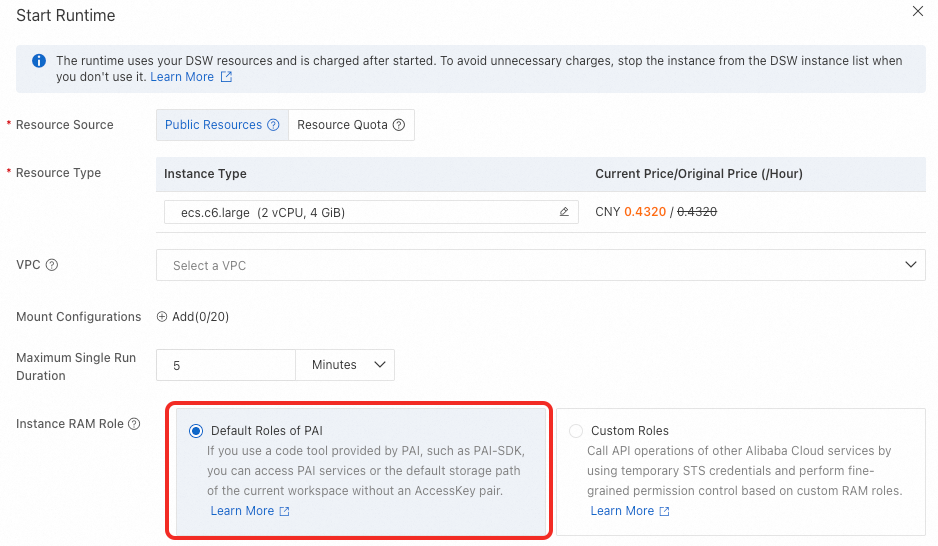
LangStudio's application flow development mode runs on PAI-DSW (Data Science Workshop) instances. Starting a runtime in LangStudio launches a DSW instance, and PAI-DSW billing begins immediately.
Stop the DSW instance from the DSW instance list when not actively in use to avoid unexpected charges.
