The PageRank algorithm measures the importance of a webpage. It analyzes hyperlinks based on the idea that the number and quality of links to a page determine its importance. A page ranks higher if it receives more links. The weight of the linking pages also influences the final PageRank score. The PageRank component outputs the weight of each node.
Algorithm description
The PageRank algorithm is a link analysis method used to evaluate the relative importance of webpages. Its core principles are as follows:
If many other webpages link to a webpage, it is generally considered a more important or higher-quality resource.
The algorithm considers not only the number of incoming links but also the weight of each linking page. This weight is based on the linking page's own PageRank score and the number of outbound links it has.
The PageRank concept also applies to social networks. A user's influence depends on their personal attributes and the quality of their social connections. For example, on Sina Weibo, a user's influence over their followers depends on the closeness of their relationships. A user typically has more influence over their family, classmates, and colleagues. In this network model, the edge weight reflects the closeness of the relationship and indicates its strength.
The PageRank formula with link weights is:
W(i): The weight of node i.
C(Ai): The link weight.
d: The damping factor.
W(A): The node weight after the algorithm converges. This represents the influence index of each user.
Configure the component
Method 1: Visualization
In the Designer workflow, add the PageRank component and configure its parameters on the right side of the interface.
Parameter type | Parameter | Description |
Field settings | Source vertex column | The column that contains the source vertices of the edge list. |
Destination vertex column | The column that contains the destination vertices of the edge list. | |
Edge weight column | The column that contains the edge weights. | |
Parameter settings | Maximum iterations | The algorithm stops iterating when it converges. The default value is 30. |
Damping factor | The probability that a user continues browsing after reaching a webpage. | |
Execution tuning | Number of processes | The number of nodes for parallel job execution. A larger value indicates a higher degree of parallelism but increases framework communication overhead. |
Memory size per worker | The maximum memory size for a single job. Unit: MB. The default value is 4096. If the actual memory usage exceeds this value, an |
Method 2: Use a PAI command
You can use a PAI command to configure the parameters for the PageRank component by invoking the command from an SQL script component. For more information, see Scenario 4: Run a PAI command in an SQL script component.
PAI -name PageRankWithWeight
    -project algo_public
    -DinputEdgeTableName=PageRankWithWeight_func_test_edge
    -DfromVertexCol=flow_out_id
    -DtoVertexCol=flow_in_id
    -DoutputTableName=PageRankWithWeight_func_test_result
    -DhasEdgeWeight=true
    -DedgeWeightCol=weight
    -DmaxIter=100;
Parameter | Required | Default value | Description |
inputEdgeTableName | Yes | None | The name of the input edge list. |
inputEdgeTablePartitions | No | Full table scan | The partitions of the input edge list. |
fromVertexCol | Yes | None | The column that contains the source vertices in the input edge list. |
toVertexCol | Yes | None | The column that contains the destination vertices in the input edge list. |
outputTableName | Yes | None | The name of the output table. |
outputTablePartitions | No | None | The partitions of the output table. |
lifecycle | No | None | The lifecycle of the output table. |
workerNum | No | Not set | The number of nodes for parallel job execution. A larger value indicates a higher degree of parallelism but increases framework communication overhead. |
workerMem | No | 4096 | The maximum memory size for a single job. Unit: MB. The default value is 4096. If the actual memory usage exceeds this value, an |
splitSize | No | 64 | The size of data chunks. Unit: MB. |
hasEdgeWeight | No | false | Specifies whether the edges in the input edge list have weights. |
edgeWeightCol | No | None | The column that contains the edge weights in the input edge list. |
maxIter | No | 30 | The maximum number of iterations. |
Examples
Add an SQL script component. Clear Use Script Mode and System Adds Create Table Statement. Then, enter the following SQL statement in the SQL Script field.
drop table if exists PageRankWithWeight_func_test_edge;
create table PageRankWithWeight_func_test_edge as
select * from
(
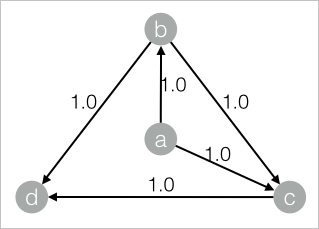
    select 'a' as flow_out_id,'b' as flow_in_id,1.0 as weight
    union all
    select 'a' as flow_out_id,'c' as flow_in_id,1.0 as weight
    union all
    select 'b' as flow_out_id,'c' as flow_in_id,1.0 as weight
    union all
    select 'b' as flow_out_id,'d' as flow_in_id,1.0 as weight
    union all
    select 'c' as flow_out_id,'d' as flow_in_id,1.0 as weight
)tmp;
The corresponding data structure graph is shown below:
Add another SQL script component. Clear Use Script Mode and System Adds Create Table Statement. Enter the following PAI command in the SQL Script field. Connect the component from Step 1 to this component.
drop table if exists ${o1};
PAI -name PageRankWithWeight
    -project algo_public
    -DinputEdgeTableName=PageRankWithWeight_func_test_edge
    -DfromVertexCol=flow_out_id
    -DtoVertexCol=flow_in_id
    -DoutputTableName=${o1}
    -DhasEdgeWeight=true
    -DedgeWeightCol=weight
    -DmaxIter 100;
Click
 in the upper-left corner to run the workflow.
After the workflow completes, right-click the component from Step 2 and select View Data > Output of SQL Script to view the training results.
| node | weight     |
| ---- | ---------- |
| a    | 0.12841452 |
| b    | 0.18299069 |
| c    | 0.26076174 |
| d    | 0.42783305 |