Creates a scheduled auto scaling rule for a service.
Try it now
 Test
Test
RAM authorization
Action | Access level | Resource type | Condition key | Dependent action |
eas:CreateServiceCronScaler | create | *All Resource
| None | None |
Request syntax
POST /api/v2/services/{ClusterId}/{ServiceName}/cronscaler HTTP/1.1Path Parameters
Parameter | Type | Required | Description | Example |
ClusterId | string | Yes | The region of the service. | cn-shanghai |
ServiceName | string | Yes | The service name. For more information, see ListServices. | foo |
Request parameters
Parameter | Type | Required | Description | Example |
| body | object | No | The request body. | |
| ScaleJobs | array<object> | Yes | The scheduled scaling tasks. | |
object | No | |||
TargetSize | integer | Yes | The target number of instances for the scaling task. | 1 |
Schedule | string | Yes | The cron expression that specifies when to run the scaling task. For more information about how to configure a cron expression, see the Cron expressions section. | 0 18 * * * * |
Name | string | No | The name of the scheduled auto-scaling task. | scale-job-1 |
TimeZone | string | No | The time zone for the scheduled scaling task. | Asia/Shanghai |
| ExcludeDates | array | No | A list of cron expressions for dates to exclude. | |
string | No | A cron expression. For more information about how to configure a cron expression, see the Cron expressions section. | * * * * * 0,6 |
Cron expressions
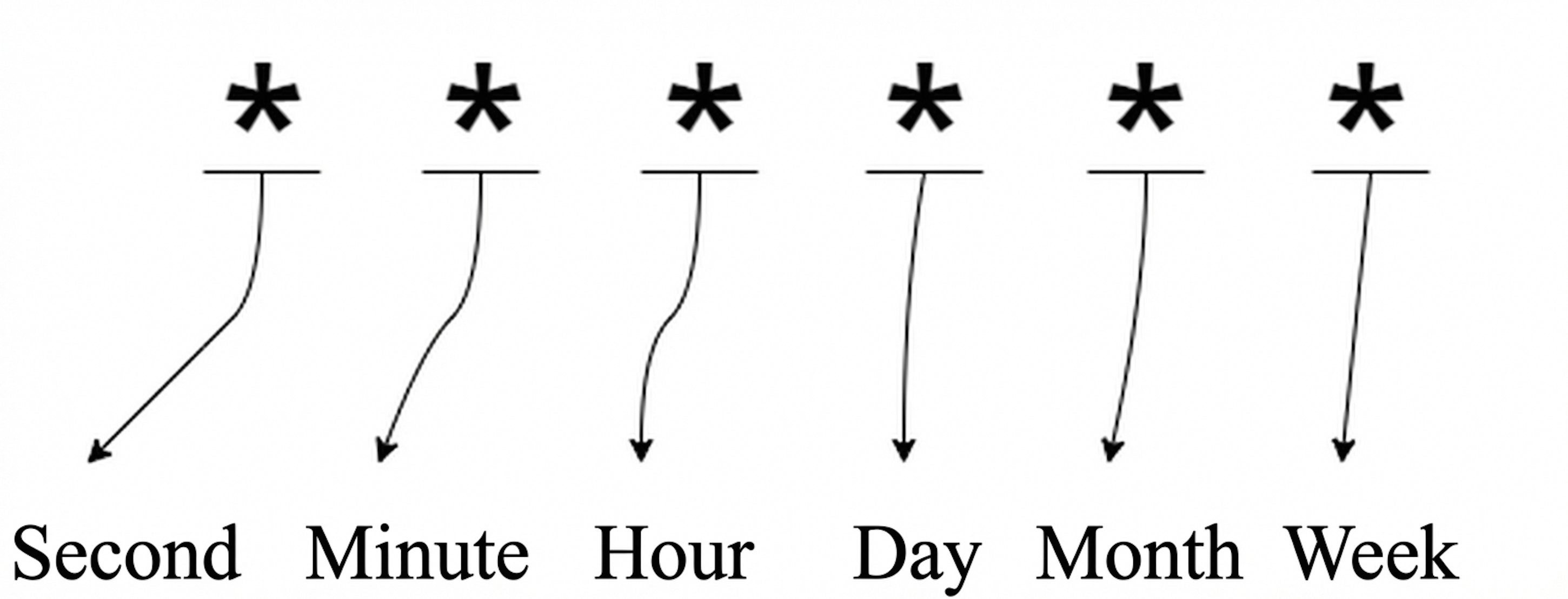
Field | Allowed values | Allowed special characters |
Second | 0-59 | * / , - |
Minute | 0-59 | * / , - |
Hour | 0-23 | * / , - |
Day of month | 1-31 | * / , - |
Month | 1-12 or JAN-DEC | * / , - |
Day of week | 0-6 or SUN-SAT | * / , - |
Special characters
Asterisk (*) An asterisk (*) represents all possible values. For example, 0 0 0 1 * * specifies 00:00 on the first day of every month.
Hyphen (-) A hyphen (-) specifies a range of values. For example, 0 0 12-14 * * * specifies 12:00, 13:00, and 14:00 every day.
Comma (,) A comma (,) specifies a list of values. For example, 0 0 12,14 * * * specifies 12:00 and 14:00 every day.
Slash (/) A slash (/) specifies an interval. For example, 0 */15 * * * * specifies the 0th, 15th, 30th, and 45th minute of every hour. You can also use a slash (/) with a hyphen (-). For example, 0 5-40/15 * * * * specifies every 15 minutes from the 5th minute to the 40th minute of every hour. The valid time points are 0:05, 0:20, and 0:35.
Response elements
Element | Type | Description | Example |
object | The response body. | ||
RequestId | string | The request ID. | 40325405-579C-4D82**** |
Message | string | The response message. | Create cron scaler for service [foo] successfully |
Examples
Success response
JSON format
{
  "RequestId": "40325405-579C-4D82****",
  "Message": "Create cron scaler for service [foo] successfully"
}
Error codes
See Error Codes for a complete list.
Release notes
See Release Notes for a complete list.