You can use frame capture to capture video frames based on your requirements and convert them to a specific format. This topic describes the parameters that you can configure to use frame capture. This topic also provides examples on how to perform frame capture.
Feature introduction
Frame capture refers to the process of extracting specific frame images from a video to save specific moments in the video as static images.
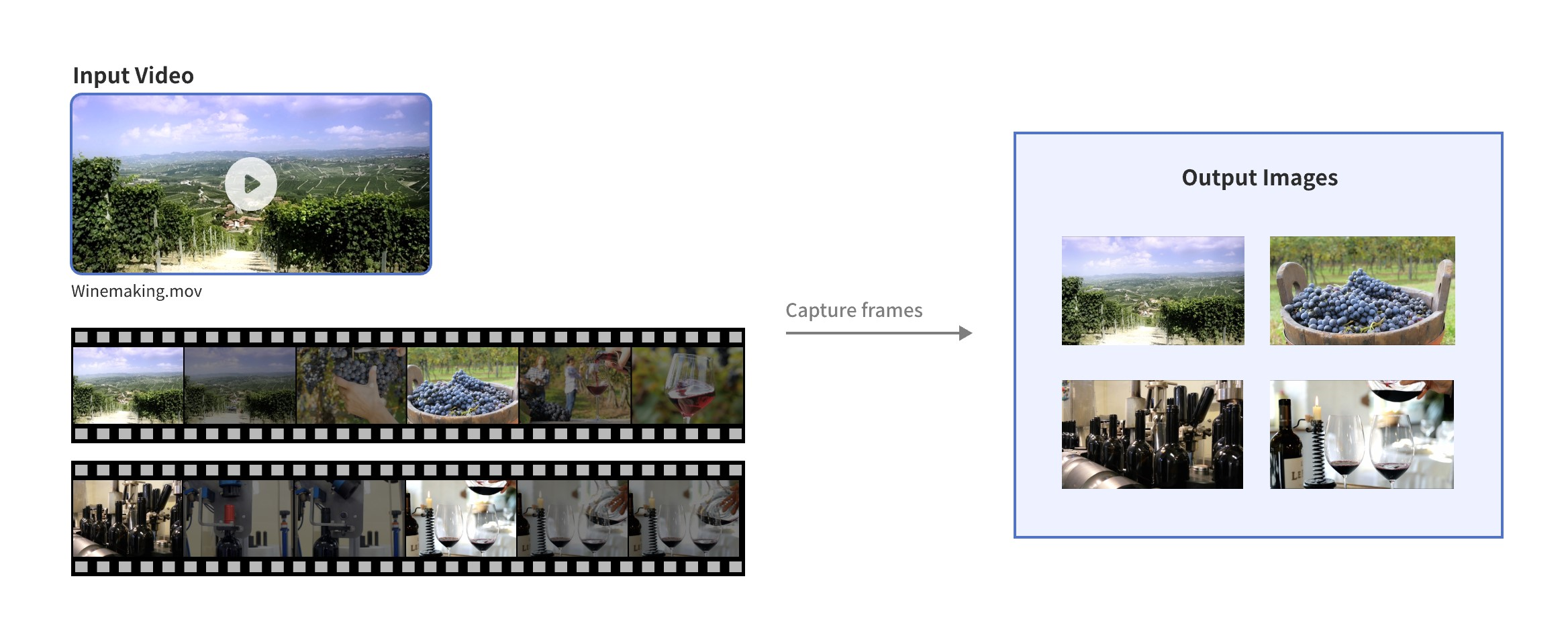
Scenarios
-
Snapshot: Save a specific moment in a video as a static image to create a poster.
-
Analysis: Extract keyframes for subsequent analysis, such as facial recognition and object detection.
-
Thumbnail creation: Create thumbnails or cover images for videos.
-
Playback summary: Select multiple key moments from a video to generate a concise summary or preview.
-
Screenshot sharing and recording: When users watch videos and want to save or share a frame they like, they can capture the video frame at that moment.
Usage
Prerequisites
-
You have activated the Intelligent Media Management (IMM) service.
-
In OSS, create a bucket, and upload the files to be processed to the bucket.
-
You have created and bound an IMM Project. The IMM Project and the bucket must be in the same region. You can bind a project in the OSS console or by calling an API.
-
You have granted the required permissions.
Video frame capture
You can use OSS SDKs only for Java, Python, or Go to run frame capture tasks in asynchronous mode.
When specifying the output path for video frame captures, do not include a file extension such as ".jpg". If you do, only the last snapshot is saved. Without an extension, the system automatically appends a sequence number (for example, "_0_1.jpg") to each output filename. To customize the sequence numbers, you can configure them using media processing variables.
Java
If you want to use OSS SDK for Java, make sure that the SDK version is V3.17.4 or later.
import com.aliyun.oss.ClientBuilderConfiguration;
import com.aliyun.oss.OSS;
import com.aliyun.oss.OSSClientBuilder;
import com.aliyun.oss.common.auth.CredentialsProviderFactory;
import com.aliyun.oss.common.auth.EnvironmentVariableCredentialsProvider;
import com.aliyun.oss.common.comm.SignVersion;
import com.aliyun.oss.model.AsyncProcessObjectRequest;
import com.aliyun.oss.model.AsyncProcessObjectResult;
import com.aliyuncs.exceptions.ClientException;

import java.util.Base64;

public class Demo {
    public static void main(String[] args) throws ClientException {
        // Specify the endpoint of the region where your bucket is located.
        String endpoint = "https://oss-cn-hangzhou.aliyuncs.com";
        // Specify the region ID. Example: cn-hangzhou.
        String region = "cn-hangzhou";
        // Obtain access credentials from environment variables. Before running this example, make sure the OSS_ACCESS_KEY_ID and OSS_ACCESS_KEY_SECRET environment variables are set.
        EnvironmentVariableCredentialsProvider credentialsProvider = CredentialsProviderFactory.newEnvironmentVariableCredentialsProvider();
        // Specify the bucket name. Example: examplebucket.
        String bucketName = "examplebucket";
        // Specify the name of the output object. Using a filename with an extension saves only the last snapshot. See the note above.
        String targetKey = "dest.png";
        // Specify the name of the source video object.
        String sourceKey = "src.mp4";

        // Create an OSSClient instance.
        // Call shutdown() when the OSSClient instance is no longer needed to release its resources.
        ClientBuilderConfiguration clientBuilderConfiguration = new ClientBuilderConfiguration();
        clientBuilderConfiguration.setSignatureVersion(SignVersion.V4);
        OSS ossClient = OSSClientBuilder.create()
                .endpoint(endpoint)
                .credentialsProvider(credentialsProvider)
                .clientConfiguration(clientBuilderConfiguration)
                .region(region)
                .build();

        try {
            // Build the style string for video processing and the parameters for video frame capture.
            String style = String.format("video/snapshots,f_jpg,w_100,h_100,scaletype_crop,inter_10000");
            // Build the asynchronous processing instruction.
            String bucketEncoded = Base64.getUrlEncoder().withoutPadding().encodeToString(bucketName.getBytes());
            String targetEncoded = Base64.getUrlEncoder().withoutPadding().encodeToString(targetKey.getBytes());
            String process = String.format("%s|sys/saveas,b_%s,o_%s/notify,topic_QXVkaW9Db252ZXJ0", style, bucketEncoded, targetEncoded);
            // Create an AsyncProcessObjectRequest object.
            AsyncProcessObjectRequest request = new AsyncProcessObjectRequest(bucketName, sourceKey, process);
            // Execute the asynchronous processing task.
            AsyncProcessObjectResult response = ossClient.asyncProcessObject(request);
            System.out.println("EventId: " + response.getEventId());
            System.out.println("RequestId: " + response.getRequestId());
            System.out.println("TaskId: " + response.getTaskId());

        } finally {
            // Shut down the OSSClient.
            ossClient.shutdown();
        }
    }
}
Python
If you want to use OSS SDK for Python, make sure that the SDK version is V2.18.4 or later.
# -*- coding: utf-8 -*-
import base64
import oss2
from oss2.credentials import EnvironmentVariableCredentialsProvider

def main():
    # Obtain the temporary access credentials from the environment variables. Before you run the sample code, make sure that the OSS_ACCESS_KEY_ID and OSS_ACCESS_KEY_SECRET environment variables are configured.
    auth = oss2.ProviderAuthV4(EnvironmentVariableCredentialsProvider())
    # Specify the endpoint of the region in which the bucket is located. For example, if the bucket is located in the China (Hangzhou) region, set the endpoint to https://oss-cn-hangzhou.aliyuncs.com.
    endpoint = 'https://oss-cn-hangzhou.aliyuncs.com'
    # Specify the ID of the Alibaba Cloud region in which the bucket is located. Example: cn-hangzhou.
    region = 'cn-hangzhou'

    # Specify the name of the bucket. Example: examplebucket.
    bucket = oss2.Bucket(auth, endpoint, 'examplebucket', region=region)

    # Specify the name of the video.
    source_key = 'src.mp4'

    # Specify the name of the captured frame.
    target_key = 'dest.png'

    # Specify frame capture parameters.
    animation_style = 'video/snapshots,f_jpg,w_100,h_100,scaletype_crop,inter_10000'

    # Create a processing instruction, in which the storage path, the Base64-encoded bucket name, and the captured frame names are included.
    bucket_name_encoded = base64.urlsafe_b64encode('examplebucket'.encode()).decode().rstrip('=')
    target_key_encoded = base64.urlsafe_b64encode(target_key.encode()).decode().rstrip('=')
    process = f"{animation_style}|sys/saveas,b_{bucket_name_encoded},o_{target_key_encoded}/notify,topic_QXVkaW9Db252ZXJ0"

    try:
        # Run the asynchronous processing task.
        result = bucket.async_process_object(source_key, process)
        print(f"EventId: {result.event_id}")
        print(f"RequestId: {result.request_id}")
        print(f"TaskId: {result.task_id}")
    except Exception as e:
        print(f"Error: {e}")


if __name__ == "__main__":
    main()
Go
If you want to use OSS SDK for Go, make sure that the SDK version is V3.0.2 or later.
package main

import (
    "encoding/base64"
    "fmt"
    "os"
    "github.com/aliyun/aliyun-oss-go-sdk/oss"
    "log"
)

func main() {
    // Obtain temporary access credentials from the environment variables. Before you run the sample code, make sure that the OSS_ACCESS_KEY_ID and OSS_ACCESS_KEY_SECRET environment variables are configured.
    provider, err := oss.NewEnvironmentVariableCredentialsProvider()
    if err != nil {
    fmt.Println("Error:", err)
    os.Exit(-1)
    }
    // Create an OSSClient instance.
    // Specify the endpoint of the region in which the bucket is located. For example, if the bucket is located in the China (Hangzhou) region, set the endpoint to https://oss-cn-hangzhou.aliyuncs.com. Specify your actual endpoint.
    // Specify the ID of the Alibaba Cloud region in which the bucket is located. Example: cn-hangzhou.
    client, err := oss.New("https://oss-cn-hangzhou.aliyuncs.com", "", "", oss.SetCredentialsProvider(&provider), oss.AuthVersion(oss.AuthV4), oss.Region("cn-hangzhou"))
    if err != nil {
    fmt.Println("Error:", err)
    os.Exit(-1)
    }
    // Specify the name of the bucket. Example: examplebucket.
    bucketName := "examplebucket"

    bucket, err := client.Bucket(bucketName)
    if err != nil {
    fmt.Println("Error:", err)
    os.Exit(-1)
    }

    // Specify the name of the source video.
    sourceKey := "src.mp4"
    // Specify the name of the captured frame.
    targetKey := "dest.png"

    // Specify frame capture parameters.
    animationStyle := "video/snapshots,f_jpg,w_100,h_100,scaletype_crop,inter_10000"

    // Create a processing instruction, in which the storage path, the Base64-encoded bucket name, and the captured frame names are included.
    bucketNameEncoded := base64.URLEncoding.EncodeToString([]byte(bucketName))
    targetKeyEncoded := base64.URLEncoding.EncodeToString([]byte(targetKey))
    process := fmt.Sprintf("%s|sys/saveas,b_%v,o_%v/notify,topic_QXVkaW9Db252ZXJ0", animationStyle, bucketNameEncoded, targetKeyEncoded)

    // Execute the asynchronous processing tasks.
    result, err := bucket.AsyncProcessObject(sourceKey, process)
    if err != nil {
    log.Fatalf("Failed to async process object: %s", err)
    }

    fmt.Printf("EventId: %s\n", result.EventId)
    fmt.Printf("RequestId: %s\n", result.RequestId)
    fmt.Printf("TaskId: %s\n", result.TaskId)
}
Parameters
Action: video/snapshots
The following table describes the parameters that you can configure when you use frame capture.
Parameter | Type | Required | Description |
ss |
int |
No |
The point in time of the video at which frame capture begins. Unit: milliseconds. Valid values:
|
f | string | Yes | The format of the return value. Valid values:
|
|
m |
string |
No |
The frame capture mode. The default is
|
|
thr |
int |
No |
The threshold for frame capture in dhash mode. A larger value results in fewer captured frames. The value must be an integer from 0 to 100. The default is 0. Note
This parameter is valid only when The dhash mode is sensitive to this threshold. We recommend setting this parameter to a value no greater than 25 and adjusting it based on your specific use case. |
num |
int |
No |
The number of frames to capture. A value of 0 (the default) means the number of frames is not limited. The behavior of the default value varies based on the frame capture mode:
Important
The actual number of captured frames might be less than the specified value due to the video duration and other frame capture parameters. |
inter |
int |
No |
The interval between frame captures, in milliseconds. A value of 0 (the default) captures all video frames. Note If the value of this parameter is less than the frame interval of the video (the reciprocal of the frame rate), frames are captured from the video based on the frame interval of the video. |
w | int | No | The width of the captured frame. Unit: pixel. Valid values: 32 to 4096. By default, the width of the frame equals the width of the video. |
h | int | No | The height of the captured frame. Unit: pixel. Valid values: 32 to 4096. By default, the height of the frame equals the height of the video. |
pw |
int |
No |
The percentage of the width of the captured frame to the width of the video. Valid values: (0, 200]. Default value: 100. Note
If you specify both w and pw, the system ignores pw. |
ph |
int |
No |
The percentage of the height of the captured frame to the height of the video. Valid values: (0, 200]. Default value: 100. Note
If you specify both h and ph, the system ignores ph. |
scaletype | string | No | The resizing mode. Valid values:
|
This action also uses the sys/saveas and notify parameters. For more information, see save as and message notification.
Related APIs
The preceding operations use API calls. For advanced customization, you can make REST API requests directly. This requires you to manually calculate the signature. For information about calculating the Authorization header, see Signature Version 4 (recommended).
Before calling the API, you must bind a bucket to your IMM project. For more information, see Bind a bucket.
Capture a frame every 10s for AI
An image frame is captured every 10 seconds for AI model training or inference. The resolution of the output image is limited to 512x512.
Information about the video and captured frames
-
Source file
Video name: example.mkv
-
Message notification
-
MNS topic: example-mns-topic
-
-
Output configuration
-
Information about captured frames
Format: JPG
Interval for frame capture: 10s
-
Output resolution: 512x512
-
Scaling method: Resize and crop
Image storage path
oss://outbucket/outobjprefix-%d.jpg
-
Example
// Capture frames from the example.mkv file.
POST /example.mkv?x-oss-async-process HTTP/1.1
Host: video-demo.oss-cn-hangzhou.aliyuncs.com
Date: Fri, 28 Oct 2022 06:40:10 GMT
Authorization: OSS4-HMAC-SHA256 Credential=LTAI********************/20250417/cn-hangzhou/oss/aliyun_v4_request,Signature=a7c3554c729d71929e0b84489addee6b2e8d5cb48595adfc51868c299c0c218e

x-oss-async-process=video/snapshots,f_jpg,w_512,h_512,scaletype_crop,inter_10000|sys/saveas,b_b3V0YnVja2V0,o_b3V0b2JqcHJlZml4LXtpbmRleH0ue2F1dG9leHR9Cg/notify,topic_ZXhhbXBsZS1tbnMtdG9waWMK
Capture 5 frames at a 4s interval
Frame capture information
-
Source file
-
File name: example.mkv
-
-
Message notification
-
MNS topic: example-mns-topic
-
-
Output configuration
-
Frame capture details
-
Format: png
-
Start time: 11s
-
Interval: 4s
-
Number of frames: 5
-
Output resolution: Half the width and height of the source video
-
-
File storage path
-
png file: oss://outbucket/outobjprefix-%d.png
-
-
Example request
// Capture frames from the example.mkv file.
POST /example.mkv?x-oss-async-process HTTP/1.1
Host: video-demo.oss-cn-hangzhou.aliyuncs.com
Date: Fri, 28 Oct 2022 06:40:10 GMT
Authorization: OSS4-HMAC-SHA256 Credential=LTAI********************/20250417/cn-hangzhou/oss/aliyun_v4_request,Signature=a7c3554c729d71929e0b84489addee6b2e8d5cb48595adfc51868c299c0c218e

x-oss-async-process=video/snapshots,ss_11000,f_png,pw_50,ph_50,num_5|sys/saveas,b_b3V0YnVja2V0,o_b3V0b2JqcHJlZml4LXtpbmRleH0ue2F1dG9leHR9Cg/notify,topic_ZXhhbXBsZS1tbnMtdG9waWMK
Extract event keyframes from a video
Use the dhash algorithm to analyze content similarity between video frames and extract those with significant visual changes as event keyframes, based on a specified threshold.
Adjust the threshold parameter (thr) for your specific use case.
Frame capture information
-
Source file
-
File name: example.mkv
-
-
Message notification
-
MNS topic: example-mns-topic
-
-
Output configuration
-
Frame capture details
-
Frame capture mode: dhash
-
Format: jpg
-
Threshold: 15
-
Interval: 1s
-
Output resolution: Same as the source video
-
-
File storage path
-
jpg file: oss://outbucket/outobjprefix-%d.jpg
-
-
Example request
// Capture frames from the example.mkv file.
POST /example.mkv?x-oss-async-process HTTP/1.1
Host: video-demo.oss-cn-hangzhou.aliyuncs.com
Date: Fri, 28 Oct 2022 06:40:10 GMT
Authorization: OSS4-HMAC-SHA256 Credential=LTAI********************/20250417/cn-hangzhou/oss/aliyun_v4_request,Signature=a7c3554c729d71929e0b84489addee6b2e8d5cb48595adfc51868c299c0c218e

x-oss-async-process=video/snapshots,m_dhash,f_jpg,inter_1000,thr_15|sys/saveas,b_b3V0YnVja2V0,o_b3V0b2JqcHJlZml4LXtpbmRleH0ue2F1dG9leHR9Cg/notify,topic_ZXhhbXBsZS1tbnMtdG9waWMK
Extract 5 representative keyframes for inference
Use the dhash algorithm to analyze content similarity between video frames and extract the five frames that show the most significant visual changes.
Frame capture information
-
Source file
-
File name: example.mkv
-
-
Message notification
-
MNS topic: example-mns-topic
-
-
Output configuration
-
Frame capture details
-
Frame capture mode: dhash
-
Format: jpg
-
Number of frames: 5
-
Interval: 1s
-
Output resolution: Same as the source video
-
-
File storage path
-
jpg file: oss://outbucket/outobjprefix-%d.jpg
-
-
Example request
// Capture frames from the example.mkv file.
POST /example.mkv?x-oss-async-process HTTP/1.1
Host: video-demo.oss-cn-hangzhou.aliyuncs.com
Date: Fri, 28 Oct 2022 06:40:10 GMT
Authorization: OSS4-HMAC-SHA256 Credential=LTAI********************/20250417/cn-hangzhou/oss/aliyun_v4_request,Signature=a7c3554c729d71929e0b84489addee6b2e8d5cb48595adfc51868c299c0c218e

x-oss-async-process=video/snapshots,m_dhash,f_jpg,inter_1000,num_5|sys/saveas,b_b3V0YnVja2V0,o_b3V0b2JqcHJlZml4LXtpbmRleH0ue2F1dG9leHR9Cg/notify,topic_ZXhhbXBsZS1tbnMtdG9waWMK
Extract all IDR frames from a video
Frame capture information
-
Source file
-
File name: example.mkv
-
-
Message notification
-
MNS topic: example-mns-topic
-
-
Output configuration
-
Frame capture details
-
Frame capture mode: key
-
Format: jpg
-
Output resolution: Same as the source video
-
-
File storage path
-
jpg file: oss://outbucket/outobjprefix-%d.jpg
-
-
Example request
// Capture frames from the example.mkv file.
POST /example.mkv?x-oss-async-process HTTP/1.1
Host: video-demo.oss-cn-hangzhou.aliyuncs.com
Date: Fri, 28 Oct 2022 06:40:10 GMT
Authorization: OSS4-HMAC-SHA256 Credential=LTAI********************/20250417/cn-hangzhou/oss/aliyun_v4_request,Signature=a7c3554c729d71929e0b84489addee6b2e8d5cb48595adfc51868c299c0c218e

x-oss-async-process=video/snapshots,m_key,f_jpg|sys/saveas,b_b3V0YnVja2V0,o_b3V0b2JqcHJlZml4LXtpbmRleH0ue2F1dG9leHR9Cg/notify,topic_ZXhhbXBsZS1tbnMtdG9waWMK
Capture 10 frames at even intervals
Frame capture information
-
Source file
-
File name: example.mkv
-
-
Message notification
-
MNS topic: example-mns-topic
-
-
Output configuration
-
Frame capture details
-
Frame capture mode: avg
-
Format: jpg
-
Number of frames: 10
-
Output resolution: Same as the source video
-
-
File storage path
-
jpg file: oss://outbucket/outobjprefix-%d.jpg
-
-
Example request
// Capture frames from the example.mkv file.
POST /example.mkv?x-oss-async-process HTTP/1.1
Host: video-demo.oss-cn-hangzhou.aliyuncs.com
Date: Fri, 28 Oct 2022 06:40:10 GMT
Authorization: OSS4-HMAC-SHA256 Credential=LTAI********************/20250417/cn-hangzhou/oss/aliyun_v4_request,Signature=a7c3554c729d71929e0b84489addee6b2e8d5cb48595adfc51868c299c0c218e

x-oss-async-process=video/snapshots,m_avg,f_jpg,num_10|sys/saveas,b_b3V0YnVja2V0,o_b3V0b2JqcHJlZml4LXtpbmRleH0ue2F1dG9leHR9Cg/notify,topic_ZXhhbXBsZS1tbnMtdG9waWMK
Extract an audio cover image
Some audio files contain embedded cover art. You can use the frame capture feature to extract the cover art.
Frame capture information
-
Source file
-
File name: example.flac
-
-
Message notification
-
MNS topic: example-mns-topic
-
-
Output configuration
-
Frame capture details
-
Format: jpg
-
Output resolution: Same as the embedded cover art
-
-
File storage path
-
jpg file: oss://outbucket/cover.jpg
-
-
Example request
// Capture frames from the example.flac file.
POST /example.flac?x-oss-async-process HTTP/1.1
Host: video-demo.oss-cn-hangzhou.aliyuncs.com
Date: Fri, 28 Oct 2022 06:40:10 GMT
Authorization: OSS4-HMAC-SHA256 Credential=LTAI********************/20250417/cn-hangzhou/oss/aliyun_v4_request,Signature=a7c3554c729d71929e0b84489addee6b2e8d5cb48595adfc51868c299c0c218e

x-oss-async-process=video/snapshots,f_jpg|sys/saveas,b_b3V0YnVja2V0,o_Y292ZXIuanBnCg/notify,topic_ZXhhbXBsZS1tbnMtdG9waWMK
Billing
Using the video framing feature invokes the IMM service and generates the following billable items in both OSS and IMM:
-
OSS: For detailed pricing, see OSS Pricing
API
Billable item
Description
GetObject
GET request
Fees are based on the number of successful requests.
outbound internet traffic fee
Calling the
GetObjectoperation with a public endpoint (for example,oss-cn-hangzhou.aliyuncs.com) or a transfer acceleration endpoint (for example,oss-accelerate.aliyuncs.com) incurs an outbound internet traffic fee. This fee is based on the amount of data transferred.Infrequent Access data retrieval
Retrieving data from the Infrequent Access storage class incurs a data retrieval fee based on the amount of retrieved data.
archive direct read data retrieval
Reading an archived object from a bucket with archive direct read enabled incurs a data retrieval fee based on the amount of retrieved data.
Transfer Acceleration
If Transfer Acceleration is enabled, accessing your bucket via a transfer acceleration domain name incurs a Transfer Acceleration fee based on the amount of data transferred.
PutObject
PUT request
Fees are based on the number of successful requests.
storage fee
The storage fee is based on the object's storage class, size, and storage duration.
HeadObject
GET request
Fees are based on the number of successful requests.
-
IMM: For detailed pricing, see IMM billable items
ImportantEffective 11:00 (UTC+8) on July 28, 2025, the price for the IMM video framing service will be reduced. This change applies to the
VideoFramingbillable item. For more information, see Announcement on Price Adjustment of IMM.API
Billable item
Description
CreateMediaConvertTask
VideoFraming
The video framing fee is based on the number of successfully captured frames.
Usage notes
Frame capture supports only asynchronous processing (x-oss-async-process).
Frame capture may fail or an incorrect number of frames may be generated due to the corruption of the video timestamp or code stream.
-
Anonymous access will be denied.
FAQ
Does frame capture filter out black screens?
No, frame capture does not filter out black screens.
Does frame capture generate thumbnail videos?
No, frame capture does not generate thumbnail videos. If you want to generate thumbnail videos, you can use the video-to-animated-image conversion feature. For more information, see Video-to-animated-image conversion.
Does frame capture impose limits on video formats?
No. Frame capture supports all mainstream video formats.
In fast mode, if the frame requested by using frame capture is in the first second, is the actual captured frame close to the latest keyframe before the first second?
Yes.
What do I do if a gray scale image instead of a specific frame is displayed as the cover of the video that I uploaded?
This issue may occur because the video bitrate is excessively high. To prevent the issue, you can transcode the video in advance.