The access frequency of data stored in OSS typically decreases over time. Storing cold data in the high-cost Standard storage class is not economical. Manually cleaning up large numbers of log files or backups is also inefficient. Lifecycle management lets you create automated rules. These rules can automatically transition objects to lower-cost storage classes, such as Infrequent Access or Archive, after a specified period, for example, 30 days. The rules can also delete objects. This helps you manage the entire lifecycle of your data intelligently and at a low cost.
How it works
Lifecycle management uses user-defined rules to perform automated operations on objects in a bucket. OSS loads a lifecycle rule within 24 hours after it is created. After the rule is loaded, OSS scans for and executes matching rules at a fixed time each day, typically after 00:00 (UTC) the next day, which is 08:00 (UTC+8).
A lifecycle rule consists of three main parts:
Objects to manage: Define which objects the rule applies to. You can filter target objects based on an object prefix (Prefix), object tag (Tag), or object size (ObjectSize).
Lifecycle rules do not support wildcard characters, suffix matching, or regular expressions.
Actions to perform: Define what to do with the filtered objects. The main actions include the following:
Storage class transition (Transition): Transition objects to lower-cost storage classes such as Infrequent Access, Archive, or Cold Archive.
Expiration and deletion (Expiration): Delete objects after they reach a specified lifecycle period.
Fragment cleanup (AbortMultipartUpload): Automatically delete parts from incomplete multipart uploads after a specified time.
Trigger policies: Define the conditions that trigger actions on the filtered objects:
Last modified time (Last-Modified-Time): Transition or delete objects based on their last modified time. This is suitable for data with a clear lifecycle, such as logs and backups. You can automatically transition storage classes or delete objects to save costs.
Last access time (Last-Access-Time): After you enable the access tracking feature, you can intelligently switch storage classes based on the last access time of an object. This is useful for scenarios with unpredictable access patterns, such as a material library. The storage class can be downgraded when data becomes cold and automatically restored when the data is accessed.
For more information about how to configure lifecycle policies, see Lifecycle configuration elements.
Configuration scenarios
Automatically clean up expired log files
Servers generate many logs every day and upload them to a specified directory. You can configure a lifecycle rule based on the last modified time to delete all objects in a bucket after a specified number of days. This releases storage space and reduces storage costs.
Use automatic storage tiering for hot and cold data
For data with uncertain access frequency, such as website images, online videos, and documents, you can enable the access tracking feature. Then, you can use a lifecycle rule based on the last access time to implement intelligent data tiering. The system automatically transitions cold data to the Infrequent Access, Archive, or Cold Archive storage class based on actual access patterns. This achieves intelligent tiering and cost optimization.
Automatically clean up previous versions
After you enable versioning, overwrite and delete operations on data are saved as previous versions. When a bucket accumulates many previous versions or expired delete markers, you can use a lifecycle rule based on the last modified time together with versioning to reduce storage costs. Objects are automatically deleted after a specified time. This reduces storage costs and improves the performance of listing objects.
Automatically clean up fragments from multipart uploads
If a multipart upload of a large file is interrupted, the system retains the unmerged parts, which continue to incur charges. You can configure a lifecycle rule to automatically clean up incomplete parts after a specified time to avoid unnecessary resource usage.
In addition to the preceding scenarios, you can implement more fine-grained data management policies. For more information, see Lifecycle configuration examples. You can combine different rules to achieve fine-grained management of data in your bucket as needed.
Multiple lifecycle rules
To ensure that multiple lifecycle rules take effect as expected, you need to understand two core mechanisms: rule execution priority and the configuration overwrite mechanism.
Rule execution priority
You can configure multiple lifecycle rules for the same bucket. The rules are independent, so the same object might match multiple rules. The final action is determined based on the results of all matching rules.
When multiple rules match the same object at the same time, they are executed in the following order of priority: Delete Object > Transition to Deep Cold Archive > Transition to Cold Archive > Transition to Archive > Transition to Infrequent Access > Transition to Standard.
The delete action always has a higher priority than storage class transitions. Set the time for delete rules to be longer than the time for transition rules. This prevents objects from being deleted before the transition is complete.
Execution example
Assume you specify the following two lifecycle rules, and both rules match the same object.
Rule 1: Specifies that objects last modified more than 365 days ago are transitioned to the Infrequent Access storage class.
Rule 2: Specifies that objects last modified more than 365 days ago are deleted.
Result: The object that matches the rules will be deleted more than 365 days after its last modification time.
Configuration overwrite mechanism
When you use the console, you do not need to worry about configuration overwrites. Each time you add or modify a rule, the console automatically reads the current configuration, merges the changes, and submits the result. This prevents accidental loss of existing rules. However, be careful when you configure lifecycle rules using ossutil, an SDK, or by directly calling the API. Each PutBucketLifecycle call completely overwrites all existing lifecycle configurations for the bucket. If you submit a new rule without including the existing ones, the existing rules will be deleted and will no longer be effective.
Example
If you want to add a new rule to your existing rules, perform the following steps:
Retrieve all currently effective lifecycle rules (for example, Rule 1).
Add the new rule (for example, Rule 2).
Resubmit the complete configuration that includes all rules (Rule 1 + Rule 2).
Note: If you submit only the configuration containing the new rule (Rule 2) without including the existing rule (Rule 1), Rule 1 will be deleted and will no longer be effective.
Going live
To use lifecycle management safely and efficiently in a production environment, we recommend the following:
Test before you deploy: Create rules in a test bucket first. Verify that their behavior is exactly as expected before applying them to a production bucket.
Use delete rules with caution: For rules configured with expiration and deletion, set the prefix precisely. This prevents the rule's scope from expanding and accidentally deleting important data.
Enable versioning as a safeguard: For critical business data, enable the versioning feature for the bucket. This way, even if the current version of an object is accidentally deleted by a lifecycle rule, you can still recover the data from a previous version.
Use tiered transitions to avoid extra fees: When designing a storage class transition policy, ensure that the trigger time for a later stage is after the sum of the trigger time of the previous stage and the minimum storage duration of that storage class. This avoids fees from premature transitions.
Incorrect example: Standard
30 days-> Infrequent Access40 days-> Archive Storage. This configuration causes the object to be stored in the IA storage class for only 10 days (< 30 days) before being transitioned again. This incurs a fee.Correct example: Standard
30 days-> Infrequent Access90 days-> Archive Storage. (The object is transitioned to the IA storage class after 30 days. It remains in the IA storage class for 60 days before being transitioned to Archive Storage, for a total of 90 days).
Billing
Configuring lifecycle rules is free of charge. Fees are incurred when a rule is executed and when the storage state changes as a result.
Request fees: When a lifecycle rule performs a storage class transition, deletes an object, or deletes a part, the system initiates a
Put-type request. Request fees are charged based on the number of requests. For more information about billing rules, see Lifecycle fee description.For buckets containing many small files, this fee can be significant. Evaluate this before you configure rules.
Storage fees: After an object is transitioned to a new storage class, it is billed at the unit price of the new class.
ImportantStorage classes such as Infrequent Access, Archive, and Cold Archive have minimum storage duration requirements (for example, 30 days for Infrequent Access and 60 days for Archive). If a lifecycle rule deletes or transitions an object before the minimum storage duration is met, you must pay for the remaining storage duration. To avoid conditional capacity fees for storage shorter than the specified duration due to transitions or deletions, see How do I avoid capacity fees for storage shorter than the specified duration?. Ensure that the minimum storage duration is met before transitioning or deleting.
Data retrieval fees: Lifecycle rules themselves do not incur data retrieval fees. However, when you access objects that have been transitioned to storage classes such as Infrequent Access or Archive, corresponding data retrieval fees are incurred.
Reading an Infrequent Access (IA) object directly incurs data retrieval fees.
Reading an Archive object directly incurs data retrieval capacity fees for real-time access.
Restoring an Archive object incurs Put-type request fees and data retrieval capacity fees.
Restoring a Cold Archive or Deep Cold Archive object incurs retrieval request fees, retrieval capacity fees, and temporary restored capacity fees.
ImportantFor Cold Archive and Deep Cold Archive objects, the fee varies depending on the retrieval priority you choose. A higher priority results in a higher fee.
FAQ
Bucket with versioning disabled
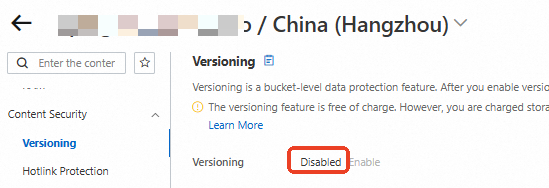
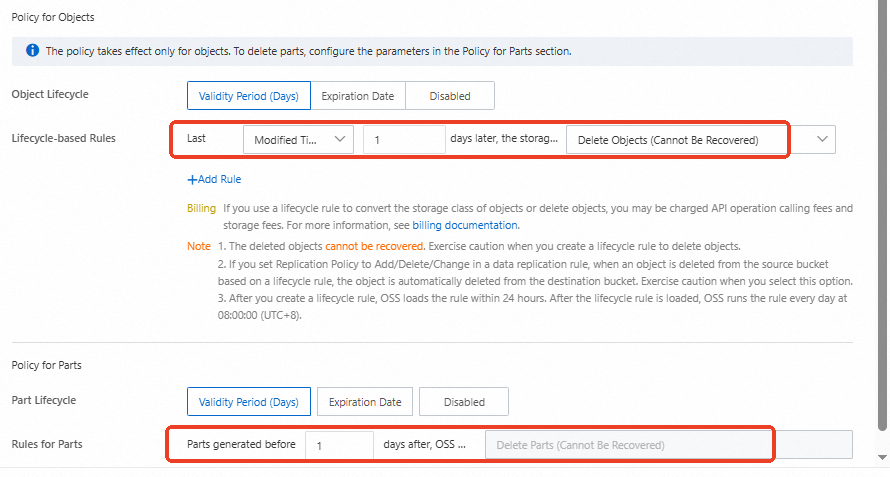
For a bucket with versioning disabled, you only need to configure one lifecycle rule to automatically and quickly clean up all files and parts from incomplete multipart uploads.
Log on to the OSS console, go to the Bucket List page, and find the target bucket.
In the navigation pane on the left, choose , and confirm that versioning is disabled for the bucket.
In the navigation pane on the left, choose . Set a lifecycle rule to automatically delete all files in the bucket 1 day after their last modification. Also, automatically clean up parts from incomplete multipart uploads that were created more than 1 day ago.
Bucket with versioning enabled
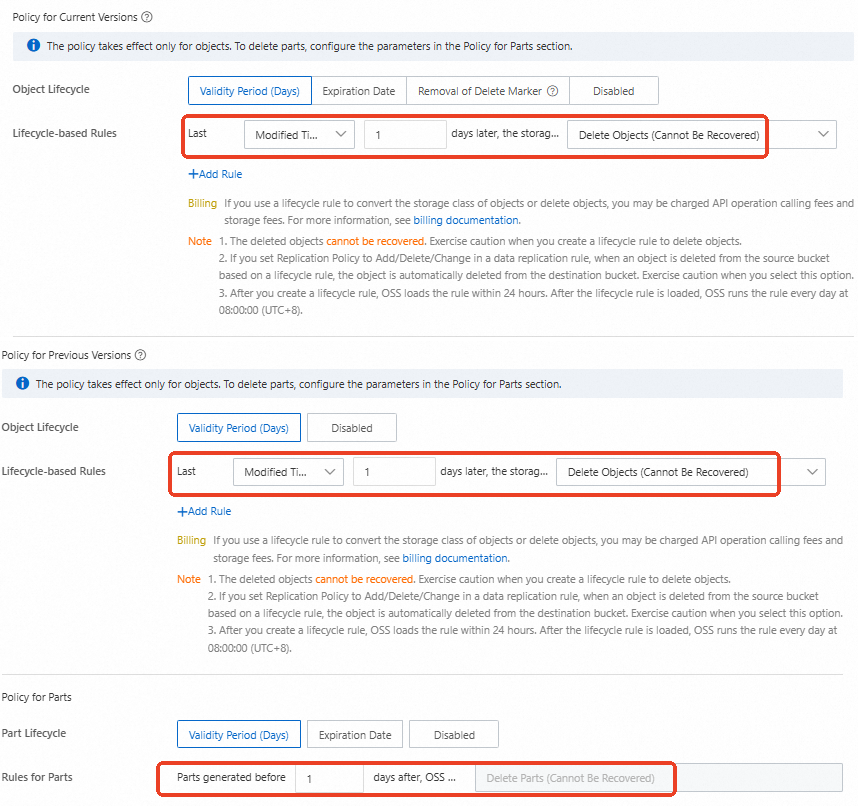
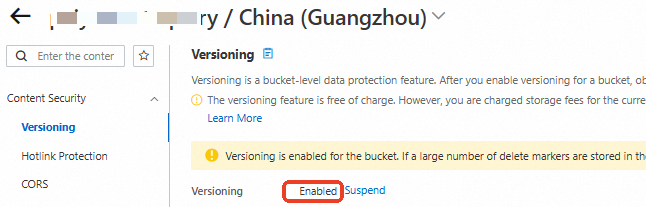
After versioning is enabled for a bucket, it generates current version objects, previous version objects, parts from incomplete multipart uploads, and delete markers. You only need to configure one lifecycle rule to automatically and quickly clean up all of these.
Log on to the OSS console, go to the Bucket List page, and find the target bucket.
In the navigation pane on the left, choose , and confirm that versioning is enabled for the bucket.
In the navigation pane on the left, choose . Set a lifecycle rule to automatically delete all current and previous version objects in the bucket 1 day after their last modification. Also, automatically clean up parts from incomplete multipart uploads that were created more than 1 day ago. This rule also cleans up delete markers.