Install the OSS C++ SDK to manage buckets, upload and download objects, process data, and work with images in your C++ applications.
Prerequisites
Before you begin, make sure you have:
A compiler that supports C++11 or later
Visual Studio 2013 or later
GCC 4.8 or later
Clang 3.3 or later
Download the SDK
Choose one of the following:
Install the SDK
The installation process has two phases:
Build and install the SDK — Install CMake, install dependencies, compile, and install the SDK libraries.
Compile your application — Link your application against the installed SDK libraries.
The following sections cover Phase 1 for each supported platform. Phase 2 (compiling your application) is described at the end of the Linux section and applies to all platforms.
Linux
1. Install CMake
The following steps use CMake 3.21.1 as an example. Replace the version number to install a different version.
Download the CMake source package.
wget https://cmake.org/files/v3.21/cmake-3.21.1.tar.gzDecompress the package.
tar xvf cmake-3.21.1.tar.gzGo to the CMake directory.
cd cmake-3.21.1/Configure the build.
./bootstrapCompile CMake.
makeInstall CMake.
sudo make install
2. Configure the PATH
Open the bash configuration file.
vim .bashrcAdd the following lines.
   CMAKE_PATH=/usr/local/cmake
   export PATH=$CMAKE_PATH/bin:$PATH
Apply the changes.
source .bashrcVerify the installation.
which cmake
3. Install dependencies
yum -y install libcurl-devel openssl-devel unzip4. Build and install the SDK
Download the SDK package.
wget -O aliyun-oss-cpp-sdk-master.zip "https://github.com/aliyun/aliyun-oss-cpp-sdk/archive/refs/tags/1.10.0.zip"Decompress the package.
unzip aliyun-oss-cpp-sdk-master.zipGo to the SDK directory.
cd aliyun-oss-cpp-sdk-masterCreate the build directory and generate the build system.
   mkdir build
   cd build
   cmake ..
Compile and install.
   make
   make install
5. Compile your application
Link your application against the SDK with the following flags:
g++ test.cpp -std=c++11 -fno-rtti -lalibabacloud-oss-cpp-sdk -lcurl -lcrypto -lpthread -o test.binThe C++ SDK disables Run-Time Type Information (RTTI) by default. When compiling with g++, always include -std=c++11, -fno-rtti, -lalibabacloud-oss-cpp-sdk, -lcurl, -lcrypto, and -lpthread.
Windows
1. Install CMake and generate project files
Install CMake 3.1 or later, then open Command Prompt, go to the SDK directory, and run:
mkdir build
cd build
cmake ..
To target the x64 architecture, use:
cmake -A x64 ..The following figure shows an example of the cmake output.
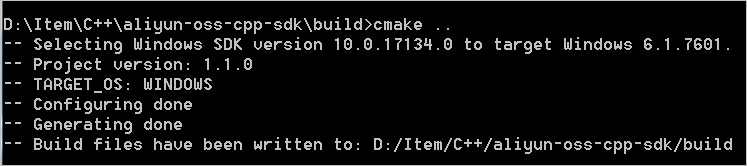
The SDK package does not include alibabacloud-oss-cpp-sdk.sln. Generate the project file using the cmake command as shown above.
2. Build and install the SDK
Open Developer Command Prompt for Visual Studio as an administrator, go to the build directory, and run:
msbuild ALL_BUILD.vcxproj
msbuild INSTALL.vcxproj
Alternatively, open alibabacloud-oss-cpp-sdk.sln in Visual Studio and build the solution.
Android
Build the SDK in a Linux environment using the android-ndk-r16 toolchain. Install the libcurl and OpenSSL dependency libraries to $ANDROID_NDK/sysroot, then run:
cmake -DCMAKE_TOOLCHAIN_FILE=$ANDROID_NDK/build/cmake/android.toolchain.cmake  \
      -DANDROID_NDK=$ANDROID_NDK    \
      -DANDROID_ABI=armeabi-v7a     \
      -DANDROID_TOOLCHAIN=clang     \
      -DANDROID_PLATFORM=android-21 \
      -DANDROID_STL=c++_shared ..
make
macOS
Install dependencies with Homebrew, then specify the OpenSSL installation path in the cmake command. The following example uses OpenSSL installed at /usr/local/Cellar/openssl/1.0.2p:
cmake -DOPENSSL_ROOT_DIR=/usr/local/Cellar/openssl/1.0.2p  \
      -DOPENSSL_LIBRARIES=/usr/local/Cellar/openssl/1.0.2p/lib  \
      -DOPENSSL_INCLUDE_DIRS=/usr/local/Cellar/openssl/1.0.2p/include/ ..
make
Compilation options
Use compilation options to customize the build for your scenario. The format is:
cmake -D${OptionName}=ON|OFF ...| Option | Description | Default | Values |
|---|---|---|---|
BUILD_SHARED_LIBS | Builds a dynamic library. When ON, both static and dynamic libraries are built; the static library gets a -static name suffix. | OFF | ON | OFF |
ENABLE_RTTI | Enables Run-Time Type Information (RTTI). | ON | ON | OFF |
OSS_DISABLE_BUCKET | Excludes bucket management interfaces from the build. Set to ON to reduce binary size. | OFF | ON | OFF |
OSS_DISABLE_LIVECHANNEL | Excludes LiveChannel interfaces from the build. Set to ON to reduce binary size. | OFF | ON | OFF |
OSS_DISABLE_RESUAMABLE | Excludes resumable transfer interfaces from the build. Set to ON to reduce binary size. | OFF | ON | OFF |
OSS_DISABLE_ENCRYPTION | Excludes client-side encryption interfaces from the build. Set to ON to reduce binary size. | OFF | ON | OFF |
Example: build a dynamic library
cmake -DBUILD_SHARED_LIBS=ON ..Example: reduce binary size by excluding unused feature groups
cmake -DOSS_DISABLE_LIVECHANNEL=ON -DOSS_DISABLE_ENCRYPTION=ON ..