Deploy a hosted inference service for text vectorization, reranking, or multimodal vector models. Each deployed service exposes a public and private API endpoint you can call directly via curl or integrate into your application using the Python SDK.
Available models
Text vectorization
Text vectorization models convert text into dense vector representations for use in semantic search, retrieval-augmented generation (RAG), and vector search applications.
| Model | Source | Languages | Max input (tokens) | Output dimensions |
|---|---|---|---|---|
| OpenSearch Text Vectorization Service-001 | AI Search Open Platform | 40+ | 300 | 1536 |
| OpenSearch General Text Vectorization Service-002 | AI Search Open Platform | 100+ | 8192 | 1024 |
| OpenSearch Text Vectorization Service-Chinese-001 | AI Search Open Platform | Chinese | 1024 | 768 |
| OpenSearch Text Vectorization Service-English-001 | AI Search Open Platform | English | 512 | 768 |
| GTE Multilingual General Text Vector Model | ModelScope | 70+ | 8192 | — |
| Custom models trained in Model customization | Model customization | — | — | — |
For API usage, see Text embedding API.
Reranking
Reranking models are cross-encoders that jointly process a query and a set of candidate documents to score each result by semantic relevance. Use a reranking model as a second stage after initial retrieval to improve the quality of your search results — for example, after a first-pass vector search in a RAG pipeline.
| Model | Source | Languages | Max input (tokens) |
|---|---|---|---|
| BGE Reranking Model | AI Search Open Platform | Chinese, English | 512 (query + document) |
| OpenSearch Self-developed Reranking Model | AI Search Open Platform | Chinese, English | 512 (query + document) |
The OpenSearch Self-developed Reranking Model is trained on multi-industry datasets and ranks results by semantic relevance between query and document.
For API usage, see Ranking service API.
Multimodal vector
Multimodal vector models support cross-modal retrieval — search by text to find images, or search by image to find text.
| Model | Source |
|---|---|
| CLIP-Chinese-English-Multi-modal Vector Model | ModelScope |
| CLIP-Chinese-English-Multi-modal Vector Model-Large | ModelScope |
Prerequisites
Before you begin, make sure you have:
An AI Search Open Platform account
(RAM users only) The Model Service-Service Deployment permission granted to your Resource Access Management (RAM) user
Deploy a model service
In the AI Search Open Platform console, go to Model Service > Service Deployment, then click Deploy Service.
On the Deploy Service page, configure the following settings.
Setting Description Service name A name to identify this deployment Deployment region The region where the service runs. Currently, only Germany (Frankfurt) is supported. Resource type The compute resource type for model inference Estimated price The estimated cost for the selected configuration 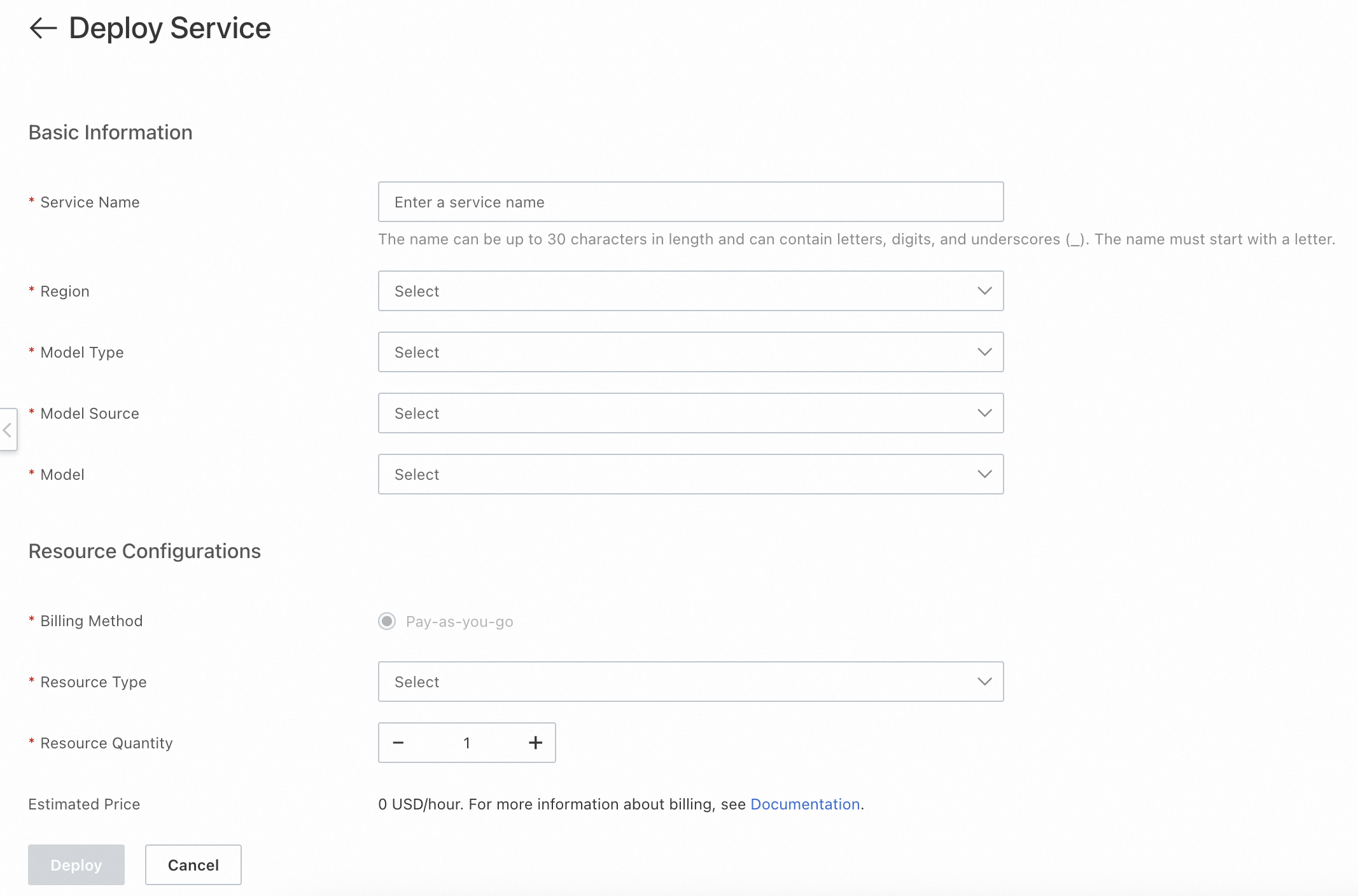
Click Deploy.
After you click Deploy, the console shows the service status in the service list.
| Status | Meaning | Available actions |
|---|---|---|
| Deploying | The service is being provisioned and is not yet available | Manage (view details), Delete (cancel the task) |
| Normal | The service is running and ready to call | Manage (view details), Change Configuration (update resource config), Delete |
| Deployment Failed | Provisioning did not complete | View details, redeploy, or delete the task |
View service credentials
To call a deployed service, you need its endpoint and credentials. In the service list, click Manage to open the service details page.

| Field | Description |
|---|---|
| Service ID | Required when calling the service through the SDK |
| Public API / Private API | The endpoint URL. Call the service through the public network or through the private network (VPC). |
| Token | The credential for service invocation. Public network and private network each have a separate Token. Pass the corresponding Token in your request header. |
| API key | Used for authentication when calling the service with an API key |

Test the service
Use curl to verify your deployment. Each request requires two credentials:
Authorizationheader: your API key, retrieved from the service details page under API keyTokenheader: the service Token (public or private network), retrieved from the service details page under Token
The following example calls a text vectorization model to generate embeddings for two input strings:
curl -X POST \
     -H "Content-Type: application/json" \
     -H "Authorization: Bearer <your-api-key>" \
     -H "Token: <your-service-token>" \
     "http://default-0fm.platform-cn-hangzhou.opensearch.aliyuncs.com/v3/openapi/deployments/******_1zj19x_1yc/predict" \
     -d '{
           "input": [
             "Science and technology is the primary productive force",
             "opensearch product documentation"
           ],
           "input_type": "query",
           "dimension": 567
         }'
Replace the following placeholders:
| Placeholder | Description |
|---|---|
<your-api-key> | Your API key from the service details page |
<your-service-token> | The public or private network Token from the service details page |
dimension | Optional. Only applies to custom models with vector dimensionality reduction enabled. The value cannot exceed the foundation model's native dimension. |
A successful response returns a JSON object with an embeddings array:
{
  "embeddings": [
    {
      "index": 0,
      "embedding": [
        -0.028656005859375,
        0.0218963623046875,
        -0.04168701171875,
        -0.0440673828125,
        0.02142333984375,
        0.012345678901234568,
        ...
        0.0009876543210987654
      ]
    }
  ]
}
Call the service through SDK
After testing, use the Python SDK to integrate inference calls into your application. All examples use get_prediction_with_options() to submit inference requests.
import json

from alibabacloud_tea_openapi.models import Config
from alibabacloud_searchplat20240529.client import Client
from alibabacloud_searchplat20240529.models import GetPredictionRequest
from alibabacloud_searchplat20240529.models import GetPredictionHeaders
from alibabacloud_tea_util import models as util_models

if __name__ == '__main__':
    config = Config(
        bearer_token="<your-api-key>",
        # Endpoint: remove the http:// or https:// prefix
        endpoint="default-xxx.platform-cn-shanghai.opensearch.aliyuncs.com",
        # Supports HTTP and HTTPS
        protocol="http"
    )
    client = Client(config=config)

    # Request body
    request = GetPredictionRequest().from_map({
        "body": {
            "input_type": "document",
            "input": ["search", "test"]
        }
    })

    # Pass the service Token in the request headers
    headers = GetPredictionHeaders(
        token="<your-service-token>"
    )

    runtime = util_models.RuntimeOptions()

    # deploymentId: the Service ID from the service details page
    response = client.get_prediction_with_options(
        "<your-service-id>",
        request,
        headers,
        runtime
    )
    print(response)
Replace the following placeholders:
| Placeholder | Description |
|---|---|
<your-api-key> | Your API key |
<your-service-token> | The Token from the service details page |
<your-service-id> | The Service ID from the service details page |
What's next
Text embedding API — Full API reference for text vectorization models
Ranking service API — Full API reference for reranking models
API key management — Create and manage API keys