Alibaba Cloud OpenSearch LLM-based Conversational Search offers built-in data parsing, chunking, vectorization, text and vector search, and multimodal LLM capabilities. This tutorial demonstrates how to integrate it with Dify, an open-source LLM application platform, to build a Retrieval-Augmented Generation (RAG) system.
As Artificial Intelligence Generated Content (AIGC) technology evolves, Large Language Models (LLMs), agent frameworks, and workflow orchestration enable diverse application services. Retrieval-Augmented Generation (RAG) has become a core component for enterprise knowledge bases, intelligent customer service, and e-commerce assistants. Development platforms such as Alibaba Cloud Model Studio (Bailian) and Dify help developers quickly build business applications with built-in RAG.
However, RAG accuracy depends heavily on search performance, and application development platforms often face the following challenges:
-
Poor usability: Platforms often restrict the format, quantity, and size of knowledge base documents, forcing developers to perform complex data preprocessing or failing to meet real-world demands.
-
Limited controllability: Most platforms are black boxes that make it difficult to customize, tune, or extend the core pipeline, often resulting in poor end-to-end performance.
-
Weak enterprise-grade capabilities: Many platforms lack enterprise-grade permission isolation and rapid data import or updates, making production adoption difficult.
To address these challenges, you can use Alibaba Cloud OpenSearch LLM-based Conversational Search as your RAG system and integrate it into your workflow to build enterprise-grade applications. OpenSearch supports integration with models from Model Studio, expanding your choice of LLMs for customized RAG performance. For more information, see LLM Management.
OpenSearch supports various invocation and authentication mechanisms for flexible integration with platforms like Model Studio and Dify. The following section uses Dify as an example to demonstrate best practices for integrating with an open-source application platform.
Architecture
Developers import the knowledge base into OpenSearch. A workflow processes the user's query and sends it to the OpenSearch RAG system, which returns a conversational answer with reference links and images. Developers can then process these results in a workflow according to business requirements before delivering the final answer to the end user.
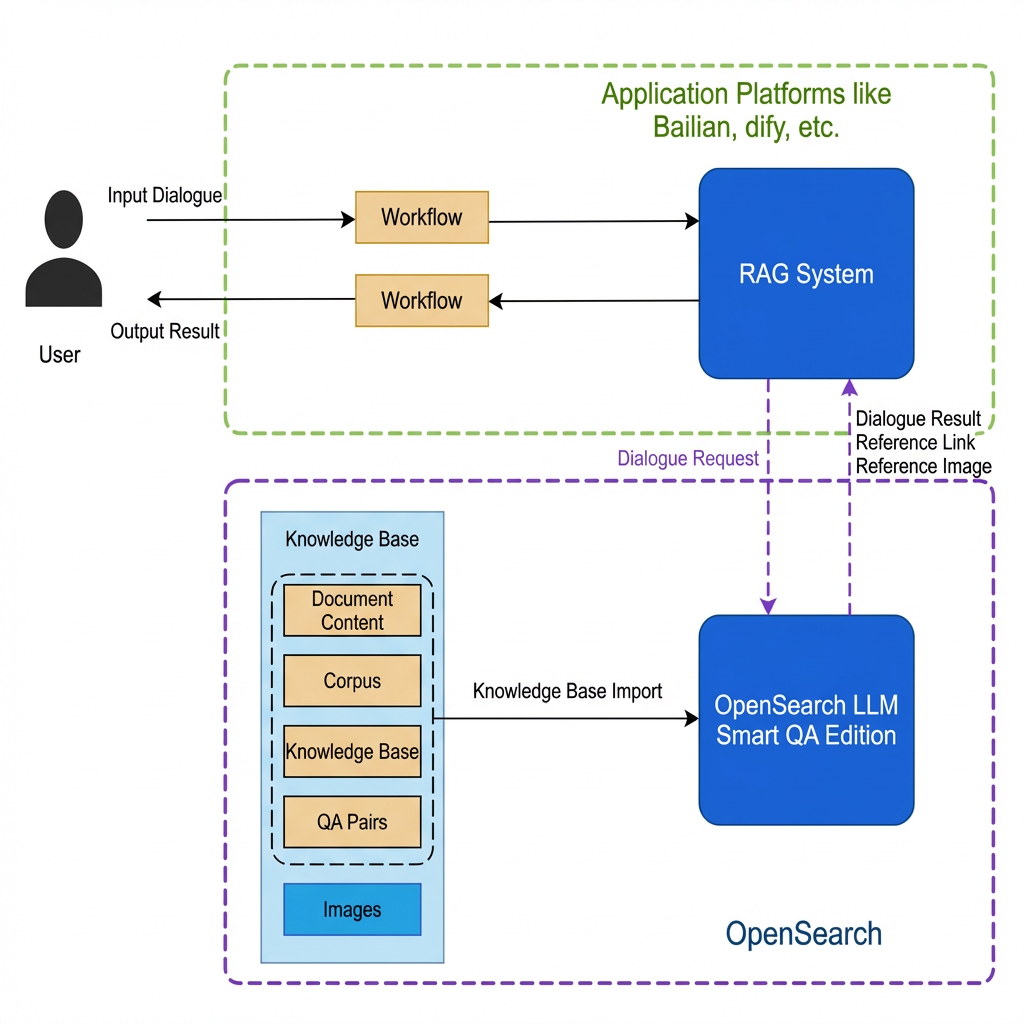
Build a RAG system in OpenSearch
Step 1: Build the RAG system
Alibaba Cloud OpenSearch LLM-based Conversational Search is an all-in-one RAG product that lets you build a RAG system in minutes. You can select models, customize prompts, and tune performance in the console. In the instance details, navigate to Configuration Center->Data Configuration to configure your enterprise knowledge base.
On the Data Configuration page, click File Import or Web Link Import to import your enterprise knowledge base data. The file import feature supports unstructured data files in doc, docx, pdf, html, txt, ppt, and pptx formats, as well as structured data in JSON or Excel formats (UTF-8 encoded, with a maximum file size of 128 MB). After selecting a file, click Upload File to complete the import.
For more information, see Build an enterprise knowledge base Q&A system by using the console.
Step 2: Create and get an API key
Create and obtain the public API domain name and API key, and store them securely for use in the HTTP request flow.
Build a business application in Dify
Step 1: Create a workflow
On the Dify Studio page, click Create Blank App. In the Create Blank App dialog box, select Chat Assistant as the app type and Workflow Orchestration as the orchestration method. Name and describe your application, then click Create.
Start: Gets the user's input.
Alibaba Cloud OpenSearch LLM-based Conversational Search (HTTP request): Sends the user's input to OpenSearch and returns the output from the RAG system.
Parse Output (Code Execution): Parses the output from the RAG system.
Return Answer: Returns the final result to the user.
Step 2: Configure the nodes
-
Access the RAG system via HTTP
Set Method to POST. An example of the JSON content for the BODY is {"question":{"text":"@ Start {x} sys.query "}}, where the user's question is passed through the workflow variable sys.query. For API key authentication:
-
Authentication type: API key
-
API authentication type: Bearer
-
API key: The API key obtained from Alibaba Cloud OpenSearch LLM-based Conversational Search.
URL: The public API domain name obtained from Alibaba Cloud OpenSearch LLM-based Conversational Search + the OpenSearch API path (example: v3/openapi/apps/[app_name]/actions/knowledge-search)
BODY: Select JSON. For the full request content and parameters, see Text Q&A.
-
Parse the output
The OpenSearch API response is in JSON format and includes the conversational answer, reference links, and reference images. Use Code Execution to parse the response and extract the required information.
Sample code to extract only the answer:
def main(body: str) -> str:
    import json
    dat = json.loads(body)
    return {
        'result': [ans['answer'] for ans in dat['result']['data']][0]
    }
Preview
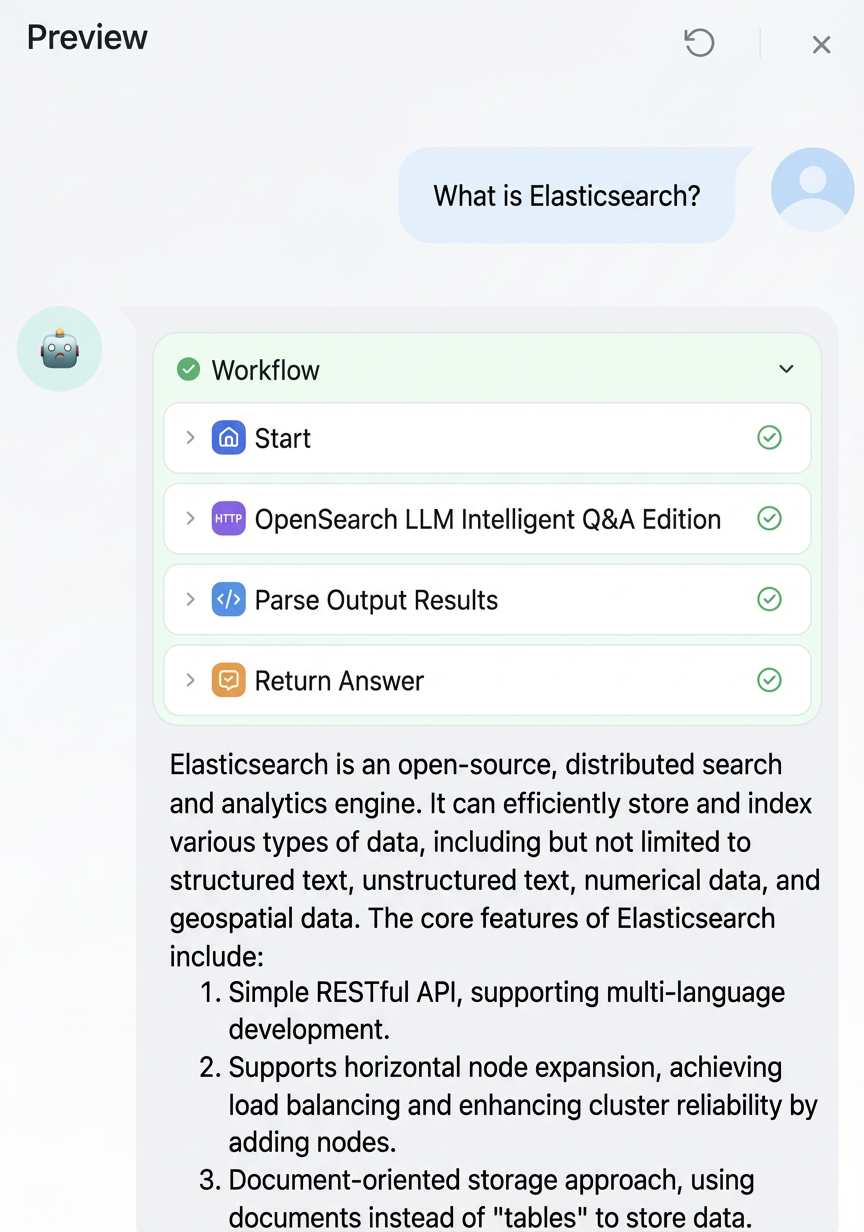
You can extend this foundation with additional workflows to build richer business applications. For example, the following intelligent conversational assistant is built on OpenSearch and the Qwen model.
First, the system classifies the user's intent into after-sales issues, product usage questions, and small talk. For after-sales issues and product usage questions, it queries the corresponding knowledge base in OpenSearch and uses the RAG system to generate answers. For small talk, it calls the Qwen model to chat with the user and answer general questions.
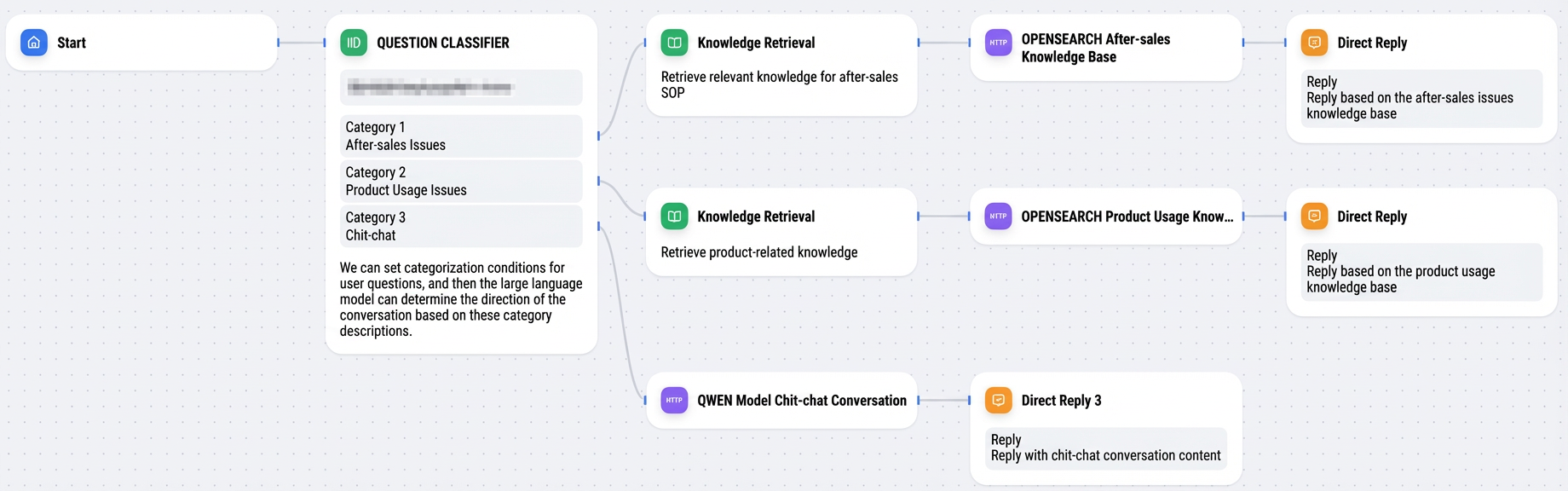
Beyond the all-in-one RAG product, you can use the Alibaba Cloud AI Search Development Workbench, which provides atomic capabilities such as document parsing, vectorization, search, and reranking. Use these capabilities to create custom Dify tools and fine-tune each step of your RAG system.
In the top navigation bar of the Dify platform, select Tools > Custom. You can see two custom tools that have been created: OpenSearch Text Embedding (text embedding) and OpenSearch Reranker Model (reranker model).
-
If you have questions about RAG systems, join the Alibaba Cloud OpenSearch LLM-based Conversational Search DingTalk support group to learn more technical details and usage guidance.