If the default rules provided by Alibaba Cloud do not meet your event requirements, and you need to subscribe to additional event types for compliance and security auditing of resources, you can create O&M items automatically through custom EventBridge rules. This enables quick and specific configuration of O&M management features to enhance efficiency. This topic explains how to create O&M items automatically using custom EventBridge rules.
Prerequisites
You have activated EventBridge. For more information, see Activate EventBridge and grant permissions.
You have activated Cloud Config. For more information, see Activate Cloud Config service.
EventBridge and Cloud Config are free for all valid Alibaba Cloud accounts during the public preview period.
Region limitations
EventBridge only supports the automatic creation of O&M items in the operation center for specific regions.
Region name | Region ID |
China (Qingdao) | cn-qingdao |
China (Shanghai) | cn-shanghai |
China (Beijing) | cn-beijing |
China (Zhangjiakou) | cn-zhangjiakou |
China (Ulanqab) | cn-wulanchabu |
China (Hangzhou) | cn-hangzhou |
China (Shenzhen) | cn-shenzhen |
China (Hohhot) | cn-huhehaote |
China (Heyuan) | cn-heyuan |
China (Guangzhou) | cn-guangzhou |
China (Chengdu) | cn-chengdu |
China (Hong Kong) | cn-hongkong |
Japan (Tokyo) | ap-northeast-1 |
Singapore | ap-southeast-1 |
Malaysia (Kuala Lumpur) | ap-southeast-3 |
Indonesia (Jakarta) | ap-southeast-5 |
US (Silicon Valley) | us-west-1 |
US (Virginia) | us-east-1 |
China East 2 Finance | cn-shanghai-finance-1 |
Thailand (Bangkok) | ap-southeast-7 |
Procedure
Log on to the EventBridge console.
In the left-side navigation pane, click Event Buses.
In the top navigation bar, select a region.
On the Event Buses page, find the system event bus and click its name default.
In the left-side navigation pane, click Event Rules.
In the left-side navigation pane, click Event Rules. On the page that appears, click Create Rule.
On the Create Rule page, complete the relevant parameter configuration.
On the Configure Basic Info wizard page, enter the Name and Description of the event bus, then click Next Step.
On the Configure Event Pattern wizard page, configure parameters such as event source type and event source, then click Next Step.
On the Configure Targets wizard page, configure event target parameters, then click Create.
For the Service Type, select
acs.openapi.oos. The default API Version is2019-06-01. For the Role Configuration parameter, select a role with OOS OpenAPI permissions. If you do not have this role, click Authorization to quickly create one.
After creating the EventBridge rule, you are automatically redirected to the default page, where you can view the newly created EventBridge rules.

Once the EventBridge rule is successfully created, and the EventBridge detects an event, the automatically created O&M items can be viewed in the section of the CloudOps Orchestration Service console.
Example: create O&M items through Cloud Config event rules
After creating a Cloud Config non-compliance event rule in the EventBridge, the EventBridge monitors Cloud Config non-compliance events. When such an event occurs, the system automatically invokes the OOS CreateOpsItem API to create O&M items. The event flow is as follows:

Create a Cloud Config rule.
This example shows how to create a rule using an RDS instance in a multi-zone as a template.
Navigate to the Cloud Config > Compliance & Audit > Rules page and click Create Rule.
Enter
multi-zonein the search box, select rds-multi-az-support, and click Next.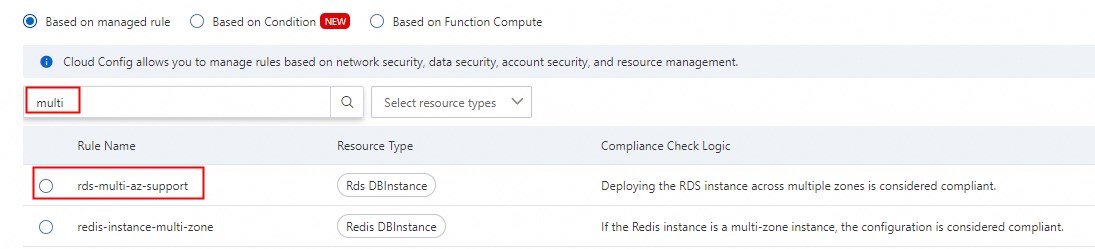
Retain the default values for basic properties and click Next.
Maintain the default values for the effective scope and click Next.
Keep the default values for remediation and click Submit.
View non-compliant resources in the Cloud Config rule list.

Create O&M items through EventBridge rules.
Go to the EventBridge > Event Buses page and select a region from the top menu bar.
Click the default event bus.
In the left-side navigation pane, click Event Rules.
In the left-side navigation pane, click Event Rules. On the page that appears, click Create Rule.
On the Create Rule page, complete the relevant parameter configuration.
On the Configure Basic Information wizard page, enter the Name and Description of the EventBridge, then click Next.
On the Configure Event Pattern wizard page, configure parameters such as event source type and event source, then click Next.
Parameter name
Description
Example value
Event Source Type
Supports two types: Alibaba Cloud Service Event Source and Custom Event Source.
Alibaba Cloud Service Event Source
Event Source
An event source is the source from which events are published to EventBridge.
acs.configEvent Type
Select the event type for event filtering.
config:CloudMonitor:ConfigurationNonCompliantNotificationNoteThis setup listens to all non-compliance rules enabled in Cloud Config.
On the Configure Targets wizard page, set the event target parameters, then click Create.
The event target parameters are configured as follows:
Parameter
Description
Parameter value
Service Type
Select the event target type.
acs.openapi.oosAPI Version
Keep the default API version.
2019-06-01API Type
Select
CreateOpsItemto create O&M items.CreateOpsItemAPI Parameters
Configure the relevant parameters for the
CreateOpsItemAPI.For more information, see API parameter configuration details.
Role Configuration
Configure a role with OOS CreateOpsItem OpenAPI permissions.
NoteIf you do not have this role, click Authorize To Create A New Role to quickly create a role.
None
For example, to audit non-compliance event messages, this assists in configuring EventBridge rules more effectively.
Visit the CloudOps Orchestration Service > Operation Center > O&M Items tab to see the automatically generated O&M items for non-compliant resources.