Before using Alibaba Cloud Model Studio's Large Language Models (LLMs) or applications, obtain an API Key as an authentication credential.
1. Get an API Key
Use an Alibaba Cloud account or a RAM user with administrator or API Key page permissions.
Singapore and Other Regions
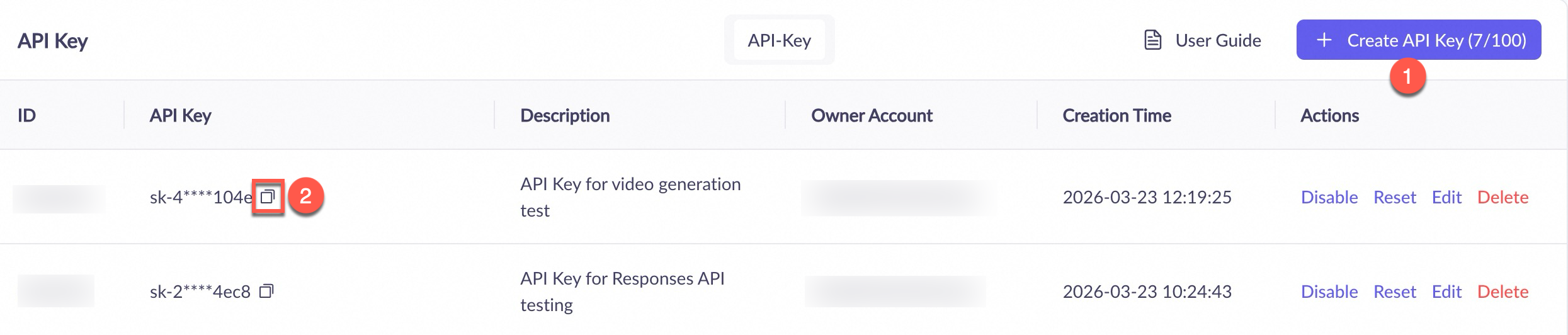
Go to the Alibaba Cloud Model Studio console home page. In the upper-right corner of the page, select the destination region. Navigate to the API Key page. Click Create API Key.
Configure the following information in the dialog box, and then click OK.
Owner Account: Select an Alibaba Cloud account. The Account column displays a numeric account ID only.
Workspace: Select the default workspace.
Click the
 icon next to the API Key to obtain the API Key.
An Alibaba Cloud account can view all API Keys. A RAM user can only view API Keys they created.

China (Beijing) Region
Go to the Alibaba Cloud Model Studio console home page and in the upper-right corner, select the China (Beijing) region. Then, go to the API Key page and click Create API Key.
You can configure the following information in the dialog box. Then click OK:
Workspace: Select the default workspace.
Permissions: Select All. If you require more granular access control, select Custom to manage the IP address whitelist for the API Key.
Click the
icon next to the API Key to obtain the API Key.An Alibaba Cloud account can view all API Keys. A RAM user can only view API Keys they created.
2. Use an API Key
Coding Plan: Use a dedicated API Key (format: sk-sp-xxxxx), instead of the general Model Studio API Key (format: sk-xxxxx) described in this topic. For information about obtaining a dedicated API Key for a Coding Plan, see Get a dedicated API Key and Base URL for a plan.
Method 1: Call models in third-party tools
If you call models using tools or platforms such as Chatbox, you may need to enter three pieces of information:
The API Key obtained in this topic
The Base URL of the region where the API Key belongs:
Singapore:
https://dashscope-intl.aliyuncs.com/compatible-mode/v1US (Virginia):
https://dashscope-us.aliyuncs.com/compatible-mode/v1China (Beijing):
https://dashscope.aliyuncs.com/compatible-mode/v1China (Hong Kong):
https://cn-hongkong.dashscope.aliyuncs.com/compatible-mode/v1Germany (Frankfurt):
https://{WorkspaceId}.eu-central-1.maas<u>.aliyuncs.com</u>/compatible-mode/v1. When calling, replaceWorkspaceIdwith the actual workspace ID.
Model name, such as qwen-plus
Common tool configurations: Chatbox, Cline, Claude Code, Dify, OpenClaw (formerly Clawdbot/Moltbot), Postman, Qwen Code.
Method 2: Call models using code
When you call the Qwen API for the first time, we recommend that you set your API key as an environment variable to prevent security risks from hard coding.
Do not expose the API Key in any way. This helps avoid security risks or financial loss due to unauthorized use.
API Key Permissions
An API Key's call permissions are entirely determined by its workspace. API Key permissions are the same within the same workspace. You do not need to create separate API Keys for different models, such as text-to-text, text-to-image, or speech synthesis.
API Keys in the default workspace: Can call all standard models and applications within the default workspace.
API key in a sub-workspace: Calls the standard models for which the sub-workspace has been granted authorization, and the applications within that sub-workspace.
Currently, only the China (Beijing) region supports configuring more granular access control for API Keys.
When you create an API Key or click Edit in the Actions column for an existing API Key, switch Permissions to Custom to configure the following:
IP address whitelist: Only IP addresses on the list can use the API key to initiate calls. Supports IPv4, IPv6, and CIDR blocks.
API Key Validity
Created API Keys do not expire. They become invalid when you manually delete them.
To provide temporary access permissions for third-party applications or users, or strictly control high-risk operations such as sensitive data access or deletion, generate a temporary API Key (valid for 60 seconds). This helps avoid exposing long-term API Keys and reduces leakage risks.
FAQ
Q: How many API Keys can a single Alibaba Cloud account create?
A: For the Singapore, China (Beijing), China (Hong Kong), and Germany (Frankfurt) regions, each Alibaba Cloud account can create a maximum of 50 API Keys per region.
Each account (including the root account) is limited to 20 API keys in the US (Virginia) region.
Q: Are API Keys created by a RAM user valid after the RAM user is deleted?
A: After you disable or delete a RAM user in the RAM console, all API Keys they created become invalid and cannot be used for model calls.