This feature is supported in baseline version 10.1.60 and later. The client must implement the sharing feature in the native code.
onShareAppMessage
Define the onShareAppMessage function in a Page object to configure the sharing information for the page.
By default, the Share button appears in the menu in the upper-right corner of every page. You can override the
onShareAppMessagefunction to customize the sharing content.This function is called when a user clicks the Share button.
This event handler must return an Object to customize the sharing content.
Input Parameters
Parameter | Type | Description | Minimum version |
from | String | The trigger source:
| |
target | Object | If the value of | |
webViewUrl | String | If the page contains a web-view component, this parameter returns the URL of the current web-view. |
Return value
Name | Type | Required | Description | Minimum version |
title | String | Yes | You can customize the share title. | N/A |
desc | String | No | The custom sharing description. Because sharing to Weibo supports a maximum of 140 characters, the description should not exceed this limit. | N/A |
path | String | Yes | The path of the custom sharing page. Custom parameters in | N/A |
imageUrl | String | No | The custom sharing icon element. Supports web image paths, apFilePaths, and relative paths. | |
bgImgUrl | String | No | The custom sharing preview image. The recommended size is 750 × 825. Supports web image paths, apFilePaths, and relative paths. | |
success | Function | No | The callback after a successful share. | |
fail | Function | No | The callback after a failed share. |
Code sample
Page({
  onShareAppMessage() {
    return {
      title: 'Miniapp Sample',
      desc: 'Official miniapp sample demo, showing supported API capabilities and components.',
      path: 'page/component/component-pages/view/view?param=123'
    };
  },
});
Initiate sharing from a page
Supported in base libraries version 1.1.0 and later.
You can set the open-type="share" property for the button component. When a user clicks the button, the Page.onShareAppMessage() event is triggered and the sharing panel opens. If the onShareAppMessage function is not defined for the current page, clicking the button has no effect. For more information, see button.
App.onShareAppMessage
You can set a global onShareAppMessage configuration in the App(Object) constructor. If page-level sharing settings are not configured, the global sharing settings are used when sharing is invoked.
my.hideShareMenu(Object)
Supported in base libraries version 1.7.0 and later. For earlier versions, see Handle compatibility.
Hides the share button.
Input Parameters
Name | Type | Required | Description |
success | Function | No | The callback function for a successful call. |
fail | Function | No | The callback function for a failed call. |
complete | Function | No | The callback function that is executed when the call is complete, regardless of whether it succeeds or fails. |
Code sample
my.hideShareMenu();Client-side extension implementation
The miniapp framework does not provide a native sharing feature because the implementation is highly customizable. Therefore, you must implement this feature.
Implementation
When sharing is initiated from the miniapp, the
shareTinyAppMsgJavaScript API (JSAPI) is called. This API passes the parameters from the object returned by theonShareAppMessagemethod in JavaScript to the client.The client must implement a custom JS plugin to handle the
shareTinyAppMsgevent. For more information about how to implement a JS plugin, see Android custom JSAPI and iOS custom JSAPI.
Android code sample
Note: The share button in the options menu in the upper-right corner of the miniapp is hidden by default. To display this button, you must configure the container. For more information, see Container configuration.
The following code sample shows how to initiate sharing in the miniapp:
Page({
data: {
  height: 0,
  title: 'Thank you for trying it out!\\nWe welcome any feedback'
},
onLoad() {
  const { windowHeight, windowWidth, pixelRatio } = my.getSystemInfoSync();
  this.setData({
    height: windowHeight * 750 / windowWidth
  })
},
onShareAppMessage() {
  return {
    title: 'Result Page',
    desc: 'Successfully retrieved the result',
    myprop: 'hello', // Custom parameter. If the fields in the document do not meet your needs, you can add more as required. They will be passed through to the client.
    path: 'pages/result/result'
  }
}
});
The following code sample shows the client-side H5 plugin:
  package com.mpaas.demo.nebula;

  import com.alibaba.fastjson.JSONObject;
  import com.alipay.mobile.antui.dialog.AUNoticeDialog;
  import com.alipay.mobile.h5container.api.H5BridgeContext;
  import com.alipay.mobile.h5container.api.H5Event;
  import com.alipay.mobile.h5container.api.H5EventFilter;
  import com.alipay.mobile.h5container.api.H5SimplePlugin;

  public class ShareTinyMsgPlugin extends H5SimplePlugin {

      private static final String ACTION_SHARE = "shareTinyAppMsg";

      @Override
      public void onPrepare(H5EventFilter filter) {
          super.onPrepare(filter);
          filter.addAction(ACTION_SHARE);
      }

      @Override
      public boolean handleEvent(H5Event event, final H5BridgeContext context) {
          String action = event.getAction();
          if (ACTION_SHARE.equals(action)) {
              JSONObject param = event.getParam();
              String title = param.getString("title");
              String desc = param.getString("desc");
              String myprop = param.getString("myprop");
              String path = param.getString("page");
              String appId = event.getH5page().getParams().getString("appId");

              // You can call the sharing component here to implement subsequent features.
              String message = "App ID: " + appId + "\n"
                      + "title: " + title + "\n"
                      + "desc: " + desc + "\n"
                      + "myprop: " + myprop + "\n"
                      + "path: " + path + "\n";

              AUNoticeDialog dialog = new AUNoticeDialog(event.getActivity(),
                      "Sharing Result", message, "Share Successful", "Share Failed");
              dialog.setPositiveListener(new AUNoticeDialog.OnClickPositiveListener() {
                  @Override
                  public void onClick() {
                      JSONObject result = new JSONObject();
                      result.put("success", true);
                      context.sendBridgeResult(result);
                  }
              });
              dialog.setNegativeListener(new AUNoticeDialog.OnClickNegativeListener() {
                  @Override
                  public void onClick() {
                      context.sendError(11, "Share failed");
                  }
              });
              dialog.show();
              //
              return true;
          }
          return false;
      }
  }
iOS code sample
The share button in the upper-right corner of the miniapp is hidden by default. To display the share button, call the following interface during container initialization:
Note: You must manually import the corresponding header file:
#import <TinyappService/TASUtils.h>.- (void)application:(UIApplication *)application afterDidFinishLaunchingWithOptions:(NSDictionary *)launchOptions { ... [TASUtils sharedInstance].shoulShowSettingMenu = YES; ... }Create a custom implementation of the
shareTinyAppMsgJSAPI to accept parameters from the miniapp page: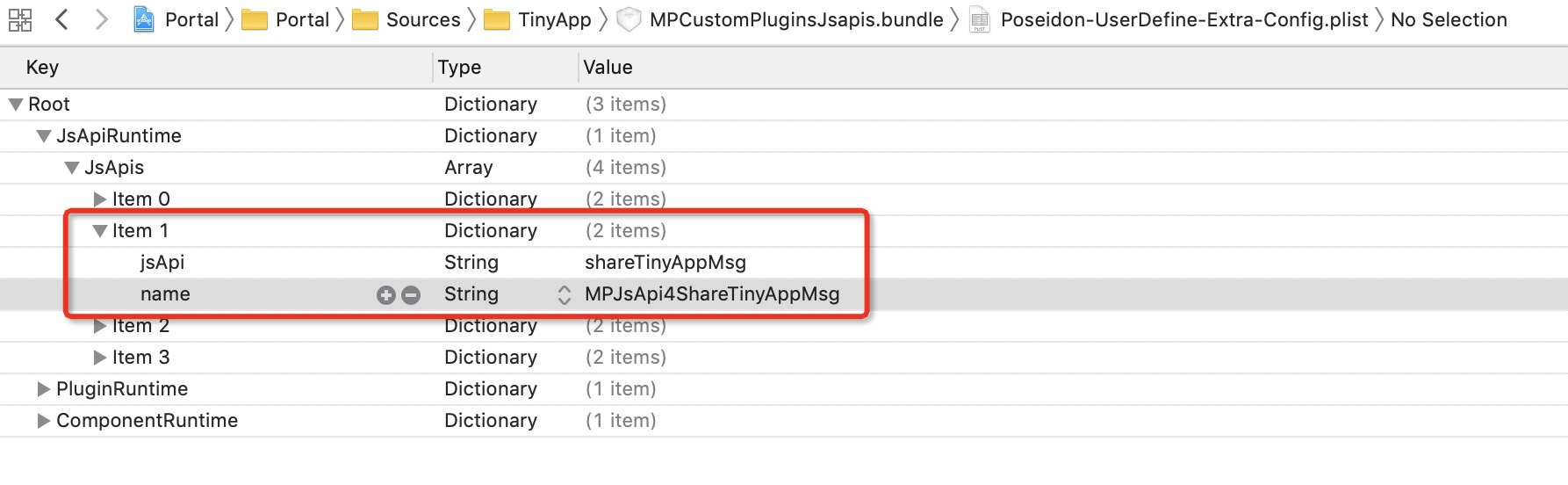
In the
MPJsApi4ShareTinyAppMsgimplementation class, you can obtain the parameters for sharing the miniapp page and handle your business logic. The following code provides an example:#import <NebulaPoseidon/NebulaPoseidon.h> @interface MPJsApi4ShareTinyAppMsg : PSDJsApiHandler @end #import "MPJsApi4ShareTinyAppMsg.h" #import <MessageUI/MessageUI.h> @interface MPJsApi4ShareTinyAppMsg()<APSKLaunchpadDelegate> @property(nonatomic, strong) NSString *shareUrlString; @end @implementation MPJsApi4ShareTinyAppMsg - (void)handler:(NSDictionary *)data context:(PSDContext *)context callback:(PSDJsApiResponseCallbackBlock)callback { [super handler:data context:context callback:callback]; NSString * appId = context.currentSession.createParam.expandParams[@"appId"]; NSString * page = data[@"page"]?:@""; NSString * title = data[@"title"]?:@""; NSString * desc = data[@"desc"]?:@""; // Concatenate the sharing content and call the sharing SDK. self.shareUrlString = [NSString stringWithFormat:@"http://appId=%@&page=%@&title=%@&desc=desc", appId, page, title, desc]; [self openPannel]; } - (void)openPannel { NSArray *channelArr = @[kAPSKChannelWeibo, kAPSKChannelWeixin, kAPSKChannelWeixinTimeLine, kAPSKChannelSMS, kAPSKChannelQQ, kAPSKChannelQQZone, kAPSKChannelDingTalkSession, kAPSKChannelALPContact, kAPSKChannelALPTimeLine]; APSKLaunchpad *launchPad = [[APSKLaunchpad alloc] initWithChannels:channelArr sort:NO]; launchPad.tag = 1000; launchPad.delegate = self; [launchPad showForView:[[UIApplication sharedApplication] keyWindow] animated:YES]; } #pragma mark - APSKLaunchpadDelegate - (void)sharingLaunchpad:(APSKLaunchpad *)launchpad didSelectChannel:(NSString *)channelName { [self shareWithChannel:channelName tag:launchpad.tag]; [launchpad dismissAnimated:YES]; } - (void)shareWithChannel:(NSString *)channelName tag:(NSInteger)tag{ APSKMessage *message = [[APSKMessage alloc] init]; message.contentType = @"url"; // The type can be "text", "image", or "url". message.content = [NSURL URLWithString:self.shareUrlString]; message.icon = [UIImage imageNamed:@"MPShareKit.bundle/Icon_Laiwang@2x.png"]; message.title = @"This is the web page title"; message.desc = @"This is the description"; APSKClient *client = [[APSKClient alloc] init]; client.disableToastDisplay = YES; [client shareMessage:message toChannel:channelName completionBlock:^(NSError *error, NSDictionary *userInfo) { if(!error) { // Success [AUToast presentToastWithin:[[UIApplication sharedApplication] keyWindow] withIcon:AUToastIconSuccess text:@"Share successful" duration:2 logTag:@"demo"]; } else { // Failure NSString *desc = error.localizedFailureReason.length > 0 ? error.localizedFailureReason : @"Share failed"; [AUToast presentToastWithin:[[UIApplication sharedApplication] keyWindow] withIcon:AUToastIconNone text:desc duration:2 logTag:@"demo"]; NSLog(@"error = %@", error); } }]; } @end