HTML5 pages are sensitive to network conditions, which degrades user experience. Offline packages solve this by bundling your static resources for local delivery — so pages load instantly and you can push updates without an app store review.
An offline package is a compressed file that bundles static resources such as HTML, JavaScript, and CSS files. The client downloads it in advance, then loads resources directly from the local device — eliminating network latency for HTML5 pages.
Offline packages provide two advantages:
Faster first load: Static resources are embedded in the app at release time. Users start using the app immediately without waiting for a network download.
Over-the-air updates: When you release a new version or an emergency fix, update the offline package configuration. The app downloads the update automatically, bypassing the app store review process.
How offline packages work
Offline package structure
An offline package is a compressed file in .amr format. Rename the .amr extension to .zip and decompress it to find HTML resources and JavaScript code. The HTML5 container loads these resources and renders them in a WebView.
The following figure shows the folder structure of a typical resource plan on an iOS system:
First-level folder: The ID of a general resource plan, such as
20150901.-
Second-level folder and subdirectories: Custom resource files. Store all frontend files in a single folder with a custom name, such as
/www. Set the default entry file for the offline package, such as/www/index.html.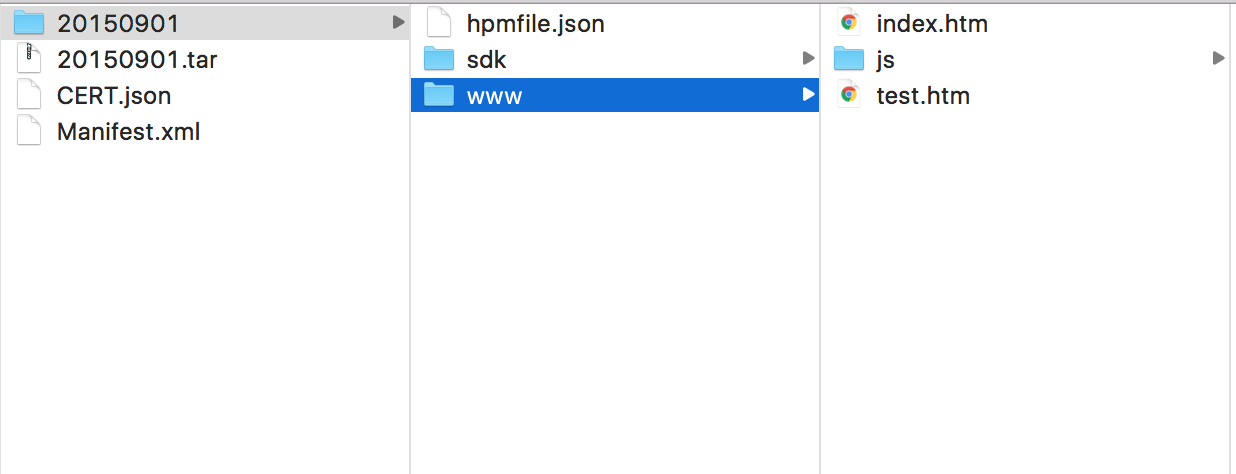
Offline package types
In an app's WebView, the cache is unreliable — on some devices it is cleared automatically when the app closes. To handle common libraries such as Zepto and FastClick consistently, use a global offline package instead of relying on the cache.
There are two types:
Global offline package: Contains public resources shared across multiple applications. The system checks the global offline package first when any HTML5 page is accessed. If the package contains the requested resource, it is served from the package rather than fetched from the network. Global offline packages are typically updated at least once a month, and their size is strictly controlled to ensure broad client coverage.
Private offline package: Used by a single application only.
Rendering process
The HTML5 container uses the same URL to request both local and network resources. It intercepts every request and decides where to serve it from:
If a matching local resource exists, the HTML5 container serves it from the offline package.
If no local resource matches, the HTML5 container fetches from the network.
The WebView has no visibility into whether a resource came from local storage or the network.
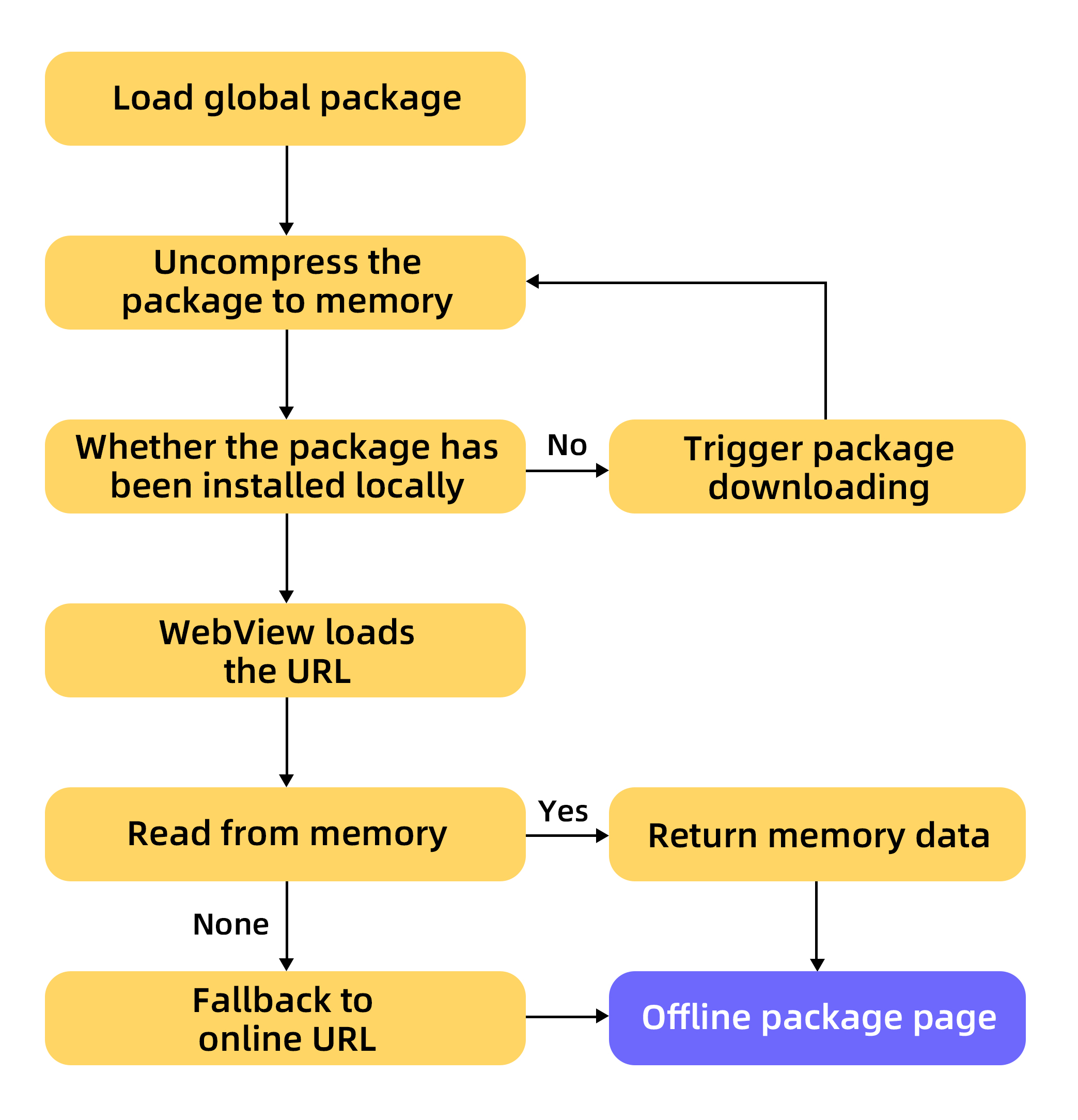
Package download behavior depends on its configuration:
If Download Timing is set to Wi-Fi only, the package downloads automatically in the background on Wi-Fi networks only.
If Download Timing is set to Download over all networks, the package downloads over non-Wi-Fi networks, which consumes user data. Use this option with caution.
If a user opens the app before the offline package finishes downloading, the app redirects to a fallback address and displays the online page instead. When an offline package is published, a corresponding online version is also published to a CDN with the same folder structure. The fallback address is delivered to the client along with the package information, allowing seamless switching between online and offline pages at any time.
Offline package running mode
Opening an offline package involves three steps:
Request package information. The client requests offline package information from the server and stores it in a local database. The information includes the download address and version number.
Download the offline package. The client downloads the package from the server to the device.
Install the offline package. The client copies the package from the download folder to the installation folder.
Virtual domain names
Virtual domain names are a container mechanism specific to offline applications. Without them, the WebView uses the file scheme to access locally stored pages, exposing the file path in the address bar. This creates two problems:
User experience: A
file://address looks unfamiliar and insecure to users.Security: The file protocol exposes the local path, which any user can inspect.
Use virtual domain names instead of file paths. A virtual domain name is an HTTPS address that complies with the URL scheme specification, such as https://xxxxxxx.HTML5app.example.com. The parent domain — for example, example.com — must be a domain name that you have registered.
The standard format for a virtual domain name is:
https://{appid}.HTML5app.example.com.