If the URL that is used to send a request is invalid, Simple Message Queue (formerly MNS) returns the following error message: Http request URL format invalid. This topic describes how to troubleshoot the issue in different scenarios.
Issue
The following error message is returned by SMQ:
[Error Code]:InvalidRequestURL, [Message]:Http request URL format invalidCause
The following causes may exist:
Cause 1: When you use an SDK, the specified SMQ endpoint is invalid.
Cause 2: When you call a queue-related API operation, the specified protocol version does not match the specified request URL.
Solution
The following solutions are provided based on the cause:
Solution 1 to Cause 1
If you use an SMQ SDK, check whether the specified SMQ endpoint in the code is valid. The following example shows how to obtain a valid SMQ endpoint.
In most cases, this issue occurs if you specify a queue endpoint instead of a SMQ endpoint in the code. Example:
SMQ endpoint: String endpoint = "http://44404.mns.cn-beijing.aliyuncs.com/".
Queue endpoint: String endpoint = "http://44404.mns.cn-beijing.aliyuncs.com/queues/LTQueue/".
Log on to the SMQ console.
Select the region where the SMQ queue that you want to use resides and click Queues. On the Queues page, find the queue.
Click Get Endpoint.
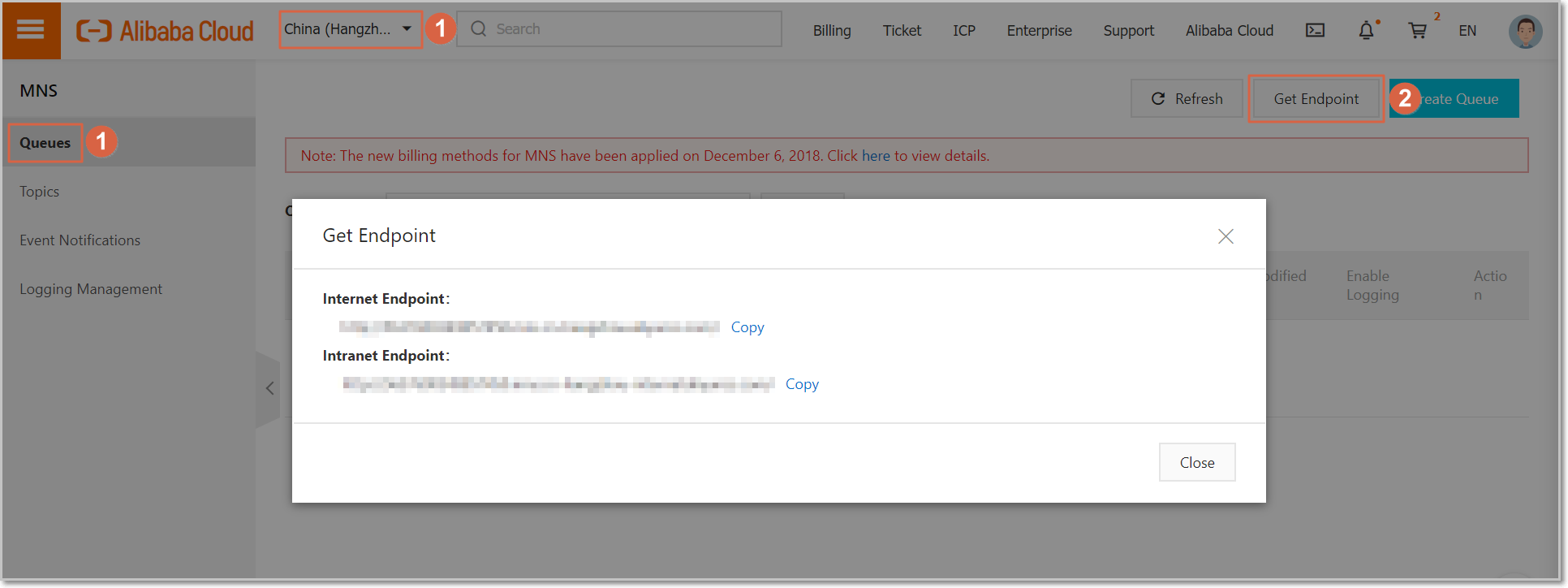
In the message that appears, copy and use the required endpoint to check whether the issue persists.
Solution 2 to Cause 2
If you call a queue-related API operation, check whether you use the latest API version or the previous API version. Make sure that the request URL complies with the specifications of the specified API version. The following table describes the latest API version and previous API version.
API version | CreateQueue | SendMessage |
Latest version (x-mns-version:2015-06-06) | PUT /queues/[$Queue_Name] | POST /queues/[$Queue_Name]/messages |
Previous version (x-mqs-version:2014-07-08) | PUT /[$Queue_Name] | POST /[$Queue_Name]/messages |
[$Queue_Name] specifies the name of a queue.