MaxCompute lets you use the DELETE and UPDATE operations to delete or update data at the row level in Transactional tables and Delta Tables.
Supported platforms:
Prerequisites
Before you run DELETE or UPDATE operations, you must have the Select and Update permissions on the target Transactional table or Delta Table. For more information about authorization, see MaxCompute permissions.
Function introduction
Similar to their use in traditional databases, the DELETE and UPDATE features in MaxCompute can delete or update specific rows in a table.
When you use the DELETE or UPDATE feature, the system automatically generates a Delta file for each delete or update operation. This file is not visible to users and records information about the deleted or updated data. The implementation works as follows:
DELETE: The Delta file uses thetxnid(BIGINT)androwid(BIGINT)fields to identify which record in the base file of a Transactional table was deleted and in which delete operation. A base file is the underlying storage format of a table.For example, assume that the base file of table t1 is f1 and its content is
a, b, c, a, b. When you run theDELETE FROM t1 WHERE c1='a';command, the system generates a separatef1.deltafile. If thetxnidist0, the content off1.deltais((0, t0), (3, t0)). This indicates that row 0 and row 3 were deleted in transaction t0. If you run anotherDELETEoperation, the system generates another Delta file, such asf2.delta. This file also references the original base file f1. When you query the data, the system combines the base file f1 with all current Delta files to retrieve only the records that have not been deleted.UPDATE: AnUPDATEoperation is implemented as aDELETEoperation and anINSERT INTOoperation.
The DELETE and UPDATE features have the following advantages:
Reduced amount of data to write
Previously, MaxCompute used
INSERT INTOorINSERT OVERWRITEoperations to delete or update table data. For more information, see Insert or overwrite data (INSERT INTO | INSERT OVERWRITE). When you needed to update a small amount of data in a table or partition, using anINSERToperation required you to first read all data from the table, update the data using aSELECToperation, and finally write all the data back to the table with anINSERToperation. This method was inefficient. Using theDELETEorUPDATEfeature, the system does not need to write back all the data, which significantly reduces the amount of data written.NoteFor the pay-as-you-go billing method, you are not charged for the write operations of
DELETE,UPDATE, andINSERT OVERWRITEjobs. However,DELETEandUPDATEjobs must read data from partitions to mark records for deletion or write back updated records. These read operations are still charged based on the pay-as-you-go billing model for SQL jobs. Therefore,DELETEandUPDATEjobs do not necessarily reduce costs compared toINSERT OVERWRITEjobs, even though less data is written.For the subscription billing method,
DELETEandUPDATEconsume fewer write resources. Compared toINSERT OVERWRITE, you can run more jobs with the same resources.
Read the latest state of the table directly
Previously, MaxCompute used zipper tables for batch data updates. This method required adding auxiliary columns such as
start_dateandend_dateto the table to track the lifecycle of a record. To query the latest state of the table, the system had to filter a large amount of data based on timestamps to find the current state, which was complex. With theDELETEandUPDATEfeatures, you can read the latest state of the table directly. The system combines the base files and Delta files to provide the current view of the data.
Executing DELETE and UPDATE operations multiple times increases the underlying storage of a Transactional table. This increases storage costs and degrades subsequent query performance. You should periodically merge (compact) the underlying data. For more information about merge operations, see Merge transactional table files.
If multiple jobs run concurrently on the same target table, job conflicts may occur. For more information, see ACID semantics.
Use cases
The DELETE and UPDATE features are suitable for random, low-frequency deletion or updates of a small amount of data in a table or partition. For example, you can periodically perform batch deletions or updates on less than 5% of the rows in a table or partition on a daily (T+1) basis.
The DELETE and UPDATE features are not suitable for high-frequency updates, deletions, or real-time writes to a target table.
Limitations
The
DELETEandUPDATEfeatures can be used only on Transactional tables and Delta Tables and are subject to the following limits:NoteFor more information about Transaction tables and Delta Tables, see Parameters for Transaction Table and Delta Table.
The
UPDATEsyntax for Delta Tables does not support modifying primary key (PK) columns.
Precautions
Consider the following items when you use DELETE or UPDATE operations to delete or update data in a table or partition:
To delete or update a small amount of data in a table and both the operation and subsequent reads are infrequent, use the
DELETEandUPDATEoperations. After you perform multiple delete or update operations, merge the table's base files and Delta files to reduce its storage footprint. For more information, see Merge transactional table files.If you delete or update many rows (more than 5%) infrequently, but subsequent read operations on the table are frequent, use
INSERT OVERWRITEorINSERT INTO. For more information, see Insert or overwrite data (INSERT INTO | INSERT OVERWRITE).For example, a business scenario involves deleting or updating 10% of the data 10 times a day. Evaluate whether the costs and subsequent read performance degradation from
DELETEandUPDATEoperations are lower than those from usingINSERT OVERWRITEorINSERT INTOfor each operation. Compare the efficiency of the two methods in your specific scenario to choose the more suitable option.Deleting data generates Delta files, which means the operation does not immediately reduce storage. If you want to reduce storage using the
DELETEoperation, you must merge the table's base files and Delta files. For more information, see Merge transactional table files.MaxCompute runs
DELETEandUPDATEjobs as batch processes. Each statement consumes resources and incurs fees. You should delete or update data in batches. For example, if you use a Python script to generate and submit many row-level update jobs where each statement operates on only one or a few rows, each statement incurs costs based on the amount of input data scanned by the SQL. The accumulated cost of many such statements significantly increases expenses and reduces system efficiency. The following are command examples.Recommended method:
UPDATE table1 SET col1= (SELECT value1 FROM table2 WHERE table1.id = table2.id AND table1.region = table2.region);Not recommended method:
UPDATE table1 SET col1=1 WHERE id='2021063001' AND region='beijing';
UPDATE table1 SET col1=2 WHERE id='2021063002' AND region='beijing';
Delete data
The DELETE operation deletes one or more rows that meet specified conditions from a Transactional table or Delta Table.
Syntax
DELETE FROM <table_name> [[AS] alias] [WHERE <condition>];Parameters
Parameter
Required
Description
table_name
Yes
The name of the Transactional table or Delta Table on which you want to run the
DELETEoperation.alias
No
The alias for the table.
where_condition
No
A WHERE clause to filter data that meets the condition. For more information about the WHERE clause, see WHERE clause (WHERE_condition). If you do not include a WHERE clause, all data in the table is deleted.
Examples
Example 1: Create a non-partitioned table named acid_delete, import data, and then run the
DELETEoperation to delete rows that meet a specified condition. The following are the sample commands:-- Create a Transactional table named acid_delete. CREATE TABLE IF NOT EXISTS acid_delete (id BIGINT) TBLPROPERTIES ("transactional"="true"); -- Insert data. INSERT OVERWRITE TABLE acid_delete VALUES (1), (2), (3), (2); -- View the inserted data. SELECT * FROM acid_delete; +------------+ | id | +------------+ | 1 | | 2 | | 3 | | 2 | +------------+ -- Delete rows where id is 2. If you run this command on the MaxCompute client (odpscmd), you must enter yes or no to confirm. DELETE FROM acid_delete WHERE id = 2; -- The following command is equivalent to the one above. DELETE FROM acid_delete ad WHERE ad.id = 2; -- View the result. The table now contains only data for 1 and 3. SELECT * FROM acid_delete; +------------+ | id | +------------+ | 1 | | 3 | +------------+Example 2: Create a partitioned table named acid_delete_pt, import data, and then run the
DELETEoperation to delete rows that meet a specified condition. The following are the sample commands:-- Create a Transactional table named acid_delete_pt. CREATE TABLE IF NOT EXISTS acid_delete_pt (id BIGINT) PARTITIONED BY (ds STRING) TBLPROPERTIES ("transactional"="true"); -- Add partitions. ALTER TABLE acid_delete_pt ADD IF NOT EXISTS PARTITION (ds = '2019'); ALTER TABLE acid_delete_pt ADD IF NOT EXISTS PARTITION (ds = '2018'); -- Insert data. INSERT OVERWRITE TABLE acid_delete_pt PARTITION (ds = '2019') VALUES (1), (2), (3); INSERT OVERWRITE TABLE acid_delete_pt PARTITION (ds = '2018') VALUES (1), (2), (3); -- View the inserted data. SELECT * FROM acid_delete_pt; +------------+------------+ | id | ds | +------------+------------+ | 1 | 2018 | | 2 | 2018 | | 3 | 2018 | | 1 | 2019 | | 2 | 2019 | | 3 | 2019 | +------------+------------+ -- Delete data where the partition is 2019 and id is 2. If you run this command on the MaxCompute client (odpscmd), you must enter yes or no to confirm. DELETE FROM acid_delete_pt WHERE ds = '2019' AND id = 2; -- View the result. The data where the partition is 2019 and id is 2 has been deleted. SELECT * FROM acid_delete_pt; +------------+------------+ | id | ds | +------------+------------+ | 1 | 2018 | | 2 | 2018 | | 3 | 2018 | | 1 | 2019 | | 3 | 2019 | +------------+------------+Example 3: Create a target table named acid_delete_t and an associated table named acid_delete_s. Then, delete rows that meet a specified condition through a join operation. The following are the sample commands:
-- Create a target Transactional table named acid_delete_t and an associated table named acid_delete_s.
CREATE TABLE IF NOT EXISTS acid_delete_t (id INT, value1 INT, value2 INT) TBLPROPERTIES ("transactional"="true");
CREATE TABLE IF NOT EXISTS acid_delete_s (id INT, value1 INT, value2 INT);

-- Insert data.
INSERT OVERWRITE TABLE acid_delete_t VALUES (2, 20, 21), (3, 30, 31), (4, 40, 41);
INSERT OVERWRITE TABLE acid_delete_s VALUES (1, 100, 101), (2, 200, 201), (3, 300, 301);

-- Delete rows from the acid_delete_t table where the id does not match an id in the acid_delete_s table. If you run this command on the MaxCompute client (odpscmd), you must enter yes or no to confirm.
DELETE FROM acid_delete_t WHERE NOT EXISTS (SELECT * FROM acid_delete_s WHERE acid_delete_t.id = acid_delete_s.id);
-- The following command is equivalent to the one above.
DELETE FROM acid_delete_t a WHERE NOT EXISTS (SELECT * FROM acid_delete_s b WHERE a.id = b.id);

-- View the result. The table now contains only data for id 2 and 3.
SELECT * FROM acid_delete_t;

+------------+------------+------------+
| id         | value1     | value2     |
+------------+------------+------------+
| 2          | 20         | 21         |
| 3          | 30         | 31         |
+------------+------------+------------+
Example 4: Create a Delta Table named mf_dt, import data, and then run the DELETE operation to delete rows that meet a specified condition. The following are the sample commands:
-- Create a target Delta Table named mf_dt.
CREATE TABLE IF  NOT EXISTS mf_dt (pk BIGINT  NOT NULL PRIMARY KEY,
                  val  BIGINT NOT NULL)
                  PARTITIONED BY(dd STRING, hh STRING)
                  tblproperties ("transactional"="true");

-- Insert data.
INSERT OVERWRITE TABLE mf_dt PARTITION (dd='01', hh='02') VALUES (1, 1), (2, 2), (3, 3);

-- View the inserted data.
SELECT * FROM mf_dt WHERE dd='01' AND hh='02';

-- The following result is returned:
+------------+------------+----+----+
| pk         | val        | dd | hh |
+------------+------------+----+----+
| 1          | 1          | 01 | 02 |
| 3          | 3          | 01 | 02 |
| 2          | 2          | 01 | 02 |
+------------+------------+----+----+

-- Delete data where the partition is 01 and 02, and val is 2.
DELETE FROM mf_dt WHERE val = 2  AND dd='01' AND hh='02';

-- View the result. The table now contains only data where val is 1 and 3.
SELECT * FROM mf_dt WHERE dd='01' AND hh='02';

-- The following result is returned:
+------------+------------+----+----+
| pk         | val        | dd | hh |
+------------+------------+----+----+
| 1          | 1          | 01 | 02 |
| 3          | 3          | 01 | 02 |
+------------+------------+----+----+
Clear column data
You can use the CLEAR COLUMN command to clear data from columns in a standard table. This operation deletes data that is no longer used from the disk and sets the column values to NULL, which helps reduce storage costs.
Syntax
ALTER TABLE <table_name>
  [PARTITION ( <pt_spec>[, <pt_spec>....] )]
  CLEAR COLUMN column1[, column2, column3, ...]
  [WITHOUT TOUCH];
Parameters
Parameter
Description
table_name
The name of the table whose column data you want to clear.
column1 , column2 ...The names of the columns whose data you want to clear.
PARTITION
Specifies the partition. If not specified, the operation applies to all partitions.
pt_spec
The partition description, in the format
(partition_col1 = PARTITION_col_value1, PARTITION_col2 = PARTITION_col_value2, ...).WITHOUT TOUCH
If specified,
LastDataModifiedTimeis not updated. If not specified,LastDataModifiedTimeis updated.NoteCurrently, `WITHOUT TOUCH` is specified by default. In a future release, the behavior for clearing column data without specifying `WITHOUT TOUCH` will be supported. This means if `WITHOUT TOUCH` is not specified,
LastDataModifiedTimewill be updated.Limits
You cannot perform a clear column operation on columns with a NOT NULL constraint. You can manually remove the NOT NULL constraint:
ALTER TABLE <table_name> change COLUMN <old_col_name> NULL;Clearing column data is not supported for ACID tables.
Clearing column data is not supported for clustered tables.
Clearing column data within nested types is not supported.
Clearing all columns is not supported. The `DROP TABLE` command achieves the same effect with better performance.
Precautions
The `CLEAR COLUMN` operation does not change the table's Archive property.
The `CLEAR COLUMN` operation on a nested type column may fail.
This failure occurs if you perform a `CLEAR COLUMN` operation on a table that contains columnar nested types while the columnar storage for nested types is disabled.
The `CLEAR COLUMN` command depends on the online Storage Service. The task may be slow if it needs to be queued during periods of high job volume.
The `CLEAR COLUMN` operation requires compute resources to read and write data. For subscription users, this consumes compute resources. For pay-as-you-go users, it incurs the same fees as an SQL job. (This feature is currently in invitational preview and is temporarily free of charge.)
Examples
-- Create a table.
CREATE TABLE IF  NOT EXISTS mf_cc(key STRING,
     value STRING,
     a1 BIGINT ,
     a2 BIGINT ,
     a3 BIGINT ,
     a4 BIGINT)
     PARTITIONED BY(ds STRING, hr STRING);

-- Add a partition.
ALTER TABLE mf_cc ADD IF  NOT EXISTS PARTITION (ds='20230509', hr='1641');

-- Insert data.
INSERT INTO mf_cc PARTITION (ds='20230509', hr='1641')
     VALUES("key","value",1,22,3,4);

-- Query data.
SELECT * FROM mf_cc WHERE ds='20230509' AND  hr='1641';
-- The following result is returned:
+-----+-------+------------+------------+--------+------+---------+-----+
| key | value | a1         | a2         | a3     | a4   | ds      | hr  |
+-----+-------+------------+------------+--------+------+---------+-----+
| key | value | 1          | 22         | 3      | 4    | 20230509| 1641|
+-----+-------+------------+------------+--------+------+---------+-----+
-- Clear column data.
ALTER TABLE mf_cc PARTITION(ds='20230509', hr='1641')
                  CLEAR COLUMN key,a1
    WITHOUT TOUCH;
-- Query data.
SELECT * FROM mf_cc WHERE ds='20230509' AND  hr='1641';
-- The following result is returned. The data in the key and a1 columns has become null.
+-----+-------+------------+------------+--------+------+---------+-----+
| key | value | a1         | a2         | a3     | a4   | ds      | hr  |
+-----+-------+------------+------------+--------+------+---------+-----+
| null| value | null       | 22         | 3      | 4    | 20230509| 1641|
+-----+-------+------------+------------+--------+------+---------+-----+
The following figure shows the change in the total storage size of the
lineitemtable (in AliORC format) as each column is cleared using the `CLEAR COLUMN` command. Thelineitemtable has 16 columns of various types, including BIGINT, DECIMAL, CHAR, DATE, and VARCHAR.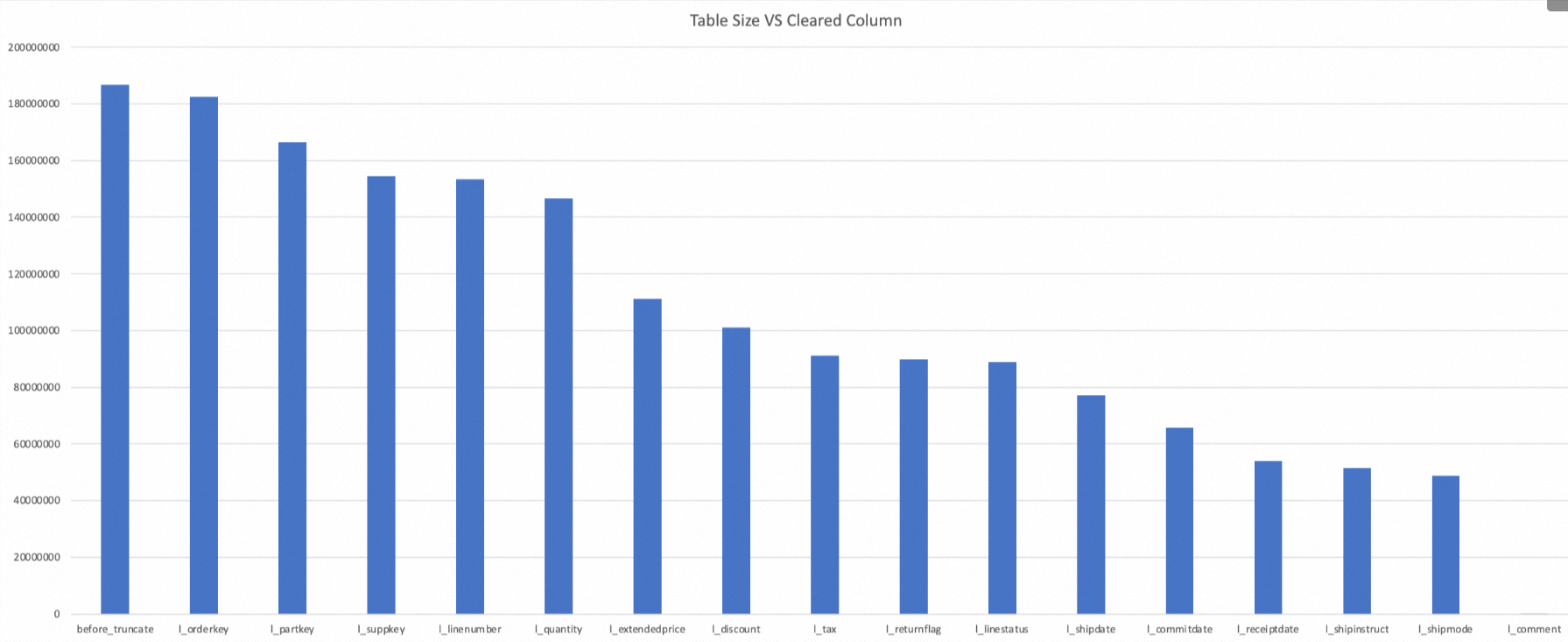
As you can see, after the 16 columns of the table are sequentially set to NULL by the `CLEAR COLUMN` command, the total storage space is reduced by 99.97% (from the initial 186,783,526 bytes to 236,715 bytes).
NoteThe amount of space saved by the `CLEAR COLUMN` operation depends on the data type and the actual stored values of the column. For example, clearing the
l_extendedpricecolumn, which is of the DECIMAL type, saved 24.2% of the space (from 146,538,799 bytes to 111,138,117 bytes), which is significantly better than the average.When all columns are set to NULL, the table size is 236,715 bytes, not 0. This is because the file structure of the table still exists. NULL fields occupy a small amount of storage space, and the system also needs to retain the file footer information.
Update data
The UPDATE operation updates the values in one or more columns for rows in a Transactional table or Delta Table.
Syntax
-- Method 1
UPDATE <table_name> [[AS] alias] SET <col1_name> = <value1> [, <col2_name> = <value2> ...] [WHERE <where_condition>];

-- Method 2
UPDATE <table_name> [[AS] alias] SET (<col1_name> [, <col2_name> ...]) = (<value1> [, <value2> ...]) [WHERE <where_condition>];

-- Method 3
UPDATE <table_name> [[AS] alias]
    SET <col1_name> = <value1> [, <col2_name> = <value2>, ...]
    [FROM <additional_tables>]
    [WHERE <where_condition>];
Parameters
table_name: Required. The name of the Transactional table or Delta Table for the
UPDATEoperation.alias: Optional. The alias for the table.
col1_name, col2_name: Required. The names of the columns to modify. You must update at least one column.
value1, value2: Required. The new values for the columns. You must update at least one column value.
where_condition: Optional. A WHERE clause to filter data. For more information about the WHERE clause, see SELECT syntax. If you do not include a WHERE clause, all data in the table is updated.
additional_tables: Optional. A FROM clause.
The
UPDATEstatement supports the FROM clause, which can simplify theUPDATEstatement. The following table compares an UPDATE statement that uses a FROM clause with one that does not.Scenario
Sample code
Without a FROM clause
UPDATE target SET v =
  (SELECT MIN(v) FROM src GROUP BY k WHERE target.k = src.key)
  WHERE target.k IN (SELECT k FROM src);
With a FROM clause
UPDATE target SET v = b.v
  FROM (SELECT k, MIN(v) AS v FROM src GROUP BY k) b
  WHERE target.k = b.k;
As the code examples show:
When you update one row in the target table using multiple rows from the source table, you must use an aggregate operation to ensure that the source data is unique because the system does not know which source row to use. The syntax that does not use a `FROM` clause is less concise. The syntax with a `FROM` clause is simpler and easier to understand.
When you perform a join update, if you want to update only the intersection of the data, the syntax that does not use a `FROM` clause requires an extra `WHERE` condition and is less concise than the syntax that uses a `FROM` clause.
Examples
Example 1: Create a non-partitioned table named acid_update, import data, and then run the
UPDATEoperation to update the columns of rows that meet a specified condition. The following are the sample commands:-- Create a Transactional table named acid_update. CREATE TABLE IF NOT EXISTS acid_update(id BIGINT) tblproperties ("transactional"="true"); -- Insert data. INSERT OVERWRITE TABLE acid_update VALUES(1),(2),(3),(2); -- View the inserted data. SELECT * FROM acid_update; -- The following result is returned: +------------+ | id | +------------+ | 1 | | 2 | | 3 | | 2 | +------------+ -- Update the id value to 4 for all rows where id is 2. UPDATE acid_update SET id = 4 WHERE id = 2; -- View the update result. 2 has been updated to 4. SELECT * FROM acid_update; -- The following result is returned: +------------+ | id | +------------+ | 1 | | 3 | | 4 | | 4 | +------------+Example 2: Create a partitioned table named acid_update, import data, and then run the
UPDATEoperation to update the columns of rows that meet a specified condition. The following are the sample commands:-- Create a Transactional table named acid_update_pt. CREATE TABLE IF NOT EXISTS acid_update_pt(id BIGINT) PARTITIONED BY(ds STRING) tblproperties ("transactional"="true"); -- Add a partition. ALTER TABLE acid_update_pt ADD IF NOT EXISTS PARTITION (ds= '2019'); -- Insert data. INSERT OVERWRITE TABLE acid_update_pt PARTITION (ds='2019') VALUES(1),(2),(3); -- View the inserted data. SELECT * FROM acid_update_pt WHERE ds = '2019'; -- The following result is returned: +------------+------------+ | id | ds | +------------+------------+ | 1 | 2019 | | 2 | 2019 | | 3 | 2019 | +------------+------------+ -- Update a column in a specified row. Set the id value to 4 for all rows where the partition is 2019 and id is 2. UPDATE acid_update_pt SET id = 4 WHERE ds = '2019' AND id = 2; -- View the update result. 2 has been updated to 4. SELECT * FROM acid_update_pt WHERE ds = '2019'; -- The following result is returned: +------------+------------+ | id | ds | +------------+------------+ | 4 | 2019 | | 1 | 2019 | | 3 | 2019 | +------------+------------+Example 3: Create a target table named acid_update_t and an associated table named acid_update_s to update multiple column values at the same time. The following are the sample commands:
-- Create a target Transactional table to be updated, named acid_update_t, and an associated table named acid_update_s.
CREATE TABLE IF  NOT EXISTS acid_update_t(id INT,value1 INT,value2 INT) tblproperties ("transactional"="true");
CREATE TABLE IF  NOT EXISTS acid_update_s(id INT,value1 INT,value2 INT);

-- Insert data.
INSERT OVERWRITE TABLE acid_update_t VALUES(2,20,21),(3,30,31),(4,40,41);
INSERT OVERWRITE TABLE acid_update_s VALUES(1,100,101),(2,200,201),(3,300,301);

-- Method 1: Update with constants.
UPDATE acid_update_t SET (value1, value2) = (60,61);
-- Query the result data in the target table for Method 1.
SELECT * FROM acid_update_t;

-- The following result is returned:
+------------+------------+------------+
| id         | value1     | value2     |
+------------+------------+------------+
| 2          | 60         | 61         |
| 3          | 60         | 61         |
| 4          | 60         | 61         |
+------------+------------+------------+

-- Method 2: Join update. The rule is a left join from acid_update_t to acid_update_s.
UPDATE acid_update_t SET (value1, value2) = (SELECT value1, value2 FROM acid_update_s WHERE acid_update_t.id = acid_update_s.id);
-- Query the result data in the target table for Method 2.
SELECT * FROM acid_update_t;

-- The following result is returned:
+------------+------------+------------+
| id         | value1     | value2     |
+------------+------------+------------+
| 2          | 200        | 201        |
| 3          | 300        | 301        |
| 4          | NULL       | NULL       |
+------------+------------+------------+

-- Method 3 (update based on the result of Method 2): Join update. The rule is to add a filter condition to update only the intersection.
UPDATE acid_update_t SET (value1, value2) = (SELECT value1, value2 FROM acid_update_s WHERE acid_update_t.id = acid_update_s.id) WHERE acid_update_t.id IN (SELECT id FROM acid_update_s);
-- Query the result data in the target table for Method 3.
SELECT * FROM acid_update_t;

-- The following result is returned:
+------------+------------+------------+
| id         | value1     | value2     |
+------------+------------+------------+
| 2          | 200        | 201        |
| 3          | 300        | 301        |
| 4          | NULL       | NULL       |
+------------+------------+------------+

-- Method 4 (update based on the result of Method 3): Join update with aggregate results.
UPDATE acid_update_t SET (id, value1, value2) = (SELECT id, MAX(value1),MAX(value2) FROM acid_update_s WHERE acid_update_t.id = acid_update_s.id GROUP BY acid_update_s.id) WHERE acid_update_t.id IN (SELECT id FROM acid_update_s);
-- Query the result data in the target table for Method 4.
SELECT * FROM acid_update_t;

-- The following result is returned:
+------------+------------+------------+
| id         | value1     | value2     |
+------------+------------+------------+
| 2          | 200        | 201        |
| 3          | 300        | 301        |
| 4          | NULL       | NULL       |
+------------+------------+------------+
Example 4: A simple join query involving two tables. The following are the sample commands:
-- Create a target table for update, acid_update_t, and an associated table, acid_update_s.
CREATE TABLE IF  NOT EXISTS acid_update_t(id BIGINT,value1 BIGINT,value2 BIGINT) tblproperties ("transactional"="true");
CREATE TABLE IF  NOT EXISTS acid_update_s(id BIGINT,value1 BIGINT,value2 BIGINT);

-- Insert data.
INSERT OVERWRITE TABLE acid_update_t VALUES(2,20,21),(3,30,31),(4,40,41);
INSERT OVERWRITE TABLE acid_update_s VALUES(1,100,101),(2,200,201),(3,300,301);

-- Query data from the acid_update_t table.
SELECT * FROM acid_update_t;
-- The following result is returned:
+------------+------------+------------+
| id         | value1     | value2     |
+------------+------------+------------+
| 2          | 20         | 21         |
| 3          | 30         | 31         |
| 4          | 40         | 41         |
+------------+------------+------------+

-- Query data from the acid_update_s table.
SELECT * FROM acid_update_s;
-- The following result is returned:
+------------+------------+------------+
| id         | value1     | value2     |
+------------+------------+------------+
| 1          | 100        | 101        |
| 2          | 200        | 201        |
| 3          | 300        | 301        |
+------------+------------+------------+

-- Join update. Add a filter condition to the target table to update only the intersection.
UPDATE acid_update_t SET value1 = b.value1, value2 = b.value2
FROM acid_update_s b WHERE acid_update_t.id = b.id;
-- The following command is equivalent to the one above.
UPDATE acid_update_t a SET a.value1 = b.value1, a.value2 = b.value2
FROM acid_update_s b WHERE a.id = b.id;

-- View the update result. 20 is updated to 200, 21 to 201, 30 to 300, and 31 to 301.
SELECT * FROM acid_update_t;
-- The following result is returned:
+------------+------------+------------+
| id         | value1     | value2     |
+------------+------------+------------+
| 4          | 40         | 41         |
| 2          | 200        | 201        |
| 3          | 300        | 301        |
+------------+------------+------------+
Example 5: A complex join query involving multiple tables. The following are the sample commands:
-- Create a target table for update, acid_update_t, and an associated table, acid_update_s.
CREATE TABLE IF  NOT EXISTS acid_update_t(id BIGINT,value1 BIGINT,value2 BIGINT) tblproperties ("transactional"="true");
CREATE TABLE IF  NOT EXISTS acid_update_s(id BIGINT,value1 BIGINT,value2 BIGINT);
CREATE TABLE IF  NOT EXISTS acid_update_m(id BIGINT,value1 BIGINT,value2 BIGINT);

-- Insert data.
INSERT OVERWRITE TABLE acid_update_t VALUES(2,20,21),(3,30,31),(4,40,41),(5,50,51);
INSERT OVERWRITE TABLE acid_update_s VALUES (1,100,101),(2,200,201),(3,300,301),(4,400,401),(5,500,501);
INSERT OVERWRITE TABLE acid_update_m VALUES(3,30,101),(4,400,201),(5,300,301);

-- Query data from the acid_update_t table.
SELECT * FROM acid_update_t;
-- The following result is returned:
+------------+------------+------------+
| id         | value1     | value2     |
+------------+------------+------------+
| 2          | 20         | 21         |
| 3          | 30         | 31         |
| 4          | 40         | 41         |
| 5          | 50         | 51         |
+------------+------------+------------+

-- Query data from the acid_update_s table.
SELECT * FROM acid_update_s;
-- The following result is returned:
+------------+------------+------------+
| id         | value1     | value2     |
+------------+------------+------------+
| 1          | 100        | 101        |
| 2          | 200        | 201        |
| 3          | 300        | 301        |
| 4          | 400        | 401        |
| 5          | 500        | 501        |
+------------+------------+------------+

-- Query data from the acid_update_m table.
SELECT * FROM acid_update_m;
-- The following result is returned:
+------------+------------+------------+
| id         | value1     | value2     |
+------------+------------+------------+
| 3          | 30         | 101        |
| 4          | 400        | 201        |
| 5          | 300        | 301        |
+------------+------------+------------+

-- Join update, and filter both the source and target tables in the WHERE clause.
UPDATE acid_update_t
SET value1 = acid_update_s.value1, value2 = acid_update_s.value2
FROM acid_update_s
WHERE acid_update_t.id = acid_update_s.id
AND acid_update_s.id > 2
AND acid_update_t.value1 NOT IN
(SELECT value1 FROM acid_update_m WHERE id = acid_update_t.id)
AND acid_update_s.value1 NOT IN
(SELECT value1 FROM acid_update_m WHERE id = acid_update_s.id);

-- View the update result. Only the data in the acid_update_t table with id 5 meets the condition. The corresponding value1 is updated to 500, and value2 is updated to 501.
SELECT * FROM acid_update_t;
-- The following result is returned:
+------------+------------+------------+
| id         | value1     | value2     |
+------------+------------+------------+
| 5          | 500        | 501        |
| 2          | 20         | 21         |
| 3          | 30         | 31         |
| 4          | 40         | 41         |
+------------+------------+------------+
Example 6: The following command is an example of how to create a Delta table named mf_dt, import data, and execute an
UPDATEoperation to delete rows that meet a specified condition:-- Create a target Delta Table named mf_dt. CREATE TABLE IF NOT EXISTS mf_dt (pk BIGINT NOT NULL PRIMARY KEY, val BIGINT NOT NULL) PARTITIONED BY(dd STRING, hh STRING) tblproperties ("transactional"="true"); -- Insert data. INSERT OVERWRITE TABLE mf_dt PARTITION (dd='01', hh='02') VALUES (1, 1), (2, 2), (3, 3); -- View the inserted data. SELECT * FROM mf_dt WHERE dd='01' AND hh='02'; -- The following result is returned: +------------+------------+----+----+ | pk | val | dd | hh | +------------+------------+----+----+ | 1 | 1 | 01 | 02 | | 3 | 3 | 01 | 02 | | 2 | 2 | 01 | 02 | +------------+------------+----+----+ -- Update a column in a specified row. Set the val value to 30 for all rows where the partition is 01 and 02, and pk is 3. -- Method 1 UPDATE mf_dt SET val = 30 WHERE pk = 3 AND dd='01' AND hh='02'; -- Method 2 UPDATE mf_dt SET val = delta.val FROM (SELECT pk, val FROM VALUES (3, 30) t (pk, val)) delta WHERE delta.pk = mf_dt.pk AND mf_dt.dd='01' AND mf_dt.hh='02'; -- View the update result. SELECT * FROM mf_dt WHERE dd='01' AND hh='02'; -- The following result is returned. The val value for the row with pk=3 is updated to 30. +------------+------------+----+----+ | pk | val | dd | hh | +------------+------------+----+----+ | 1 | 1 | 01 | 02 | | 3 | 30 | 01 | 02 | | 2 | 2 | 01 | 02 | +------------+------------+----+----+
Merge transactional table files
The underlying physical storage of a Transactional table consists of base files and Delta files, which are not directly readable. When you run an UPDATE or DELETE operation on a Transactional table, the base files are not modified. Instead, Delta files are appended. This means that the more updates or deletions you perform, the more storage the table occupies. The accumulation of many Delta files can increase storage and subsequent query costs.
Running multiple UPDATE or DELETE operations on the same table or partition generates many Delta files. When the system reads data, it must load these Delta files to determine which rows were updated or deleted. Many Delta files can degrade data read performance. In this case, you can merge the base files and Delta files to reduce storage and improve data read performance.
Syntax
ALTER TABLE <table_name> [PARTITION (<partition_key> = '<partition_value>' [, ...])] compact {minor|major};Parameters
Parameter
Required
Description
table_name
Yes
The name of the Transactional table whose files you want to merge.
partition_key
No
If the Transactional table is a partitioned table, specify the partition key column name.
partition_value
No
If the Transactional table is a partitioned table, specify the value for the partition key column.
major|minor
Yes
You must select one. The differences are:
minor: Merges only the base files and all their underlying Delta files, eliminating the Delta files.major: Not only merges the base files and all their underlying Delta files to eliminate the Delta files, but also merges small files within the table's corresponding base files. If a base file is small (less than 32 MB) or if Delta files exist, this is equivalent to running anINSERT OVERWRITEoperation on the table again. However, if the base file is large enough (greater than or equal to 32 MB) and no Delta files exist, it will not be rewritten.Precautions
Small files merged by the `compact` operation are deleted after one day. If you use the local backup feature to restore a history that depends on these small files, the recovery will fail because the files are missing.
Examples
Example 1: Merge files for the Transactional table acid_delete. The following is the sample command:
ALTER TABLE acid_delete compact minor;The following result is returned:
Summary:
Nothing found to merge, set odps.merge.cross.paths=true if cross path merge is permitted.
OK
Example 2: Merge files for the Transactional table acid_update_pt. The following is the sample command:
ALTER TABLE acid_update_pt PARTITION (ds = '2019') compact major;The following result is returned:
Summary:
table name: acid_update_pt /ds=2019  instance count: 2  run time: 6
  before merge, file count:        8  file size: 2613  file physical size: 7839
   after merge, file count:        2  file size: 679  file physical size: 2037

OK
FAQ
Issue 1:
Problem description: When I run an
UPDATEstatement, the errorODPS-0010000:System internal error - fuxi job failed, caused by: Data Set should contain exactly one rowis reported.Cause: The rows to be updated do not have a one-to-one correspondence with the data in the subquery result. The system cannot determine which row to update. The following is a sample command:
UPDATE store SET (s_county, s_manager) = (SELECT d_country, d_manager FROM store_delta sd WHERE sd.s_store_sk = store.s_store_sk) WHERE s_store_sk IN (SELECT s_store_sk FROM store_delta);The subquery
SELECT d_country, d_manager FROM store_delta sd WHERE sd.s_store_sk = store.s_store_skis used to join with store_delta, and the data from store_delta is used to update store. Assume that the s_store_sk column in the store table contains three rows of data:[1, 2, 3]. If the s_store_sk column in the store_delta table has two rows of data,[1, 1], a one-to-one correspondence does not exist, and the execution fails.Solution: Ensure that the rows to be updated have a one-to-one correspondence with the data in the subquery result.
Issue 2:
Problem description: When I run the
compactcommand in DataWorks DataStudio, the errorODPS-0130161:[1,39] Parse exception - invalid token 'minor', expect one of 'StringLiteral','DoubleQuoteStringLiteral'is reported.Cause: The MaxCompute client version in the exclusive resource group for DataWorks does not support the
compactcommand.Solution: Contact the technical support team through the DataWorks DingTalk group to upgrade the MaxCompute client version in the exclusive resource group.