Balancing MaxCompute computing costs with on-time job completion is a challenge. You might over-provision expensive subscription resources for peak loads, leading to waste, or under-provision and cause critical jobs to miss their deadlines. The MaxCompute Compute Cost Optimization feature solves this problem. It acts as an intelligent advisor, analyzing your project's historical workload patterns to generate data-driven resource plans. These recommendations help you fine-tune an existing subscription quota or switch from pay-as-you-go, reducing costs while meeting performance targets.
How it works
The following three use cases show how MaxCompute generates resource configuration optimization plans.
Use case 1: Optimize an existing subscription quota
Description
A company uses subscription computing resources. The current plan reserves 1,000 CUs for jobs. Two batches of jobs run on these resources at fixed times every day:
First batch: Jobs are submitted before 01:00 and must finish by 02:00. However, under the current configuration, the jobs fail to meet this deadline.
Second batch: Jobs are submitted before 05:00 and must finish by 06:00.
Resource cost (list price): The monthly computing resource cost is , and 1,000 CU × 22.0 USD/CU = 22,000 USD.
MaxCompute's logic for generating an optimization plan
MaxCompute predicts the daily CU request volume based on the scenario's information.
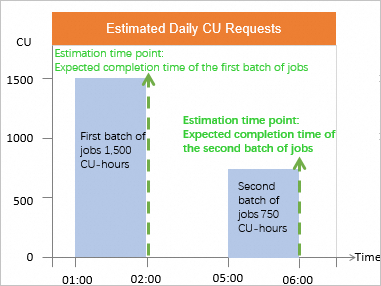
Based on the runtime data of the two job batches over the last 30 days, MaxCompute predicts the workload required to complete them. Assume the two predicted values are:
First batch of jobs
The jobs consume 1,500 CUs and run for 1 hour. The resource usage is 1,500 CU × 1 h = 1,500 CU-hours.
Second batch of jobs
The jobs consume 750 CUs and run for 1 hour. The resource usage is 750 CU × 1 h = 750 CU-hours.
Set two Estimation time points based on the expected completion times of the job batches: 02:00 and 06:00.
Next, MaxCompute evaluates resource consumption under the current configuration.
NoteThe following evaluation metrics are estimated primarily using CU-hours. For detailed calculation logic, see the corresponding terms in the "Related terminology" section below.
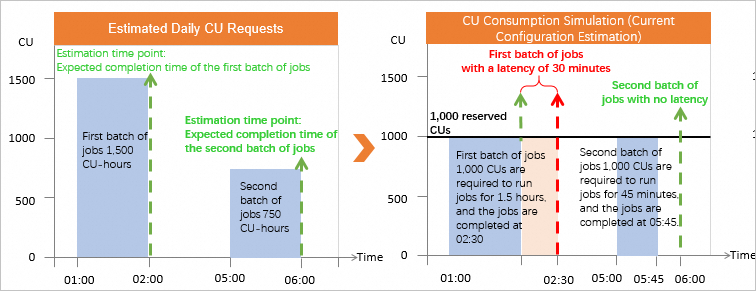
For the first batch of jobs, 1,500 CU-hours are required, and 1,000 reserved CUs are configured. The first batch of jobs can be completed in 1.5 hours. In this case, the first batch of jobs can be completed at 02:30. The job latency is 30 minutes.
For the second batch of jobs, 750 CU-hours are required, and 1,000 reserved CUs are configured. The second batch of jobs can be completed in 0.75 hours. In this case, all jobs are completed at about 05:45. Redundant CUs are available and no job latency exists.
The following estimate is based on the current resource configuration:
Estimation metric
Calculation formula
First batch of jobs
Second batch of jobs
Requirement satisfaction
Expected completion time:
Used CU-hours/Actually required CU-hours66.67%
(Resource insufficiency)
100%
(Resource redundancy)
Job latency
If jobs are not completed before the expected completion time:
Actual completion time - Expected completion time30 minutes
0 minutes
The system generates an optimal resource configuration optimization plan based on the output objective. The output objective refers to the time before which all the jobs involved are expected to be completed.
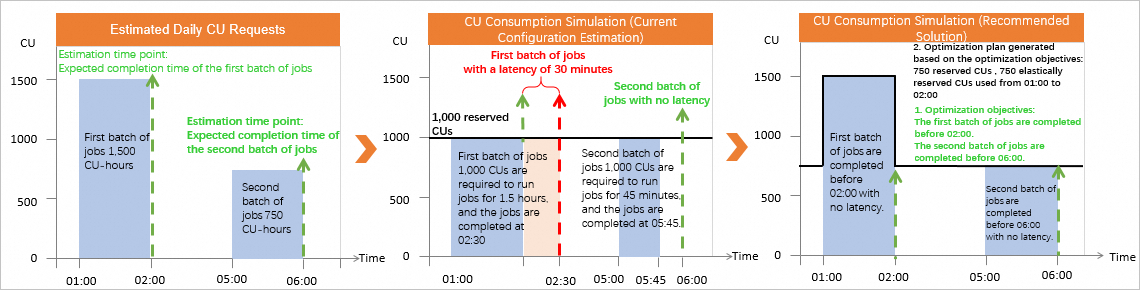
Optimization plan: 750 reserved CUs and 750 elastically reserved CUs for the period from 01:00 to 02:00.
Optimization results:
For the two batches of jobs, the requirement satisfaction is 100%, and the job latency is 0 minutes.
Resource cost (list price): 750 CU × 22.0 USD/CU + 750 CU × 0.0488 USD/CU/H × 1 H × 30 = 17,598 USD. This represents a reduction of 4,402 USD from the pre-optimization monthly compute cost of 1,000 CU × 22.0 USD/CU = 22,000 USD.
Use case 2: Migrate a pay-as-you-go project to a new subscription quota
Description
A company uses MaxCompute Pay-as-you-go Standard Edition. Project A has two batches of jobs that run at fixed times every day:
First batch of jobs: All jobs are submitted and started before 01:00 every day. The company expects to complete the jobs before 02:00.
Second batch of jobs: All jobs are submitted and started before 05:00 every day. The company expects to complete the jobs before 06:00.
Resource cost (list price): Pay-as-you-go SQL jobs are billed based on the data scan volume. The average daily data scan volume is about 1,200 GB. The monthly compute cost is 1,200 GB × 0.0438 USD/GB × 30 = 1,576.8 USD.
The company wants to purchase a subscription computing quota to run the computing jobs in Project A.
MaxCompute's logic for generating an optimization plan
The system estimates the number of daily CU requests based on the basic scenario information.
Based on the running results of two batches of jobs in 30 days, the system estimates the CU-hours that are separately consumed by the two batches of jobs. The following content lists the estimated values.
First batch of jobs
The jobs consume 100 CUs and run for 1 hour. The resource usage is 100 CU × 1 h = 100 CU-hours.
Second batch of jobs
The jobs consume 50 CUs and run for 1 hour. The resource usage is 50 CU × 1 h = 50 CU-hours.
The system sets two estimation time points 02:00 and 06:00 based on the expected completion time of the two batches of jobs. The system also sets the output objective. By default, job latency is not allowed.
The system generates an optimal resource configuration optimization plan based on the output objective. The output objective refers to the time before which all the jobs involved are expected to be completed.
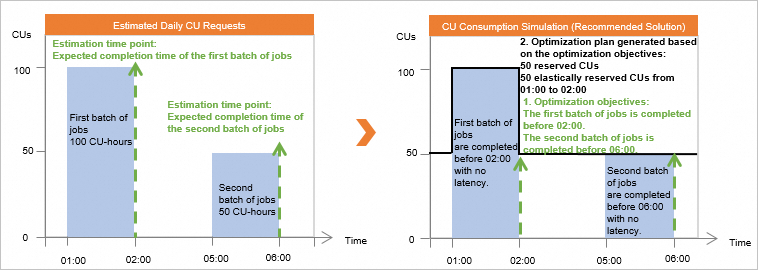
Optimization plan: 50 reserved CUs and 50 elastically reserved CUs for the period from 01:00 to 02:00.
Optimization results:
For the two batches of jobs, the requirement satisfaction is 100%, and the job latency is 0 minutes.
Resource cost (list price): 50 CU × 22.0 USD/CU + 50 CU × 0.0488 USD/CU/H × 1 H × 30 = 1,173.2 USD. This represents a reduction of 403.6 USD from the pre-optimization monthly compute cost of 1,576.8 USD.
Use case 3: Merge a pay-as-you-go project into an existing subscription quota
Description
A company purchased specific subscription computing resources. In the current resource configuration plan, 1,000 reserved compute units (CUs) are configured for jobs. Two batches of jobs consume the reserved CUs every day.
First batch of jobs: All jobs are submitted and started before 01:00 every day. The company expects to complete the jobs before 02:00.
Second batch of jobs: All jobs are submitted and started before 05:00 every day. The company expects to complete the jobs before 06:00.
Resource cost (list price): The monthly compute resource cost is 1,000 CU × 22.0 USD/CU = 22,000 USD.
The company activates MaxCompute billed in pay-as-you-go mode. In Project A, two batches of jobs run with pay-as-you-go resources at fixed periods of time every day.
First batch of jobs: All jobs are submitted and started before 01:00 every day. The company expects to complete the jobs before 02:00.
Second batch of jobs: All jobs are submitted and started before 05:00 every day. The company expects to complete the jobs before 06:00.
Resource cost (list price): Pay-as-you-go SQL jobs are billed based on the data scan volume. The average daily data scan volume is about 4,200 GB. The monthly compute cost is 4,200 GB × 0.0438 USD/GB × 30 = 5,518.8 USD.
The total monthly cost of computing resources is 22,000 + 5,518.8 = USD 27,518.8.
The company wants to run the computing jobs of Project A in the existing subscription quota and ensure that the jobs can be completed at the expected time.
-
MaxCompute's logic for generating an optimization plan
The system estimates the number of daily CU requests of the pay-as-you-go project and the subscription quota based on the basic scenario information.
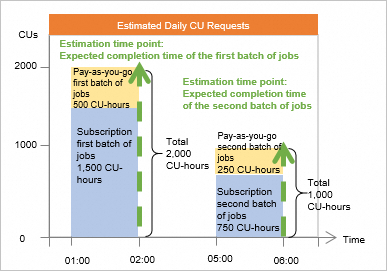
Based on the run data for the two batches of jobs on the subscription quota over the last 30 days, the system predicts the resources (CU-hours) required to complete each batch. Assume the predicted values are as follows:
First batch of jobs
The jobs require 1,500 CUs and run for 1 hour. The resource usage is 1,500 CU × 1 h = 1,500 CU-hours.
Second batch of jobs
The jobs require 750 CUs and run for 1 hour. The resource usage is 750 CU × 1 h = 750 CU-hours.
Based on the run data of the two batches of jobs in Project A over the last 30 days, the system predicts the resources (CU-hours) required to complete each batch. Assume the predicted values are as follows:
First batch of jobs
The jobs require 500 CUs and run for 1 hour. The resource usage is 500 CU × 1 h = 500 CU-hours.
Second batch of jobs
The jobs require 250 CUs and run for 1 hour. The resource usage is 250 CU × 1 h = 250 CU-hours.
The system sets two estimation time points 02:00 and 06:00 based on the expected completion time of the two batches of jobs.
-
The system estimates resource consumption based on the current resource configuration of the subscription quota.
NoteThe following evaluation metrics are estimated primarily using CU-hours. For detailed calculation logic, see the corresponding terms in the "Related terminology" section below.
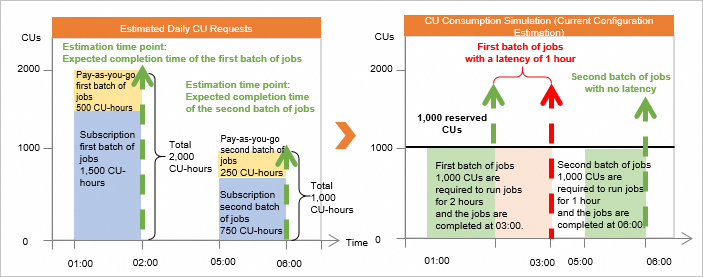
After the first batch of jobs of pay-as-you-go Project A are added to the subscription quota, 2,000 CU-hours are required to run all the first batch of jobs in the quota, and 1,000 reserved CUs are configured. The first batch of jobs can be completed in 2 hours. In this case, the first batch of jobs is completed at 03:00. The job latency is 1 hour.
After the second batch of jobs of pay-as-you-go Project A are added to the subscription quota, 1,000 CU-hours are required to run all the second batch of jobs in the quota, and 1,000 reserved CUs are configured. The second batch of jobs can be completed in 1 hour. In this case, all jobs are completed at about 06:00. No job latency exists.
The estimate for the current resource configuration is as follows:
Estimation metric
Calculation formula
First batch of jobs
Second batch of jobs
Requirement satisfaction
Calculated based on resource consumption at the expected completion time: Used CU-hours/Actually required CU-hours
50% (Resource insufficiency)
100%
Job latency
Calculated if jobs are not completed before the expected completion time: Actual completion time - Expected completion time
1 hour
0 minutes
The system generates an optimal resource configuration optimization plan based on the output objective. The output objective refers to the time before which all the jobs involved are expected to be completed. The system estimates resource consumption based on the current resource configuration of the subscription quota.
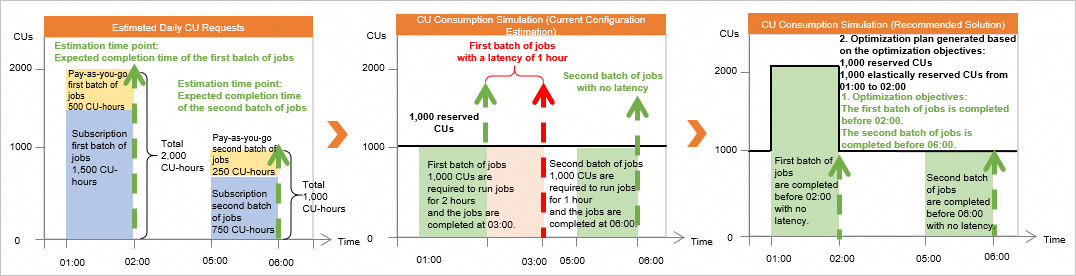
Optimization plan: 1,000 reserved CUs and 1,000 elastically reserved CUs for the period from 01:00 to 02:00.
Optimization results:
For the two batches of jobs, the requirement satisfaction is 100%, and the job latency is 0 minutes.
Resource cost (list price): 1,000 CU × 22.0 USD/CU + 1,000 CU × 0.0488 USD/CU/H × 1 H × 30 = 23,464 USD. This represents a reduction of 4,054.8 USD from the pre-optimization monthly compute cost of 27,518.8 USD.
Terms (Click to expand)
Limitations
MaxCompute can analyze computing resources and generate resource configuration optimization plans only for computing resources in a level-1 subscription quota and pay-as-you-go computing resources.
NoteMaxCompute compute resources support three billing methods: pay-as-you-go, subscription, and pay-per-hour. For more information about the billing of different resources, see Billable items and billing methods.
You can use the quota management feature to allocate MaxCompute computing resources to different levels of quotas. For more information, see Manage quotas in the new MaxCompute console.
This feature is available only in the following regions: China (Hangzhou), China (Shanghai), China (Beijing), China (Zhangjiakou), China (Shenzhen), China (Chengdu), China (Hong Kong), Singapore, Indonesia (Jakarta), and Germany (Frankfurt).
Procedure
-
Log in to the MaxCompute console and select a region in the upper-left corner.
-
In the left-side navigation pane, choose .
-
On the Intelligent Optimization > Computing Resource Config Optimization page, select a Quota from the Quota Name drop-down list.
If you select a subscription compute quota, you can view recommendations for upgrading or downgrading your existing subscription compute resources.
-
If you select a pay-as-you-go compute quota, you can view the recommended resource plan and projected outcomes for switching a project from pay-as-you-go to subscription resources. The default name for a MaxCompute Pay-as-you-go Standard Edition quota is PayAsYouGoQuota_p.
If you select a pay-as-you-go compute quota, select the project that is attached to the pay-as-you-go Standard Edition compute resources that you want to analyze.
The project list contains only pay-as-you-go projects that meet the analysis requirements. A project must have run jobs every day for the last seven days. The project list data is updated daily at 00:00:00.
To ensure a smooth page experience, you can select up to 20 projects for evaluation at a time.
-
The Configuration Change Method is selected by default.
If you have an existing subscription quota, the optimization feature evaluates and recommends changes based on the resource requests of your existing subscription quota.
If you do not have a subscription quota, the optimization feature recommends purchasing a new subscription quota based on the resource requests of the specified project.
-
On the Intelligent Optimization > Computing Resource Config Optimization page, click Analyze Computing Requirements.
You can view the daily CU prediction graph for a specific primary subscription Quota group to understand the predicted daily resource requirements. If you use an existing upfront primary Quota for the Configuration Change Method, you can view a cumulative prediction that combines the computing demands of the project being upgraded or downgraded with the existing subscription Quota.
You cannot use this feature if you have insufficient historical job request data or if the data shows no regular patterns.
The estimated values in the chart are calculated using the period identification and decomposition algorithm based on the job request data in 30 days.
-
In the Set Estimation Time Point section, set the evaluation time point to your desired job completion time. You can click Hour, Half Hour, or Deselect.
MaxCompute then evaluates whether resources are sufficient and whether jobs will be delayed in different resource configuration plans based on the set estimation time points. For more information about the logic, see How it works.
Configuration examples:
If you want all jobs to be completed by 05:00 every day, set the estimation time point to 05:00.
All jobs submitted between 05:00:00 on the previous day and 05:00:00 on the current day are considered as a batch of jobs. You can estimate requirement satisfaction and job latency of this batch of jobs at 05:00:00 on the current day.
If you want the first batch of jobs to be completed by 02:00 and the second batch by 10:00 every day, set two estimation time points, such as 02:00 and 10:00. The system then does the following:
All jobs submitted between 10:00:00 on the previous day and 02:00:00 on the current day are considered as the first batch of jobs. You can estimate requirement satisfaction and job latency of this batch of jobs at 02:00:00 on the current day.
All jobs submitted between 02:00:00 and 10:00:00 on the current day are considered as the second batch of jobs. You can estimate requirement satisfaction and job latency of this batch of jobs at 10:00:00 on the current day.
-
In the Set Output Goal section, set the target completion times for your jobs with the optimized configuration.
By default, the optimization objective time point is the estimation time point. You can also set a time point that is earlier than the estimation time point to reserve extra time for job output. Alternatively, you can set a maximum acceptable job latency to allow for a specific delay in job output to reduce resource costs.
-
Click View Recommended Plan to review the details and expected outcomes of the recommended plan.
The optimization outcome is also presented as a CU consumption simulation for the recommended plan. The information is consistent with the current plan evaluation chart, which you can use for comparison.
ImportantThe recommended plan is for reference only and cannot guarantee that the optimization objective will be fully achieved. We recommend that you gradually change the configuration as needed and monitor the outcomes after the change.
-
In the Recommended Plan section, download the recommended plan.
We recommend downloading the recommended plan as an
.xlsxfile. This simplifies record-keeping and comparing different plans. Then, based on your business requirements, click Configure to apply the settings on the Quotas page.
What to do next
After an optimization plan is generated, you can evaluate the optimized compute resource cost based on the compute resource configuration provided in the plan.
Monthly cost of computing resources (catalog price) = Number of purchased subscription CUs × USD 22.0 per month + Number of elastically reserved CUs × Scaling period (hours) × USD 0.0488 per CU-hour × 30For more information about billing for subscription resources, see and Cost calculation (Pay-as-you-go). The actual price is subject to the price on the order submission page.
Evaluate the cost and the optimized completion time based on the cost and optimization objective of the plan. Purchase subscription resources based on the optimization plan, gradually change the configuration, and monitor the job run results after the change.
References
Best practices for using the computing resource optimization feature: Use the cost optimization feature to achieve cost-effectiveness.
For more information about MaxCompute cost optimization, see the following topics: