To allow certain users to view sensitive data in a MaxCompute project while hiding key information, enable dynamic data masking. This feature hides or replaces sensitive data in real time upon access to prevent data leaks. This topic describes how to enable the dynamic data masking feature in MaxCompute and provides usage examples.
Introduction
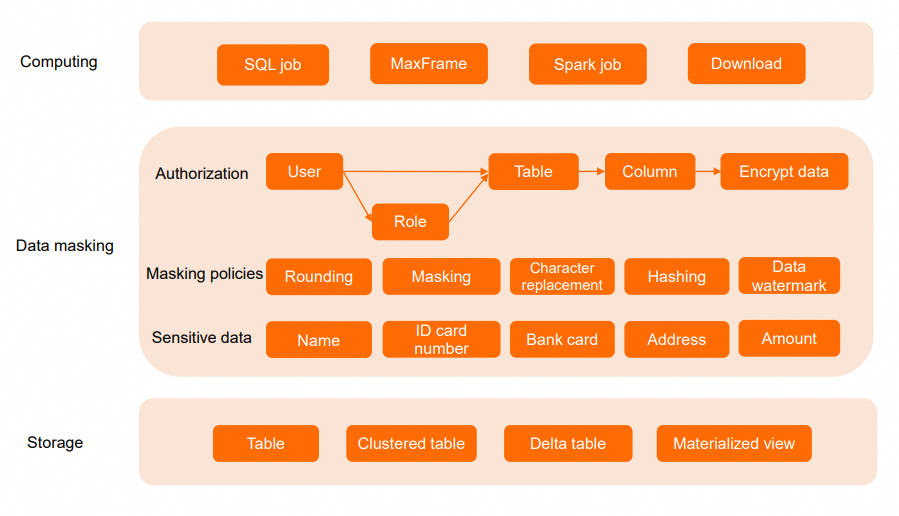
MaxCompute provides dynamic data masking to protect sensitive data, such as personally identifiable information (PII), in scenarios like development, testing, data sharing, and operations. Unlike column-level access control lists (ACLs), which require users to modify their queries to exclude columns they cannot access, dynamic data masking works automatically without modifying existing queries. When a user accesses data, the system automatically applies the appropriate masking policy based on the user or their role. This ensures that data is masked during queries, downloads, joins, and user-defined function (UDF) computations, and mitigates the risk of sensitive data exposure.
Masking policies support various methods, including masking, hashing, character replacement, numeric rounding, and date truncation, to protect data such as identification numbers, bank card numbers, addresses, and phone numbers. MaxCompute applies data masking at the earliest stage of data retrieval from storage. This approach ensures high performance and security.
Usage notes
Supported regions
This feature is in public preview and is available only in the following regions: China (Hangzhou), China (Shanghai), China (Beijing), China (Zhangjiakou), China (Ulanqab), China (Shenzhen), China (Chengdu), China (Hong Kong), Japan (Tokyo), Singapore, Malaysia (Kuala Lumpur), Indonesia (Jakarta), Germany (Frankfurt), US (Silicon Valley), and US (Virginia).
Supported driver versions
Connection method
Minimum version
Masking support
Java SDK
0.48.0-public or later
Supported
odpscmd
0.47.1 or later
Supported
JDBC
3.4.3 or later
Supported
MaxFrame
All versions
Supported
PyODPS
All versions
Supported
Go SDK
All versions
Supported
Internal and external tables
Masking policies are supported for both MaxCompute internal and external tables.
Dynamic data masking and row-level permissions are mutually exclusive. You cannot configure row-level permissions for a table that already has a masking policy, and vice versa.
When you apply a masking policy to Chinese characters, the character encoding must be UTF-8.
Views
Standard views support masking policies. The policies on a view are synchronized with those on the source table. When a masking policy is bound to or unbound from the source table, the change takes effect on the view immediately.
A materialized view inherits the masking policies from its source table at the time of creation. Subsequent changes to the source table's policies do not affect the materialized view.
Masking policies
If multiple masking policies apply to a user, the one with the highest priority is used. For more information, see Policy priorities.
How it works
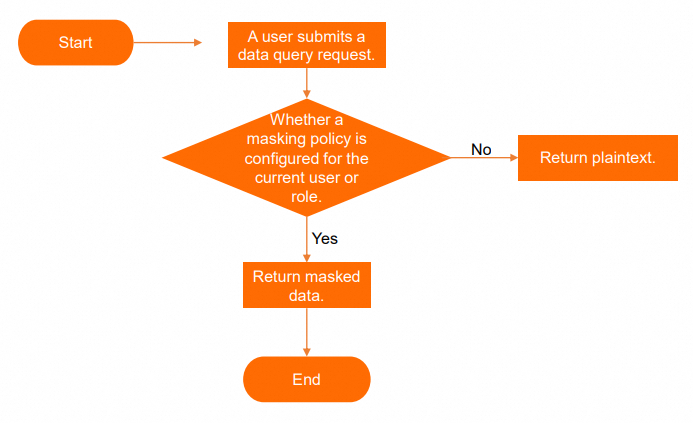
A project owner or users with the Super_Administrator or Admin role can manage masking policies. When a user accesses a table that contains sensitive data, the system checks for masking policies associated with the user or their role and returns either masked data or plaintext data accordingly.
Masking permissions
Only the project owner or users granted the project-level Super_Administrator or Admin role can enable or disable the dynamic data masking feature for a project.
The permissions required to manage masking policies for a table are as follows:
By default, the project owner or users with the project-level Super_Administrator or Admin role have the required permissions.
You can also grant permissions to a RAM User or RAM Role using a custom administrative project role. Log on to the MaxCompute console. In the left-side navigation pane, choose . On the management page for your project, go to the Project Settings page and select the Role Permissions tab. Click Create Project-level Role to create a project role with MaxCompute permissions. Set the **Role Type** to **Admin (management role)** and use a policy statement similar to the following example:
 {
  "Version": "1",
  "Statement": [
    {
      "Effect": "Allow",
      "Action": [
    		"odps:CreateDataMaskingPolicy","odps:ListDataMaskingPolicies"],
      "Resource": [
    "acs:odps:*:projects/[project_name]/authorization/datamaskingpolicies"
      ]
    },
    {
      "Effect": "Allow",
      "Action": [
    		"odps:DropDataMaskingPolicy",
        "odps:DescribeDataMaskingPolicy"
      ],
      "Resource": [
  "acs:odps:*:projects/[project_name]/authorization/datamaskingpolicies/*"
      ]
    },
    {
      "Effect": "Allow",
      "Action": "odps:ApplyDataMaskingPolicy",
      "Resource": [
        "acs:odps:*:projects/[project_name]/authorization/tables/*",
  "acs:odps:*:projects/[project_name]/authorization/datamaskingpolicies/*"
      ]
    }
  ]
}
Commands
Enable or disable data masking
The data masking switch odps.data.masking.policy.enable is a project-level property. Only the project owner or users granted the project-level Super_Administrator or Admin role can configure this property. For more information, see Manage built-in roles.
After you enable or disable data masking, the change takes approximately 15 minutes to take effect due to cache refresh latency.
Enable dynamic data masking for the project.
setproject odps.data.masking.policy.enable=true;Disable dynamic data masking for the project.
setproject odps.data.masking.policy.enable=false;
Create and drop masking policies
A project can have a maximum of 1,000 masking policies.
Syntax
Create a masking policy.
CREATE DATA MASKING POLICY [IF NOT EXISTS] <policy_name>
TO { USER <user_list> | ROLE <role_list> | default }
USING <Predefined Masking Policy>;
Drop a masking policy.
DROP DATA MASKING POLICY <policy_name>;
Parameters
Parameter
Required
Description
policy_name
Yes
The name of the masking policy. The policy name is case-insensitive and can consist only of letters (a–z, A–Z), digits (0–9), and underscores (_). We recommend starting the name with a letter. The name can be up to 128 bytes long.
USER | ROLE | default
Yes
Choose one of the following options:
USER: Applies the policy to specific users. In
<user_list>, specify the names of the users. You can run thelist users;command to view user information.ROLE: Applies the policy to specific roles. In
<role_list>, specify the names of the roles. You can run thelist roles;command to view role information.default: Applies the policy by default. If no other masking policy matches a user or role, the default policy is applied.
Predefined Masking Policy
Yes
A predefined masking policy. For more information, see Predefined masking policies.
Examples
Example 1: Create an MD5 hashing policy for userA, userB, and userC.
CREATE data masking policy IF NOT EXISTS masking_test_001
TO USER (userA, userB, userC)
USING MASKED_MD5(0);
Example 2: Create an MD5 hashing policy for the development and operations roles of a project.
CREATE data masking policy IF NOT EXISTS masking_test_001
TO ROLE (role_project_deploy, role_project_dev)
USING MASKED_MD5(0);
Apply policies to columns
Syntax
--Bind a policy to a column
APPLY DATA MASKING POLICY <policy_name> BIND TO TABLE <table_name> COLUMN <column_name>;

--Unbind a specific masking policy from a sensitive data column
APPLY DATA MASKING POLICY <policy_name> UNBIND FROM TABLE <table_name> COLUMN <column_name>;

--Unbind all masking policies from a sensitive data column
APPLY DATA MASKING POLICY UNBIND ALL FROM TABLE <table_name> COLUMN <column_name>;

--Unbind all masking policies from all sensitive data columns of a table
APPLY DATA MASKING POLICY UNBIND ALL FROM TABLE <table_name>;
Parameters
Parameter
Required
Description
policy_name
Yes
The name of the masking policy.
table_name
Yes
The name of the table that contains sensitive data.
column_name
Yes
The name of the column that contains sensitive data.
View masking policies
Syntax
--View the creation information of a masking policy
DESC DATA MASKING POLICY <policy_name>;

--View a table's extended information, including its masking policies
DESC EXTENDED <table_name>;

--List the names of all masking policies in the current project
LIST DATA MASKING POLICY;

--List the names of masking policies bound to a specific user
LIST DATA MASKING POLICY TO USER <user_name>;

--List the names of masking policies bound to a specific role
LIST DATA MASKING POLICY TO ROLE <role_name>;

--List the names of all masking policies bound to a specific table
LIST DATA MASKING POLICY ON <table_name>;

--List the names of all masking policies bound to a specific column of a table
LIST DATA MASKING POLICY ON <table_name> TO COLUMN <column_name>;
Parameters
Parameter
Required
Description
policy_name
Yes
The name of the masking policy.
table_name
Yes
The name of the table that contains sensitive data.
column_name
Yes
The name of the column that contains sensitive data.
user_name
Yes
The username.
role_name
Yes
The role name.
Predefined masking policies
Predefined masking policies include methods such as masking, hashing, character replacement, and rounding. Choose a policy based on the data type and your protection requirements.
Policy type | Policy name | Syntax | Description |
General | No masking | UNMASKED | Returns data in plaintext. Supported data types: All. |
Nullify | MASKED_NULLIFY | Replaces the data with NULL.
| |
Default value | MASKED_DV | Replaces the value with the default value of the corresponding data type. For more information, see Default values for MASKED_DV.
| |
Date truncation | MASKED_DATE_YEAR | Retains only the year part of a time value and resets the month, day, and time to the beginning of that year (January 1, 00:00:00 UTC).
| |
Rounding | MASKED_POINT_RESERVE(<num>) | Rounds a number to a specified number of decimal places, from 0 to 5.
| |
Masking | Mask start and end | MASKED_STRING_MASKED_BA(<before>, <after>) | Masks the start and end of a string with asterisks (
|
Mask middle | MASKED_STRING_UNMASKED_BA(<before>, <after>) | Displays the start and end of a string in plaintext and masks the middle part with asterisks (
| |
Hashing | SHA-256 hashing | MASKED_SHA256(<salt>) | Masks data by using the SHA-256 hashing algorithm.
|
SHA-512 hashing | MASKED_SHA512(<salt>) | Masks data by using the SHA-512 hashing algorithm.
| |
MD5 hashing | MASKED_MD5(<salt>) | Masks data by using the MD5 hashing algorithm.
| |
SM3 hashing | MASKED_SM3(<salt>) | Masks data by using the SM3 hashing algorithm.
| |
Character replacement | Random replacement | MASKED_REPLACE_RANDOM(<position>) | Replaces data with random characters, including digits and letters. The length of the string remains unchanged.
|
Random replacement at start and end | MASKED_REPLACE_RANDOM_BA(<before>, <after>) | Replaces the start and end of a string with random characters, including digits and letters. The length of the string remains unchanged.
| |
Fixed replacement | MASKED_REPLACE_FIXED(<position>, <fixed_string>) |
|
Examples
Mask sensitive personal information
This example shows how to configure masking policies to mask sensitive personal information.
Prepare the data.
Create a table to store personal information and insert sensitive data.
-- Create a table for sensitive information.
CREATE TABLE if NOT EXISTS personal_info (
 id bigint COMMENT 'The unique ID of the user.',
 name string COMMENT 'The name of the user.',
 age int COMMENT 'The age of the user.',
 gender string COMMENT 'The gender of the user.',
 height float COMMENT 'The height of the user.',
 birthday date COMMENT 'The birth date of the user.',
 phone_number string COMMENT 'The phone number of the user.',
 email string COMMENT 'The email address of the user.',
 address string COMMENT 'The address of the user.',
 salary decimal(18, 2) COMMENT 'The salary of the user.',
 create_time timestamp COMMENT 'The time when the user information was created.',
 update_time timestamp COMMENT 'The time when the user information was updated.',
 is_deleted boolean COMMENT 'Indicates whether the user information is deleted.'
);
-- Insert sensitive data.
INSERT INTO personal_info VALUES
 (1, 'Zhang San', 18, 'Male', 178.56, '1990-01-01', '13800000000', 'zhangsan@example.com', 'Haidian District, Beijing', 5000.00, '2023-04-19 11:32:00', '2023-04-19 11:32:00', false),
 (2, 'Li Si', 20, 'Female', 162.70, '1992-02-02', '13900000000', 'lisi@example.com', 'Pudong New Area, Shanghai', 6000.00, '2023-04-19 11:32:00', '2023-04-19 11:32:00',false),
 (3, 'Wang Wu', 22, 'Male', 185.21, '1994-03-03', '14000000000', 'wangwu@example.com', 'Nanshan District, Shenzhen', 7000.00, '2023-04-19 11:32:00', '2023-04-19 11:32:00', false);
Configure masking policies.
For names, retain only the first character and replace the rest with asterisks (
*).CREATE data masking policy IF NOT EXISTS masking_name TO USER (RAM$xxx@test.aliyunid.com:xxx) USING MASKED_STRING_UNMASKED_BA(1, 0); apply data masking policy masking_name bind TO TABLE personal_info COLUMN name;Round height values to the nearest integer.
CREATE data masking policy IF NOT EXISTS masking_height
TO USER (RAM$xxx@test.aliyunid.com:xxx)
USING MASKED_POINT_RESERVE(0);

apply data masking policy masking_height bind TO
TABLE personal_info COLUMN height;
For birth dates, retain only the year.
CREATE data masking policy IF NOT EXISTS masking_birthday
TO USER (RAM$xxx@test.aliyunid.com:xxx)
USING MASKED_DATE_YEAR;

apply data masking policy masking_birthday bind TO
TABLE personal_info COLUMN birthday;
For default users, hash phone numbers by using the SM3 algorithm.
CREATE DATA MASKING POLICY default_sm3
TO DEFAULT
USING MASKED_SM3(0);

apply data masking policy default_sm3 bind TO
TABLE personal_info COLUMN phone_number;
Use an account subject to the masking policies to query the data.
SELECT id, name, height, birthday, phone_number FROM personal_info;

-- Before masking
+------------+-----------+--------+------------+--------------+
| id         | name      | height | birthday   | phone_number |
+------------+-----------+--------+------------+--------------+
| 1          | Zhang San | 178.56 | 1990-01-01 | 13800000000  |
| 2          | Li Si     | 162.7  | 1992-02-02 | 13900000000  |
| 3          | Wang Wu   | 185.21 | 1994-03-03 | 14000000000  |
+------------+-----------+--------+------------+--------------+

-- After masking
+------------+------------+------------+------------+------------------------------------------------+
| id         | name       | height     | birthday   | phone_number                                   |
+------------+------------+------------+------------+------------------------------------------------+
| 1          | Z********  | 179.0      | 1990-01-01 | lvYJaH4ElL2ilpQx/8tfMUw7xP22yblIgmfWp0/msUQ=    |
| 2          | L****      | 163.0      | 1992-01-01 | 9fFWacNSwCRZLAjMHqunlfwkqhTbP2ubuDOeOSh4N1c=    |
| 3          | W******    | 185.0      | 1994-01-01 | k/0JoQCSarJg9ATJ5tyVnhQf1jIBxHXRbB+cvUm4OmE=    |
+------------+------------+------------+------------+------------------------------------------------+
Default masking
This example shows how policy priority works when a user or role matches multiple masking policies.
Apply the MASKED_SHA256(5) policy to default users.
CREATE DATA MASKING POLICY default_hash_policy
TO DEFAULT
USING MASKED_SHA256(5);
Apply the UNMASKED policy to specific users A and B.
CREATE DATA MASKING POLICY ab_unmask_policy
TO USER (A, B)
USING UNMASKED;
Result: Users A and B can access plaintext data. Other users can access only the SHA-256-hashed data.
Users A and B match both the MASKED_SHA256(5) and UNMASKED policies. The system applies UNMASKED because it has a higher priority. For more information, see Policy priorities. Other users match only the MASKED_SHA256(5) policy.
Appendix
Policy priorities
When multiple masking policies apply to a user, the one with the highest priority is used.
For example, a user named A accesses the col_string column, and they match two masking policies: MASKED_REPLACE_RANDOM(3) with priority level 3 and MASKED_SM3 with priority level 4. Because a lower number indicates a higher priority, the MASKED_REPLACE_RANDOM(3) policy is applied. User A sees the data masked with random characters.
Priority | Masking policy |
0 (Highest) | UNMASKED |
1 | MASKED_POINT_RESERVE(num) |
2 | MASKED_DATE_YEAR |
3 | MASKED_STRING_MASKED_BA(before, after) |
MASKED_STRING_UNMASKED_BA(before, after) | |
MASKED_REPLACE_RANDOM(position) | |
MASKED_REPLACE_RANDOM_BA(before, after) | |
MASKED_REPLACE_FIXED(position, fixed_string) | |
4 | MASKED_SHA256 |
MASKED_SHA512 | |
MASKED_MD5 | |
MASKED_SM3 | |
5 | MASKED_DV |
6 (Lowest) | MASKED_NULLIFY |
Default values for MASKED_DV
Type | Default |
BIGINT | 0 |
DOUBLE | 0.0 |
DECIMAL | 0 |
STRING | "" (empty string) |
DATETIME | DATETIME '1970-01-01 00:00:00' (UTC) |
BOOLEAN | false |
TINYINT | 0 |
SMALLINT | 0 |
INT | 0 |
BINARY | '' (empty binary string) |
FLOAT | 0.0 |
DOUBLE | 0.0 |
DECIMAL | 0 |
VARCHAR(n) | "" (empty string) |
CHAR(n) | " " (n spaces) |
DATE | DATE '1970-01-01' |
TIMESTAMP | TIMESTAMP '1970-01-01 00:00:00' (UTC) |
TIMESTAMP_NTZ | TIMESTAMP '1970-01-01 00:00:00' (UTC) |
ARRAY | An empty array. |
MAP | An empty map. |
JSON | "" (empty string) |
STRUCT | (default values of the field types) |