LindormTable uses a Log-Structured Merge-Tree (LSM-Tree) storage structure. Getting an exact row count requires a full table scan — the larger the table, the longer the operation takes. Avoid running COUNT operations frequently.
Lindorm
The differences between the exact row count and estimated row count of a Lindorm wide table are as follows:
Exact row count | Estimated row count | |
Statistics method | Scans the whole table to obtain the accurate row count. | Obtains metadata directly at the file level, so the result may differ from the actual table size. |
Statistics performance | Long time to complete, with high extra load when executed concurrently. | Short time to complete, with low extra load when executed concurrently. |
Applicable scenarios | Scenarios such as data verification before and after data migration. | Scenarios where the application page displays the trend of the table size change. |
Methods to obtain the exact row count of a wide table
You can use the following methods to obtain the exact row count of a wide table. We recommend that you choose a method based on your business scenario:
Using Lindorm SQL to count rows is generally faster than using HBase RowCounter because Lindorm automatically distributes and processes the COUNT operation in parallel (multi-threaded execution), whereas HBase Shell counts single-threaded. However, COUNT still needs to scan the whole table, and the default timeout is 120 seconds. The operation reports an error when it times out. For large tables, you can increase the timeout using the HINT in SQL. Lindorm SQL processing speeds can reach hundreds of thousands of rows per node per second. Because COUNT is CPU-intensive, do not execute it during peak business hours.
Get the exact row count of a wide table by using SQL
You can use Lindorm-cli, Use a MySQL client to connect to and use LindormTable, or JDBC to connect to Lindorm and run SQL statements.
For example, you can run the following SQL statement to count the rows of table_name and set the execution timeout to 5 minutes.
SELECT /*+ _l_operation_timeout_(300000) */ COUNT(*) FROM table_name;The result is as follows:
+--------+
| EXPR$0 |
+--------+
| 160000 |
+--------+Counting the exact rows of a table requires a full table scan. Perform this operation with caution. If the data volume exceeds one million rows, we recommend that you:
Use search indexes for acceleration: Query data in a wide table using a search index.
1843_v1_4_0.xdita">.
Add the
_l_operation_timeoutHINT to increase the statement timeout: HINT.of a wide table by using HBase Shell
Connect to LindormTable using HBase Shell. For more information, see Access LindormTable using Lindorm Shell.
Use the COUNT command (Recommended)
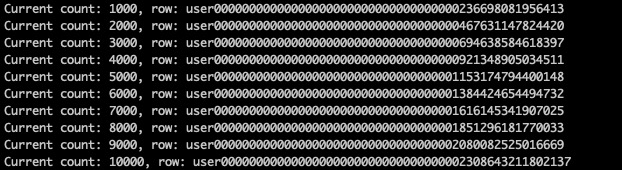
Using the COUNT command in HBase Shell provides the exact row count of an HBase table. The principle is to scan all data of the table in batches and count. Therefore, we recommend that you run the COUNT command from an ECS client in the same VPC. If you run the COUNT command over the Internet, the network utilization is high and reduces the statistics efficiency. Depending on the table structure, the scan speed varies. The full-table scan speed of the COUNT command can be less than 100,000 rows per second. Run the following statement to count the total rows of the table:
count 'table_name'The result is as follows:
Use the HBase RowCounter plug-in for acceleration
Using the count command in HBase Shell can obtain the exact row count of a wide table, but the speed is slow for large tables. The RowCounter plug-in starts a local pseudo-distributed MR task to perform the COUNT operation. By default, the plug-in runs in a single thread, and the statistics speed is similar to that of the HBase Shell COUNT command. To improve statistics speed, you can specify
mapreduce.local.map.tasks.maximumto increase the number of threads. Running in parallel with multiple threads greatly accelerates statistics.The thread count must be less than or equal to the number of regions in the table.
be less than or equal to the number of regions in the table.be less than or equal to the number of regions in the table.
Increasing the number of threads may cause high cluster load and affect online services. Set the number based on business requirements.
ause high cluster load and affect online services. Set the number based on business requirements.
For example, run the following commands in HBase Shell to use the RowCounter plug-in to count the rows of a Lindorm wide table.
Run the following commands in HBase Shell to count the rows of a Lindorm wide table.
Use the RowCounter plug-in to count the total rows of the target table (table).
the total rows of the target table (table).
./alihbase-2.0.18/bin/hbase org.apache.hadoop.hbase.mapreduce.RowCounter "table_name"Use the RowCounter plug-in to count the total rows of the table (table) with 16 concurrent threads.
l rows of the table (table) with 16 concurrent threads.
./alihbase-2.0.18/bin/hbase org.apache.hadoop.hbase.mapreduce.RowCounter -Dmapreduce.local.map.tasks.maximum=16 "table_name"Use the RowCounter plug-in to count the total rows of the target table (table) in namespace ns.
s of the target table (table) in namespace ns.
./alihbase-2.0.18/bin/hbase org.apache.hadoop.hbase.mapreduce.RowCounter "ns:table_name"The statistics result of the RowCounter plug-in is saved in the
hbase.logfile in the Log directory, as shown in the following figure.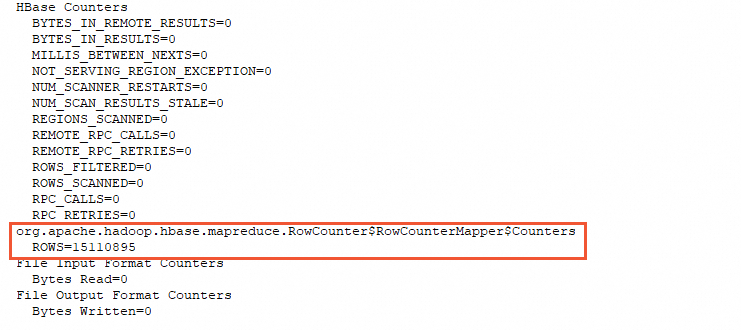
Methods to obtain the estimated row count of a wide table
You can use the following methods to obtain the estimated row count of a wide table:
Get the estimated row count of a wide table by using SQL
Different from using the SELECT statement to obtain the exact row count, obtaining the estimated row count uses the following SHOW statement:
This feature requires LindormTable version 2.8.2.6 or later and Lindorm SQL version 2.8.2.6 or later.
SHOW ESTIMATED ROWS FROM table_name;The following result is returned:
+---------------------+
| ESTIMATED_ROW_COUNT |
+---------------------+
| 15000               |
+---------------------+
View the estimated row count of a table in the cluster management system
First, Log on to the cluster management system.
In the Lindorm cluster management system, you can view a rough row count of a table on the Overview page. This estimated value is calculated by summing the row count metadata of the data files. If the user performs update or delete operations, the same row of data may be distributed among multiple files. In addition, the row count metadata of a file is collected when the file is generated. If the user uses the TTL feature, some data in the file may have expired, which may cause the estimated row count to differ from the actual row count.
In the Lindorm cluster management system, click Overview in the left-side navigation pane. In the Current IDC area, find the target table. The row count is displayed in the Rows column.
If the table has data but the estimated row count is 0, the minor version of the Lindorm wide table engine is too low. Upgrade the minor version. For information about how to upgrade, see Upgrade the minor engine version of a Lindorm instance.