IoT Platform's remote configuration feature lets you remotely update device configurations, such as system and network parameters, without restarts or interruptions.
Prerequisites
The Link SDK for your device supports the remote configuration service. For more information about the topics and Alink data formats that devices use for configuration requests and that IoT Platform uses for configuration pushes, see Remote configuration.
For more information about how to develop with the Link SDK, see Download a Link SDK. If you use the C-based Link SDK provided by IoT Platform:
-
For C SDK v3.x or v2.x, you must define
FEATURE_SERVICE_OTA_ENABLED = yin the SDK and call linkkit_cota_init to initialize remote configuration (Config Over The Air, COTA). -
For C SDK v4.x, on the SDK Customization page, under Advanced Capabilities, select OTA to enable the remote configuration service for the device. For more information, see Procedure.
Background
This method increases the maintenance workload for firmware versions and requires taking the device offline to complete the update.
To address these issues, IoT Platform provides the remote configuration feature, which lets you update configuration information online without device restarts or interruptions.
The remote configuration feature modifies device configurations at the product level. This means a configuration file uploaded to IoT Platform applies to all devices of that product. You cannot apply it to a single device.
Features
The remote configuration feature of IoT Platform allows you to:
-
Enable or disable remote configuration for a product.
-
Edit configuration files and manage their versions online.
-
Push configuration files from IoT Platform to update device configurations in a batch.
-
Allow devices to proactively request configuration updates.
Use cases
Remote configuration can be used in the following two scenarios:
-
From the IoT Platform console, you can push configuration information to devices in a batch. After a device receives the information, it updates its local configuration file.
-
A device proactively requests a new configuration file from IoT Platform to perform an update.
The following sections describe the procedures for these use cases.
Use case 1: IoT Platform pushes configurations
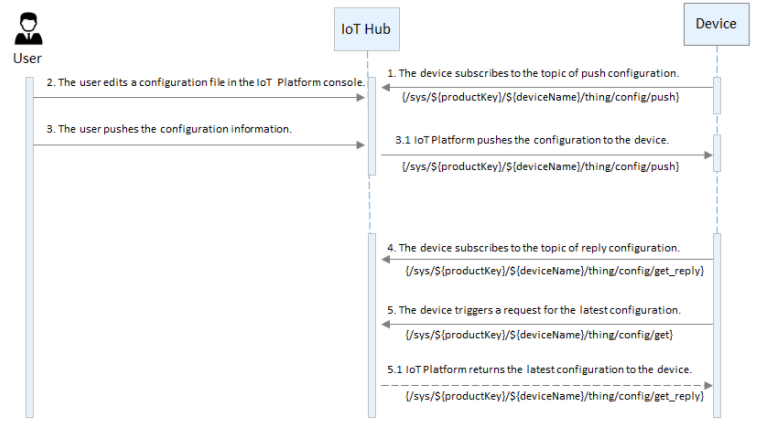
In the IoT Platform console, you can push a configuration file to all devices of a product in a batch.
-
Connect the device to IoT Platform.
For more information about the device development process and code samples, see the Link SDK documentation.
ImportantWhen you develop the device, you must configure the device to subscribe to the topic for pushing configuration information:
/sys/${productKey}/${deviceName}/thing/config/push. -
In the IoT Platform console, edit the configuration file.
-
Log on to the IoT Platform console.
On the Overview page, click All environment. On the All environment tab, find the instance that you want to manage and click the instance ID or instance name.
-
In the left-side navigation pane, choose .
-
Select a product, turn on the remote configuration switch, and click Edit.
-
In the editor under Configuration Template, write or paste the configuration information in JSON format.
NoteA product configuration template applies to all devices under that product. You cannot push a configuration file to a single device from the IoT Platform console.
-
After you edit the configuration information, click Save, and then click Confirm.
After saving, you can manually push the configuration information to all devices under the product in a batch, or devices can proactively request this configuration.
-
-
Click Batch Update, and then click Confirm Update.
After you confirm, IoT Platform pushes the configuration file to all devices under the product in a batch.
If IoT Platform detects that the operation is performed in an untrusted environment after you click Batch Update, it initiates an SMS verification. IoT Platform sends the configuration file to the devices only after you complete the verification.
Important-
After a successful push, you cannot push a new configuration file to the same product within one hour.
-
You can push the same configuration file to a product only once from IoT Platform.
-
To stop batch updates for device configurations, turn off the remote configuration switch for the product. After you turn off remote configuration, IoT Platform stops all update pushes and denies proactive update requests from devices.
-
-
The device receives the configuration file download URL from IoT Platform and updates its configuration.
NoteThe download URL for the configuration file is valid for 30 minutes. The device must download the file within this period.
-
(Optional) View and manage configuration file versions.
The remote configuration feature saves the last five modification records by default. If you successfully edit and submit a new configuration file, the previous version appears in the version history list below.
You can view the update time and content of each version for traceability. Click View for a specific version to see its configuration content in a dialog box. In the dialog box, you can click Restore to This Version to load its content into the editor. You can then modify the content and perform a batch update.
Use case 2: Device requests configurations
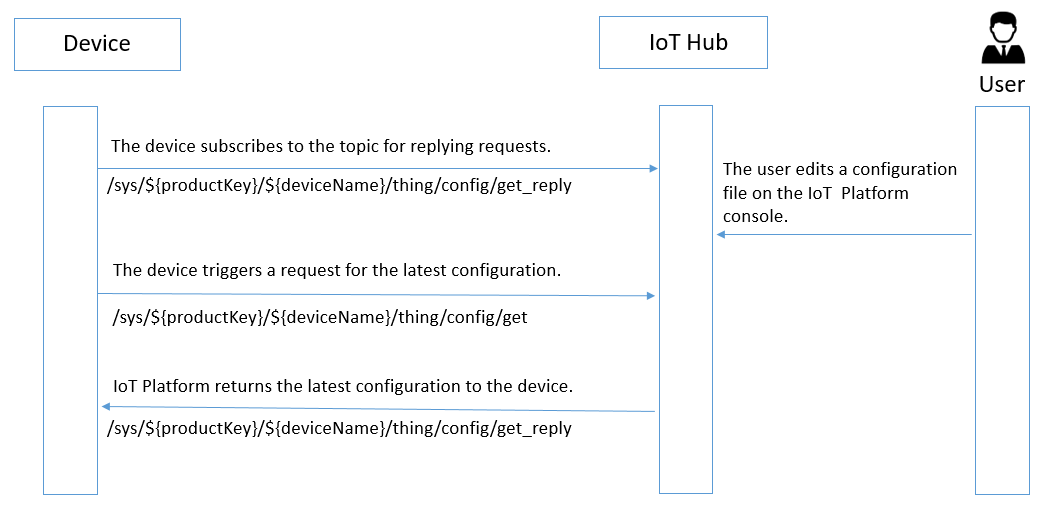
The following flowchart shows how a device proactively queries and updates its configuration information.
-
Connect the device to IoT Platform.
For more information about the device development process and code samples, see the Link SDK documentation.
NoteWhen you develop the device, you must configure it to subscribe to the topic that IoT Platform uses to respond to configuration information requests from the device:
/sys/${productKey}/${deviceName}/thing/config/get_reply. -
In the IoT Platform console, enable remote configuration and edit the configuration information. For more information, see Step 2 in Use case 1.
-
The device calls the linkkit_invoke_cota_get_config interface to trigger a remote configuration request.
-
The device sends a request to the
/sys/${productKey}/${deviceName}/thing/config/gettopic to query the latest configuration information. -
After receiving the request, IoT Platform returns the latest configuration information to the topic:
/sys/${productKey}/${deviceName}/thing/config/get_reply. -
The device uses the provided URL to download the configuration file.
For example, C SDK v3.x provides the cota_callback callback function to download the configuration file and complete the update.
NoteThe download URL for the configuration file is valid for 30 minutes. The device must download the file within this period.