IoT Platform allows devices to upload files to your Object Storage Service (OSS) buckets or IoT Platform file storage over MQTT, reducing hardware overhead and development costs. Configure the C Link SDK to enable file upload for your devices.
Prerequisites
-
You have obtained the C Link SDK.
To customize the SDK, on the SDK Customization page, in the Advanced Features area, select File Upload.
Background information
-
IoT Platform provides a File management feature for uploaded files.
-
After a device uploads a file, manage it through these cloud APIs:
How it works
Devices upload files to IoT Platform over MQTT:
-
MQTT upload API reference: aiot_mqtt_upload_api.h.
-
File upload requires an MQTT connection.
-
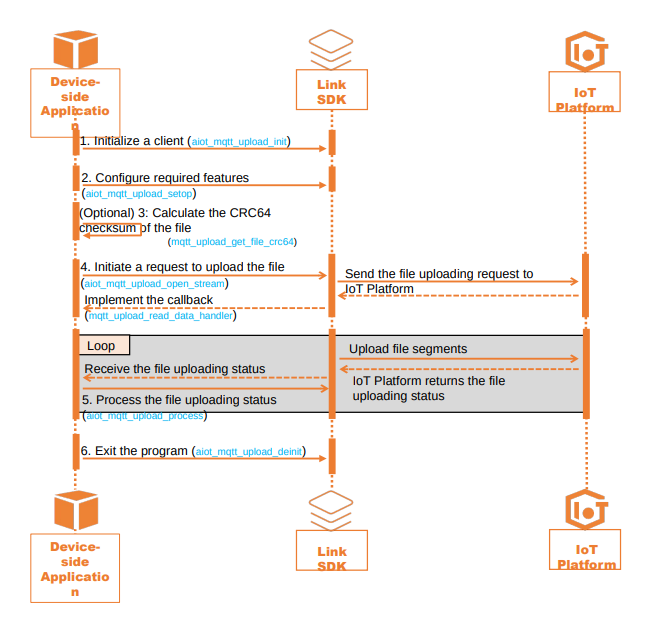
Sequence diagram for ./demos/mqtt_upload_basic_demo.c:
Limits
-
Devices can upload files using the MQTT protocol only in the China (Shanghai), China (Beijing), and China (Shenzhen) regions.
-
File name requirements:
-
The supported characters are digits, letters, underscores (_), and periods (.).
-
The first character must be a letter or a number.
-
The maximum length is 100 bytes.
-
-
Multiple file uploads are supported.
-
Maximum total storage per instance: 1 GB.
-
Maximum files per device: 1,000.
-
Maximum single file size: 16 MB.
-
IoT Platform applies a filename-based conflict policy for each upload request:
-
If no file with the same name exists, a new upload task is created.
-
If a file with the same name exists, IoT Platform applies the configured duplicate-handling policy. Sample code: Step 4: Request to upload a file.
Policy (conflictStrategy)
Description
Overwrite mode (overwrite)
Default. Deletes the existing file and keeps only the new upload.
Append mode (append)
IoT Platform returns information about the existing file. The device can:
-
If the file was partially uploaded, resume the upload.
NoteIncomplete uploads are retained for 24 hours only.
-
If the file was fully uploaded, use overwrite mode or rename the file before re-uploading.
Reject mode (reject)
IoT Platform returns an error code that indicates the file already exists and rejects the upload request.
-
-