Intelligent production supports video editing, composition, special effects rendering, and template-based production for live streams, on-demand video, and OSS media files.
System architecture
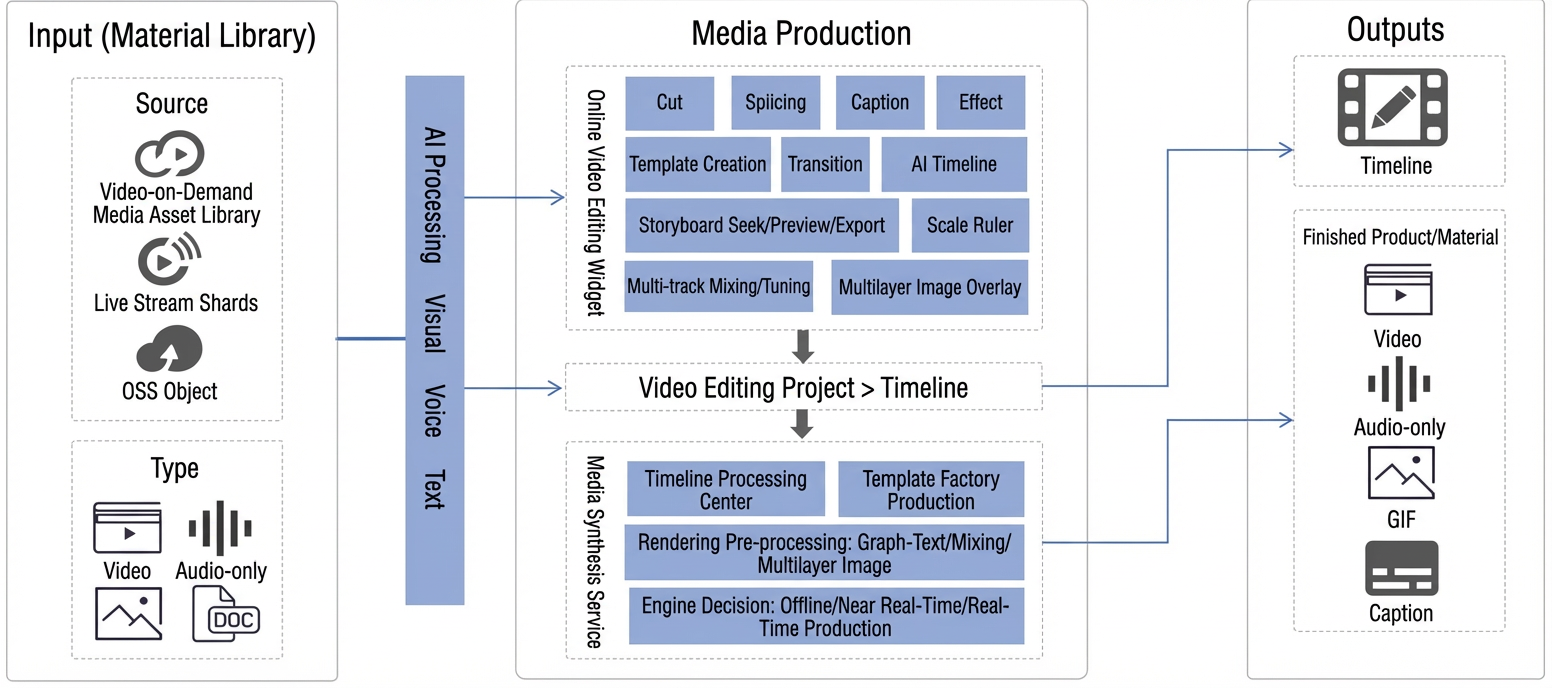
Video production connects capture to distribution in the video workflow. The online editing service is its core, supporting cutting, merging, audio mixing, captions, image overlays, masking, and transitions. The following figure shows the system architecture:
Features
Intelligent production provides these features:
Feature | Description |
Live editing | Delivers editing and composition speeds over 20x for live broadcasts, with standard editing jumps and faster highlight clipping. |
Standard editing | Provides a timeline-based online editing tool for automated and collaborative video production, with OpenAPI operations and a web SDK for integration. |
Template-based production | Provides basic and advanced templates for repetitive and custom video production. Replace media assets in custom templates to produce videos in batch. |
Intelligent tasks | Provides intelligent subtitling, text-to-speech, green screen keying, and dynamic charts to streamline video production. |
Intelligent production | It provides various forms of media content processing and content generation capabilities, and supports various media processing and generation functions such as intelligent cover, intelligent horizontal rotation and vertical rotation, green screen matting, portrait matting, intelligent icon blurring, intelligent subtitle removal, subtitle extraction, chorus detection, music rhythm detection, etc., to improve the production efficiency and quality of media content. |
Digital human | Generates videos with a text- or voice-driven digital human that simulates real narration. Supports dynamic visual content such as videos, images, dynamic charts, and captions. |
One-click video creation | For marketing mixed cutting scenarios, it provides intelligent product services such as scripted one-key film formation, intelligent graphic one-key film formation and intelligent search one-key film formation to meet the needs of fast, batch and non-repetitive production and production. |
Video translation | Supports subtitle-level translation. You can translate subtitles in a video to a specified language. Users can easily implement cross-language subtitle conversion of videos to meet the needs of audiences in different regions and cultural backgrounds. |
References
Intelligent Media Services provides timeline examples and online editing templates. Edit videos in the console or call server-side OpenAPI operations with a timeline or template ID.
Timeline | Template | Example | Description | |
Editing and production timeline | Combines, cuts, trims, and merges video clips from any time interval, and mixes videos with images. | ||
Supports muting, audio mixing, extraction, volume adjustment, and dubbing. | |||
Supports external captions and stylized text effects. | |||
Configures transitions, effects, and filters between video clips. | |||
Online editing template | Normal template | Create and use a normal template. | |
Examples from the normal template library. | |||
Designer guide for normal templates. | |||
Detailed description of the Config file for normal templates | Config parameters for normal templates and their corresponding timelines. | ||
Advanced template | Create and use an advanced template. | ||
Examples from the advanced template library. | |||
Designer guide for advanced templates. | |||
Contact us
If you have questions or want to obtain technical support, join the DingTalk group for IMS (ID: 84650000851) to contact us.