Intelligent production provides features for producing and processing media content, including video editing, live editing, template factory, intelligent tasks, intelligent media processing, digital human, voice cloning, one-click video generation, and video translation.
Overview
Intelligent production is a suite of features in Intelligent Media Services (IMS) for producing and processing video, audio, and image content. The following list describes the features covered on this page:
Video editing — Produce videos from video, audio, image, and text materials, with frame-level editing, digital human broadcast, and effects such as transitions, filters, and stickers.
Live editing — Record, split, and edit Alibaba Cloud live streams, and import splitting results into the video editor.
Template factory — Save frequently-used editing styles as regular or advanced templates, and produce new videos by replacing the materials in a template.
Intelligent task — Automatically generate subtitles, dubbing, transparent-background matting results, and animated charts from your materials.
Intelligent production (media processing) — Process audio, video, and image content with features such as intelligent thumbnail, landscape-to-portrait conversion, image matting, logo blurring, subtitle removal, subtitle extraction, chorus detection, and music beat detection.
Digital human — Generate a digital human trained on the appearance of a real person, driven by text or voice, to simulate a real-person broadcast.
Voice cloning — Train a voice model on a real human voice and synthesize speech with the cloned voice.
One-click video generation — Automatically select materials and generate videos based on preset scripts or voiceover text.
Video translation — Translate subtitles in a video into a specified language for cross-language distribution.
Video editing
Video editing provides professional online video production capabilities. You can use various video, audio, and text materials to generate engaging videos. Video editing supports image processing such as split, stitching, cropping, and rotation, text-driven or voice-driven digital human broadcast, and content enhancement such as transitions, filters, effects, stickers, and animated text. You can also process multiple tasks simultaneously in the background through scripts.

File source
Alibaba Cloud Object Storage Service (OSS), ApsaraVideo VOD, and local media assets are supported. Local media assets must be uploaded to OSS or ApsaraVideo VOD.
Trial
Try the feature in the IMS console. For more information, seeVideo editing.
Capability manifest
The following table describes the capabilities of video editing:
Type | Capability | Description | |
Material processing | General | Number of supported material tracks | By default, 100 material tracks are supported. If you have special requirements, join the DingTalk group 84650000851 for technical support. |
Material type | Video, audio, image, and text materials are supported. | ||
Material segmentation, deletion, and stitching | Supported. | ||
Editing precision | Editing precision at the frame level is supported. | ||
Video, audio, and image | Image preview | Supported. | |
Playback speed setting | Supported. | ||
Toning | Supported. | ||
Types of materials that support resizing and position adjustments | Video and image materials support resizing and position adjustments. | ||
Types of materials that support cropping | Video and image materials support cropping. | ||
Types of materials that support fade-in and fade-out | Video and audio materials support fade-in and fade-out. | ||
Types of materials that support volume adjustments | Video and audio materials support volume adjustments. | ||
Digital human | Drive mode | Text-driven or voice-driven digital human broadcast is supported. | |
Subtitle | Subtitle format | The Text, Automatic Speech Recognition (ASR), and Advanced SubStation Alpha (ASS) formats are supported. | |
Style settings | You can configure the font, font size, color, and word art. A custom font file is supported. | ||
Alignment mode | Left alignment, center alignment, and right alignment are supported. | ||
Animation effect | The following animation effects are supported: entrance effect, exit effect, and loop effect. | ||
Beautification | Visual effect | Multiple visual effects are supported. For more information, seeSample visual effects. | |
Filter effect | Multiple filter effects are supported. For more information, seeSample filter effects. | ||
Transition effect | Multiple transition effects are supported. For more information, seeSample transition effects. | ||
Sticker effect | Multiple sticker effects are supported. | ||
Editing and production | Definition | Resolution | A custom resolution is supported. The maximum resolution is 4K. The default resolution can be dynamically calculated based on the input materials. |
Bitrate | A custom bitrate is supported. The default bitrate can be dynamically calculated based on the input materials. | ||
Callback | N/A | The callback methods of Simple Message Queue (SMQ, formerly MNS) queues and HTTP requests are supported. You can configure callbacks for output videos. For more information, seeConfigure callbacks. |
Live editing
Live editing supports Live to VOD and live stream splitting. Live stream editors are integrated with regular editors. You can directly import live stream splitting results to a regular editor for fine editing.

File source
Active streams from Alibaba Cloud ApsaraVideo Live.
Trial
Try the feature in the IMS console. For more information, seeLive editing.
Capability manifest
The following table describes the capabilities of live editing:
Capability | Description |
Type of live streams | You can edit Alibaba Cloud live streams. |
Scheduled editing | You can schedule the time when a recording starts or editing starts. |
Splitting | You can configure the start time and end time of splitting. After the confirmation, the splitting is complete. |
Callback | The callback method of SMQ queues is supported. |
Fine editing | Fine editing for splitting results is supported. You can use video editing capabilities to implement fine editing. |
Template factory
Template factory allows you to save your frequently-used editing styles as templates. You need to only replace the materials in the template to quickly produce a new video with similar effects.
Regular template: a template that is created based on the timeline of a video editing project. Multiple materials in the timeline are overlaid and merged. A regular template can implement effects such as converting images into videos, albums, intro and outro segments, and default watermarks.
Advanced template: a template that is created based on Adobe After Effects (AE). You can configure complex animation effects to implement advanced media effects.
Choose a template type based on the effects that you require: use a regular template for timeline-based effects such as converting images into videos, and use an advanced template for complex AE-based animations.
File source
Alibaba Cloud OSS, ApsaraVideo VOD, and local media assets are supported. Local media assets must be uploaded to OSS or ApsaraVideo VOD.
Trial
You can try the feature in the IMS console. For more information, seeTemplate factory.
Official and custom templates
IMS provides official templates and the ability for users to create their own templates. For more information, seeOfficial and custom templates.
Capability manifest
The following table describes the capabilities of template factory:
Template type | Operation | Capability | Description |
Regular template | Create a template | Specify dynamic materials | Supported. Materials that are not specified as dynamic materials are fixed materials. |
Specify time adaptation conditions of dynamic materials | Supported. If the duration of the replacement material is longer than the duration of the position of the dynamic material, the options of automatic splitting and postponing subsequent materials for smooth connection are supported. If the duration of the replacement material is shorter than the duration of the position of the dynamic material, the options of black frames, advancing subsequent materials for smooth connection, and mute frames at last are supported. | ||
Specify space adaptation conditions of dynamic materials | Supported. If the size of the replacement material does not match the size of the position of the dynamic material, the options of automatic black bar addition, custom background colors, and background blurring are supported. | ||
Preset production parameters | Supported. You can specify the default resolution and bitrate of a produced video. | ||
Use a template | Replace dynamic materials | Supported. | |
Submit a template-based editing task | Supported. You can submit materials for replacing the dynamic materials and a template ID. This way, you can use the template-based editing solution to produce a new video. | ||
Advanced template | Create a template | Create template effects | Supported. Multiple AE plug-ins are supported. You can use AE plug-ins to enrich image effects such as video transitions and effects. For more information, seeFor more information, see. |
Specify dynamic materials | Supported. Materials that are not specified as dynamic materials are fixed materials. | ||
Specify dynamic materials to replace interface styles | Supported. You can configure editing groups and decorative images. If a template is used for a user-created page, intelligent production distributes editing groups and decorative images in a centralized manner. | ||
Use a template | Replace dynamic materials | Supported. | |
Submit a template-based editing task | Supported. You can submit materials for replacing the dynamic materials and a template ID. This way, you can use the template-based editing solution to produce a new video. |
Intelligent task
Intelligent task provides tasks that help automatically produce videos from various auditory and visual materials, such as videos, audio, and text.
File source
Alibaba Cloud OSS, ApsaraVideo VOD, and local media assets are supported. Local media assets must be uploaded to OSS or ApsaraVideo VOD.
Capability manifest
Intelligent subtitling
Voices of audio or videos can be converted into subtitle information, including text content and time information.
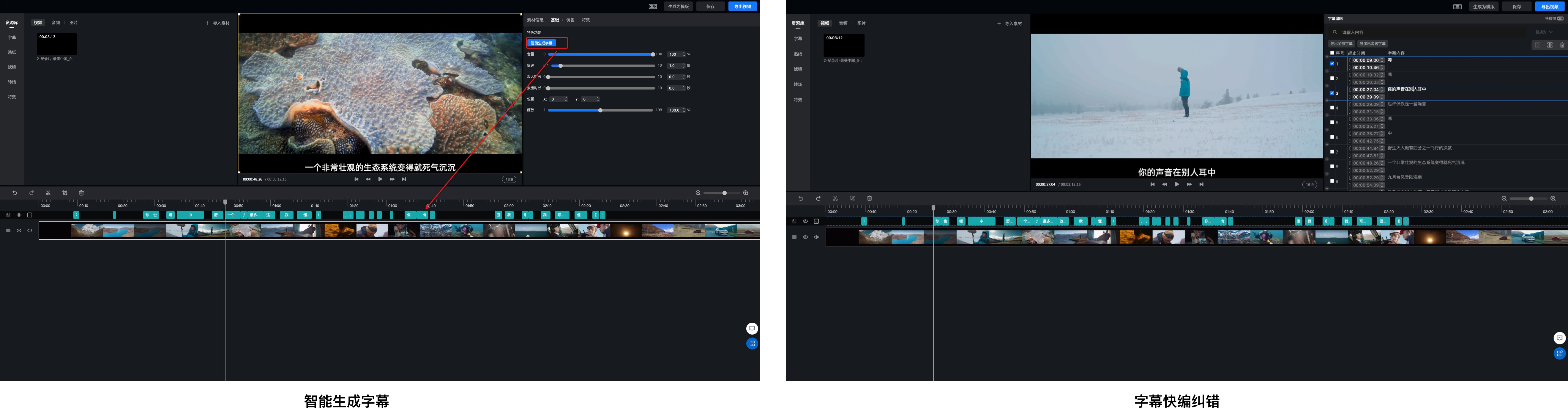
Intelligent subtitling includes two features:Intelligent subtitle generationandSubtitle quick editing and correction. To generate subtitles, clickSpeech Recognition Subtitlesto trigger recognition. You can set style parameters such as font size, stroke, background color, and position. Subtitle quick editing and correction allows you to edit and correct recognized subtitle text line by line.
Intelligent dubbing
Text can be converted into speeches. You can configure dubbing voices and dubbing speeds.
Image matting
An object can be removed from a green-screen image to generate a video or an image with a transparent background.
Intelligent chart
Excel tables or rule data can be used to generate a playable animated chart video. Pie charts, line charts, column charts, and custom charts are supported.
Intelligent production
Intelligent production provides media content processing and content generation capabilities in multiple forms. Supported media processing and generation features include intelligent thumbnail, landscape-to-portrait conversion, image matting, portrait matting, logo blurring, subtitle removal, subtitle extraction, chorus detection, and music beat detection. These features improve the efficiency and quality of media content production.
The following table describes the capabilities of intelligent production:
Type | Capability | Description |
Audio processing | Chorus detection | The time information of chorus segments can be extracted. |
Beat detection | Multi-level beat points in music can be analyzed and identified. | |
Intelligent audio mixing | Multiple types of audio, such as vocals and music, can be processed. | |
Audio quality detection | Issues in input audio, such as silence and stuttering, can be identified. | |
Intelligent noise reduction | Noise can be filtered out while a high speech fidelity is maintained. | |
Vocal and accompaniment separation | Vocals and accompaniment can be quickly separated into two independent audio files. | |
Video processing | Intelligent thumbnail | Cover images and animated covers are supported. |
Video synopsis | Highlight clips can be extracted from a video and merged into a representative 5-second video synopsis. | |
Subtitle extraction | Chinese and English subtitles can be recognized and extracted. | |
Subtitle removal | Text subtitles in videos or images can be intelligently detected and removed. | |
Logo blurring | Logos can be blurred to restore the video to the original state before the logo was added. | |
Landscape-to-portrait conversion | Videos shot in landscape mode can be converted into videos suitable for portrait playback on mobile devices. | |
Image matting | The foreground and background of video frames can be analyzed and extracted. | |
Video retouching | Faces can be automatically detected and retouched with effects such as skin smoothing, skin whitening, and ruddy complexion. | |
Image processing | Logo blurring | Logos can be blurred to restore the image to the original state before the logo was added. |
Landscape-to-portrait conversion | Landscape images can be converted into images suitable for portrait browsing on mobile devices. | |
Face stylization | Anime, American comic, and other styles are supported. |
Digital human
Digital human learns and trains on the appearance of real people so that a digital human, driven by text or voice, can simulate a real-person broadcast. This creates an intelligent virtual human that delivers interactive experiences.
The following capabilities are provided:
Custom training
Through algorithm training, the appearance of a real person is converted into a digital model. This way, real-person recording is not required for subsequent use, and appearance videos can be synthesized by algorithms. For more information, seeCustom training.
Synthesis
Synthesize videos by using a trained digital human appearance. For more information, seeSynthesis.
Voice cloning
Voice cloning learns and trains on real human voices to implement personalized voice cloning. This delivers an efficient and convenient speech synthesis experience.
The following capabilities are provided:
Custom voice training
Through algorithm training, a real human voice is converted into a digital model. This way, real-person recording is not required for subsequent use, and human voices can be synthesized by algorithms. For more information, seeCustom voice training.
Voice synthesis
Synthesize audio by using a trained voice model. For more information, seeVoice synthesis.
Samples
For more information, seeVoice samples.
One-click video generation
One-click video generation is an automated video production feature. Based on your preset scripts or voiceover text, it intelligently selects materials and automatically generates videos.
The following generation modes are provided:
Script-based automatic generation
Script-based automatic generation is suitable for scenarios where you have a defined expectation for the video structure and the corresponding material reserves. You preset the video structure and associate the corresponding materials. The system then arranges the materials in the order of the structure as a whole, randomly selects a material at each node, combines the voiceover script, and adapts the duration. Up to 100 different videos can be generated in a single batch. For more information, seeScript-based automatic generation.
Intelligent text-to-media matching
Intelligent text-to-media matching is suitable for scenarios where you want to intelligently clip segments from the material library based on the voiceover text and combine the clips into a video. For each sentence of voiceover text, the system intelligently clips a segment from the material library to complete the video production. For more information, seeIntelligent text-to-media matching.
Intelligent search-based generation
If you have a large amount of material and want to create videos based on your own inspiration and ideas, intelligent search-based generation is suitable. For more information, seeIntelligent search-based generation.
Samples
Rich samples are provided for your reference. For more information, seeSamples.
Video translation
Subtitle-level translation is supported. Subtitles that appear in a video can be translated into a specified language. This makes cross-language subtitle conversion easy and meets the needs of audiences in different regions and cultural backgrounds.
The following capabilities are provided:
Video subtitle translation
Subtitle content in a video can be translated into a specified language.
OCR is provided to recognize subtitle positions and intelligently recognize and translate the subtitles in a video.
You can upload a subtitle file, such as an SRT file, for translation.
Subtitle removal and custom positioning
Subtitle removal is provided. Subtitles in the original video can be intelligently recognized and removed.
You can specify the subtitle removal area to make sure that the translated subtitles do not overlap with other content.
You can customize the position and style of the translated subtitles to improve the viewing experience.
Support for secondary editing
During translation, you can choose whether to enable the secondary editing feature.
After the feature is enabled, the system retains all intermediate files generated during processing and generates an editing project for your subsequent editing and creation.
For more information about how to use video translation, seeVideo translation.