Hologres's automatic partitioning feature automates partition creation and management based on rules you define for a partition table, eliminating the need for upfront configuration. This feature also moves eligible data to cold storage, reducing storage costs without affecting query performance.
Overview
The automatic partitioning feature has evolved over several Hologres versions:
-
Hologres V1.3: Introduced automatic partitioning, which periodically runs scheduled tasks to pre-create and delete partitions based on user-defined rules.
-
Hologres V1.3.37: Added support for tiered storage, which automatically archives data to cold storage to reduce storage cost. For more information, see Tiered Storage.
-
Starting with Hologres V2.1.11, dynamic partitioning supports the Date type as a partition key.
-
Hologres V2.2: Added the
schd_start_timeproperty to the automatic partitioning configuration, which lets you customize the schedule for creating, deleting, and archiving partitions. -
Hologres V3.0.12: Added the
auto_partitioning_time_formatparameter to specify the date and time format for the partition key, allowing you to create partitions in the YYYY-MM-DD format.
Notes
-
Data must be written to a child table, not to the parent table directly.
Realtime Compute for Apache Flink can write data to a parent table in real time. For details, see Write data to a partitioned Hologres sink table in real time.
-
Hologres supports only list partitioning (
PARTITION BY LIST). -
The partition key must be a single column.
-
Each partitioning rule can be used to create only one partitioned table.
-
If the parent table has a primary key, the partition key column must be part of that primary key.
-
For dynamic partitioning, the schedule time (
schd_start_time) applies only to a parent table, not to its child tables. -
The
auto_partitioning_time_formatparameter is immutable. You can specify it in the CREATE TABLE statement for a new table, but you cannot modify it for an existing one. -
The names of child tables follow the date format specified by the
auto_partitioning_time_formatparameter. When you query a child table, you must enclose its name in double quotation marks. For example:SELECT xxx FROM "tbl_2024_11_22".
Configure automatic partitioning
Syntax
You can set automatic partitioning properties when creating a partitioned table or for an existing one.
Using the WITH clause
-
Configure automatic partitioning properties when you create a partitioned table.
-- Configure automatic partitioning properties when you create a partitioned table. CREATE TABLE [IF NOT EXISTS] [<schema_name>.]<table_name> ([ { <column_name> <column_type> [ <column_constraints>, [...]] | <table_constraints> [, ...] } ]) PARTITION BY LIST(<column_name>) WITH ( auto_partitioning_enable = 'xxx', auto_partitioning_time_unit = 'xxx', auto_partitioning_time_zone = 'xxx', auto_partitioning_num_precreate = 'xxx', auto_partitioning_num_retention = 'xxx', auto_partitioning_num_hot='xxx', -- Note: The auto_partitioning_schd_start_time property is supported in Hologres V2.2 and later. auto_partitioning_schd_start_time = 'xxx', -- Note: The auto_partitioning_time_format property is supported in Hologres V3.0.12 and later. auto_partitioning_time_format = 'xxx' ); -
Modify automatic partitioning properties for an existing partitioned table.
-- Modify automatic partitioning properties.
ALTER TABLE [<schema_name>.]<table_name> SET (
   auto_partitioning_enable = 'xxx',
   auto_partitioning_time_unit = 'xxx',
   auto_partitioning_time_zone = 'xxx',
   auto_partitioning_num_precreate = 'xxx',
   auto_partitioning_num_retention = 'xxx',
   auto_partitioning_num_hot='xxx',
   -- Note: The auto_partitioning_schd_start_time property is supported in Hologres V2.2 and later.
   auto_partitioning_schd_start_time = 'xxx',
   -- Note: The auto_partitioning_time_format property is supported in Hologres V3.0.12 and later.
   auto_partitioning_time_format = 'xxx'
);
Using the CALL command
-
Configure automatic partitioning properties when you create a partitioned table.
-- Configure automatic partitioning properties when you create a partitioned table. BEGIN; CREATE TABLE [IF NOT EXISTS] [<schema_name>.]<table_name> ([ { <column_name> <column_type> [ <column_constraints>, [...]] | <table_constraints> [, ...] } ]) PARTITION BY LIST(<column_name>); CALL set_table_property('[<schema_name>.]<table_name>', 'auto_partitioning.enable', 'xxx'); CALL set_table_property('[<schema_name>.]<table_name>', 'auto_partitioning.time_unit', 'xxx'); CALL set_table_property('[<schema_name>.]<table_name>', 'auto_partitioning.time_zone', 'xxx'); CALL set_table_property('[<schema_name>.]<table_name>', 'auto_partitioning.num_precreate', 'xxx'); CALL set_table_property('[<schema_name>.]<table_name>', 'auto_partitioning.num_retention', 'xxx'); CALL set_table_property('[<schema_name>.]<table_name>', 'auto_partitioning.num_hot', 'xxx'); -- Note: The auto_partitioning.schd_start_time property is supported in Hologres V2.2 and later. CALL set_table_property ('[<schema_name>.]<table_name>', 'auto_partitioning.schd_start_time', 'xxx'); -- Note: The auto_partitioning.time_format property is supported in Hologres V3.0.12 and later. CALL set_table_property ('[<schema_name>.]<table_name>', 'auto_partitioning.time_format', 'xxx'); COMMIT; -
Modify automatic partitioning properties for an existing partitioned table.
-- Modify automatic partitioning properties.
CALL set_table_property('[<schema_name>.]<table_name>', 'auto_partitioning.enable', 'xxx');
CALL set_table_property('[<schema_name>.]<table_name>', 'auto_partitioning.num_precreate', 'xxx');
CALL set_table_property('[<schema_name>.]<table_name>', 'auto_partitioning.num_retention', 'xxx');
-- Note: The auto_partitioning.time_format property is supported in Hologres V3.0.12 and later.
CALL set_table_property('[<schema_name>.]<table_name>', 'auto_partitioning.time_format', 'xxx');
Parameters
When you use the CREATE TABLE WITH syntax to configure automatic partitioning, you must replace the dots (.) in property names with underscores (_). For example, change auto_partitioning.enable to auto_partitioning_enable.
|
Parameter |
Required |
Description |
Updatable |
Version requirements |
|
|
No |
Controls whether automatic partitioning is enabled. Valid values:
|
Yes |
Hologres V1.3 and later |
|
|
Yes |
Specifies the time unit for partitioning. Valid values:
For example, if you set this property to |
No |
|
|
|
No |
Specifies the time zone for partitioning. Defaults to the current session's time zone. After you configure this property, partitions are managed based on the specified time zone. You can run the following SQL statement to view available time zones. The |
No |
|
|
|
No |
Specifies the number of partitions to pre-create. Valid values:
Note
For example, if the current date is 2022-01-10 and you set Important
Pre-creating partitions affects the behavior of the MAX_PT function. Before using this property, verify its impact on any application that depends on the MAX_PT function. |
Yes |
|
|
|
No |
Specifies the number of historical partitions to retain. Valid values:
You can run Note
For example, if the current date is 2022-01-10, |
Yes |
|
|
|
No |
Specifies the number of hot partitions to retain. Hot partitions are those in hot storage. Valid values:
|
Yes |
Hologres V1.3.37 and later |
|
|
No |
Specifies a custom time to run the partitioning task. By default, this task runs at the beginning of the hour if You can use this property to change the schedule time. For information about supported formats, see Time Formats. If you set a future time, the schedule takes effect at that time. |
Yes |
Hologres V2.2 and later |
|
|
No |
Specifies the string format of the partition key's value.
|
No |
Hologres V3.0.12 and later |
Child table naming rules
When you set the auto_partitioning.time_unit property to HOUR, DAY, MONTH, QUARTER, or YEAR, Hologres names new child tables by appending a time suffix to the parent table name. The format is {parent_table}_{time_suffix}. The time suffix is generated based on the automatic partitioning schedule and the format template for the specified time unit. The following table describes the mappings.
|
Time unit |
Time suffix format |
Example suffix |
Scheduling time |
|
HOUR |
YYYYMMDDHH24 |
|
At the beginning of each hour. Example: 21:00:01 on November 22, 2024. |
|
YYYY-MM-DD-HH24 |
|
||
|
DAY |
YYYYMMDD |
|
At 00:00:01 on each day. Example: 00:00:01 on November 22, 2024. |
|
YYYY-MM-DD |
|
||
|
MONTH |
YYYYMM |
|
At 00:00:01 on the first day of each month. Example: 00:00:01 on November 1, 2024. |
|
YYYY-MM |
|
||
|
QUARTER |
YYYYQ |
|
At 00:00:01 on the first day of each quarter. Example: 00:00:01 on January 1, 2024. |
|
YYYY-Q |
|
||
|
YEAR |
YYYY |
|
At 00:00:01 on the first day of each year. Example: 00:00:01 on January 1, 2023. |
Examples
The following example creates a table partitioned by day. It is configured to pre-create partitions for the next three days, retain historical partitions for two days, and use the Asia/Shanghai time zone.
Using the WITH clause
-
Create the partitioned table
tbl1.-- Create a partitioned table and configure automatic partitioning. CREATE TABLE tbl1 ( c1 TEXT NOT NULL, c2 TEXT ) PARTITION BY LIST (c2) WITH ( auto_partitioning_enable = 'true', auto_partitioning_time_unit = 'DAY', auto_partitioning_time_zone = 'Asia/Shanghai', auto_partitioning_num_precreate = '3', auto_partitioning_num_retention = '2' ); -
Insert data.
INSERT INTO tbl1 (c1, c2) VALUES ('Data 1', '20231212'); INSERT INTO tbl1 (c1, c2) VALUES ('Data 2', '20231213'); INSERT INTO tbl1 (c1, c2) VALUES ('Data 3', '20231214'); -
Query the data.
SELECT * FROM tbl1 WHERE c2='20231212';The following result is returned:
c1	     c2
Data 1   20231212
Using the CALL command
-
Create the partitioned table
tbl1.-- Create a partitioned table and configure automatic partitioning. BEGIN; CREATE TABLE tbl1 ( c1 TEXT NOT NULL, c2 TEXT ) PARTITION BY LIST (c2); CALL set_table_property ('tbl1', 'auto_partitioning.enable', 'true'); CALL set_table_property ('tbl1', 'auto_partitioning.time_unit', 'DAY'); CALL set_table_property ('tbl1', 'auto_partitioning.time_zone', 'Asia/Shanghai'); CALL set_table_property ('tbl1', 'auto_partitioning.num_precreate', '3'); CALL set_table_property ('tbl1', 'auto_partitioning.num_retention', '2'); COMMIT; -
Insert data.
INSERT INTO tbl1 (c1, c2) VALUES ('Data 1', '20231212'); INSERT INTO tbl1 (c1, c2) VALUES ('Data 2', '20231213'); INSERT INTO tbl1 (c1, c2) VALUES ('Data 3', '20231214'); -
Query the data.
SELECT * FROM tbl1 WHERE c2='20231212';The following result is returned:
c1	     c2
Data 1   20231212
The following table describes the logic for creating and deleting partitions.
|
Time |
Event |
Result |
|
2023-12-12 09:00:00 |
Run the preceding SQL statement to create the partitioned table. |
|
|
2023-12-13 00:00:00 |
The system automatically creates a child table. |
|
|
2023-12-14 00:00:00 |
The system automatically creates a child table. |
|
|
2023-12-15 00:00:00 |
The system automatically creates a child table and deletes an old one. |
|
|
2023-12-16 00:00:00 |
The system automatically creates a child table and deletes an old one. |
|
Use cases
Retain specific child tables
By default, Hologres automatically creates and deletes child tables based on the configured automatic partitioning rules, deleting any that fall outside the retention range. However, in some scenarios, you may need to retain important data, such as retaining data from annual shopping festivals for year-over-year analysis in an e-commerce business. To retain specific child tables, set the keep_alive property for them. The syntax is as follows.
-
Syntax for Hologres V2.1 and later:
-- Retain a child table. ALTER TABLE [<schema_name>.]<table_name> SET (keep_alive = 'true'); -- Stop retaining a child table. After you remove this property, automatic partitioning immediately triggers a cleanup of expired data. ALTER TABLE [<schema_name>.]<table_name> SET (keep_alive = 'false'); -
Syntax for all versions:
-- Retain a child table. CALL set_table_property('[<schema_name>.]<table_name>', 'keep_alive', 'true'); -- Stop retaining a child table. After you remove this property, automatic partitioning immediately triggers a cleanup of expired data. CALL set_table_property('[<schema_name>.]<table_name>', 'keep_alive', 'false');NoteReplace
table_namewith the name of the child table.
Manage storage tiers for partitioned tables
When you manage partitioned tables, storage tiering helps you balance cost and performance. For example, you can keep the latest N historical partitions in hot storage for frequent queries, and then store the next M older partitions in cold storage to reduce costs. Combined with automatic partitioning, this feature lets you define a policy to automatically delete data outside the N+M retention period.
Create an automatic partitioned table
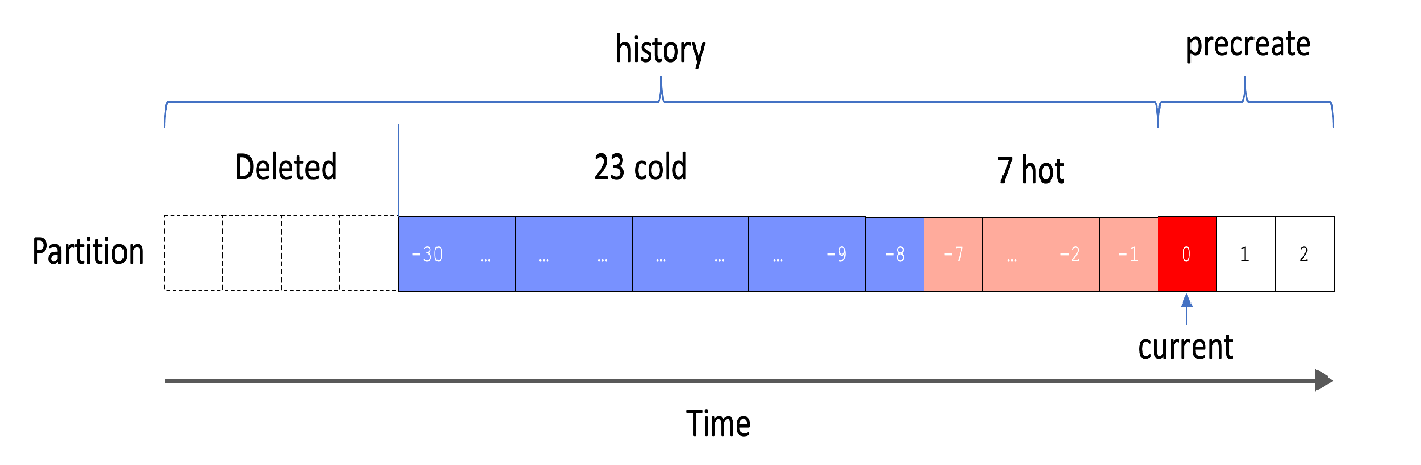
The following example creates a partitioned table that is partitioned by day. The policy retains the last 7 days of partitions in hot storage and the preceding 23 days of partitions in cold storage. Partitions older than 30 days are automatically deleted.
BEGIN;
CREATE TABLE tbl2(
  c1 text not null,
  c2 text
)
PARTITION BY LIST(c2);
CALL set_table_property('tbl2', 'auto_partitioning.enable', 'true');
CALL set_table_property('tbl2', 'auto_partitioning.time_unit', 'DAY');
CALL set_table_property('tbl2', 'auto_partitioning.num_precreate', '3');
CALL set_table_property('tbl2', 'auto_partitioning.num_hot', '7');
CALL set_table_property('tbl2', 'auto_partitioning.num_retention', '30');
COMMIT;
The result is shown in the following figure.
Modify the storage tiering policy
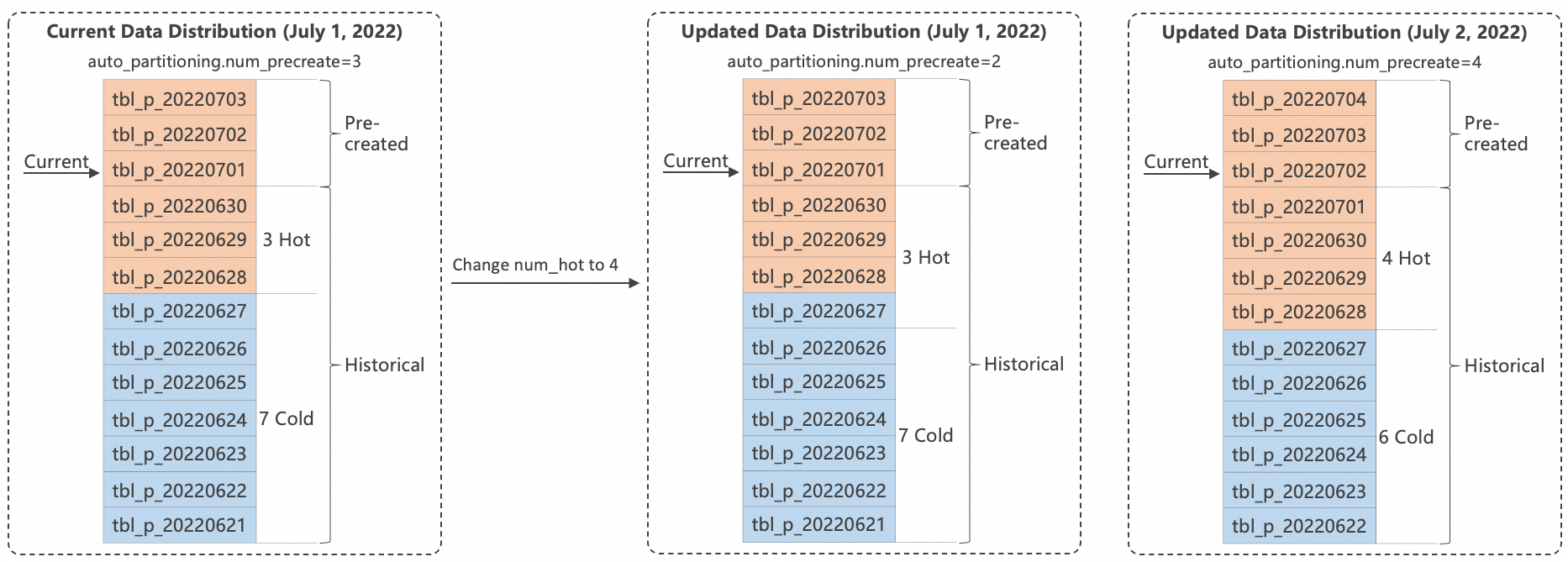
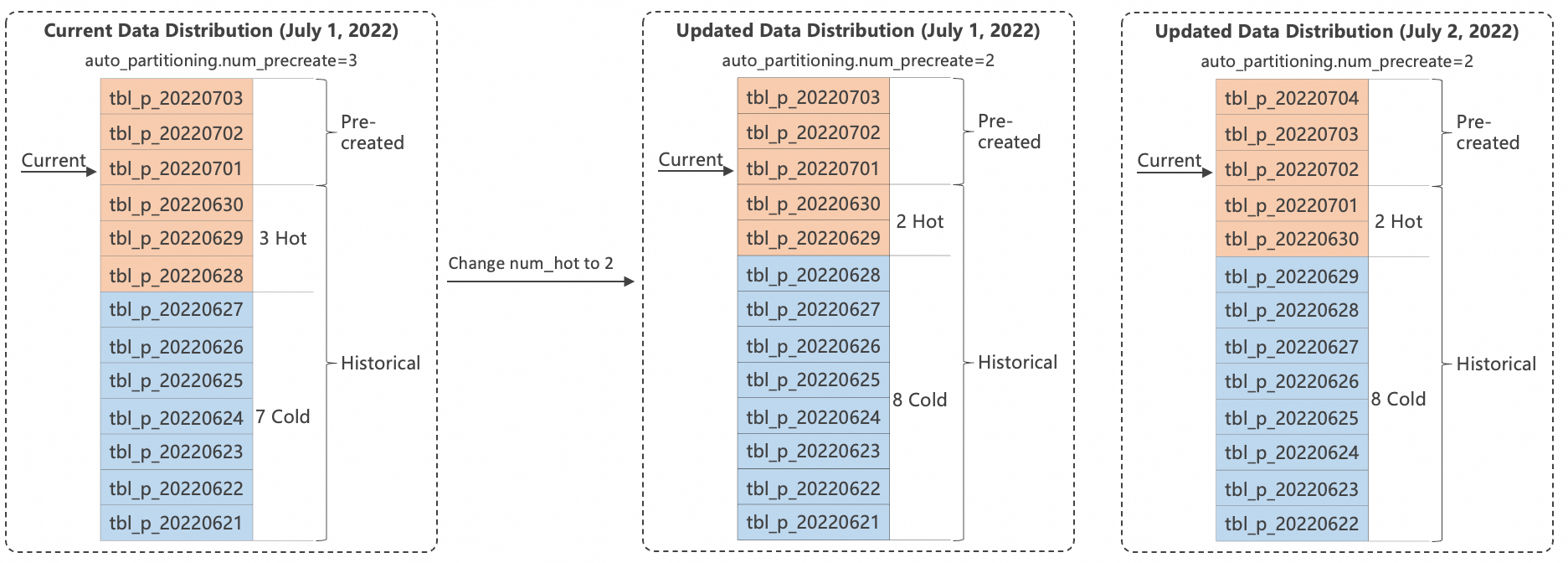
You can modify the hot storage partition policy by changing the value of the auto_partitioning.num_hot parameter. Note that if you modify this policy, Hologres does not automatically move child tables that are already in cold storage back to hot storage. Assume that the current date is July 1, 2022, and you create the following partitioned table.
BEGIN;
CREATE TABLE tbl_p(
  c1 text not null,
  c2 text
)
PARTITION BY LIST(c2);
CALL set_table_property('tbl_p', 'auto_partitioning.enable', 'true');
CALL set_table_property('tbl_p', 'auto_partitioning.time_unit', 'DAY');
CALL set_table_property('tbl_p', 'auto_partitioning.num_precreate', '3');
CALL set_table_property('tbl_p', 'auto_partitioning.num_hot', '3');
CALL set_table_property('tbl_p', 'auto_partitioning.num_retention', '10');
COMMIT;
This can result in the following two scenarios for data distribution:
-
Scenario 1: Increase the number of hot partitions
To change the hot partition policy to retain four partitions, run the following code:
CALL set_table_property('tbl_p', 'auto_partitioning.num_hot', '4');Because child tables that are already in cold storage are not automatically moved to hot storage, the effect of the change is shown in the following figure.
-
Scenario 2: Decrease the number of hot partitions
If you need to change the hot partition policy to retain two partitions, run the following code:
CALL set_table_property('tbl_p', 'auto_partitioning.num_hot', '2');Child tables in cold storage are not automatically moved to hot storage. However, Hologres moves data that now qualifies for cold storage to the cold storage tier. The effect of the change is shown in the following figure.
Convert a cold table to an auto-partitioned table
To convert a partitioned table from cold storage to an automatic partitioned table and move the partitions for the last seven days to hot storage, follow these steps.
-
Prepare data.
-- Specify the cold storage tier when you create the table. BEGIN; CREATE TABLE tbl2( c1 TEXT NOT NULL, c2 TEXT ) PARTITION BY LIST(c2); CALL set_table_property('tbl2', 'storage_mode', 'cold'); CREATE TABLE tbl2_20230808 PARTITION OF tbl2 FOR VALUES IN('20230808'); CREATE TABLE tbl2_20230809 PARTITION OF tbl2 FOR VALUES IN('20230809'); CREATE TABLE tbl2_20230810 PARTITION OF tbl2 FOR VALUES IN('20230810'); CREATE TABLE tbl2_20230817 PARTITION OF tbl2 FOR VALUES IN('20230817'); COMMIT; -
Convert the table to an automatic partitioned table and set the partitions for the last seven days to hot storage.
BEGIN;
CALL set_table_property('tbl2', 'storage_mode', 'hot'); -- Set the parent table to hot storage.
CALL set_table_property('tbl2_20230810', 'storage_mode', 'cold'); -- Set the child tables that do not need to be moved to hot storage to cold storage.
CALL set_table_property('tbl2_20230809', 'storage_mode', 'cold');
CALL set_table_property('tbl2_20230808', 'storage_mode', 'cold');
CALL set_table_property('tbl2', 'auto_partitioning.enable', 'true');
CALL set_table_property('tbl2', 'auto_partitioning.time_unit', 'DAY');
CALL set_table_property('tbl2', 'auto_partitioning.num_precreate', '3');
CALL set_table_property('tbl2', 'auto_partitioning.num_hot', '7');
CALL set_table_property('tbl2', 'auto_partitioning.num_retention', '10');
COMMIT;
View automatic partitioning configurations and schedules
To query the information and configurations of automatic partitioned tables in the current database, run the following SQL statement.
SELECT
    nsp_name AS schema_name,
    tbl_name AS table_name,
    ENABLE,
    time_unit,
    time_zone,
    num_precreate,
    num_retention,
    b.usename AS create_user,
    cret_time,
    schd_start_time,
    options
FROM
    hologres.hg_partitioning_config AS a
    LEFT JOIN pg_user AS b ON a.cret_user = b.usesysid;
The following table describes the fields in the query result.
|
Parameter |
Description |
|
schema_name |
The name of the table's schema. |
|
table_name |
The table name. |
|
ENABLE |
Specifies whether automatic partitioning is enabled. |
|
time_unit |
The time unit for automatic partitioning. |
|
time_zone |
The time zone for automatic partitioning. |
|
num_precreate |
The number of pre-created partitions. |
|
num_retention |
The number of historical partitions to retain. |
|
create_user |
The user who created the configuration. |
|
cret_time |
The time when the configuration was created. |
|
schd_start_time |
The most recent time the partitioning task was scheduled to run. |
The following code block shows a sample query result.
 schema_name |       table_name       | enable | time_unit | time_zone | num_precreate | num_retention |   create_user    |          cret_time          |     schd_start_time      | options
-------------+------------------------+--------+-----------+-----------+---------------+---------------+------------------+-----------------------------+--------------------------+---------
 public      | test_auto_part_daily      | t      | day       | PRC       |             4 |            -1 | 1534141793071340 | 2022-04-01 11:45:33+08 | 2050-01-01 00:00:00+08 | {}
 public      | test_auto_part_hourly     | t      | hour      | PRC       |             4 |            -1 | 1534141793071340 | 2022-04-01 11:44:39+08 | 2050-01-03 18:00:00+08 | {}
 public      | test_auto_part_weekly     | t      | week      | PRC       |             2 |             3 | 1534141793071340 | 2022-04-01 11:45:43+08 | 2050-01-03 00:00:00+08 | {}
 public      | test_auto_part_monthly    | t      | month     | PRC       |             1 |             0 | 1534141793071340 | 2022-04-01 11:45:55+08 | 2050-01-01 00:00:00+08 | {}
 public      | test_auto_part_quarterly  | t      | quarter   | PRC       |             2 |            -1 | 1534141793071340 | 2022-04-01 11:46:09+08 | 2050-01-01 00:00:00+08 | {}
 public      | test_auto_part_yearly     | t      | year      | PRC       |             1 |            -1 | 1534141793071340 | 2022-04-01 11:46:18+08 | 2050-01-01 00:00:00+08 | {}
(6 rows)
View child table logs
The Query Log does not record logs for creating or purging child tables. You can run the following SQL statement to query these logs.
SELECT
    relname,
    relowner,
    schdtime,
    trigtime,
    status,
    message,
    precreate,
    discard
FROM
    hologres.hg_partitioning_log
The following table describes the fields in the query result.
|
Parameter |
Description |
|
relname |
The schema and table name in the format of |
|
relowner |
The owner of the partitioned table. |
|
schdtime |
The scheduled time. |
|
trigtime |
The actual trigger time. |
|
status |
The status. |
|
message |
Execution details or error messages. |
|
precreate |
The names of the child tables that were created. |
|
discard |
The names of the child tables that were purged. |
The following code block shows a sample query result.
   relname   |     relowner     |        schdtime        |        trigtime        | status  | message |          precreate           |     discard
-----------+------------------+------------------------+------------------------+---------+---------+------------------------------+------------------
 public.tbl1 | 1534141793071340 | 2022-04-01 11:00:00+08 | 2022-04-01 11:24:22+08 | SUCCESS |         | {tbl1_2022032713,tbl1_2022032714} | {}
 public.tbl2 | 1534141793071340 | 2022-04-01 12:00:00+08 | 2022-04-01 12:38:31+08 | SUCCESS |         | {tbl2_2022040112}                 | {}
 public.tbl2 | 1534141793071340 | 2022-04-01 13:00:00+08 | 2022-04-01 13:00:00+08 | SUCCESS |         | {tbl2_2022040113}                 | {}
 public.tbl2 | 1534141793071340 | 2022-04-01 14:00:00+08 | 2022-04-01 14:00:00+08 | SUCCESS |         | {tbl2_2022040114}                 | {tbl2_2022040112}
(4 rows)
FAQ
Enable automatic partitioning for existing tables
To enable automatic partitioning for an existing partitioned table, run one of the following SQL statements.
-- Example for Hologres V2.1 and later
ALTER TABLE auto_part_old SET (
   auto_partitioning_enable = 'true',
   auto_partitioning_time_unit = 'HOUR',
   auto_partitioning_time_zone = 'PRC',
   auto_partitioning_num_precreate = '4',
   auto_partitioning_num_retention = '-1',
   auto_partitioning_num_hot = '-1'
);
-- Example for all Hologres versions
BEGIN;
CALL set_table_property('auto_part_old', 'auto_partitioning.enable', 'true');
CALL set_table_property('auto_part_old', 'auto_partitioning.time_unit', 'HOUR');
CALL set_table_property('auto_part_old', 'auto_partitioning.time_zone', 'PRC');
CALL set_table_property('auto_part_old', 'auto_partitioning.num_precreate', '4');
CALL set_table_property('auto_part_old', 'auto_partitioning.num_retention', '-1');
CALL set_table_property('auto_part_old', 'auto_partitioning.num_hot', '-1');
COMMIT;The auto_partitioning.time_unit and auto_partitioning.time_zone properties are core settings for automatic partitioning. Once set, these properties cannot be changed.
Automatic cleanup for existing child tables
The system determines whether to delete a child table based on its name. If a child table's name matches the {parent_table}_{time_suffix} naming convention, it is eligible for cleanup. Otherwise, it is not affected.
Delayed creation of num_precreate child tables
When you first enable automatic partitioning for a table, the creation task does not run instantly. The system checks for partitions to create every 10 minutes by default. As a result, the system creates your child tables within this 10-minute window.